1. Introduzione
Thank you for choosing the Charmast C05S 5000mAh Portable Power Bank. This device is designed to provide convenient and fast charging for your mobile devices on the go. Its compact size, built-in cable, and digital display make it an essential accessory for daily use and travel.
2. Cuntenutu di u pacchettu
- Charmast C05S 5000mAh Portable Power Bank with built-in Lightning cable (x1)
- USB-C to USB-C charging cable (x1)
- Manuale d'uso (x1)

3. Produttu Finituview
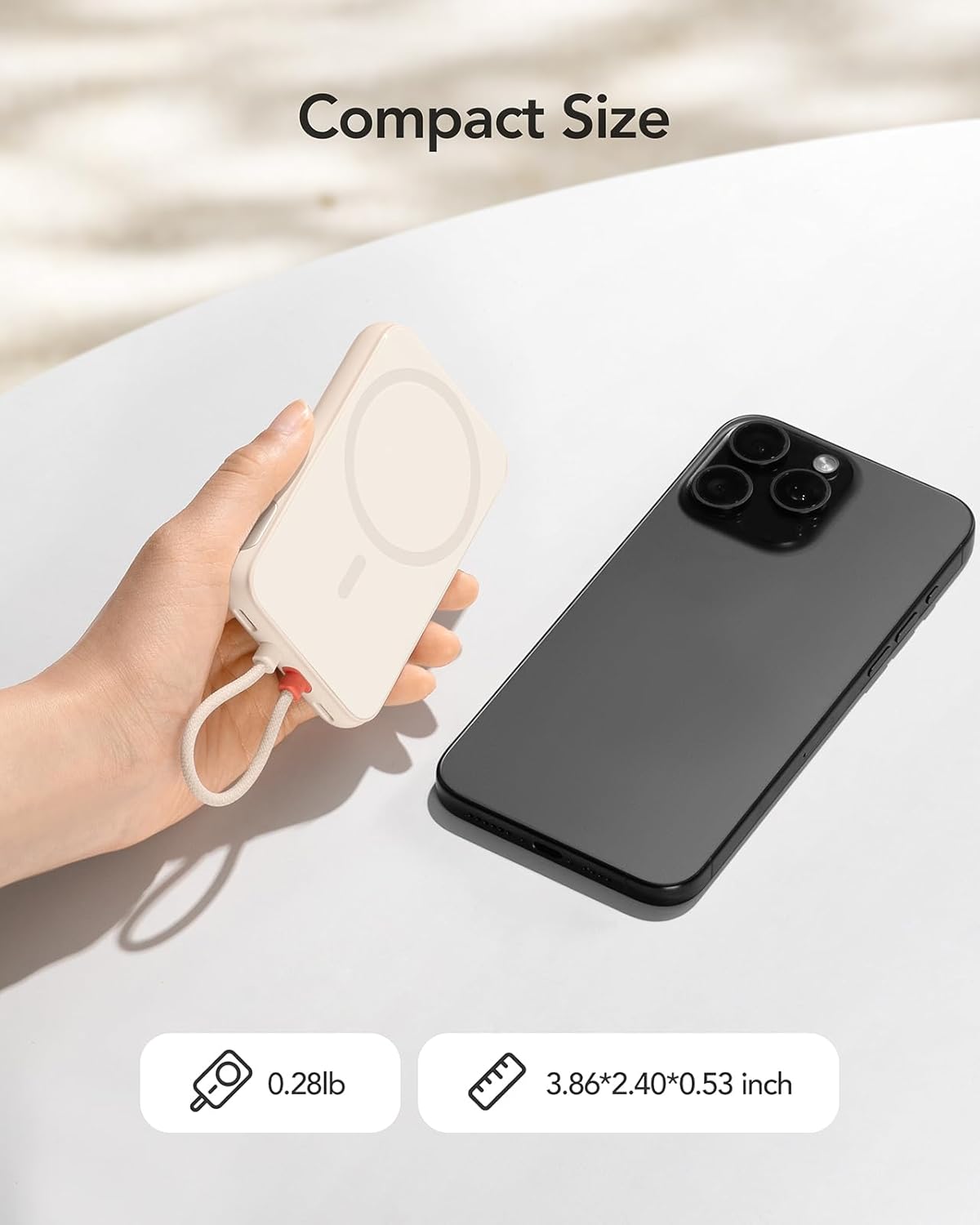
The Charmast C05S is a slim and lightweight power bank designed for portability and efficiency.
- Dimensioni: 3.86 x 2.40 x 0.53 inch
- Pesu: Approximately 0.28 pounds (5.9 ounces)
- Cable integratu: Features an integrated Lightning cable for direct connection to compatible Apple devices.
- Portu USB-C: A versatile USB-C port for both input (recharging the power bank) and output (charging other devices).
- Display Digitale: An LED screen on the side indicates the remaining battery percentage.

4. Setup and Recharging the Power Bank
Before first use, fully charge your Charmast C05S Power Bank.
- Utilizendu u portu USB-C: Connect the provided USB-C to USB-C cable to the power bank's USB-C port and to a compatible USB wall adapter (not included). The power bank will fully recharge in approximately 2.0 hours.
- Aduprendu u cavu Lightning integratu: Connect the built-in Lightning cable to a compatible Lightning input port on a wall adapter. The power bank will fully recharge in approximately 3.5 hours.
The digital display will show the charging progress, indicating 100% when fully charged.

5. Operating Instructions
Per carica i vostri dispositi:
- For iPhone (Lightning devices): Pull out the built-in Lightning cable and connect it directly to your iPhone or other compatible Lightning device.
- Per i dispositivi USB-C: Use the provided USB-C to USB-C cable. Connect one end to the power bank's USB-C port and the other end to your USB-C compatible device.
A batteria esterna cumincerà automaticamente à caricà u vostru dispositivu. U display digitale mostrerà a percentuale di batteria restante.tage di u power bank.


6. Display digitale
The integrated digital display provides real-time information about the power bank's battery level. It shows the remaining percentage, allowing you to easily monitor when it's time to recharge the power bank.
- To activate the display, press the on/off button located on the side of the power bank.
- The display will automatically turn off after a short period of inactivity to conserve power.
7. Universal Compatibility and Charging Speed
The Charmast C05S Power Bank offers broad compatibility and fast charging capabilities.
- Cable Lightning integratu: Universally compatible with iPhone 14, 13, 12, 11, 8, 7 series, and other Lightning-enabled devices.
- Portu USB-C: Compatible with iPhone 15 series, Samsung S24/S23/S22/S21/S20, Google Pixel series, other Android phones, and various low-current devices such as portable fans, neck fans, Bluetooth headphones, and heated vests.
- Carica rapida PD 20W: Supports Power Delivery (PD) 20W fast charging, significantly reducing charging times for both your devices and the power bank itself.


8. Mantenimentu è Cura
To ensure the longevity and optimal performance of your power bank:
- Livellu di batteria: Keep the power bank's battery level above 40% to improve overall battery life and maintain efficient charging speeds.
- Conservazione: Conservate a batteria esterna in un locu frescu è asciuttu, luntanu da a luce diretta di u sole è da temperature estreme.
- Pulizia: Aduprate un pannu dolce è asciuttu per pulisce l'esternu di a batteria esterna. Evitate l'usu di prudutti chimichi aggressivi o materiali abrasivi.
- Evite Drops: Prutegge u dispusitivu da cadute è impatti, chì ponu dannà i cumpunenti interni.
9. Risoluzione di prublemi
If you encounter issues with your Charmast C05S Power Bank, please refer to the following common solutions:
- U dispositivu ùn si carica micca: Ensure the power bank is sufficiently charged. Check that the charging cable (built-in Lightning or USB-C) is securely connected to both the power bank and your device. Try a different cable or device to isolate the issue.
- A batteria esterna ùn si ricarica micca: Verify that the charging cable and wall adapter are functioning correctly. Ensure the cable is properly inserted into the power bank's input port.
- Digital display not showing: Press the on/off button on the side of the power bank to reactivate the display. If it remains off, the power bank might be fully depleted and requires recharging.
- Carica lenta: Ensure you are using a 20W PD compatible wall adapter for optimal fast charging. Charging speed can also be affected by the device being charged and its current battery level.
10. Specificazioni
| Feature | Detail |
|---|---|
| Numero di mudellu | C05S |
| Capacità batterie | 5000 XNUMX Milliamp Ore (mAh) |
| Dimensioni di u produttu | 3.86 x 2.4 x 0.53 inch |
| Pesu di l'articulu | 5.9 once |
| Input (USB-C) | 20W PD (Max) |
| Input (Lightning) | 10 W (max) |
| Surtita (Cable Lightning integratu) | 20W PD (Max) |
| Surtita (Porta USB-C) | 20W PD (Max) |
| Funzioni spiciali | Built-in Cable, Digital Display, Fast Charging, Pocket Size, Ultra Slim |
11. Garanzia è Support
Charmast provides Assistenza di 24 mesi for this product. If you encounter any problems or have questions, please contact us through Amazon. We are committed to resolving any issues within 24 hours.
12. Informazioni di sicurezza
Leghjite è seguitate queste linee guida di sicurezza per impedisce danni à u pruduttu o ferite à voi stessi:
- Ùn espone micca a batteria esterna à l'acqua, à l'umidità o à temperature estreme.
- Ùn disassemble, mudificà o tentativu di riparà u dispusitivu.
- Mantene fora di a portata di i zitelli.
- Avoid dropping or subjecting the power bank to heavy impacts.
- Smaltite a batteria esterna in modu rispunsevule secondu e regulazioni lucali. Ùn a ghjittà micca in i rifiuti domestichi.


