Introduzione
Grazie per l'acquistuasing the CHiQ U55QG7L QLED TV. This manual provides essential information for setting up, operating, and maintaining your new television. Please read these instructions carefully before using the product and retain them for future reference.

The CHiQ U55QG7L QLED TV features Android 11, 4K HDR, and a frameless design, offering an immersive viewsperienza.
Informazioni di sicurezza
Per assicurà un funziunamentu sicuru è prevene danni, osservate e seguenti precauzioni di sicurezza:
- Ùn espone micca a TV à a pioggia o l'umidità.
- Assicuratevi una ventilazione adatta; ùn bluccate micca l'aperture di ventilazione.
- Ùn mette micca u televisore nantu à un carrettu, supportu, treppiede, staffa o tavula instabile.
- Prutegge u cordone di alimentazione da esse camminatu o pizzicatu.
- Scollegate u televisore durante i temporali o quandu ùn hè micca utilizatu per longhi periodi.
- Riferite tutte l'assistenza à u persunale di serviziu qualificatu.
Cuntenutu di u pacchettu
Verificate chì tutti l'articuli sò presenti in u pacchettu:
- CHiQ U55QG7L QLED TV
- Control remoto
- Supportu TV (2 pezzi)
- Viti per u montaggio di u supportu
- Cavu di putenza
- Manuale d'uso (stu documentu)
Istituisci
Attaccà u Stand
- Pone cù cura u televisore à faccia in giù nantu à una superficia morbida è piana per impedisce di dannighjà u schermu.
- Allineate ogni pezzu di supportu cù e fessure currispondenti in u fondu di u televisore.
- Assicurate i supporti cù e viti furnite.
Montaggio à u muru (opcional)
The TV is compatible with VESA standard wall mounts. For wall mounting, remove the stands and use appropriate VESA-compliant hardware (not included). Consult a professional for installation.
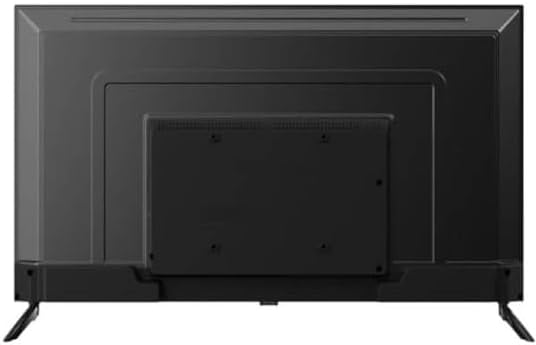
daretu view of the CHiQ U55QG7L QLED TV, showing mounting points for the stand or wall bracket.
Cunnessu periferiche
Connect external devices such as set-top boxes, gaming consoles, or Blu-ray players to the HDMI ports. Use the USB ports for media playback or connecting USB devices. Connect your antenna cable to the RF input for terrestrial TV channels.
Accensione iniziale è assistente di cunfigurazione
After connecting the power cable, press the power button on the remote control. The TV will guide you through the initial setup process, including language selection, network connection (Wi-Fi), and Google account sign-in for Android TV features.
Operazione
Cuntrollu à distanza sopraview
The remote control allows you to navigate the TV's functions. Key buttons typically include:
- putenza: Accende / spegne a TV.
- Input: Selects the input source (HDMI, TV, USB).
- Volume +/-: Ajusta u livellu di u voluminu.
- Canale +/-: Cambia i canali TV.
- Casa: Accede à a schermata iniziale di Android TV.
- Navigazione (Su/Ghjuttu/Sinistra/Destra) è OK: Per a navigazione è a selezzione di u menù.
- Torna: Ritorna à u screnu precedente.
- Google Assistant: Attiva u cuntrollu vocale.
Funzioni Smart TV
The CHiQ U55QG7L runs on Android TV, providing access to a wide range of streaming services and applications via the Google Play Store. Use the Google Assistant for voice commands and smart home integration.
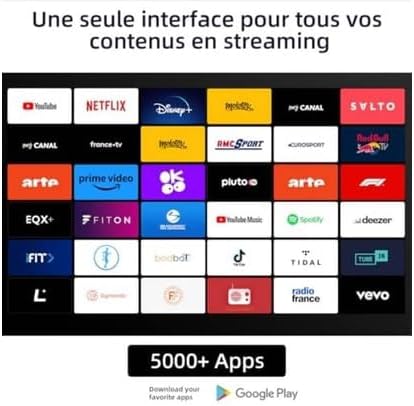
A display of various streaming applications available on the CHiQ U55QG7L QLED TV, including YouTube, Netflix, Disney+, and Prime Video.
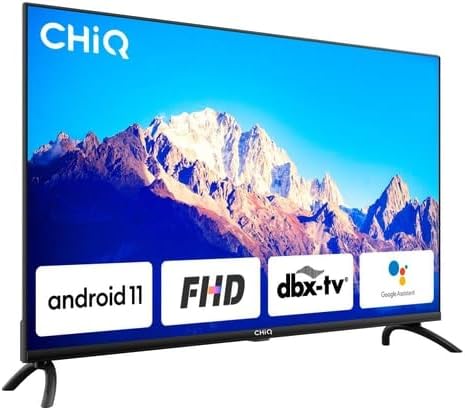
The CHiQ U55QG7L QLED TV showcasing key features like Android 11, FHD compatibility, dbx-tv audio, and integrated Google Assistant.
Configurazione di l'Imagine è u Sonu
Access the TV's settings menu to customize picture and sound. Adjust brightness, contrast, color, and sharpness. Select from various sound modes (e.g., Standard, Movie, Music) or customize equalizer settings. The TV supports HDR and Dolby Vision for enhanced visual quality and Dolby Audio and dbx-tv for superior sound.

A vibrant image demonstrating the enhanced picture quality of the CHiQ U55QG7L QLED TV with 4K, HDR, and Dolby Vision technologies.
Mantenimentu
Pulizia di u Screen
Asciugate delicatamente u schermu cù un pannu dolce, asciuttu è senza pelu. Per e macchie ostinate, asciugate leggermente.ampSciacquate u pannu cù acqua o un detergente per schermi specializatu. Ùn spruzzate mai liquidu direttamente nantu à u schermu.
Cura generale
Avoid placing the TV in direct sunlight or near heat sources. Ensure adequate air circulation around the TV. Do not place heavy objects on top of the TV.
Risoluzione di prublemi
Sè avete prublemi cù u vostru televisore, riferitevi à e seguenti suluzioni cumuni:
- Nisun putere: Check if the power cable is securely connected and the power outlet is functional.
- Nisuna imagine/sonu: Verificate chì a fonte d'entrata curretta sia selezziunata. Verificate e cunnessione di u dispusitivu esternu.
- U cuntrollu remoto ùn funziona micca: Rimpiazzà e batterie. Assicuratevi chì ùn ci sia micca ostaculi trà u telecomandu è u sensore IR di u televisore.
- Scarsa qualità di l'imagine: Check antenna connection or internet speed for streaming content. Adjust picture settings.
- Nisuna cunnessione Internet: Restart your router. Check Wi-Fi settings on the TV.
Specificazioni
| Numero di mudellu | 100015647 |
| Tipu di visualizazione | QLED |
| Size Screen | 55 inches (139 cm) |
| Risoluzione | 4K UHD (3840 x 2160) |
| Supportu HDR | HDR, Dolby Vision |
| Culori | 1.07 miliardi di culori |
| Sistema upirativu | Android 11 |
| Memoria | 2 GB di RAM, 16 GB di ROM |
| Connettività | Wi-Fi 2.4/5GHz |
| Tecnulugia Audio | Dolby Audio, dbx-tv |
| Pesu | 15.5 chilògrammi |
| Classe di efficienza energetica | G (84 kWh/1000h) |

The energy efficiency label for the CHiQ U55QG7L QLED TV, indicating an energy class G rating and 84 kWh/1000h consumption.

A collage highlighting key specifications of the CHiQ U55QG7L QLED TV, including QLED, 4K HDR, 1.07 Billion Colors, Android TV OS, 2.4/5GHz Wi-Fi, 2GB RAM + 16GB ROM, frameless design, dbx-tv, and Dolby Audio.
Garanzia è Supportu
Per infurmazioni nantu à a garanzia è l'assistenza tecnica, vi pregu di cunsultà a carta di garanzia inclusa cù u vostru pruduttu o visitate u situ ufficiale di CHiQ. website. Do not attempt to repair the TV yourself, as this may void your warranty.


