Introduzione
This manual provides comprehensive instructions for the setup, operation, and maintenance of your Blaupunkt 43QD7050 43-inch 4K Ultra HD QLED Google TV. Please read this manual thoroughly before using the television to ensure proper functionality and safety.

Image: Front view of the Blaupunkt 43QD7050 QLED Google TV, highlighting its display and features.
Importante infurmazione di sicurezza
Segui sempre e precauzioni di sicurezza basiche quandu aduprate stu televisore per riduce u risicu d'incendiu, scossa elettrica è ferite. Conservate stu manuale per riferimenti futuri.
- Ùn espone micca u televisore à a pioggia o à l'umidità.
- Ùn bluccate micca l'aperture di ventilazione.
- Assicuratevi una messa à terra curretta per u cavu di alimentazione.
- Scollegate u televisore durante i temporali o quandu ùn hè micca utilizatu per longhi periodi.
- Riferite tutte l'assistenza à u persunale di serviziu qualificatu.
Chì ci hè in u Box
Verify that all components are present upon unpacking your television.
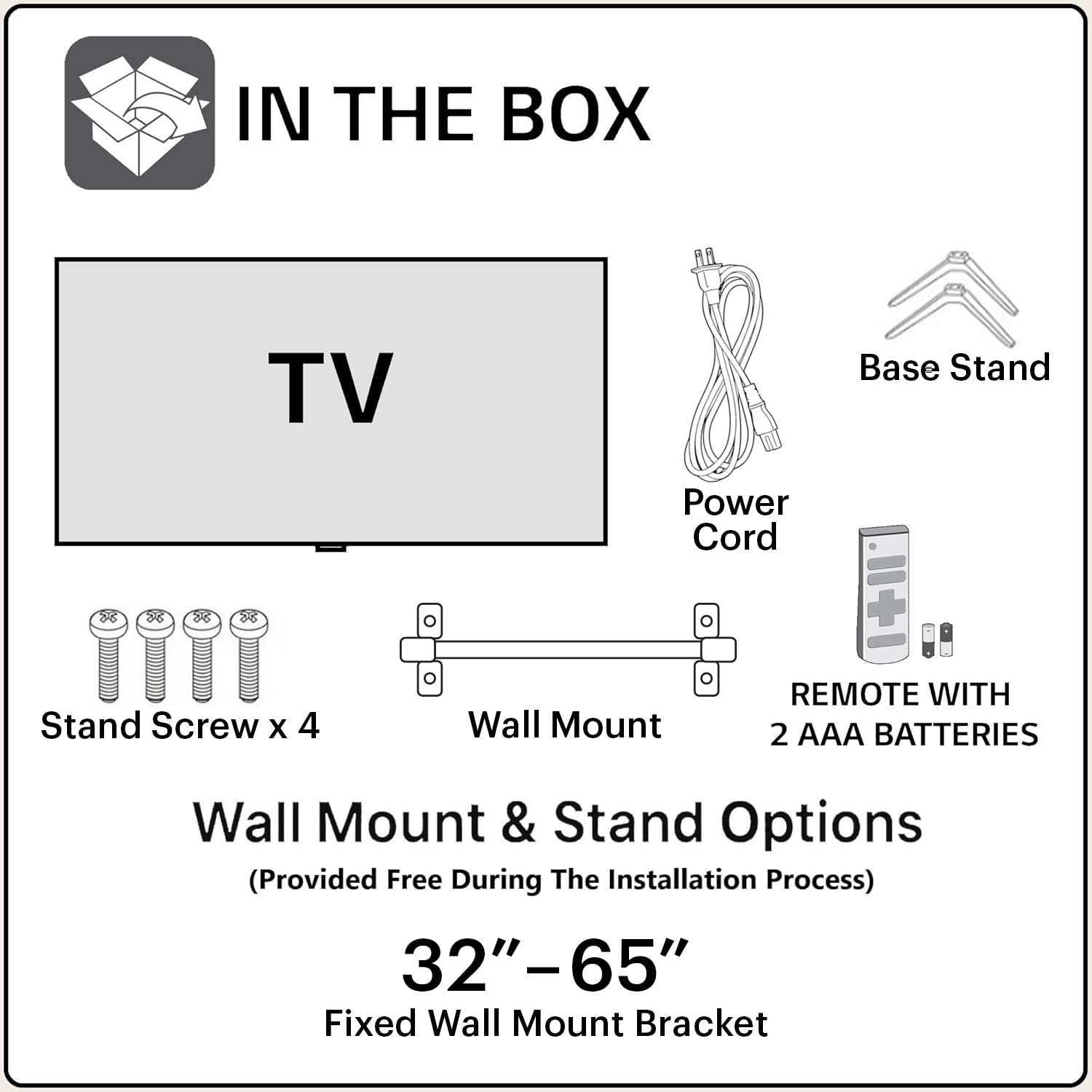
Image: Diagram showing the items included in the product packaging: TV, remote control, wall mount, stand screws, power cord, and AAA batteries.
- 1 x Blaupunkt 43QD7050 LED TV
- 1 x Control remoto
- 1 x Wall Mount Bracket (for 32"-65" models)
- 2 x Batterie AAA (per u telecomandu)
- 1 x Cordone d'energia
- 1 x Base Stand Set (with 4 stand screws)
- Manuale d'uso (stu documentu)
Finu fisicuview
Fronte View

Image: Front view di a televisione, spettaculuasing the screen and minimal bezels.
Latu View

Imagine: Side profile di a televisione, chì illustreghja u so design sveltu.
daretu View è i porti

Imagine: Daretu view of the television, detailing the location of various input and output ports.
The rear panel of the TV includes various ports for connectivity:
- Porte HDMI (x3): For connecting devices like gaming consoles, set-top boxes, and Blu-ray players. One port supports eARC.
- Porte USB (x2): Per cunnette dispositivi di almacenamiento USB.
- Portu Ethernet: Per una cunnessione internet via filu.
- Ingressu Antenna/Cavu: Per cunnette un'antenna o una TV via cavo.
- Out audio: Per cunnette sistemi audio esterni.
- Input di putenza: Per cunnette u cavu di alimentazione.
Guida di installazione
1. Installazione di u stand (opzionale)
If you choose to place the TV on a stand, follow these steps:
- Pone cù cura u televisore à faccia in giù nantu à una superficia morbida è piana per impedisce di dannighjà u schermu.
- Align the base stands with the screw holes on the bottom of the TV.
- Assicurate ogni supportu cù e viti furnite.
2. Muntatura à u muru (opzionale)
The TV comes with a wall mount bracket. Professional installation is recommended for wall mounting. Ensure the wall can support the weight of the TV.
- Refer to the wall mount bracket's instructions for specific installation details.
- Ensure adequate ventilation around the mounted TV.
3. Cunnessu Peripherals
Cunnette i vostri dispositivi esterni à i porti adatti nantu à u pannellu posteriore di u televisore.
- HDMI: Use HDMI cables to connect devices like set-top boxes, gaming consoles, or Blu-ray players.
- USB: Inserite unità USB per a riproduzione multimediale.
- Ethernet: Cunnette un cavu Ethernet per una cunnessione internet cablata stabile.
- putenza: Cunnette u cavu di alimentazione à l'entrata di alimentazione di u televisore è dopu à una presa murale.

Image: Visual representation of the TV's connectivity options including HDMI, Bluetooth, Dual Band Wi-Fi, and USB.
4. Accensione iniziale è cunfigurazione di Google TV
- Cunnette u televisore à una presa di corrente.
- Appughjà u buttone Power nant'à u telecomandu o a TV.
- Segui l'istruzzioni nantu à u screnu per compie a cunfigurazione iniziale, cumprese a selezzione di a lingua, a cunnessione di rete (Wi-Fi o Ethernet) è l'accessu à u contu Google.
Istruzzioni di funziunamentu
Funzioni di cuntrollu remoto

Image: Layout of the Blaupunkt TV remote control, showing buttons for power, navigation, volume, and quick access to streaming services.
The remote control allows you to navigate the TV's features:
- Pulsante di putenza: Accende o spegne a TV.
- Tastiera di navigazione (Su/Ghjuù/Sinistra/Destra/OK): Per a navigazione è a selezzione di u menù.
- Pulsante Back: Ritorna à u screnu precedente.
- Pulsante Home: Accede à a schermata iniziale di Google TV.
- Volume su / giù: Ajusta u livellu di u voluminu.
- Buttone Mutu: Silenzia o riattiva u sonu.
- Buttoni d'accessu rapidu: Dedicated buttons for Netflix, Prime Video, YouTube, and other services.
- Buttone di l'Assistente Google: Attiva u cuntrollu vocale.
Google TV Interface Navigation
Google TV organizes your content from various streaming services into a personalized home screen.

Image: Screenshot of the Google TV interface, displaying personalized movie and show recommendations and a unified watchlist.
- Use the navigation pad to browse through recommended content, apps, and settings.
- Select an item by pressing the OK buttone.
- Access the full list of installed apps from the "Apps" tab.
Funzioni intelligenti
- Cuntrollu vocale (Assistente Google): Appughjà u buttone Google Assistant nant'à u vostru telecomandu è parlà di cumandamenti per circà cuntenutu, cuntrullà i dispusitivi di casa intelligente o ottene infurmazioni.
- Mirroring di u screnu: Cast content from your compatible smartphone or tablet to the TV using the built-in casting feature.
- Apps & Games: Access a wide range of applications and games from the Google Play Store.

Image: Display of the TV screen showcasing a selection of over 10,000 available apps and games, including popular streaming services.
Mantenimentu
- Pulizia di u screnu: Asciugate delicatamente u schermu cù un pannu dolce è senza pelu. Per e macchie ostinate, aduprate un detergente per schermi specificamente cuncipitu per i televisori, applicatu à u pannu, micca direttamente à u schermu.
- Pulizia di l'armadiu: Aduprate un pannu dolce è asciuttu per asciugà u mobile di a TV. Ùn aduprate micca detergenti abrasivi o solventi.
- Actualizazioni di u software: The TV may receive automatic software updates. Ensure your TV is connected to the internet to receive these updates, which improve performance and add new features.
Risoluzione di prublemi
Riferitevi à sta sezione per e suluzioni à i prublemi cumuni.
| Prublemu | Soluzione Possibile |
|---|---|
| Nisun putere | Assicuratevi chì u cavu d'alimentazione sia bè cunnessu à u televisore è à una presa elettrica funzionante. Verificate a luce indicatrice di alimentazione nantu à u televisore. |
| Nisuna imagine, ma u sonu hè presente | Check the input source. Press the "Input" button on the remote to cycle through sources. Ensure external devices are powered on and connected correctly. |
| Nisun sonu, ma l'imagine hè presente | Check the volume level and ensure the TV is not muted. Verify audio settings in the TV menu. If using external speakers, check their connections and power. |
| U cuntrollu remoto ùn funziona micca | Rimpiazzate e batterie di u telecomandu. Assicuratevi chì ùn ci sia micca ostaculi trà u telecomandu è u sensore IR di u televisore. |
| Povera qualità di stampa | Check the cable connections. Adjust picture settings (brightness, contrast, sharpness) in the TV menu. For external devices, ensure they are outputting at the correct resolution. |
| Problemi di cunnessione Wi-Fi | Restart your router and modem. Go to the TV's network settings and reconnect to your Wi-Fi network. Ensure the TV is within range of your router. |
Specificazioni
Detailed technical specifications for the Blaupunkt 43QD7050 QLED Google TV.

Image: Diagram illustrating the physical dimensions of the Blaupunkt 43QD7050 TV, including screen size, width, height, and depth.
| Feature | Detail |
|---|---|
| Mudellu | 43QD7050 |
| Size Screen | 43 Inches (108 cm) |
| Tecnulugia di visualizazione | QLED |
| Risoluzione | 4K Ultra HD (3840 x 2160) |
| Frequenza di rinfrescante | 60 Hz |
| Sistema upirativu | Google TV |
| Output sonu | 60 Watt |
| Funzioni audio | Dolby Digital Plus, DTS TruSurround, CyberSound Gen2 Technology |
| Connettività | Dual Band Wi-Fi, 3 HDMI ports (eARC support), 2 USB ports, Ethernet, Bluetooth |
| Funzioni spiciali | 4K HDR, Google Assistant, Screen Mirroring, HDR 10+ |
| Memoria (RAM/Storage) | 2 GB RAM / 16 GB Storage |
| Dimensioni di u produttu (LxWxH) | 97 x 10 x 55 cm (senza stand) |
| Pesu di l'articulu | 5.9 kg |
| Annu mudellu | 2024 |

Image: Representation of the MediaTek MT9602 processor, highlighting its quad-core ARM Cortex A53 CPU and Mali-G52MC1 GPU for performance.
Garanzia è Supportu
Your Blaupunkt 43QD7050 television comes with a manufacturer's warranty.
- Garanzia di u produttu: 1 annu da a data di compra.
- Remote Accessories Warranty: 6 mesi da a data di compra.
- Reclamazione di garanzia: The brand warranty can be availed using the purchase invoice.
- Articuli micca coperti: Light bleeding and dot issues (Mura issues) occurring within acceptable Mura Inspection standards (2% guideline) are not considered panel defects and are not covered.
For customer support, service requests, or further inquiries, please contact:
- Cuntattu gratuitu: 1800-274-4342
- ID email: consumercare@blaupunkttv.in
- Indirizzu di u fabricatore: B-29,30,31, Phase-II, Noida, Gautam Buddha Nagar, Uttar Pradesh, 201301, India.
Please have your product model number (43QD7050) and purchase invoice ready when contacting support.


