Introduzione
This manual provides essential information for setting up, operating, and maintaining your HP 17.3 Inch Laptop. Designed for productivity and entertainment, this laptop features a 13th Gen Intel Core i7 processor, a vibrant 17.3-inch HD+ touchscreen, 36GB RAM, and a 1TB SSD, running on Windows 11 Pro.
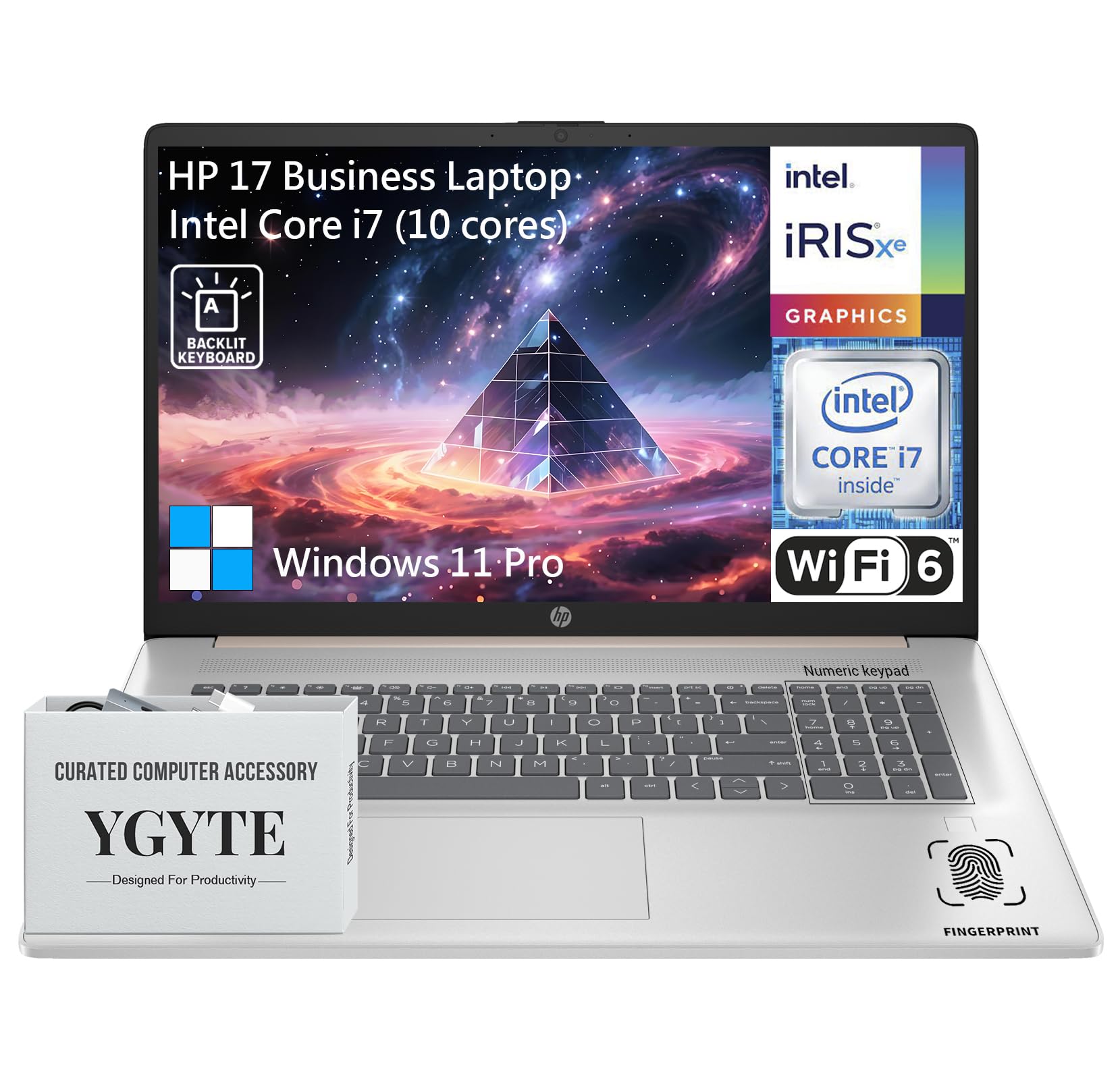
Un generale view of the HP 17.3 Inch Laptop, showcasing its design and large display.

Overview of the HP 17.3 Inch Laptop, highlighting its core components: Intel Core i7 processor, Intel Iris Xe Graphics, and Windows 11 Pro operating system.
Chì ci hè in u Box
Upon unpacking your HP 17.3 Inch Laptop, ensure all the following items are present:
- HP 17.3 Inch Laptop
- Adattatore di alimentazione AC
- Documentazione (Guida di avvio rapidu, Informazioni di garanzia)
Istituisci
1. Accensione iniziale è carica
- Cunnette l'adattatore di alimentazione: Plug the AC power adapter into the laptop's power port and then into a wall outlet.
- Caricà a Batteria: Lasciate chì u laptop si carica per almenu 30 minuti prima di l'usu iniziale, o finu à chì l'indicatore di batteria mostri una carica sufficiente.
- Power On: Aprite u coperchio di u laptop è appughjà u buttone di accensione, chì si trova generalmente nantu à a tastiera.
2. Windows 11 Pro Setup
Follow the on-screen instructions to complete the Windows 11 Pro setup process. This includes:
- Selezziunà a vostra regione è u layout di tastiera.
- Cunnessione à una reta Wi-Fi.
- Cunnessione o creazione di un contu Microsoft.
- Configurazione di un PIN o di una password.
- Configuring privacy settings.
3. Connection Network
Your laptop supports Wi-Fi 6 for fast wireless connectivity. During Windows setup, you will be prompted to connect to a Wi-Fi network. If you need to connect later:
- Cliccate nant'à l'icona Wi-Fi in a barra di attività.
- Selezziunate a rete desiderata da a lista.
- Inserite a chjave di sicurezza di a rete (password) se dumandatu.
- Cliccate Cunnette.
Funziunà u vostru urdinatore purtatile
Mostra
The HP 17.3 Inch Laptop features a 17.3-inch HD+ (1600 x 900) BrightView Touchscreen. This display offers crisp details and vibrant colors, providing ample space for multitasking and immersive viewsperienze.

The 17.3-inch HD+ touchscreen display offers a resolution of 1600x900 pixels with BrightView technology for enhanced visual clarity.
Prestazione
Your laptop is equipped with a 13th Gen Intel Core i7 processor (10 cores, 12 threads, up to 5.0GHz) and Intel Iris Xe Graphics. This configuration provides robust performance for demanding applications, multitasking, and immersive entertainment.

Details of the Intel Core i7-1355U processor, including its 10 cores, 12 threads, 12MB cache, and a maximum turbo frequency of 5.0 GHz, designed for fast response and processing speed.
Storage and Multitasking
With 36GB of high-bandwidth DDR4 RAM, the laptop allows for seamless switching between applications. The 1TB high-speed SSD provides rapid boot times, quick application loading, and ampu almacenamentu per u vostru files.

The laptop features 36GB DDR4 RAM for swift multitasking efficiency, a 1TB SSD for fast access and ample storage, and Wi-Fi 6 for faster wireless connectivity.
Connettività
The HP 17.3 Inch Laptop offers a range of ports and wireless technologies to keep you connected:
- USB-C: SuperSpeed USB-C (5Gbps signaling rate) for data transfer and power delivery.
- USB-A: Two SuperSpeed USB-A ports (5Gbps signaling rate).
- HDMI 1.4b: Per a cunnessione à schermi esterni.
- Wi-Fi 6: Advanced wireless networking for faster and more reliable internet.
- Bluetooth: Per cunnette periferiche senza filu.
- Jack cumminatu per cuffie/microfonu: Per l'entrata è l'uscita audio.
- Pin intelligente AC: Per a cunnessione di l'adattatore di alimentazione.

Side profile of the HP 17.3 Inch Laptop illustrating the placement of USB Type-A, HDMI 1.4b, headphone/microphone combo, USB Type-C, and AC smart pin ports, along with its dimensions and weight.
Audio and Camera
Engage in clear video calls and enjoy immersive audio with the integrated features:
- HP Wide Vision 720p HD Camera: Provides clear visuals for video conferencing.
- Dual Array Digital Microphones: Ensures your voice is captured clearly.
- B&O Dual Speakers: Delivers rich, authentic audio tuned by Bang & Olufsen.

The HP 17.3 Inch Laptop features an HP True Vision 720p HD camera, dual array digital microphones, and B&O dual speakers for enhanced communication and audio experience.
Tastiera è Touchpad
The full-size backlit keyboard includes a 10-key number pad for comfortable and efficient typing. The larger trackpad provides precise navigation.
Lettore di impronte digitali
For enhanced security and quick login, utilize the integrated fingerprint reader. You can set this up through Windows Hello in your laptop's settings.
Mantenimentu
Proper maintenance ensures the longevity and optimal performance of your HP laptop:
- Pulizia: Aduprate un pannu dolce è senza pelu per pulisce u schermu è l'esternu. Per e macchie ostinate, dampSciacquate u pannu cù acqua o un detergente per schermi. Evitate i prudutti chimichi aggressivi.
- Actualizazioni di u software: Verificate è installate regularmente l'aghjurnamenti di Windows è l'aghjurnamenti di i driver HP per assicurà a stabilità è a sicurezza di u sistema.
- Cura di a batteria: To prolong battery life, avoid extreme temperatures. If storing the laptop for an extended period, charge the battery to about 50-70%.
- Ventilazione: Assicuratevi chì e prese d'aria di u laptop ùn sianu micca ostruite per impedisce u surriscaldamentu. Aduprate u laptop nantu à una superficia dura è piana.
- Backup di dati: Fate regularmente copie di salvezza di i dati impurtanti nantu à un discu esternu o un almacenamentu in nuvola per impedisce a perdita di dati.
Risoluzione di prublemi
Eccu alcuni prublemi cumuni è e so suluzione:
| Issue | Soluzione |
|---|---|
| U laptop ùn s'accende micca. | Ensure the power adapter is securely connected to both the laptop and a working power outlet. Check if the power outlet is functional. Try a different outlet. |
| U schermu hè biancu o neru. | Press the power button to ensure the laptop is on. Connect an external monitor to check if the display output is working. Adjust screen brightness using function keys. |
| Prublemi di cunnessione Wi-Fi. | Ensure Wi-Fi is enabled in Windows settings. Restart your router and modem. Check for updated Wi-Fi drivers. Try connecting to a different network if available. |
| Prestazione lenta. | Close unnecessary applications. Check for background processes consuming high resources (Task Manager). Ensure Windows and drivers are up to date. Run a disk cleanup. |
| A tastiera o u touchpad ùn risponde micca. | Restart the laptop. Check for any physical obstructions. Ensure drivers are updated. |
Specificazioni
| Feature | Detail |
|---|---|
| Marca | HP |
| Nome di mudellu | Essential 17 (HP 17) |
| Size Screen | 17.3 inch |
| Risoluzione di u screnu | 1600 x 900 pixel (HD+) |
| Processore | 13th Gen Intel Core i7 (10 Cores, up to 5.0 GHz) |
| RAM | 36 GB DDR4 |
| Storage | 1 TB SSD (PCIe x 16 interface) |
| Coprocessore graficu | Grafica Intel Iris Xe (Integrata) |
| Sistema upirativu | Windows 11 Pro |
| Tipu wireless | 802.11ax (Wi-Fi 6) |
| Connettività | USB-C (5Gbps), 2x USB-A (5Gbps), HDMI 1.4b, Headphone/Microphone Combo |
| Funzioni spiciali | Backlit Keyboard, Fingerprint Reader, Touchscreen |
| Pesu di l'articulu | 4.61 liri |
| Dimensioni di u produttu (LxWxH) | 15.78 x 10.15 x 0.78 inch |
| Culore | Rose Gold |
| Batterie | 1 Batteria Lithium Ion (inclusa) |
Garanzia è Supportu
Your HP 17.3 Inch Laptop comes with a standard manufacturer's warranty. For detailed warranty terms and conditions, please refer to the documentation included with your product or visit the official HP support websitu.
Per assistenza tecnica, scaricamentu di driver o ulteriore supportu, visitate u situ ufficiale di supportu HP. websitu:
Pudete ancu truvà risorse utili è fori di a cumunità nantu à u situ HP. websitu.