1. Introduzione
This manual provides essential information for the safe and efficient operation of your TELLUR Obia PRO 60W Bluetooth Speaker. Please read this manual thoroughly before using the product and retain it for future reference.
2. Informazioni di sicurezza
- Ùn espone micca l'altoparlante à temperature estreme o à a luce diretta di u sole per periodi prolungati.
- Evite di caccià o sottumette u parlante à forti impatti.
- Ùn pruvate micca di smuntà o mudificà l'altoparlante. Questu annullerà a garanzia.
- Mantene l'altoparlante luntanu da i dispositivi medichi.
- Ensure the charging port cover is securely closed when near water to maintain IPX6 water resistance.
- Aduprate solu u cavu di carica è l'adattatore di alimentazione specificati.
3. Cuntenutu di u pacchettu
Verificate chì tutti l'articuli sò presenti in u pacchettu:
- TELLUR Obia PRO 60W Bluetooth Speaker
- Cavu di carica USB
- Cavu Audio 3.5mm AUX
- Manuale d'uso (stu documentu)
4. Produttu Finituview è cuntrolli
Familiarizatevi cù i cumpunenti di l'altoparlante è i buttoni di cuntrollu.

Figura 4.1: Fronte view of the TELLUR Obia PRO speaker, showcasing the main grille, control panel, and integrated LED lights on the handle and side woofers.
4.1 Pannellu di cuntrollu

Figura 4.2: Detailed view of the control buttons located on the top panel of the speaker.
- Volume Down (-) / Previous Track: Appughjà brevemente per diminuisce u vulume. Appughjà è tene premutu per andà à a traccia precedente.
- Volume Up (+) / Next Track: Appughjà brevemente per aumentà u vulume. Appughjà è tene premutu per andà à a traccia dopu.
- LED Light Mode Button: Press to cycle through different LED light modes.
- Pulsante di putenza: Press and hold to power on/off. Briefly press to play/pause music.
- TWS (True Wireless Stereo) Button: Press to activate TWS pairing mode.
- Pulsante Mode (M): Press to switch between Bluetooth, USB, and AUX input modes.
4.2 Input / Output Ports
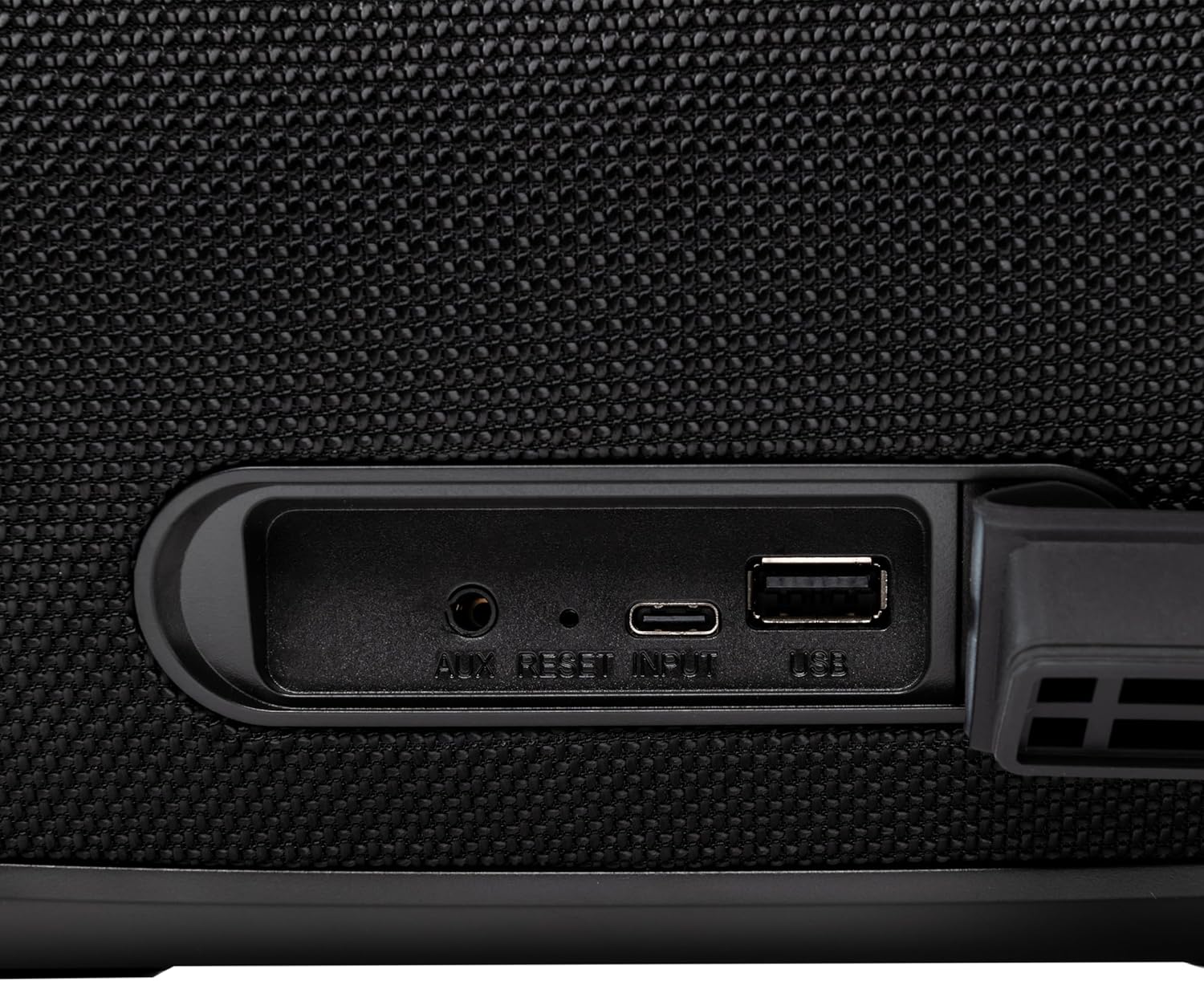
Figura 4.3: Close-up of the protected input/output ports on the rear of the speaker.
- Porta AUX-IN: Per cunnette dispositivi audio esterni via un cavu audio di 3.5 mm.
- Pulsante di reset: Use a thin object to press and reset the speaker if necessary.
- Input USB-C: Per carica l'altoparlante.
- Port USB-A: For playing MP3 audio files from a USB drive or for power bank functionality.
5. Setup
5.1 Caricamentu di l'altoparlante
Before initial use, fully charge the speaker. The speaker also functions as a power bank to charge other devices via its USB-A port.
- Connect the USB charging cable to the USB-C input port on the speaker.
- Cunnette l'altra estremità di u cavu à un adattatore di alimentazione USB cumpatibile (micca inclusu).
- The charging indicator light will illuminate. It will turn off once charging is complete.
- The battery level can be displayed on your connected phone when paired via Bluetooth.
5.2 Accensione / spegnimentu
- Per accende: Appughjà è tene premutu Pulsante di putenza for approximately 3 seconds until you hear an audible prompt and the LED lights activate.
- Per spegne: Appughjà è tene premutu Pulsante di putenza for approximately 3 seconds until you hear an audible prompt and the LED lights turn off.
6. Operating Instructions
6.1 Accoppiamentu Bluetooth
The speaker uses Bluetooth v5.3 for stable wireless connection up to 10 meters.
- Ensure the speaker is powered on and in Bluetooth mode (indicated by a flashing blue LED). If not, press the Pulsante di modu (M) per passà à u modu Bluetooth.
- Attivate u Bluetooth nant'à u vostru dispositivu mobile (smartphone, tablet, ecc.).
- Cerca i dispusitivi Bluetooth dispunibili è selezziunate "TELLUR Obia PRO" da a lista.
- Once paired, the speaker will emit an audible confirmation, and the blue LED will stop flashing.
- L'altoparlante si ricunnetterà automaticamente à l'ultimu dispositivu accoppiatu quandu hè acceso, se dispunibule.

Figura 6.1: The TELLUR Obia PRO speaker wirelessly connected to a smartphone, ready for audio playback.
6.2 Funzione Stereo True Wireless (TWS)
TWS allows you to pair two Obia PRO speakers for a stereo sound experience.
- Ensure both Obia PRO speakers are powered on and in Bluetooth mode, but not yet paired with any device.
- Nant'à un altoparlante (questu serà l'altoparlante principale), appughjà u buttone Pulsante TWS. The speaker will enter TWS pairing mode, indicated by a flashing light.
- The two speakers will automatically connect to each other. Once connected, you will hear an audible confirmation, and the TWS indicator light on both speakers will become solid.
- Now, connect your mobile device to the primary speaker via Bluetooth as described in Section 6.1. The audio will play in stereo across both speakers.
6.3 Multiple Link Technology
This technology allows connecting an unlimited number of Obia PRO speakers wirelessly for a synchronized audio experience. Refer to the manufacturer's website or specific instructions for detailed setup of Multiple Link.
6.4 USB Playback (MP3)
Riproduci l'audio MP3 files directly from a USB flash drive (up to 128GB).
- Inserite una unità flash USB chì cuntene MP3 files into the USB-A port.
- Press u Pulsante di modu (M) to switch to USB mode. The speaker will automatically begin playing music from the USB drive.
- Aduprà u Volume Up / Down è Pulsante di putenza (for play/pause) to control playback.
6.5 Cunnessione AUX-IN
Connect non-Bluetooth devices using the 3.5mm AUX audio cable.
- Connect one end of the 3.5mm AUX audio cable to the AUX-IN port on the speaker.
- Connect the other end to the audio output jack of your external device (e.g., MP3 player, laptop).
- Press u Pulsante di modu (M) per passare in modalità AUX.
- Cuntrolla a riproduzione è u vulume da u vostru dispositivu esternu.
6.6 Chjamazione in mani libere
When connected to a smartphone via Bluetooth, the speaker's built-in microphone allows for hands-free calls.
- Rispondi / Finisce a chjama: Appughjà brevemente u Pulsante di putenza.
- Reject Call: Appughjà è tene premutu Pulsante di putenza per 2 seconde.
6.7 modi di luce LED
The speaker features integrated LED lights with multiple display modes.
- Press u Pulsante di modalità di luce LED to cycle through available light patterns and colors.
- Appughjà è tene premutu Pulsante di modalità di luce LED to turn the lights off or on.

Figura 6.2: A user interacting with the LED light mode button to change the speaker's lighting effects.
6.8 Equalizer Settings (Indoor/Outdoor)
The speaker allows for equalizer customization for different environments. Specific controls for this are not detailed in the provided data, but typically involve a dedicated button or a combination of existing buttons. Refer to the product's quick start guide or manufacturer's website for precise instructions on adjusting the equalizer.
7. Mantenimentu
7.1 Pulizia
- Asciugate l'altoparlante cù un pannu dolce è asciuttu.
- Ùn aduprate micca detergenti abrasivi, alcolu o solventi chimichi.
7.2 Resistenza à l'acqua (IPX6)
The Obia PRO speaker is rated IPX6, meaning it is protected against high-pressure water jets from any direction. This makes it suitable for outdoor use and environments where it might be exposed to splashes or rain.
- Ensure the rubber cover for the charging and AUX ports is securely closed before exposing the speaker to water.
- Ùn immergete u parlante in acqua.
- Dopu l'esposizione à l'acqua, asciugate l'altoparlante prima di caricallu.
7.3 Cura di a batteria
- Per prolongà a durata di a batteria, evitate di scaricà cumpletamente a batteria spessu.
- Caricate l'altoparlante regularmente, ancu s'ellu ùn hè micca in usu, per mantene a salute di a batteria.
- Conservate l'altoparlante in un locu frescu è asciuttu quandu ùn hè micca in usu per periodi prolungati.
8. Risoluzione di prublemi
| Prublemu | Causa Possibile | Soluzione |
|---|---|---|
| L'altoparlante ùn s'accende micca. | Batteria bassa. | Caricate cumpletamente l'altoparlante. |
| Ùn si pò micca accoppià via Bluetooth. | L'altoparlante ùn hè micca in modu di accoppiamentu; Bluetooth di u dispusitivu hè disattivatu; troppu luntanu da l'altoparlante. | Ensure speaker is in Bluetooth mode (flashing LED). Turn on Bluetooth on your device. Move device closer to speaker (within 10m). |
| Nisun sonu. | Vulume troppu bassu; modu incorrectu sceltu; u dispusitivu ùn ghjoca micca. | Increase speaker and device volume. Press Pulsante di modu (M) to select correct input. Ensure audio is playing on the connected device. |
| L'accoppiamentu TWS fiasca. | Speakers already paired to a device; not both Obia PRO models. | Disconnect both speakers from any Bluetooth devices. Ensure both speakers are Obia PRO models. Try TWS pairing again. |
| A riproduzione USB ùn funziona micca. | Unità USB micca furmattata currettamente; micca supportata file type; drive capacity too large. | Assicuratevi chì a chiavetta USB sia furmattata in FAT32. Solu MP3 files are supported. Max capacity 128GB. |
9. Specificazioni
| Nome di mudellu | Obia PRO |
| Marca | TELLUR |
| Forza di output | 60W (2x 20W RMS subwoofers, 2x 10W RMS tweeters) |
| Versione Bluetooth | v5.3 |
| Range Wireless | Finu à 10 metri |
| Risposta di Frequency | 80 MHz (Note: This value is unusual for speaker frequency response and may be a typo in source data. Typically measured in Hz-kHz.) |
| Impedenza | 4 ohms |
| Modi audio | Bluetooth, USB (MP3), AUX-IN |
| Supportu USB | USB 2.0/3.0, up to 128GB (MP3 format) |
| Resistenza à l'acqua | IPX6 |
| Capacità batterie | 5400 mAh |
| Tempu di riproduzione | Finu à 12 ore (à vulume moderatu) |
| Funzione Power Bank | Yes, via USB-A port |
| Dimensioni (L x W x H) | 37.7 x 17 x 18 cm |
| Pesu | 3.48 kg |
| Materiale | Plastica |
| Culore | Neru |
Nota: e specificazioni sò sottumessi à cambià senza avvisu previ.
10. Garanzia è Support
TELLUR products are manufactured to the highest quality standards. For information regarding warranty terms, technical support, or service, please refer to the warranty card included with your product or visit the official TELLUR websitu.
Informazioni di cuntattu: Per piacè visitate www.tellur.com per l'ultime informazioni di supportu.