1. Introduzione
The Darmoshark M2 Wireless Gaming Mouse is engineered for high-performance gaming, offering versatile connectivity options, a high-precision sensor, and a lightweight, ergonomic design. This manual provides essential information for setup, operation, and maintenance to ensure optimal performance.
2. Funzioni chjave
2.1 Cunnessione Tri-Mode
The Darmoshark M2 supports three connection modes: 2.4G wireless, USB-C wired, and Bluetooth. This versatility allows seamless switching between devices and setups, providing flexibility for various gaming and work environments. The 4K mode enhances responsiveness and battery life during gaming sessions.

Image: Darmoshark M2 showcasing its tri-mode connectivity features.
Video: Un overview of the Darmoshark M2 Wireless Gaming Mouse, demonstrating its various features and connectivity options.
2.2 PAW3395 Optical Sensor
Equipped with the top-tier PAW3395 optical sensor, the M2 mouse delivers exceptional precision with up to 26,000 DPI resolution, 650 IPS tracking speed, and a response rate of 1000-4000Hz (up to 8000Hz with a 4K receiver). This ensures faster and more accurate tracking for a superior gaming experience.

Image: Close-up of the Darmoshark M2's internal components, featuring the high-end PAW3395 flagship sensor.
2.3 Lightweight Magnesium Alloy Design
The M2 features a pure right-handed ergonomic design crafted from magnesium alloy, making it incredibly durable and lightweight at approximately 39g. This design minimizes wrist strain and palm sweating during extended use, enhancing comfort and reducing fatigue.
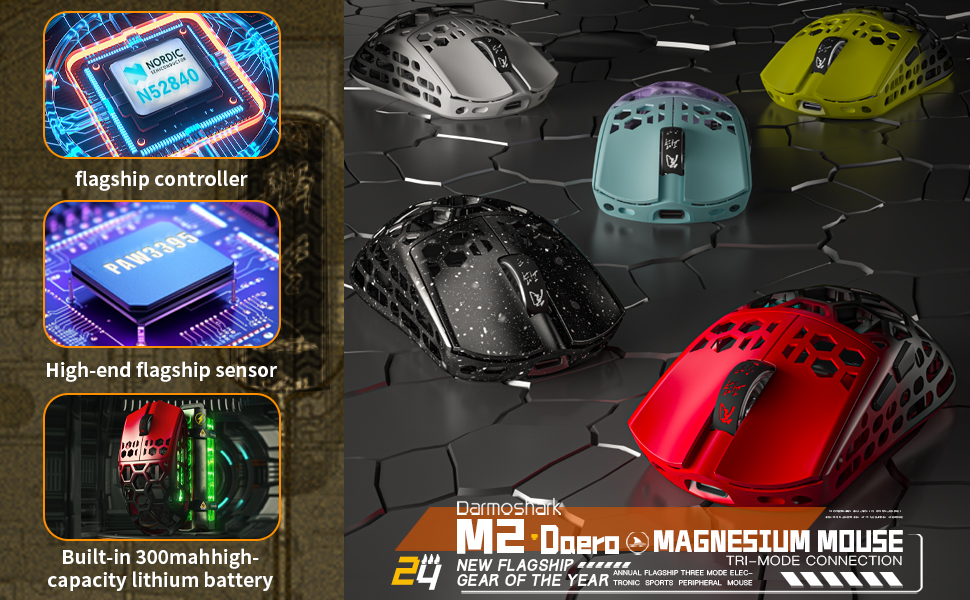
Image: The Darmoshark M2 mouse showcasing its magnesium alloy exoskeleton structure.
Video: The Darmoshark M2 Magnesium aluminum alloy Wireless Gaming Mouse, highlighting its lightweight construction and material.
2.4 Pulsanti Programmable
The mouse features 5 programmable buttons, allowing users to customize DPI settings, key functions, and macro assignments through dedicated software. This level of customization provides a competitive edge and adapts the mouse to individual gaming styles.

Image: A visual representation of the Darmoshark M2 mouse's customizable settings via its software interface.
3. Setup
3.1 Cunnessione di u mouse
- Modu wireless 2.4G:
- Inserite u ricevitore USB 2.4G in un portu USB dispunibule nantu à u vostru urdinatore.
- Switch the mode selector on the bottom of the mouse to the 2.4G position.
- U mouse si deve cunnette automaticamente.
- Modu Bluetooth:
- Switch the mode selector on the bottom of the mouse to the Bluetooth position.
- Nant'à u vostru urdinatore o dispusitivu, navigate à i paràmetri Bluetooth è cercate novi dispusitivi.
- Select "Darmoshark M2" from the list to pair.
- Modu Wired:
- Connect the provided USB-C cable to the mouse and the other end to your computer.
- U mouse passerà automaticamente in modalità cablata è cumincerà à carica.
3.2 Caricamentu di u mouse
Connect the mouse to your computer using the supplied USB-C cable. The mouse will charge while in wired mode or when connected to a power source. The 500mAh battery provides extended usage time.

Image: The Darmoshark M2 mouse connected to a computer via its USB-C charging cable.
4. Operating Instructions
4.1 Ajustamentu DPI
The DPI (Dots Per Inch) can be adjusted to change the mouse's sensitivity. Use the dedicated DPI button (refer to the product diagram for location) or the accompanying software to cycle through preset DPI levels or customize your own.
4.2 Pulsanti Programmable
Utilize the Darmoshark software to assign custom functions, macros, or hotkeys to the 5 programmable buttons. This allows for personalized control and optimized gameplay.
4.3 Tassa di sondaggio
The mouse supports polling rates from 1000Hz to 4000Hz, with an option for 8000Hz when using the 4K receiver. Higher polling rates provide more frequent updates to your computer, resulting in smoother and more responsive cursor movement.
5. Mantenimentu
5.1 Pulizia
To clean your Darmoshark M2 mouse, use a soft, dry, lint-free cloth. Avoid using harsh chemicals, cleaning solvents, or abrasive materials, as these may damage the mouse's finish or internal components.
5.2 Cura di a batteria
To prolong battery life, avoid exposing the mouse to extreme temperatures. Charge the mouse regularly, especially if it will not be used for an extended period. Do not attempt to replace the internal battery yourself.
6. Risoluzione di prublemi
6.1 U mouse ùn risponde micca
- Verificate u livellu di a batteria è caricate u mouse se necessariu.
- Ensure the mouse is correctly connected in your chosen mode (2.4G, Bluetooth, or Wired).
- Per a modalità 2.4G, assicuratevi chì u ricevitore USB sia cunnessu currettamente.
- For Bluetooth mode, ensure Bluetooth is enabled on your device and the mouse is paired.
- Try connecting the mouse to a different USB port or computer to rule out port/computer issues.
6.2 Lag or Stuttering Cursor
- Ensure there are no obstructions or sources of interference (e.g., other wireless devices) between the mouse and the receiver (2.4G mode).
- Update your mouse drivers and firmware to the latest version using the Darmoshark software.
- Reduce the polling rate if your system experiences performance issues.
6.3 DPI ùn cambia micca
- Assicuratevi chì u mouse sia accesu è cunnessu.
- Check if the DPI button is functioning correctly.
- Open the Darmoshark software to verify and adjust DPI settings.
7. Specificazioni
| Feature | Detail |
|---|---|
| Mudellu | Darmoshark M2 |
| Tecnulugia di cunnessione | Tri-Mode (2.4G Wireless, USB-C Wired, Bluetooth) |
| Tecnulugia di rilevazione di u muvimentu | Otticu (Sensore PAW3395) |
| Risoluzione DPI | Finu à 26,000 DPI |
| Tracking Speed | 650 FPS |
| Acceleration | 50G |
| Tasso di votazione | 1000-4000Hz (up to 8000Hz with 4K receiver) |
| Pulsanti programmabili | 5 |
| Pesu di l'articulu | 1.48 once (circa 42 g) |
| Batteria | 500mAh Ioni di litiu (inclusa) |
| Dimensioni di u pacchettu | 6.34 x 4.45 x 3.03 inch |
| Culore | Red (variant) |
8. Garanzia è Support
The Darmoshark M2 Wireless Gaming Mouse comes with a manufacturer's warranty. For detailed warranty information, product support, or technical assistance, please visit the official Darmoshark websitu o cuntattate u so serviziu clienti. Cunservate a vostra ricevuta d'acquistu per e richieste di garanzia.


