COLBOR W60

Manuale d'usu di a luce video LED COLBOR Wonder W60

Mudellu: W60 | Marca: COLBOR

Compact and powerful LED video light with wide color temperature range and APP control.

1. Introduzione

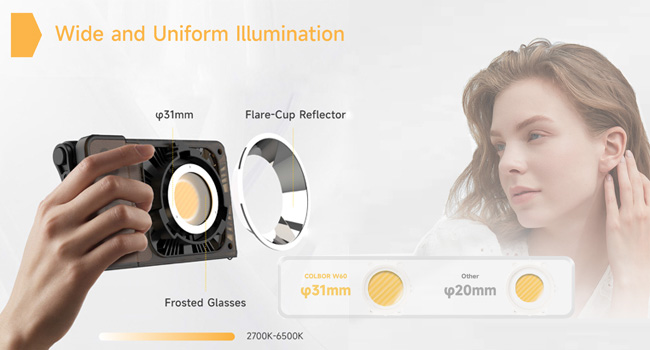
The COLBOR Wonder W60 is a compact and powerful LED video light designed for various photography and videography needs, including YouTube content creation and live streaming. It offers a wide color temperature range from 2700K to 6500K and boasts a high CRI of 97+ for accurate color rendition. Its lightweight and slim design make it highly portable, while multiple power options and APP control enhance its versatility and ease of use.

2. Ciò chì hè in a scatula

COLBOR Wonder W60 LED Video Light and included accessories

Image: The COLBOR Wonder W60 LED Video Light shown with its complete set of accessories.

  • COLBOR Wonder W60 Video Light x1
  • Cable x1
  • Adattatore di alimentazione x1
  • Copertura COB x1
  • Dome x1
  • Riflettore x 1

3. Produttu Finituview è Setup

Familiarize yourself with the components and initial setup of your COLBOR Wonder W60 LED Video Light.

3.1 Cumpunenti di u produttu

Latu view of COLBOR Wonder W60 showing controls and ports

Imagine: Latu view of the COLBOR Wonder W60, highlighting the control buttons and ports.

  • Pulsante di putenza: Used for turning the device on and off.
  • Wireless Control Setting Button: For switching between 2.4GHz remote and APP control modes, and initiating pairing.
  • Brightness Control Wheel: Adjusts the light's brightness.
  • Color Temperature Control Knob: Adjusts the color temperature.
  • NFC Detection Area: For quick pairing with compatible devices.
  • COLBOR Mount Lock & Mount: Securely attach accessories.
  • Portu DC: Per cunnette l'adattatore di corrente.
  • Tip-C Port: For PD Type-C fast charging.
  • 1/4" Hole Screw: For mounting the light onto stands or grips.

3.2 Installazione di luce

Follow these steps to prepare your light for use:

  1. Removal of COB protection cover: Hold the COB cover with the COLBOR Mount tenon and rotate it to remove it.
    Removing the COB protection cover from the COLBOR W60

    Image: Demonstrating the removal of the protective COB cover by rotating it from the mount.

  2. Installazione è rimuzione di u riflettore: Align the reflector with the groove around the lamp head and clip it in, then rotate it to fix it. Follow the instructions for "Removal of COB protection cover" to remove the reflector.
    Attaching a reflector to the COLBOR W60

    Image: A reflector being attached to the front of the COLBOR W60 light.

  3. Installation of stand: Align the 1/4" screw hole on the light's bottom or side with the 1/4" screw on the stand, and rotate it to fix it.
    COLBOR W60 mounted on a stand and with a power grip

    Image: The COLBOR W60 shown mounted on a light stand and also attached to a power grip, demonstrating versatile mounting options.

3.3 Alimentazione di u dispusitivu

The COLBOR Wonder W60 offers flexible powering options:

  • Power with power adapter: Cunnette vi l 'adapter power, align the DC power jack di lamp body, and then power on through the cable after stable connection.

    *Do not suspend the power adapter in the air. Use wire rings to hang it on the lamp stand.

    Connecting COLBOR W60 to power adapter

    Image: The COLBOR W60 being powered via its included power adapter.

  • Power with COLBOR Power Grip: Align the 1/4" screw hole on the light's bottom or side with the 1/4" screw on the stand. Rotate it to fix it. Connect the light to the Power Grip via the D-Tap to DC cable for powering.

    *Please do not use the Type-C to Type-C cable to power the light.

    Connecting COLBOR W60 to COLBOR Power Grip

    Image: The COLBOR W60 connected to a COLBOR Power Grip for portable power.

4. Operating Instructions

Learn how to operate your COLBOR Wonder W60 LED Video Light.

Video: Official instruction video for the COLBOR Wonder W60/W100 LED Video Light, covering setup, powering, and operation.

4.1 Power On/Off

  • Power On: Cunnette vi à a surgente putenza poi appughjà longu u buttone putenza.
  • Spegnimentu: Long-press the power button to turn it off.

4.2 Ajuste di temperatura di culore

  • Rotate the color temperature control knob for continuous color temperature adjustment.
  • Short press the knob to select the preset color temperature: (2700K, 3200K, 4300K, 5600K, 6500K).

4.3 Ajustamentu di luminosità

  • Roll the brightness adjustment wheel for continuous brightness adjustment.
  • Short press the wheel side to select preset brightness: (0%, 25%, 50%, 75%, 100%).

4.4 Wireless Connection (APP Control)

The COLBOR Wonder W60 supports APP control for seamless and efficient lighting adjustments.

  • Appughjà brevemente u buttone di cuntrollu remoto per cambià trà i modi di cuntrollu 2.4GHz (CTRL1 remote) è APP (COLBOR Studio APP).
  • Long-press the button to start pairing with the APP.
  • Cunnettetevi à l'APP per i paràmetri di Fan è EFF.
COLBOR W60 controlled via smartphone app

Image: The COLBOR W60 being controlled remotely via the COLBOR Studio APP on a smartphone.

5. Mantenimentu

To ensure the longevity and optimal performance of your COLBOR Wonder W60 LED Video Light, follow these maintenance guidelines:

Diagram of COLBOR W60's smart cooling system

Imagine: Un internu view highlighting the intelligent air duct and heat pipe cooling system of the COLBOR W60.

6. Risoluzione di prublemi

If you encounter issues with your COLBOR Wonder W60, refer to the following common problems and solutions:

PrublemuCausa PossibileSoluzione
A luce ùn accende micca.No power, loose connection, or power button not pressed correctly.Ensure power adapter is securely connected and plugged into a working outlet. If using a power grip, ensure it is charged and properly attached. Long-press the power button for 2-3 seconds.
A luminosità o a temperatura di u culore ùn ponu esse aghjustate.Control knob/wheel malfunction or in locked mode.Check the display for any lock indicators. Try restarting the device. If using APP control, ensure the light is properly paired and the APP is functioning correctly.
U cuntrollu APP ùn funziona micca.Bluetooth/2.4GHz connection issue, APP not updated, or incorrect mode.Ensure the light is in APP control mode (short press wireless control button). Long-press the button to re-initiate pairing. Check your smartphone's Bluetooth settings. Update the COLBOR Studio APP to the latest version.
A luce surriscalda.Obstructed ventilation or prolonged high-power use in hot environment.Ensure ventilation grilles are clear of obstructions. Reduce brightness or allow the light to cool down. Operate in a well-ventilated area.

If the problem persists after trying these solutions, please contact COLBOR customer support for further assistance.

7. Specificazioni

FeatureDetail
MarcaCOLBOR
MudelluW60
Dimensioni di u produttu6.18 x 1.69 x 3.66 inch
Pesu di l'articulu2.14 pounds (approx. 345g as per feature bullet)
Illuminazione2890Lux@1m (5600K)
Température de couleur (CCT)2700K à 6500K
CRI97+
Tecnulugia di cunnessioneBluetooth (per u cuntrollu APP)
Opzioni di putenzaCOLBOR Battery Grip, DC adapter, PD Type-C fast charging
Sistema di rinfrescanteIntelligent Air Duct and Heat Pipe Cooling System
Livellu di resistenza à l'acquaÙn hè resistente à l'acqua
Paese d'origineCina

8. Garanzia è Support

COLBOR products are manufactured to the highest quality standards. For warranty information and technical support, please refer to the warranty card included with your product or visit the official COLBOR websitu. Conservate a vostra ricevuta d'acquistu cum'è prova d'acquistu per e richieste di garanzia.

For further assistance, you may contact COLBOR customer service through their official channels. Please provide your product model (W60) and any relevant details when seeking support.

Documenti cunnessi - W60

Preview Manuale d'uso COLBOR PB74 Power Base
Manuale d'usu per a basa di alimentazione COLBOR PB74, chì detalla e so caratteristiche, u funziunamentu, a carica, l'installazione, e specifiche è l'infurmazioni di garanzia per l'alimentazione di e luci di e serie COLBOR W60 è W100.
Preview Manuale d'usu di a monoluce LED Colbor CL60R RGB COB
Manuale d'usu cumpletu per u Colbor CL60R RGB COB LED Monolight, chì detalla l'istruzzioni di sicurezza, i cumpunenti di u produttu, l'installazione, u funziunamentu è e diverse modalità d'illuminazione cumprese CCT, HSI è effetti speciali.
Preview Manuale d'usu di a luce video COLBOR CL220 COB
Manuale d'usu cumpletu per a luce video COLBOR CL220 COB, chì detalla e so caratteristiche, u funziunamentu, l'installazione, e specifiche è l'infurmazioni di garanzia. Amparate cumu cunfigurà, cuntrullà è mantene a vostra attrezzatura d'illuminazione.
Preview Manuale d'usu di a luce video COLBOR CL220M | Funzionamentu, Specifiche, Garanzia
Manuale d'usu cumpletu per a luce video COLBOR CL220M. Amparate nantu à e caratteristiche di u produttu, l'istruzzioni d'usu, a cunnessione di l'alimentazione, i paràmetri, u cuntrollu di l'app, e specifiche, u cuntenutu di a cunfezione è l'infurmazioni di garanzia.
Preview Manuale d'uso COLBOR CL220R Video Light
Una guida cumpleta per a luce video COLBOR CL220R, chì detalla e so caratteristiche, u funziunamentu, i modi, u cuntrollu di l'app, e specifiche è l'infurmazioni di garanzia.
Preview COLBOR WB60R Video Light User Manual - Features, Operation, Specifications
Comprehensive user manual for the COLBOR WB60R Video Light. Learn about its features, installation, operation modes (CCT, PRST, HSI, Effects), wireless and NFC connectivity, specifications, packing list, and warranty information.