Introduzione
Thank you for choosing the Mastech MS8233D Digital Multimeter. This manual provides essential information for the safe and effective operation, maintenance, and troubleshooting of your device. Please read this manual thoroughly before use and keep it for future reference.
Informazioni di sicurezza
ATTENZIONE: Per evità scosse elettriche o ferite persunale, leghjite è capite tutte l'infurmazioni di sicurezza prima di utilizà stu pruduttu.
- Always ensure the multimeter is in the correct function and range before making measurements.
- Ùn applicà micca più di u volu nominalitage, as marked on the meter, between terminals or between any terminal and earth ground. The MS8233D has a Safety Rating of CATII 600V.
- Aduprate prudenza quandu u travagliu cù u voltagsopra à 30V AC RMS, 42V di piccu, o 60V DC. Tale vulumetagsò un periculu di scossa.
- Keep your fingers behind the probe barriers during measurements.
- Do not use the meter if it is damaged or if the case is open. Inspect the meter and test leads before use.
- Rimpiazzate subitu a batteria quandu appare l'indicatore di batteria bassa per assicurà letture precise.
- Ùn aduprate micca u misuratore in ambienti cù gas esplosivi, vapori o polvere.
Funzioni chjave
The Mastech MS8233D Digital Multimeter offers a range of functionalities for various electrical measurements:
- Display: 2000 counts for precise readings.
- Variazione: Auto and Manual Ranging capabilities.
- Test diode: Features a Diode Open Voltage di 1.5 V.
- Test di continuità: Audible buzzer for resistance less than 60Ω.
- Mantene di dati: Freezes the displayed reading for convenience.
- Spegnimentu automaticu: Cunserva a durata di a batteria.
- Senza cuntattu Voltage Detection (NCV): For identifying live wires without direct contact.
- Misurazione massima: Records the highest value measured.
- Retroilluminazione di u display: Per a visibilità in cundizioni di poca luce.
- Indicazione di batteria bassa: Indica quandu hè necessariu rimpiazzà a batteria.
- Alimentazione elettrica: Operates on 1x 9V 6F22 Battery.
- Certificazioni: Conforme à RoHS.
- Valutazione di sicurezza: CATII 600V.
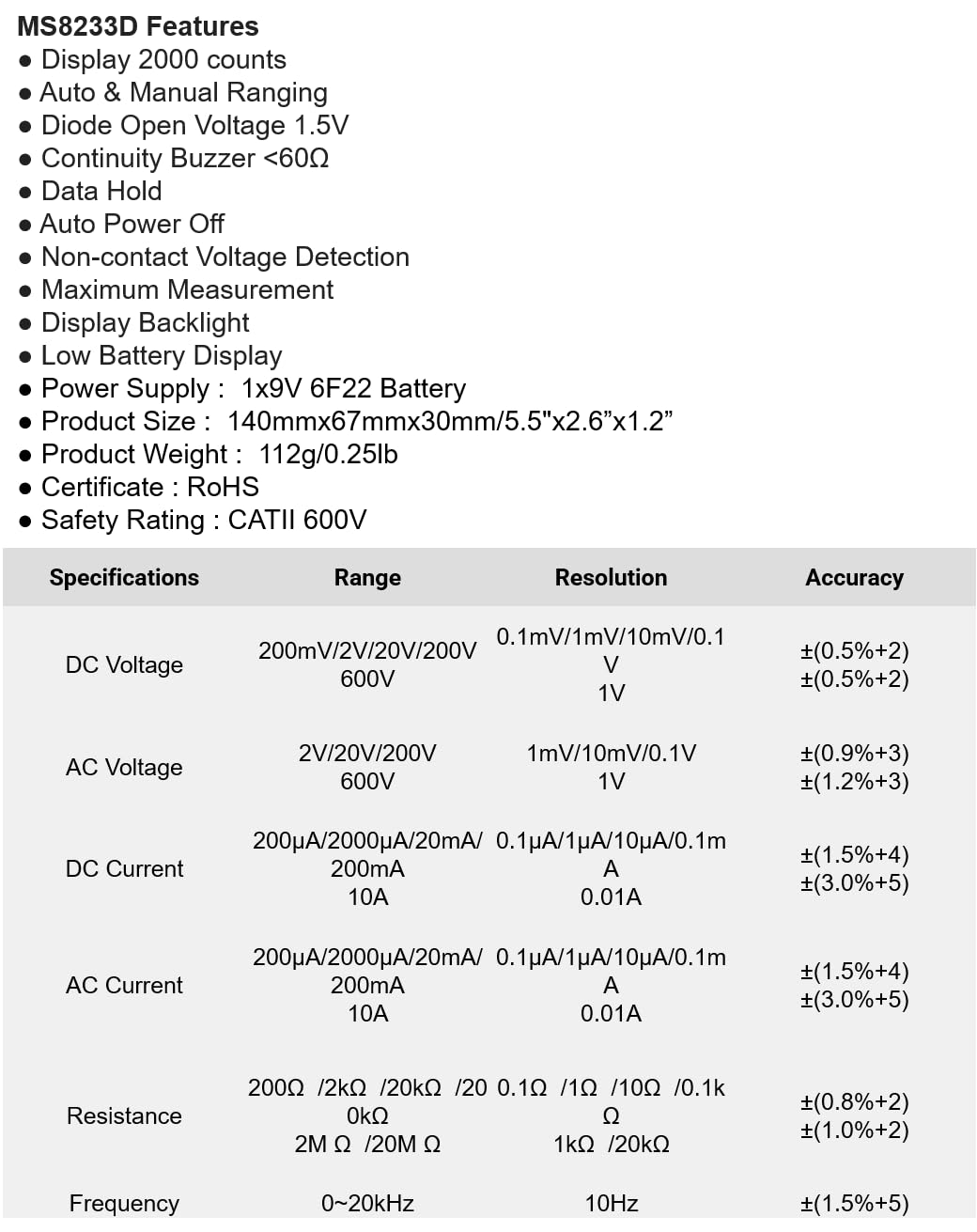
Figura 1: Fronte view of the Mastech MS8233D Digital Multimeter, highlighting the display, rotary function switch, and input terminals.
Product Overview è cumpunenti
The MS8233D multimeter is designed for ease of use and durability. Familiarize yourself with its main parts:

Figura 2: Overview of the MS8233D Digital Multimeter, illustrating its physical dimensions, power supply, and typical applications in domestic, industrial, and electronics settings.
- Display LCD: Mostra letture di misurazione, unità è indicatori di funzione.
- Interruttore rotativu di funzione: Used to select the desired measurement function (e.g., ACV, DCV, Resistance, Diode, Continuity, Temperature, NCV).
- Jacks di input: Terminals for connecting test leads.
- COM Jack: Terminale d'entrata cumunu (negativu) per tutte e misurazioni.
- Jack VΩmA: Terminal di input pusitivu per voltage, resistance, diode, continuity, and small current measurements.
- Jack 10A: Terminale d'entrata pusitivu per misure di corrente alta (finu à 10 A).
- Pulsanti di funzione: For features like Data Hold, Backlight, and Range selection.
Istituisci
Installazione di batterie
The MS8233D requires one 9V 6F22 battery for operation. To install or replace the battery:
- Assicuratevi chì u multimetru sia spento è scollegate tutti i cavi di prova da i terminali d'entrata.
- Truvate u coperchiu di u compartimentu di a batteria nant'à u spinu di u misuratore.
- Aduprate un cacciavite per allentà a(e) vite(i) nantu à u coperchiu di a batteria è caccià u coperchiu.
- Connect the new 9V battery to the battery clips, observing the correct polarity.
- Pone a batteria in u compartimentu è rimpiazzate u coperchio, fissendu lu cù a (e) vite.
Nota: The meter includes a low battery indicator. Replace the battery promptly when this indicator appears to maintain measurement accuracy.
Istruzzioni di funziunamentu
Before making any measurement, ensure the test leads are properly connected and the function switch is set to the desired range.
Misurazione DC Voltage (DCV)
- Insert the red test lead into the VΩmA jack and the black test lead into the COM jack.
- Set the rotary switch to the desired DCV range (e.g., 200mV, 2V, 20V, 200V, 600V). If unsure, start with the highest range or use auto-ranging if available.
- Cunnette i puntali di prova à traversu u cumpunente o u circuitu da misurà, osservendu a polarità.
- Leghjite u voltage valore nantu à u display LCD.
Misurazione AC Voltage (ACV)
- Insert the red test lead into the VΩmA jack and the black test lead into the COM jack.
- Set the rotary switch to the desired ACV range (e.g., 2V, 20V, 200V, 600V).
- Cunnette i puntali di prova à traversu u cumpunente o u circuitu da misurà.
- Leghjite u voltage valore nantu à u display LCD.
Measuring DC/AC Current (DCA/ACA)
CAUTION: Never connect the meter in parallel to a voltaga fonte quandu si misura a corrente. Questu pò dannà u misuratore è u circuitu.
- For currents up to 200mA, insert the red test lead into the VΩmA jack. For currents up to 10A, insert the red test lead into the 10A jack. Insert the black test lead into the COM jack.
- Set the rotary switch to the desired DC or AC current range (e.g., 200µA, 2000µA, 20mA, 200mA, 10A).
- Aprite u circuitu induve a corrente deve esse misurata è cunnette u misuratore in serie cù u caricu.
- Leghjite u valore attuale nantu à u display LCD.
Misurazione di a Resistenza (Ω)
- Insert the red test lead into the VΩmA jack and the black test lead into the COM jack.
- Impostate l'interruttore rotativu nantu à a gamma di resistenza desiderata (per esempiu, 200Ω, 2kΩ, 20kΩ, 200kΩ, 2MΩ, 20MΩ).
- Assicuratevi chì u circuitu o u cumpunente sia disenergizatu prima di misurà a resistenza.
- Cunnette i sondi di prova à traversu u cumpunente.
- Leghjite u valore di resistenza nant'à u display LCD.
Test di Diodu
- Insert the red test lead into the VΩmA jack and the black test lead into the COM jack.
- Set the rotary switch to the Diode symbol (usually shared with Continuity).
- Cunnette a sonda rossa à l'anodu è a sonda nera à u catodu di u diodu.
- U display mostrerà u vulume in avantitage drop. Reverse the probes; the display should show 'OL' (Open Loop) for a good diode.
Test di continuità
- Insert the red test lead into the VΩmA jack and the black test lead into the COM jack.
- Set the rotary switch to the Continuity symbol (usually shared with Diode).
- Cunnette i sondi di prova à traversu u circuitu o u cumpunente.
- Sè a resistenza hè sottu à circa 60 Ω, u cicalino sonerà, indicendu a continuità. U display mostrerà ancu u valore di resistenza.
Senza cuntattu Voltage (NCV) Detection
- Set the rotary switch to the NCV function.
- Move the top part of the meter (NCV sensor area) close to the conductor suspected of having AC voltage.
- The meter will emit an audible beep and the NCV indicator will light up if AC voltage hè rilevatu.
Funzione Data Hold
Appughjà u buttone "HOLD" per bluccà a lettura attuale nant'à u display. Appughjà lu torna per liberà u hold è ripiglià e misurazioni in diretta.
Funzione di retroilluminazione
Press the 'LIGHT' button to turn on the display backlight. Press it again to turn it off. The backlight may automatically turn off after a short period to conserve battery.
Mantenimentu
Pulizia
Pulite a carcassa di u misuratore cù a publicitàamp pannu è un detergente dolce. Ùn aduprate micca abrasivi o solventi. Assicuratevi chì u misuratore sia cumpletamente asciuttu prima di l'usu.
Sustituzione di batterie
Refer to the 'Battery Installation' section under 'Setup' for instructions on replacing the 9V battery. Always replace the battery when the low battery indicator is displayed to ensure accurate readings and proper operation.
Sostituzione di fusible
The MS8233D is equipped with internal fuses to protect against overcurrent. If the current measurement function stops working, the fuse may need replacement. Fuse replacement should only be performed by qualified personnel. Use only fuses of the specified type and rating (e.g., F200mA/250V for mA range, F10A/250V for 10A range).
Risoluzione di prublemi
| Prublemu | Causa Possibile | Soluzione |
|---|---|---|
| Nisun display o display scuru | Batteria morta o bassa | Rimpiazzate a bateria 9V. |
| Letture sbagliate | Funzione/intervallu incorrectu selezziunatu; cunnessione di i cavi di prova debuli; batteria bassa | Verify function and range; check test lead connections; replace battery. |
| A misurazione di corrente ùn funziona micca | Fusibile brusgiatu | Replace the appropriate fuse (refer to Maintenance section). |
| "OL" (Sovraccaricu) visualizatu | Measurement exceeds selected range; open circuit (for continuity/resistance) | Select a higher range; check for open circuit. |
| Nisun bip di continuità | Resistance too high; open circuit | Check for continuity; ensure resistance is below 60Ω. |
Specificazioni
The following table details the measurement ranges, resolutions, and accuracies for the Mastech MS8233D Digital Multimeter:

Figure 3: Comprehensive specifications for the MS8233D, outlining measurement capabilities and precision.
| Feature | Specificazione |
|---|---|
| Mostra | 2000 cunti |
| DC Voltage | 200mV / 2V / 20V / 200V / 600V |
| AC Voltage | 2V / 20V / 200V / 600V |
| Corrente DC | 200µA / 2000µA / 20mA / 200mA / 10A |
| Curentu AC | 200µA / 2000µA / 20mA / 200mA / 10A |
| Resistenza | 200Ω / 2kΩ / 20kΩ / 200kΩ / 2MΩ / 20MΩ |
| Frequency | 0-20 kHz |
| Diodu Open Voltage | 1.5V |
| Cuntinuità di Cuntinuità | <60Ω |
| Alimentazione elettrica | 1x 9V 6F22 Battery |
| Dimensioni di u produttu | 140 mm x 67 mm x 30 mm (5.5 "x 2.6" x 1.2") |
| Pesu di u produttu | 112 g (0.25 lb) |
| Valutazione di sicurezza | CATII 600V |
| Certificazioni | CE, RoHS |
Garanzia è Supportu
For warranty information and technical support, please refer to the documentation provided with your purchase or contact the seller/manufacturer directly. Keep your purchase receipt as proof of purchase for any warranty claims.


