Introduzione
This manual provides detailed instructions for the installation, operation, and maintenance of your Vtopek T309S 10.26-inch Wireless Carplay Android Auto Display. This device integrates wireless Carplay and Android Auto, a 2.5K front dash camera, and a 1080P rear camera, offering enhanced connectivity and safety features for your vehicle.
Installazione è installazione
Follow these steps to properly install your Vtopek T309S display.
1. Muntaggio di u display
The display comes with two adjustable monitor brackets for flexible installation. Choose the bracket suitable for your vehicle's dashboard or windshield.
- Montatura adesiva: For dashboard installation, ensure the surface is clean and dry before applying the adhesive base.
- Montatura di a ventosa: For windshield installation, press the suction cup firmly against the glass and engage the locking mechanism.
- Adjust the display angle using the 360° rotatable support for optimal viewing without obstructing your line of sight.

Figure 1: Adjustable Monitor Brackets for flexible installation.
2. Connection Power
The device is powered via a Type-C port and connects to your vehicle's cigarette lighter (7-32V compatible).
- Impurtante: Always use the original power adapter provided. Using other brands or phone data cables may cause the device to restart repeatedly or malfunction.
- Plug the power supply into the car charger. The Type-C port ensures stable and fast power delivery.
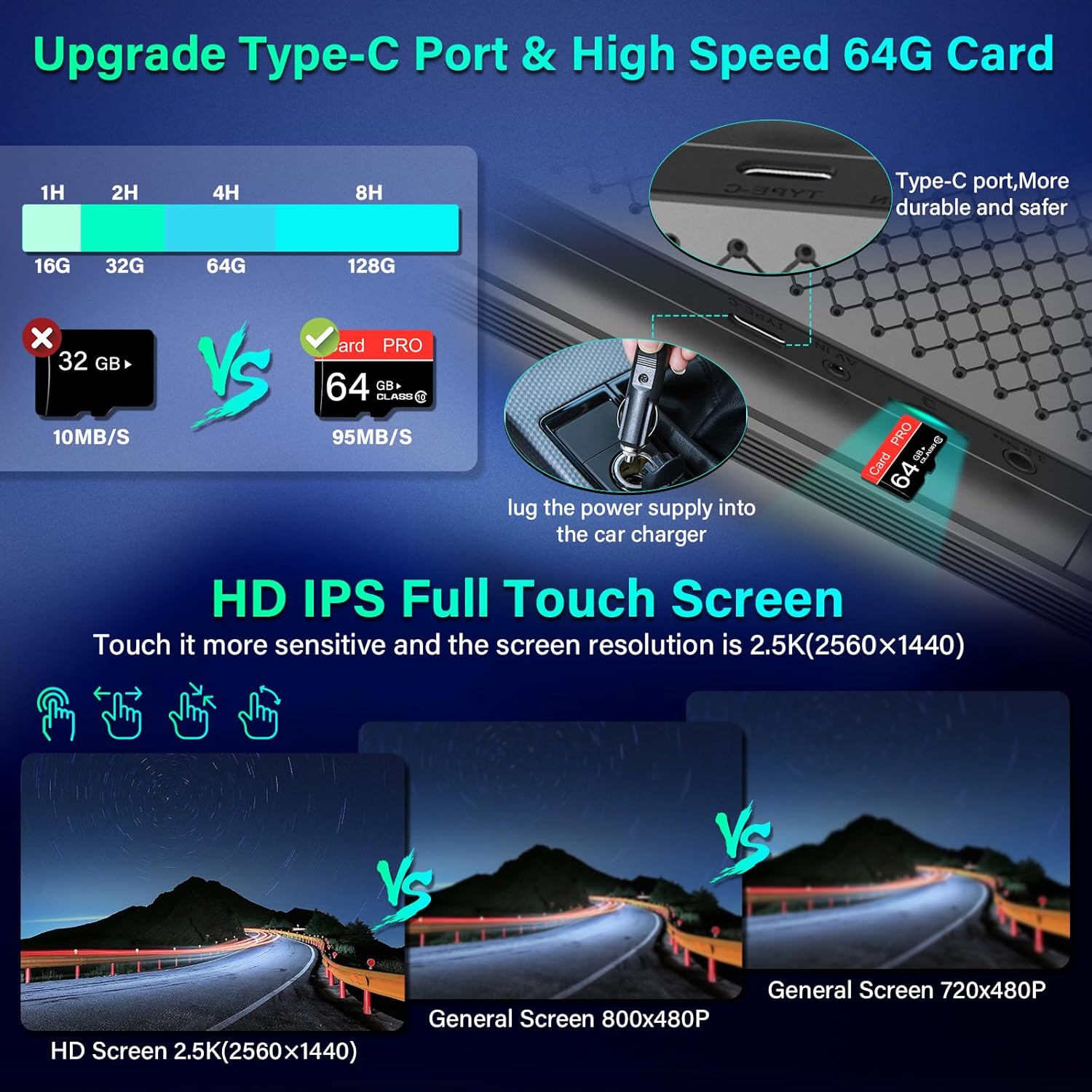
Figure 2: Type-C Port and 64GB SD Card Slot.
3. Stallazione di a Camera
The system includes a 2.5K front dash camera and a 1080P rear camera.
- Camera frontale: Integrated into the main display unit. It supports rotation and can be used as an interior camera.
- Camera posteriore: Install the 1080P rear camera at the back of your vehicle. It is IP69 waterproof.
- Reversing Light Connection: To enable the automatic display of the rear view when reversing, connect the red wire from the rear camera to your vehicle's reversing lights.
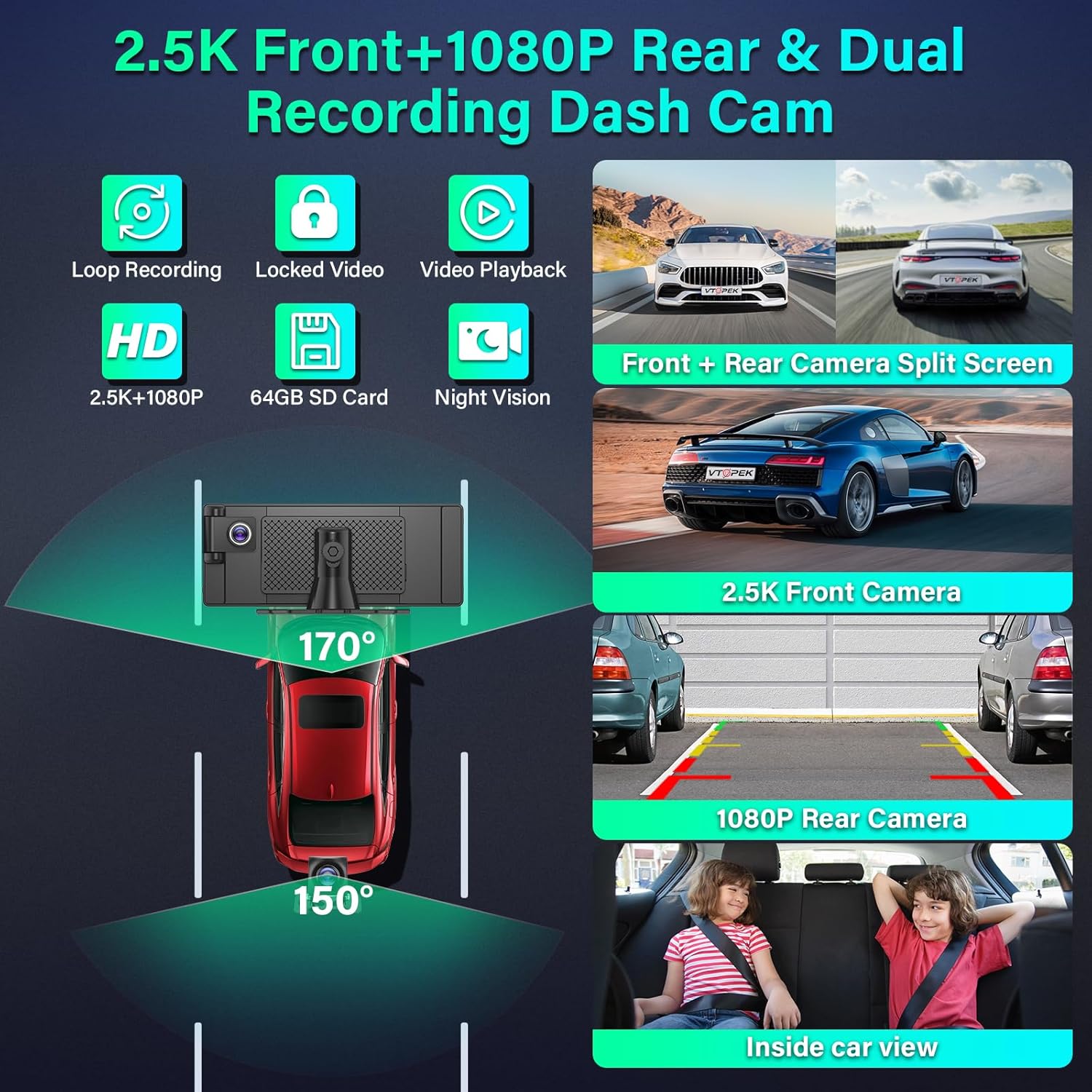
Figure 3: Dual Recording Dash Cam System Overview.

Figure 4: Adjustable Reversing Line and Waterproof Rear Camera.
Istruzzioni di funziunamentu
Learn how to use the various features of your Vtopek T309S display.
1. Carplay senza filu è Android Auto
Connect your smartphone wirelessly for seamless integration of navigation, music, calls, and messages.
- Attivate u Wi-Fi è u Bluetooth nant'à u vostru smartphone.
- The 10.26-inch display will automatically connect to Carplay (for iPhone) or Android Auto (for Android phones).
- Access map navigation, make calls, play music, and send text messages directly from the display.

Figure 5: Wireless Carplay, Android Auto, and Mirror Link Interfaces.
2. Mirror Link (AirPlay / Android Cast)
Project your smartphone screen onto the display.
- Connect your smartphone to the Carplay display via AirPlay (for iPhone) or Android Cast (for Android phones).
- Questu vi permette view videos from apps like YouTube or TikTok on the display.
- Nota: Compatibility may vary with certain phone models.
3. Voice Assistant (Siri & Google Assistant)
Control the device hands-free using voice commands.
- Activate Siri or Google Assistant to navigate, make calls, play music, and more.
- This feature enhances driving safety by allowing you to keep your hands on the wheel.

Figure 6: Voice Assistant and Hands-free Calling.
4. Dual Bluetooth 5.0
The display features dual Bluetooth technology for enhanced audio and connectivity.
- Connect your phone's Bluetooth to the Carplay screen.
- Simultaneously connect the Carplay screen to your car's original speakers for high-quality audio output.

Figure 7: Dual Bluetooth Mode for Audio Streaming.
5. Opzioni di uscita audio
The Vtopek T309S offers multiple ways to output audio to your car's sound system:
- Bluetooth à l'altoparlante di vittura: Connect the display to your car's Bluetooth for wireless audio.
- Trasmettitore FM: Tune the display and your car radio to the same FM frequency to transmit audio.
- Cunnessione AUX: Use an AUX cable to connect the display to your car's AUX input.
- Speaker integratu: The display has integrated stereo speakers for direct audio output.

Figure 8: Multiple Audio Output Options.
6. Dash Cam Features
The integrated dash cam provides comprehensive recording capabilities.
- Registrazione in loop: Records continuously, overwriting the oldest files when the 64GB SD card is full.
- Video Locked: Critical events (e.g., collisions detected by G-sensor) are automatically locked and protected from being overwritten.
- Riproduzione Video: Review arregistratu footage directly on the display.
- Visione notturna: Equipped with F1.6 aperture and WDR technology for clear recordings in low-light conditions.
- Split Screen: The Android Carplay screen supports split-screen mode, allowing you to view front camera footage alongside navigation or music.
7. Assistenza à a retromarcia
The rear camera provides assistance for safe parking.
- When reversing, the system automatically displays the rear camera view in piena schermu.
- Adjustable Reversing Lines: Parking guidelines are displayed and can be adjusted to suit various vehicle types.
- The 170° front and 150° rear wide-angle lenses reduce blind spots.
Mantenimentu
Una manutenzione adatta assicura a longevità è e prestazioni ottimali di u vostru dispositivu.
- Gestione Card SD: The device supports loop recording. When the included 64GB SD card is full, the oldest recordings will be automatically overwritten. Regularly back up important footage.
- Pulizia: Aduprate un pannu dolce è asciuttu per pulisce u schermu. Evitate detergenti abrasivi o solventi.
- Camera posteriore: The IP69 waterproof rating protects the rear camera from water and dust. Periodically check for any obstructions or dirt on the lens and clean gently if necessary.
- Adattatore di putenza: Always use the original power adapter to prevent damage and ensure stable operation.
Risoluzione di prublemi
Sè avete prublemi, riferitevi à i seguenti prublemi cumuni è suluzioni.
| Prublemu | Causa Possibile | Soluzione |
|---|---|---|
| Device repeatedly restarts or does not power on. | Incorrect power adapter used. Insufficient power supply. | Ensure you are using the original power adapter provided with the device. Verify the car's cigarette lighter socket is functioning correctly. |
| Wireless Carplay/Android Auto fails to connect. | Bluetooth/Wi-Fi off on phone. Phone not paired. | Ensure your phone's Bluetooth and Wi-Fi are enabled. Go to the device's settings to initiate pairing. Restart both the display and your phone. |
| Nisun audio o una qualità audio scarsa. | Incorrect audio output setting. Volume too low. | Check the audio output settings on the display (Bluetooth, FM, AUX, Built-in Speaker). Adjust the volume on both the display and your car stereo. Ensure FM frequency matches if using FM transmitter. |
| Rear camera image not displayed when reversing. | Red wire not connected to reversing lights. Camera cable loose. | Verify that the red wire from the rear camera is correctly connected to your vehicle's reversing light power supply. Check all camera cable connections. |
| Screen shows abnormal colors (e.g., pink/green screen). | Internal hardware issue. | Attempt a factory reset if available in settings. If the problem persists, contact customer support. |
Specificazioni
| Feature | Detail |
|---|---|
| Marca | Vtopek |
| Numero di mudellu | T309S |
| Size Screen | 10.26 inch |
| Tipu di visualizazione | HD IPS Full Touch Screen, LED |
| Risoluzione massima di u display | 1600 x 900 Pixels (QHD wide 1440p) |
| Risoluzione Camera Front | 2.5K |
| Risoluzione di a camera posteriore | 1080 p |
| Tecnulugia di cunnessione | Bluetooth 5.0, Wi-Fi |
| Funzioni spiciali | Wireless Android Auto, Built-in Bluetooth, Wireless Carplay, FM Tuner, Touch Screen, Loop Recording, 24H Parking Monitor, Night Vision, IP69 Waterproof Rear Camera |
| Dispositivi compatibles | Smartphone |
| Input di putenza | 7-32V (Cigarette Lighter) |
| Storage | 64 GB di carta SD (inclusa) |
| Rapportu d'aspettu di l'imagine | 16: 9 |
| Rapportu di cuntrastu di l'immagine | 1000: 1 |
Garanzia è Supportu
Your Vtopek T309S display comes with comprehensive support and warranty.
- Garanzia: The product is covered by a 1-year manufacturer's warranty from the date of purchase.
- Assistenza tecnica: Vtopek offers lifetime technical support.
- Serviziu à i clienti: For any issues or inquiries, please contact our professional customer service team.

Figure 9: Warranty and Support Information.
Email di cuntattu: jenny@jansite.cn
