Product Overview
The JTEMAN 360 Rotating Cell Phone Stand with Wireless Bluetooth Speaker with Light is a versatile device designed to enhance your mobile experience. It integrates a rotatable phone stand, a Bluetooth speaker, and an atmosphere light into a single unit. This manual provides detailed instructions for its setup, operation, and maintenance.
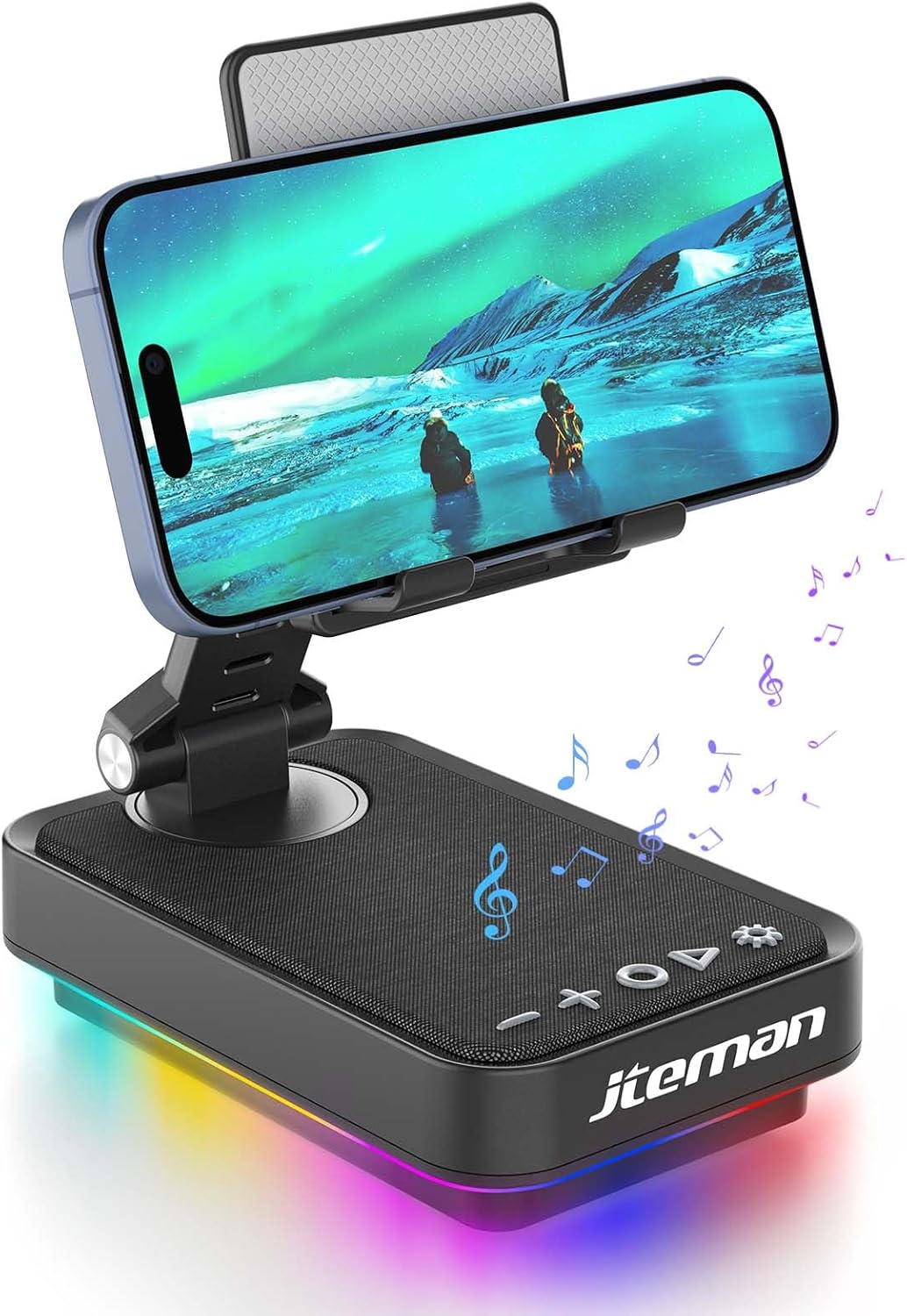
Figure 1: JTEMAN 360 Rotating Cell Phone Stand with Wireless Bluetooth Speaker with Light.
Cumpunenti inclusi:
- Bluetooth Speaker (with integrated phone stand and light)
- Cavu Type-C
- Manuale d'istruzzioni
Guida di installazione
1. Disimballaggio è ispezione iniziale:
Carefully remove all components from the packaging. Inspect the device and accessories for any signs of damage. Ensure all listed components are present.
Video 1: Unboxing and initial setup of the JTEMAN phone stand and Bluetooth speaker.
2. Preparing the Phone Stand:
Before first use, locate and remove the silicone protective patch from the device's base. This patch protects the surface during shipping.
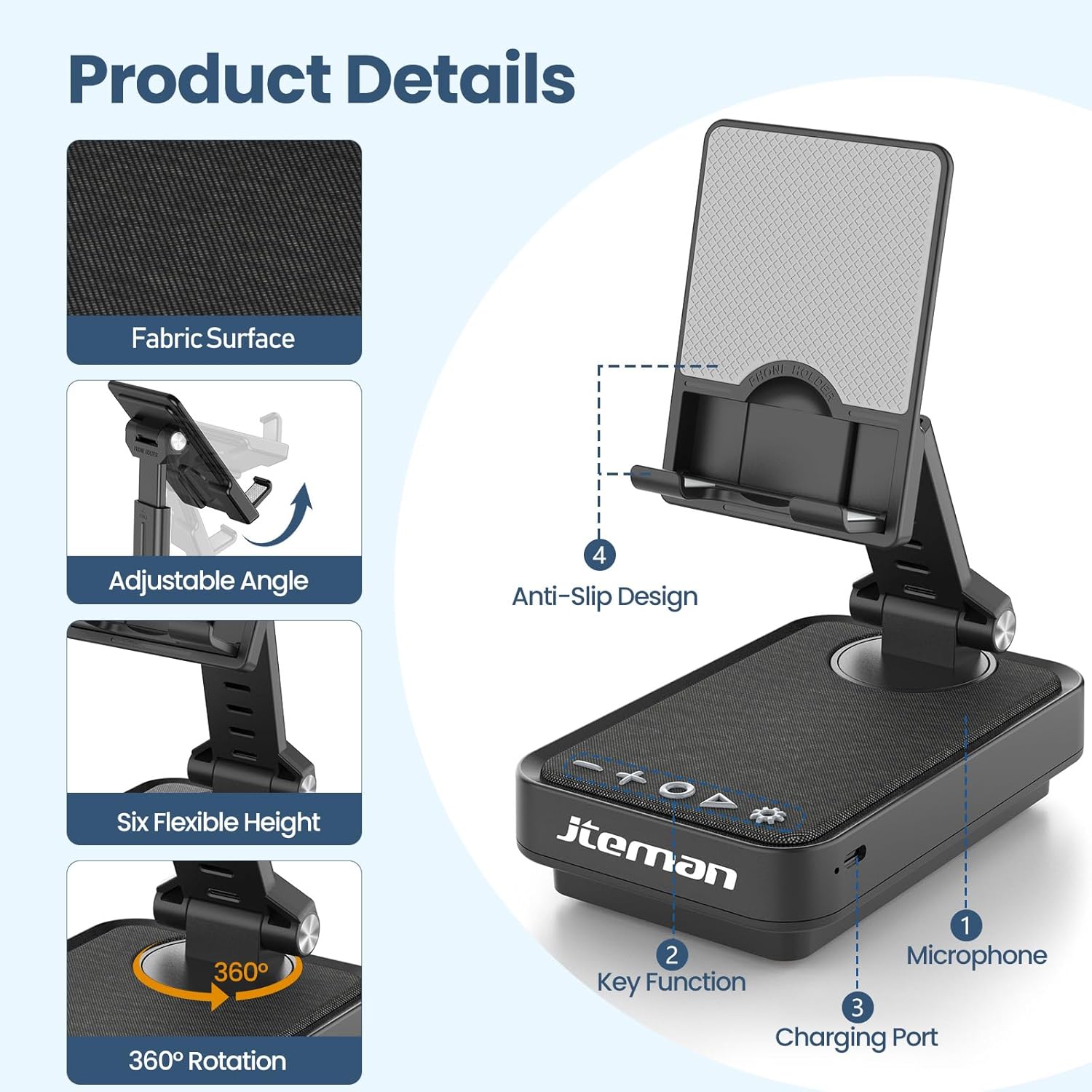
Figure 2: Product details and components. Note the anti-slip design and key functions.
3. Caricà u dispusitivu:
Connect the provided Type-C cable to the charging port on the device and the other end to a compatible USB power adapter (not included). The power indicator light will show red during charging and turn green when fully charged.
- Luce rossa: A batteria hè in carica.
- Luce verde: A batteria hè cumpletamente carica.

Figura 3: Capacità di a batteria è tempi d'usu stimati.
4. Abbinamentu Bluetooth:
- Long press the Power ON/OFF button (3) for 3 seconds to turn on the speaker. The speaker will enter pairing mode, indicated by a flashing blue light.
- On your smartphone or tablet, navigate to Bluetooth settings.
- Select "L39-1" from the list of available devices.
- Once connected, the blue light will become solid.

Figure 4: Bluetooth connection with a laptop, demonstrating wireless audio playback.
Istruzzioni di funziunamentu
Pannellu di cuntrollu Overview:

Figura 5: Detailed view di u pannellu di cuntrollu è e so funzioni.
- VOL- (1): Pulsà per calà u vulume.
- VOL+ (2): Pulsà per aumentà u vulume.
- Answer/Hang up/Play/Pause/Next (4):
- Pressione breve per ghjucà / mette in pausa a musica.
- Short press to answer/hang up calls.
- Premete longu per saltà à a pista successiva.
- Accensione/Spegnimentu (3):
- Premete longu per 3 seconde per accende / spegne u parlante.
- Double press to switch between Bluetooth and AUX modes.
- Short press to adjust the brightness of the atmosphere lights (4 levels).
- Atmosphere Light (5):
- Long press for 3 seconds to turn on/off the light.
- Short press to switch lighting mode (11 modes available, 3 modes sync with music).
- Microfonu (6): Per chjamate senza mani.
- Portu di carica (7): Type-C input for charging.
- Power Indicator Light (8): Shows charging status and Bluetooth connection status.
Phone Stand Adjustment:
The phone stand features 360° rotation and adjustable height and angle to suit various viewing needs. The anti-slip silicone pads ensure device stability.

Figure 6: The phone stand supports a wide range of devices, including smartphones and tablets (4-13 inches).
The stand is foldable for easy portability.

Figure 7: The foldable design allows for easy storage and transport.
Mantenimentu
Pulizia:
Wipe the device with a soft, dry cloth. Do not use abrasive cleaners, solvents, or harsh chemicals, as these may damage the surface or internal components. Avoid exposing the device to excessive moisture.
Conservazione:
When not in use for extended periods, store the device in a cool, dry place away from direct sunlight and extreme temperatures. Ensure the device is fully charged before storing to prolong battery life.
Cura di a batteria:
To maximize battery lifespan, avoid fully discharging the battery frequently. Charge the device regularly, even if not in constant use. Do not expose the battery to high temperatures.
Risoluzione di prublemi
| Prublemu | Causa Possibile | Soluzione |
|---|---|---|
| U dispusitivu ùn accende micca. | Batteria bassa. | Caricate u dispusitivu cù u cavu Type-C furnitu. |
| Ùn si pò cunnette via Bluetooth. | Bluetooth not enabled on device; speaker not in pairing mode; too far from speaker. | Ensure Bluetooth is enabled on your phone/tablet. Long press Power ON/OFF button to enter pairing mode (flashing blue light). Move device closer to the speaker. |
| Nisun sonu da l'altoparlante. | Volume too low; device not connected; AUX mode active. | Increase volume on both the speaker and your connected device. Verify Bluetooth connection. Double press Power ON/OFF button to switch to Bluetooth mode if in AUX mode. |
| Atmosphere lights not working. | Luci spente; batteria bassa. | Long press the Atmosphere Light button (5) to turn on. Charge the device. |
Specificazioni
| Feature | Detail |
|---|---|
| Nome di mudellu | L39-1 |
| Tipu di muntatura | Munti di tavulinu |
| Tipu di parlante | Son surround |
| Funzione speciale | Luce LED |
| Usi cunsigliati | Per Smartphones o Tablet |
| Dispositivi compatibles | Smartphone, Tablet (4-13 inches) |
| Tipu di cuntrollu | Pulsante, Touch |
| Canale di sonu surround | 2.0 |
| Dimensioni di u produttu | 5.3 "D x 3.5" W x 2.3 "H |
| Hè Impermeabile | FALSE |
| Fonte d'energia | Alimentatu à batteria |
| Tipu di batterie | 1 Lithium Ion (inclusa) |
| Tipu di Driver Audio | Driver dinamicu |
| Connettività wireless | Bluetooth 5.3 |
| Potenza massima di output di Speaker | 5 Watt |
| Risposta di Frequency | 1 kHz |
| Pesu di l'articulu | 15.5 once |
Infurmazioni di Garanzia
This JTEMAN product comes with a Garanzia di un annu da a data di compra. Questa garanzia copre i difetti di fabricazione è i malfunzionamenti in cundizioni d'usu nurmale. Ùn copre micca i danni causati da un usu impropriu, incidenti, mudificazioni micca autorizate o usura normale.
Please retain your proof of purchase for warranty claims. For detailed warranty terms and conditions, refer to the official JTEMAN websitu o cuntattate l'assistenza clienti.
Assistenza Clienti
If you encounter any issues or have questions not covered in this manual, please contact JTEMAN customer support. Provide your product model number (L39-1) and a detailed description of the issue to assist our support team.
For the most up-to-date contact information, please visit the official JTEMAN websitu: JTEMAN Store on Amazon


