Introduzione
The Westcott FJ80 II Universal Touchscreen 80Ws Speedlight is a versatile and powerful flash unit designed for both on-camera and off-camera use. Featuring a soft round head for even light coverage, a large touchscreen for intuitive control, and multi-brand compatibility, it is an essential tool for photographers seeking reliable and high-performance lighting.
This manual provides detailed instructions for setting up, operating, and maintaining your FJ80 II Speedlight to ensure optimal performance and longevity.
Chì ci hè in u Box
Upon unboxing your Westcott FJ80 II Speedlight, please verify that all the following components are included:
- (1) FJ80 II M Universal Speedlight
- (1) FJ80 II Lithium Polymer Battery
- (1) FJ80 II Battery Charger and Cord
- (1) FJ80 II AC Adapter
- (1) FJ80 II Shoe Stand
- (1) FJ80 II USB-C Cable
- (1) FJ80 II Travel Case
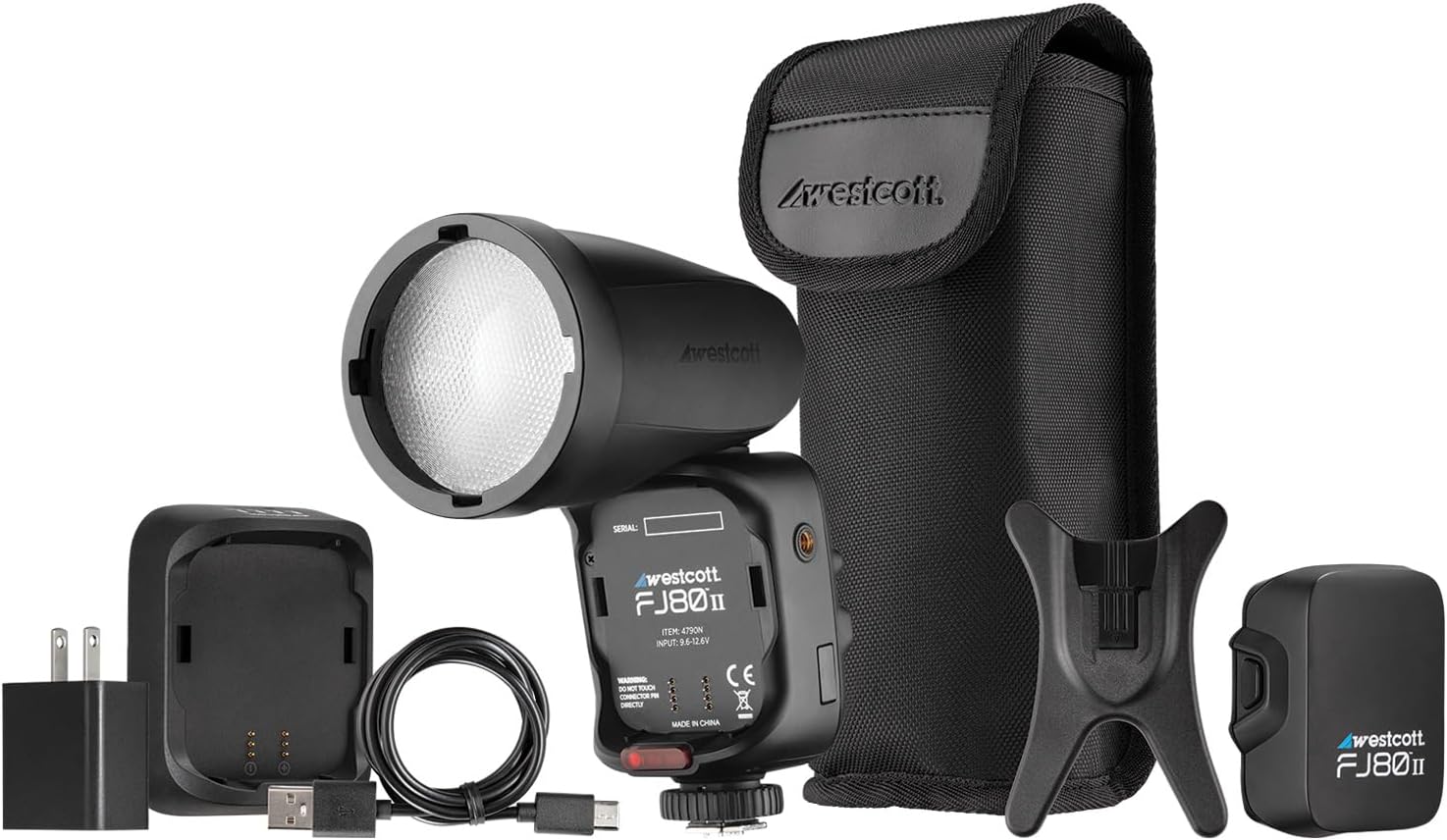
Figure 1: All components included in the Westcott FJ80 II package.
Istituisci
Stallazione è Carica di Batteria
- Insert the FJ80 II Lithium Polymer Battery into the battery compartment of the speedlight. Ensure it clicks securely into place.
- Connect the FJ80 II Battery Charger to the AC Adapter.
- Inserite l'adattatore CA in una presa di corrente standard.
- Connect the battery to the charger. The charging indicator light will show the charging status.
- Allow the battery to fully charge before first use. A full charge provides 500+ full-power flashes.
Mounting the Speedlight
The FJ80 II can be mounted on-camera or used off-camera with the included shoe stand.
Muntatura nantu à a camera:
- Assicuratevi chì a vostra camera sia spenta.
- Slide the FJ80 II's hot shoe mount into your camera's hot shoe.
- Secure the speedlight by tightening the locking mechanism on the hot shoe mount.

Figure 2: FJ80 II mounted on various camera brands, demonstrating multi-brand compatibility.
Off-Camera Use:
- Attach the FJ80 II to the included shoe stand.
- Place the shoe stand on a flat, stable surface or mount it onto a light stand with a compatible adapter (not included).
Operating the Speedlight
Accensione / Off
Mantene premutu u buttone di putenza (Ⓢ) on the side of the speedlight to turn it on or off. The touchscreen will illuminate upon power-on.
Interfaccia touchscreen
The FJ80 II features a large 2.8-inch LCD color touchscreen for easy navigation and control of settings. Tap icons and values to adjust them.

Figura 3: Detailed view of the FJ80 II's touchscreen and control buttons.
Modi Flash
The FJ80 II supports various flash modes for different photographic needs:
- Modu Manuale (M): Allows precise control over flash power output. Adjust power levels directly on the touchscreen.
- Modu TTL (Attraversu l'Obiettivu): Automatically adjusts flash output based on camera metering for balanced exposure.
- Sincronizza à alta velocità (HSS): Enables flash synchronization at shutter speeds faster than the camera's native sync speed, useful for freezing action or overpowering ambient light.
- Sincronizazione di u Curtain Front: U lampu si accende à l'iniziu di l'esposizione.
- Sincronizazione di u Curtain posteriore: Flash fires at the end of the exposure, creating a motion blur effect behind the subject.
Comunicazione wireless
The FJ80 II features reliable wireless communication with a range of up to 328 feet (100 meters). This allows for flexible off-camera lighting setups. Refer to your camera's manual for specific wireless flash triggering instructions if using it as a master or slave unit.
Cumpatibilità
The Westcott FJ80 II is designed for multi-brand compatibility, supporting a wide range of camera systems. It is compatible with:
- Canon
- Nikon
- Sony (with adapter)
- Fuji
- Lumix (Panasonic)
- Olimpu
For dedicated Sony compatibility without an adapter, please refer to Westcott part #4796N.
Mantenimentu
Proper maintenance ensures the longevity and optimal performance of your FJ80 II Speedlight.
- Pulizia: Use a soft, dry cloth to clean the exterior of the speedlight. For the touchscreen, use a microfiber cloth specifically designed for electronics. Avoid abrasive cleaners or solvents.
- Conservazione: When not in use, store the speedlight in its travel case in a cool, dry place away from direct sunlight and extreme temperatures. Remove the battery if storing for extended periods.
- Cura di a batteria: Recharge the battery regularly, even if not in frequent use, to maintain its health. Avoid fully depleting the battery before recharging.
- Prestazione termica: The FJ80 II features enhanced thermal performance to avoid overheating during prolonged use. However, continuous high-power flashes may still trigger thermal protection. Allow the unit to cool down if this occurs.
Risoluzione di prublemi
| Prublemu | Causa Possibile | Soluzione |
|---|---|---|
| Speedlight does not power on. | A batteria hè scarica o ùn hè micca inserita currettamente. | Assicuratevi chì a batteria sia cumpletamente carica è installata currettamente. |
| U lampu ùn si accende micca. | Incorrect camera settings, speedlight not securely mounted, or in sleep mode. | Check camera flash settings. Re-mount speedlight. Tap touchscreen or press a button to wake from sleep. |
| L'output di u flash hè inconsistente. | Battery low, or thermal protection activated. | Recharge battery. Allow speedlight to cool down if used continuously at high power. |
| Wireless communication issues. | Out of range, interference, or incorrect channel/group settings. | Ensure units are within 328 ft range. Change channels/groups to avoid interference. |
Specificazioni
| Feature | Detail |
|---|---|
| Dimensioni di u produttu | 8.28 x 3.11 x 3.11 inch |
| Pesu di l'articulu | 2.55 liri |
| Numero di mudellu | Multi-Brand |
| Batterie necessarie | 2 AA batteries (for internal components, main power is Lithium Polymer) |
| U fabricatore | F.J. Westcott |
| Muntaggi compatibili | Canon, Nikon, Sony (with adapter), Fuji, Panasonic, Olympus |
| Battery Life (Flashes) | 500+ full-power flashes per charge |
| Riciclà u Tempu | 0.05-1.5 seconde |
| Range Wireless | 328 piedi (100 metri) |
| Temperature di culore | 5500K (stable) |
Garanzia è Supportu
Westcott provides a full 1-year pledge for this product. Additionally, lifetime support and US-based customer service are available. For any inquiries or assistance, please contact Westcott customer support directly.
For more information, visit the official Westcott websitu o riferitevi à i dettagli di cuntattu furniti cù l'imballu di u vostru pruduttu.