1. Introduzione
Thank you for choosing the Rabitpos U27-W Wireless 1D 2D QR Barcode Scanner. This manual provides detailed instructions for setting up, operating, and maintaining your device. Please read this manual thoroughly before use to ensure optimal performance and longevity of your scanner.

Image 1.1: The Rabitpos U27-W Wireless Barcode Scanner, shown held comfortably in a user's hand, highlighting its ergonomic design.
2. Produttu Finituview
Funzioni chjave:
- Scansione versatile: Reads 1D, 2D, and QR barcodes from both paper and digital screens.
- Cunnessione senza filu è cablata: Supports 2.4GHz wireless via USB dongle and wired USB connection.
- Batteria di longa durata: Equipped with a 2000mAh rechargeable battery for extended operation.
- Modi di scansione multipli: Features Key Trigger and Auto-induction scanning modes.
- Opzioni di carica di dati: Supports Instant Upload and Storage modes for flexible data management.
- Ampia cumpatibilità: Funziona cù i sistemi operativi Windows, Mac è Linux.
3. Setup Instructions
3.1 Cunnessione di u scanner
The Rabitpos U27-W scanner offers two connection methods: 2.4GHz wireless and wired USB. Both are plug-and-play, requiring no driver installation.
Cunnessione senza filu (2.4 GHz):
- Insert the 2.4GHz USB receiver into an available USB port on your computer (PC, laptop, or POS system).
- Turn on the barcode scanner. It will automatically pair with the receiver. A successful connection is indicated by a specific beep sound or LED indicator (refer to LED indicator section for details).
Wired Connection (USB Cable):
- Cunnette una estremità di u cavu USB furnitu à a porta USB di u scanner.
- Cunnette vi l 'altra estremità di u cavu USB à un portu USB disponibile nant'à u vostru urdinatore.
- The scanner will be recognized as a standard HID keyboard device.

Image 3.1: Illustration of the scanner's 2-in-1 connection capability, demonstrating both wired USB 2.0 and 2.4GHz wireless options with a laptop.
4. Operating Instructions
4.1 Modi di scansione
The scanner supports two primary scanning modes to suit different operational needs:
- Modu di attivazione chjave: Appughjà u buttone di scattu per attivà u raghju di scansione è leghje un codice à barre. Rilasciate u buttone per piantà a scansione.
- Modu di induzione automatica: The scanner automatically detects a barcode within its scanning range and activates the beam to read it without requiring a trigger press. This mode is ideal for hands-free operation.
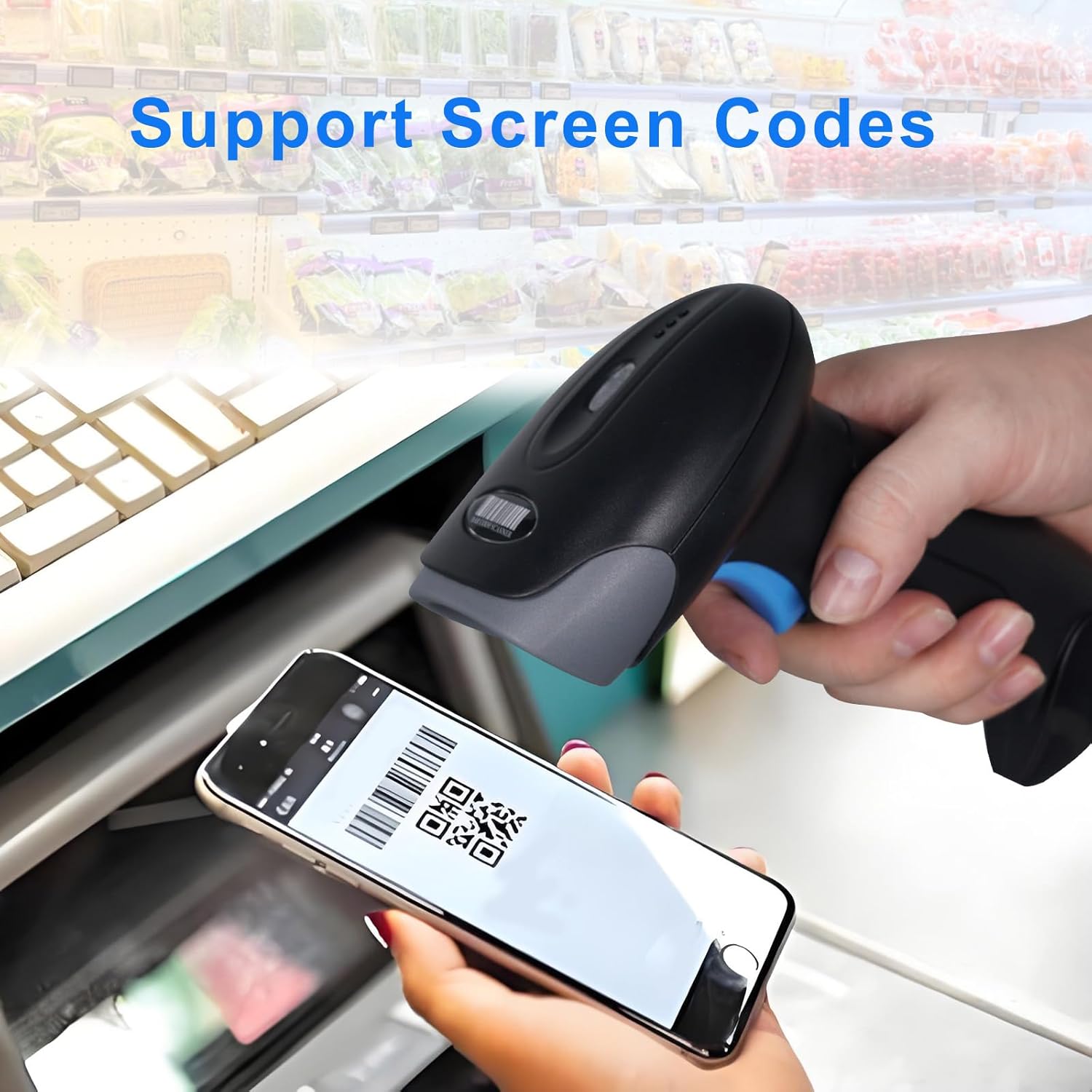
Image 4.1: Visual representation of the two scanning modes: Key Trigger Mode, where the user presses a button, and Auto-induction Mode, where scanning is automatic.
4.2 Modi di Caricamentu di Dati
Choose between two data upload modes based on your workflow:
- Modu di carica istantanea: Scanned data is immediately transmitted to the connected device. This is the default mode and suitable for real-time inventory or POS operations.
- Modu Storage: Scanned data is stored internally in the scanner's memory. This mode is useful when working out of range of the receiver. Data can be uploaded later by scanning a specific command barcode (refer to the programming guide for details).

Image 4.2: Depiction of the two data upload modes: Instant Upload, where data is sent immediately, and Storage Mode, where data is saved for later batch upload.
4.3 Tipi di codici à barre supportati
The Rabitpos U27-W scanner is capable of decoding a wide range of 1D and 2D barcode symbologies:
- Codici a barre 1D: UPC-A, UPC-E, EAN-8, EAN-13, Code 128, Code 39, Code 93, Code 11, Interleaved 2 of 5, Matrix 2 of 5, Standard 2 of 5, Codabar, MSI Plessey, GS1, Databar (RSS), etc.
- Codici a barre 2D: PDF417, Data Matrix, QR Code, Aztec Code, Micro QR Code, MaxiCode, etc.
The scanner also supports reading barcodes directly from digital screens, such as mobile phones or tablets.

Image 4.3: The scanner demonstrating its ability to read QR codes and other barcodes directly from a mobile phone screen.

Image 4.4: The scanner's superior decoding ability is shown as it accurately reads a 1D barcode from a printed sheet.
4.4 Beep Settings
The scanner provides audible feedback for successful scans and other operations. You can configure the beep sound settings:
- Turn On Sound: Enables audible beeps.
- Disattiva u sonu: Disables audible beeps for silent operation.
Refer to the scanner's programming guide (usually a separate sheet of barcodes) to change these settings by scanning the appropriate configuration barcodes.

Image 4.5: Visual guide for adjusting the scanner's beep settings, allowing users to enable or disable sound feedback.
5. Mantenimentu
5.1 Pulizia di u scanner
To maintain optimal scanning performance, keep the scanner's window clean. Use a soft, lint-free cloth, slightly dampened with water or a mild, non-abrasive cleaning solution. Avoid harsh chemicals or abrasive materials that could scratch the scanning window.
5.2 Cura di a batteria
The scanner is equipped with a 2000mAh rechargeable battery, providing approximately 72 hours of continuous operation and up to 1 month of standby time on a full charge. To prolong battery life:
- Caricate a batteria cumpletamente prima di u primu usu.
- Evitate di svuotà cumpletamente a batteria regularmente.
- Conservate u scanner in un locu frescu è asciuttu quandu ùn hè micca adupratu per periodi prolungati.
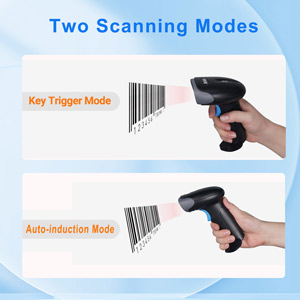
Image 5.1: An illustration emphasizing the scanner's built-in rechargeable battery and its long-lasting capacity.
6. Risoluzione di prublemi
If you encounter issues with your Rabitpos U27-W scanner, refer to the following common problems and solutions:
| Prublemu | Causa Possibile | Soluzione |
|---|---|---|
| Scanner does not connect wirelessly. | USB receiver not properly inserted; scanner not powered on; out of range; pairing lost. | Ensure receiver is firmly plugged in. Turn scanner on. Move closer to receiver. Re-pair the scanner by scanning the pairing barcode (refer to programming guide). |
| U scanner ùn legge micca i codici à barre. | Barcode damaged or unclear; incorrect scanning mode; scanner window dirty; unsupported barcode type. | Ensure barcode is clear. Check scanning mode (Key Trigger/Auto-induction). Clean scanner window. Verify barcode type is supported. |
| Slow scanning response. | Low battery; interference; system lag. | Charge the scanner fully. Reduce wireless interference. Test on a different computer. |
| No scan indicator (light/beep). | Scanner not powered on; beep sound disabled. | Ensure scanner is powered on. Enable beep sound via programming barcode. |
| Data not uploading in Storage Mode. | Upload command barcode not scanned; memory full. | Scan the 'Upload Data' programming barcode. Clear memory if full (refer to programming guide). |
7. Specificazioni
| Feature | Detail |
|---|---|
| Numero di mudellu | HBA-U27W |
| Connettività | 2.4GHz Wireless, USB Cable |
| Batteria | 2000mAh Rechargeable (1 A battery included) |
| U tempu di travagliu cuntinuu | Finu à 72 ore |
| Tempu di Standby | Finu à 1 mese |
| Dispositivi compatibles | Desktop, Laptop, POS systems |
| Sistemi Operativi | Windows, Mac OS, Linux |
| Pesu di l'articulu | 0.634 once |
| Dimensioni di u pacchettu | 7.68 x 4.21 x 3.31 inch |
8. Garanzia è Support
Rabitpos products are designed for reliability and performance. For warranty information, technical support, or service inquiries, please refer to the contact information provided with your product packaging or visit the official Rabitpos website. Please have your model number (U27-W) and purchase details ready when contacting support.


