1. Introduzione
This manual provides detailed instructions for the safe and effective use of your KKnoon Digital Multimeter, specifically focusing on the FY128 model. This compact and intelligent electrical tester is designed for accurate measurements of various electrical parameters, making it suitable for professionals, educational institutions, and home users. It adheres to the safety requirements of the International Electrotechnical Safety Standard (IEC-61010) for electronic measuring instruments.
The multimeter features a 5999-count backlit LCD for clear readings, along with functions for AC/DC voltage, resistance, frequency, continuity, live wire checking, and Non-Contact Voltage (NCV) rilevazione.

Figura 1: Fronte view of the KKnoon Digital Multimeter (Model FY128) showing the display and control buttons.
2. Informazioni di sicurezza
To ensure safe operation and prevent damage to the meter, please read and follow all safety instructions carefully. Improper use can result in electric shock or damage to the instrument.
- Always verify the meter's functionality before use by testing a known voltage o fonte di corrente.
- Ùn superate micca i valori massimi d'ingressu specificati per ogni intervallu di misurazione.
- Ensure test leads are in good condition, free from cracks or damaged insulation, before connecting them to any circuit.
- Never use the meter if it appears damaged or if the casing hè apertu.
- Eserciziu estrema prudenza quandu travaglia cù voltagsopra à 30V AC RMS, 42V di piccu, o 60V DC. Quessi voltagsò un periculu di scossa.
- Eliminate i cavi di prova da u circuitu prima di cambià e funzioni o i campi.
- Rimpiazzate subitu e batterie quandu appare l'indicatore di batteria scarica per assicurà letture precise.
- Ùn aduprate micca u misuratore in ambienti cù gas esplosivi, vapori o polvere.
3. Caratteristiche di u produttu
The KKnoon Digital Multimeter offers a range of features designed for convenience and accuracy:
- Multifunzionalità: Misure AC/DC Voltage, Resistance, Frequency, Continuity, Live Wire Checking, and NCV (Non-Contact Voltagè).
- Two Measurement Modes:
- Auto Identification: Automatically detects and measures AC/DC voltage, frequency, resistance, and continuity.
- Commutazione manuale: Allows selection of specific functions including AC/DC voltage, frequency, resistance, continuity, diode, capacitance (FY129C only), and LIVE NCV.
- Mantene di dati: Lock the current measurement reading on the display with a single button press.
- Grande display LCD: Provides clear and easy-to-read values with a 5999-count resolution.
- Flashlight & Screen Backlight: Aumenta a visibilità in cundizioni di poca luce.
- Compact Design with Bracket: Portable and includes a built-in support bracket for hands-free operation.
- Conformità à a Sicurezza: Designed and produced according to IEC-61010 safety standards.

Figure 2: The multimeter's large LCD display clearly shows various measurement functions.

Figure 3: The integrated support bracket allows for convenient hands-free use.
4. Cuntenutu di u pacchettu
À l'apertura di u vostru pacchettu, verificate chì tutti l'articuli elencati quì sottu sò presenti è in bonu statu:
- 1 x KKnoon Digital Multimeter (Model FY128)
- 1 x Coppia di Cavi di Prova (Rossi è Neri)
- 1 x Manuale d'usu (inglese)
5. Setup
5.1 Installazione di batterie
The multimeter requires 2 x 1.5V AAA batteries (not included). To install or replace batteries:
- Assicuratevi chì u multimetru sia spento è chì i cavi di prova sianu scollegati.
- Truvate u coperchiu di u compartimentu di a batteria nantu à u spinu di u dispusitivu.
- Aduprate un cacciavite per apre u compartmentu di a bateria.
- Inserite duie batterie AAA di 1.5 V, rispettendu a polarità curretta (+/-) cum'è indicata in l'internu di u compartimentu.
- Sustituite a tappa di u compartmentu di a bateria è assicuratelu cù a vite.
5.2 Cunnessione di i cavi di prova
U multimetru vene cun una coppia di cavi di prova (rossu è neru). Cunnetteli cum'è seguita:
- Inserite u cavu di prova neru in a presa d'entrata "COM" (Common).
- Insert the red test lead into the 'INPUT' jack for most measurements (Voltage, Resistance, Frequency, Continuity, Diode, Capacitance).

Figure 4: Labeled diagram of the multimeter's functions and input jacks.
6. Operating Instructions
6.1 Power On/Off
Appughjà u buttone rossu di accensione (Pulsante di accensione) to turn the multimeter on or off. The device features an auto-shutdown function to conserve battery life after a period of inactivity.
6.2 Modi di misurazione
The multimeter offers two primary measurement modes:

Figure 5: The multimeter supports both auto identification and manual switching modes.
- Modu d'identificazione automatica: When powered on, the meter defaults to auto identification. In this mode, it automatically detects and measures AC/DC voltage, frequency, resistance, and continuity. Simply connect the test leads to the circuit, and the meter will display the relevant measurement.
- Modu di cambiamentu manuale: To access specific functions not covered by auto identification or to manually select a range, press the 'NCV/LIVE' button (or other function buttons if available on your specific model, e.g., FY129C for Diode/Capacitance). This allows you to cycle through AC/DC voltage, frequency, resistance, continuity, LIVE, and NCV.
6.3 Misurazione AC/DC Voltage
- Connect the black test lead to the 'COM' jack and the red test lead to the 'INPUT' jack.
- If in auto identification mode, the meter will automatically detect voltage. If in manual mode, select the appropriate AC or DC voltage funzione.
- Cunnette i cavi di prova in parallelu à traversu u cumpunente o u circuitu da misurà.
- Leghjite u voltage valore nantu à u display LCD.
6.4 Resistenza di misurazione
- Assicuratevi chì u circuitu sia disenergizatu prima di misurà a resistenza.
- Connect the black test lead to 'COM' and the red test lead to 'INPUT'.
- If in auto identification mode, the meter will automatically detect resistance. If in manual mode, select the resistance function (Ω).
- Connect the test leads across the component whose resistance you wish to measure.
- Leghjite u valore di resistenza nant'à u display LCD.
6.5 Frequenza di misura
- Connect the black test lead to 'COM' and the red test lead to 'INPUT'.
- If in auto identification mode, the meter will automatically detect frequency. If in manual mode, select the frequency function (Hz).
- Connect the test leads to the circuit where frequency is to be measured.
- Leghjite u valore di frequenza nantu à u display LCD.
6.6 Test di Continuità
- Assicuratevi chì u circuitu sia disenergizatu.
- Connect the black test lead to 'COM' and the red test lead to 'INPUT'.
- If in auto identification mode, the meter will automatically detect continuity. If in manual mode, select the continuity function (★)).
- Touch the test leads to the two points of the circuit or component you want to test.
- A continuous beep indicates a low resistance path (continuity). The display will show the resistance value.
6.7 Live Wire Checking
This function helps identify live AC wires.
- Connect the black test lead to 'COM' and the red test lead to 'INPUT'.
- Press the 'NCV/LIVE' button until 'LIVE' is indicated on the display.
- Insert the red test lead into the socket or touch it to the wire you suspect is live.
- The meter will beep and the display will indicate 'LIVE' if a live wire is detected.
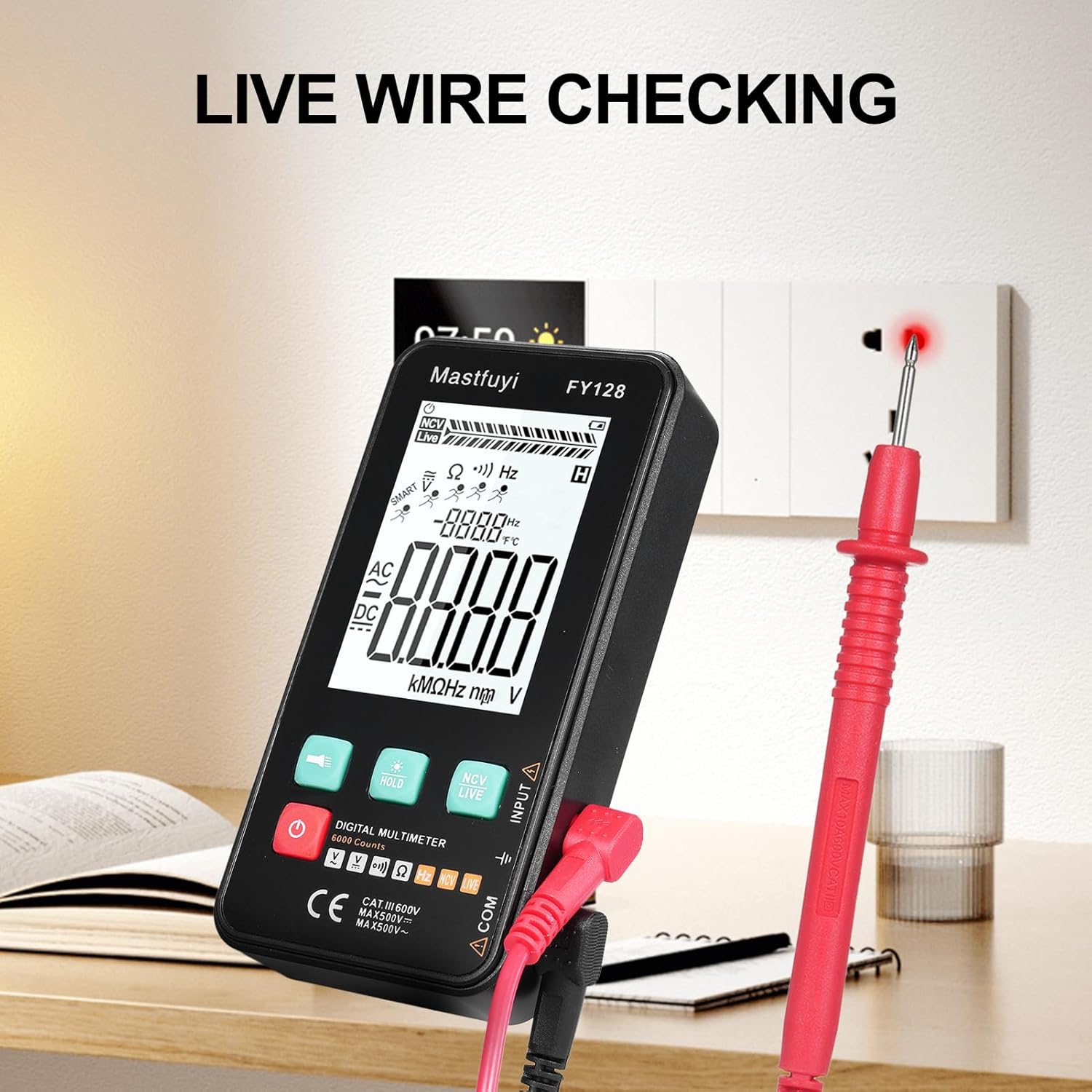
Figure 6: Using the multimeter for live wire detection.
6.8 NCV (Volume senza cuntattu)tage) Test
A funzione NCV permette a rilevazione di u vulume ACtage senza cuntattu direttu.
- Press the 'NCV/LIVE' button until 'NCV' is indicated on the display.
- Bring the top front part of the multimeter close to the wire or electrical outlet.
- The meter will beep and the NCV indicator on the display will illuminate or increase in intensity as it detects AC voltage.

Figura 7: Volumu senza cuntattutage (NCV) detection in progress.
6.9 Funzione Data Hold
To freeze the current reading on the display, press the 'HOLD' button. Press it again to release the hold and resume live measurements.
6.10 Flashlight & Backlight
Press the flashlight button (🔦) to turn on the built-in flashlight. Long press the 'HOLD' button to activate the screen backlight for improved visibility in dark environments.
7. Mantenimentu
7.1 Sustituzione di batterie
Quandu l'indicatore di batteria bassa appare nantu à u display, rimpiazzate e batterie cum'è descrittu in a Sezione 5.1. Aduprate sempre batterie AAA nove da 1.5 V.
7.2 Pulizia
Per pulisce u multimetru, asciugate a carcassa cù un pannu publicitariu.amp pannu è un detergente dolce. Ùn aduprate micca abrasivi o solventi. Assicuratevi chì u dispusitivu sia cumpletamente asciuttu prima di l'usu.
7.3 Storage
If the multimeter is not used for an extended period, remove the batteries to prevent leakage and corrosion. Store the device in a cool, dry place, away from direct sunlight and extreme temperatures.
8. Risoluzione di prublemi
Sè avete prublemi cù u vostru multimetru, riferitevi à i seguenti prublemi è suluzioni cumuni:
| Prublemu | Causa Possibile | Soluzione |
|---|---|---|
| Nisun display o display scuru | Batterie basse o scariche; Installazione incorretta di a batteria | Rimpiazzà e batterie; Verificate a polarità di e batterie |
| Letture imprecise | Low batteries; Damaged test leads; Incorrect function selected | Replace batteries; Inspect/replace test leads; Select correct measurement function |
| Continuity test does not beep | Open circuit; High resistance; Incorrect function | Ensure circuit is closed; Check for breaks; Select continuity function |
| Meter does not respond | Frozen display (Data Hold); Internal fault | Press 'HOLD' button to release; Contact customer support if issue persists |
9. Specificazioni
The following specifications apply to the KKnoon Digital Multimeter Model FY128 (and FY128C, unless specified for FY129C):
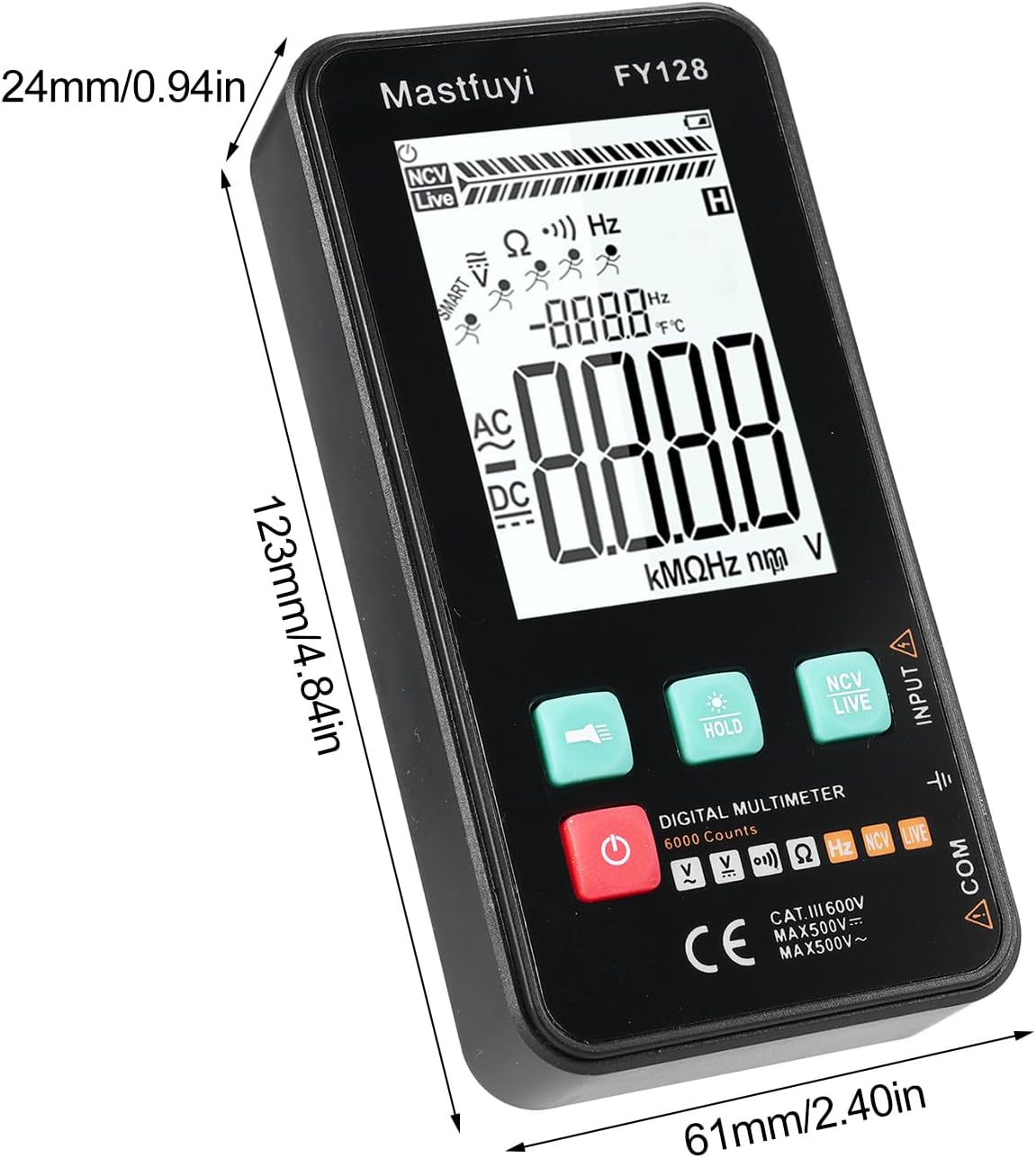
Figure 8: Physical dimensions of the KKnoon Digital Multimeter.
| Parametru | Specification (FY128/FY128C) | Specification (FY129C - if different) |
|---|---|---|
| AC Voltage | 1V~500V, ±(1.5%+3) | 0.8V~500V, ±(1.5%+5) |
| DC Voltage | 0.5V~500V, ±(1.2%+5) | 0.8V~500V, ±(1.2%+5) |
| Resistenza | 30Ω~10000KΩ, ±(2%+5) | 30Ω~60000KΩ, ±(2%+5) |
| Frequency | 40Hz~1000Hz, ±(2.5%+5) | 10Hz~6000Hz, ±(2.5%+5) |
| Capacità | N/A | 6nf~60000µf, ±(2.5%+5) |
| Temperature | N/A | -20℃~1000℃, ±(5%+4) |
| Temperature ambiente | N/A | 0 ℃ ~ 70 ℃ |
| diodu | Innò | Iè |
| Cuntinuità | Iè | Iè |
| NCV | Iè | Iè |
| Verificazione di i fili in tensione | Iè | Iè |
| Spegnimentu automaticu | Iè | Iè |
| Alimentazione elettrica | 2 * 1.5V AAA batteries (Not included) | 2 * 1.5V AAA batteries (Not included) |
| Dimensione di l'articulu | 123 * 61 * 24 mm / 4.84 * 2.40 * 0.94 in | 123 * 61 * 24 mm / 4.84 * 2.40 * 0.94 in |
| Pesu di l'articulu | 113 g / 3.98 once | 113 g / 3.98 once |
10. Garanzia è Support
For warranty information or technical support, please refer to the product packaging or contact your retailer. Keep your purchase receipt as proof of purchase. For general inquiries, you may visit the KKnoon brand page on Amazon.
