Introduzione
The Mytrix Tac Master Wireless Gaming Headset is designed to provide a high-quality audio experience for gaming across multiple platforms. Featuring 2.4GHz lossless wireless technology, Bluetooth 5.3, and a 3.5mm wired connection, this headset offers versatile connectivity, low latency, and immersive surround sound. The detachable noise-canceling microphone ensures clear communication, while the ergonomic design and long battery life provide comfort for extended use.
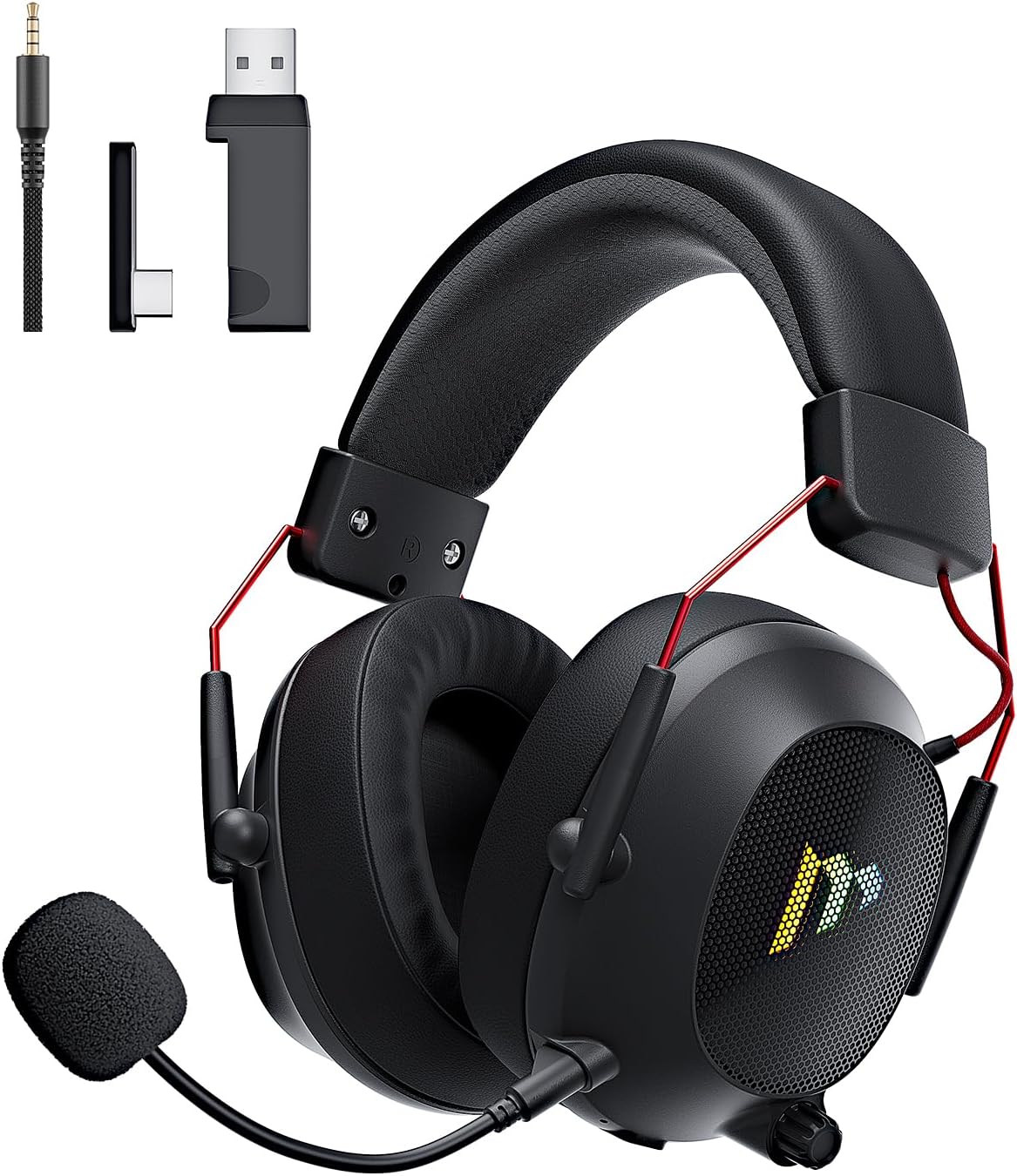
Image: The Mytrix Tac Master Wireless Gaming Headset, showcasing its sleek black design with red accents, detachable microphone, and included USB dongle and Type-C adapter.
Cuntenutu di u pacchettu
Verificate chì tutti l'articuli elencati quì sottu sò inclusi in u vostru pacchettu:
- Mytrix Tac Master Wireless Gaming Headset
- Microfonu à cancellazione di rumore staccabile
- 2.4GHz USB-A Wireless Dongle
- USB Type-C Transmitter
- Cavo audio da 3.5 mm
- Cavu di Carica USB (USB-A à USB-C)
- Manuale d'uso (stu documentu)
Headset Controls and Components
Familiarize yourself with the various controls and components of your Mytrix Tac Master headset:

Image: Diagram illustrating the location and function of controls on the Mytrix Tac Master headset, including power button, volume wheel, microphone mute button, and mode switch.
- Pulsante di putenza: Press and hold for 3 seconds to turn on/off. Single press to pause/play audio.
- Pulsante Mode (M): Single press to toggle microphone on/off. Double press to switch between Bluetooth and 2.4G wireless modes. Press and hold for 3 seconds to turn RGB lights on/off.
- Rota di volume: Girate in sù per aumentà u vulume, girate in giù per diminuisce u vulume.
- Portu di microfonu: For attaching the detachable microphone.
- Jack audio da 3.5 mm: Per cunnessione cablata.
- Portu di carica USB-C: Per carica l'auriculare.
- Illuminazione RGB: Located on the earcups.
Istituisci
1. Charging the Headset
Before first use, fully charge the headset. Connect the USB charging cable to the headset's USB-C port and the other end to a USB power source (e.g., computer USB port, USB wall adapter). The LED indicator will show charging status and turn off when fully charged. A full charge takes approximately 3 hours and provides up to 48 hours of battery life.

Image: Visual representation of the headset's long-lasting battery life, indicating approximately 50 hours of use and a 3-hour charging time.
2. Attaccà u microfonu
Insert the detachable microphone into the microphone port on the left earcup. Ensure it is securely seated. The microphone is flexible and omni-directional, allowing for angle adjustment.
3. Opzioni di cunnessione
The Mytrix Tac Master headset offers multiple connection methods for broad compatibility:

Image: Diagram illustrating the four connection modes: 2.4GHz Dongle (USB-A and USB-C), Bluetooth 5.3, and 3.5mm Wired, along with compatible devices for each mode.
3.1. 2.4GHz Wireless Connection (Recommended for PC, PS4, PS5, Switch Docked Mode)
- Identify the appropriate dongle for your device:
- For devices with a USB-A port (PC, PS4, PS5, Switch Docked): Use the 2.4GHz USB-A dongle.
- For devices with a USB-C port (Switch Handheld, Laptops, Tablets): Use the USB Type-C transmitter.
- Plug the selected 2.4GHz dongle/transmitter into an available USB port on your device.
- Power on the headset by pressing and holding the Power button for 3 seconds.
- Ensure the headset is in 2.4GHz mode. If not, double-press the 'M' button to switch modes until the headset connects to the dongle. The headset will automatically pair with the dongle.
- On your device, select the headset as the audio output and input device.
3.2. Bluetooth 5.3 Connection (Recommended for Mobile Phones, Tablets, Laptops)
- Power on the headset by pressing and holding the Power button for 3 seconds.
- Double-press the 'M' button to switch the headset to Bluetooth pairing mode. The LED indicator will flash, indicating it's ready to pair.
- On your device, enable Bluetooth and search for "Mytrix Tac Master" in the list of available devices.
- Select "Mytrix Tac Master" to connect. Once connected, the LED indicator will stop flashing.
3.3. 3.5mm Wired Connection (Recommended for Xbox, Game Console Controllers, Devices without USB/Bluetooth)
- Cunnette un'estremità di u cavu audio di 3.5 mm à u jack di 3.5 mm di l'auriculare.
- Connect the other end of the 3.5mm audio cable to the audio jack on your device (e.g., Xbox controller, phone).
- In wired mode, the headset's microphone and RGB lighting functions are not active.
Istruzzioni di funziunamentu
Power On/Off
- Per accende: Press and hold the Power button for approximately 3 seconds until the headset powers on.
- Per spegne: Press and hold the Power button for approximately 3 seconds until the headset powers off.
Volume Control
- Aumenta u Volume: Rotate the Volume wheel upwards.
- Riduce u Volume: Rotate the Volume wheel downwards.
Cuntrollu Microfonu
- Mute / Unmute Microfonu: Single press the 'M' button.
- The detachable microphone features noise cancellation for clear voice chat.
Cuntrollu di l'illuminazione RGB
- Turn RGB Lights On/Off: Press and hold the 'M' button for approximately 3 seconds.
Cuntrollu di a riproduzione audio
- Leghje/Pausa Audio: Appughjà una volta u buttone di accensione.
Son surround
The headset features 7.1 stereo surround sound for an immersive audio experience, allowing for precise positioning of sound details in games.

Imagine: Un esplosu view of the headset's 50mm drivers, illustrating the components that contribute to its 7.1 stereo surround sound capability.
Mantenimentu
- Pulizia: Use a soft, dry cloth to clean the headset. Do not use abrasive cleaners or solvents. For earcups, gently wipe with a damp pannu è lasciate asciugà cumpletamente à l'aria prima di l'usu.
- Conservazione: Conservate l'auriculare in un locu frescu è asciuttu, luntanu da a luce diretta di u sole è da e temperature estreme. Sè vo u conservate per un periodu prolongatu, assicuratevi chì a batteria sia parzialmente carica (intornu à u 50%) per priservà a salute di a batteria.
- Cura di a batteria: Avoid fully discharging the battery frequently. Charge the headset regularly, even if not in constant use, to maintain battery longevity.
- Cura di u microfonu: Handle the detachable microphone gently. Avoid excessive bending or twisting.
Risoluzione di prublemi
| Prublemu | Causa Possibile | Soluzione |
|---|---|---|
| Nisun sonu da l'auriculare. | Headset not powered on, low battery, incorrect audio output selected, connection issue. | Ensure headset is powered on and charged. Check device's audio settings to confirm "Mytrix Tac Master" is selected as output. Re-establish 2.4GHz or Bluetooth connection. For wired mode, ensure cable is fully inserted. |
| U microfonu ùn funziona micca. | Microphone muted, not properly attached, incorrect audio input selected, wired mode limitation. | Single press the 'M' button to unmute. Ensure microphone is securely attached. Check device's audio settings to confirm "Mytrix Tac Master" is selected as input. Note: Microphone does not function in 3.5mm wired mode. |
| Ùn si pò cunnette via wireless 2.4GHz. | Dongle not recognized, headset not in 2.4GHz mode, interference. | Ensure dongle is fully inserted into a working USB port. Double-press 'M' button to switch headset to 2.4GHz mode. Try a different USB port. Move closer to the dongle to reduce interference. |
| Ùn si pò cunnette via Bluetooth. | L'auriculare ùn hè micca in modu di accoppiamentu, Bluetooth disattivatu nant'à u dispusitivu, digià cunnessu à un altru dispusitivu. | Double-press 'M' button to enter Bluetooth pairing mode (LED flashes). Ensure Bluetooth is enabled on your device. Disconnect from other Bluetooth devices if necessary. |
| E luci RGB ùn funzionanu micca. | Lights turned off, low battery, wired mode limitation. | Press and hold the 'M' button for 3 seconds to toggle RGB lights. Ensure headset has sufficient battery. Note: RGB lights do not function in 3.5mm wired mode. |
Specificazioni
| Feature | Detail |
|---|---|
| Nome di mudellu | Gaming Headset (G901) |
| Tecnulugia di cunnessione | Senza filu 2.4 GHz, Bluetooth 5.3, cablatu 3.5 mm |
| Jack per cuffie | Jack da 3.5 mm |
| Range Wireless | Finu à 50 piedi (in spazii aperti) |
| Latenza | ≤20ms (2.4GHz) |
| Tipu di Driver Audio | Driver dinamichi da 50 mm |
| Funzioni di u sonu | 7.1 Stereo Surround Sound |
| Micrufonu | Detachable, Omni-directional, Noise-Canceling |
| A vita di a batteria | Finu à 48 ore |
| Tempu di carica | Circa. 3 ore |
| Tipu di batterie | 1 Batteria Lithium Ion (inclusa) |
| Forma di l'auriculare | Over Ear |
| Funzioni spiciali | Ergonomic Design, RGB Lighting, Foldable & Portable |
| Dimensioni di u produttu | 5.91 x 3.94 x 5.91 inch |
| Pesu di l'articulu | 13.4 once |
| U fabricatore | Mytrix |
Garanzia è Supportu
Mytrix products are manufactured to high quality standards. For information regarding warranty coverage, technical support, or service inquiries, please refer to the warranty card included with your product or visit the official Mytrix website. You may also contact Mytrix customer support directly for assistance with your Tac Master Gaming Headset.
Per più assistenza, visitate u Negoziu Mytrix nant'à Amazon.
Importante infurmazione di sicurezza
- Ùn espone micca l'auriculare à temperature estreme, umidità o liquidi.
- Evitate di fà cascà o di sottumette l'auriculare à impatti forti.
- Do not attempt to disassemble or repair the headset yourself. This will void the warranty.
- Ascoltà à livelli di vulume moderati per impedisce danni à l'audizione. L'esposizione prolungata à soni forti pò causà una perdita permanente di l'audizione.
- Mantene fora di a portata di i zitelli.


