1. Introduzione
This manual provides detailed instructions for the installation, operation, and maintenance of your BOTSLAB G980H 4K Dual Dash Cam and G300H 2.5K Front Dash Cam. Please read this manual thoroughly before using the device to ensure proper functionality and safety. Keep this manual for future reference.
2. Cuntenutu di u pacchettu
Verificate chì tutti l'articuli elencati quì sottu sò inclusi in u vostru pacchettu:
- BOTSLAB G980H 4K Dual Dash Cam Unit
- BOTSLAB G300H 2.5K Front Dash Cam Unit
- Hardwire Kit (Included as per product specifications)
- Cavu di putenza
- Rear Camera Cable (for G980H)
- Supporti di muntatura
- Manuale d'uso (Stu documentu)
3. Produttu Finituview
The BOTSLAB G980H and G300H dash cams are designed to provide high-quality video recording for vehicle safety and security. The G980H offers true 4K resolution for the front camera and 1080P for the rear, while the G300H provides 2.5K front recording. Both models incorporate advanced features for an enhanced driving experience.
Funzioni chjave:
- True 4K Front Recording (G980H): Utilizes a Sony IMX 415 sensor for superior clarity.
- 2.5K Front Recording (G300H): Provides enhanced clarity at 30 frames per second.
- Sistemi Avanzati di Assistenza à a Guida (ADAS): Powered by a 1.5TOPS AI NPU chip, offering real-time alerts for pedestrian collisions, vehicle movement ahead, lane departure, and headway monitoring.
- GPS integratu: Records journey details including speed and location, viewable on Google Maps via your phone.
- 24/7 Parking Mode: Provides theft and vandalism protection when the vehicle is off (requires dedicated hardwire kit, ASIN: B0D3QK86TQ).
- G-Sensor: Blocca automaticamente u video footage during collisions or sudden movements to prevent overwriting.
- Visione notturna: Chiarezza migliorata in cundizioni di poca luce.
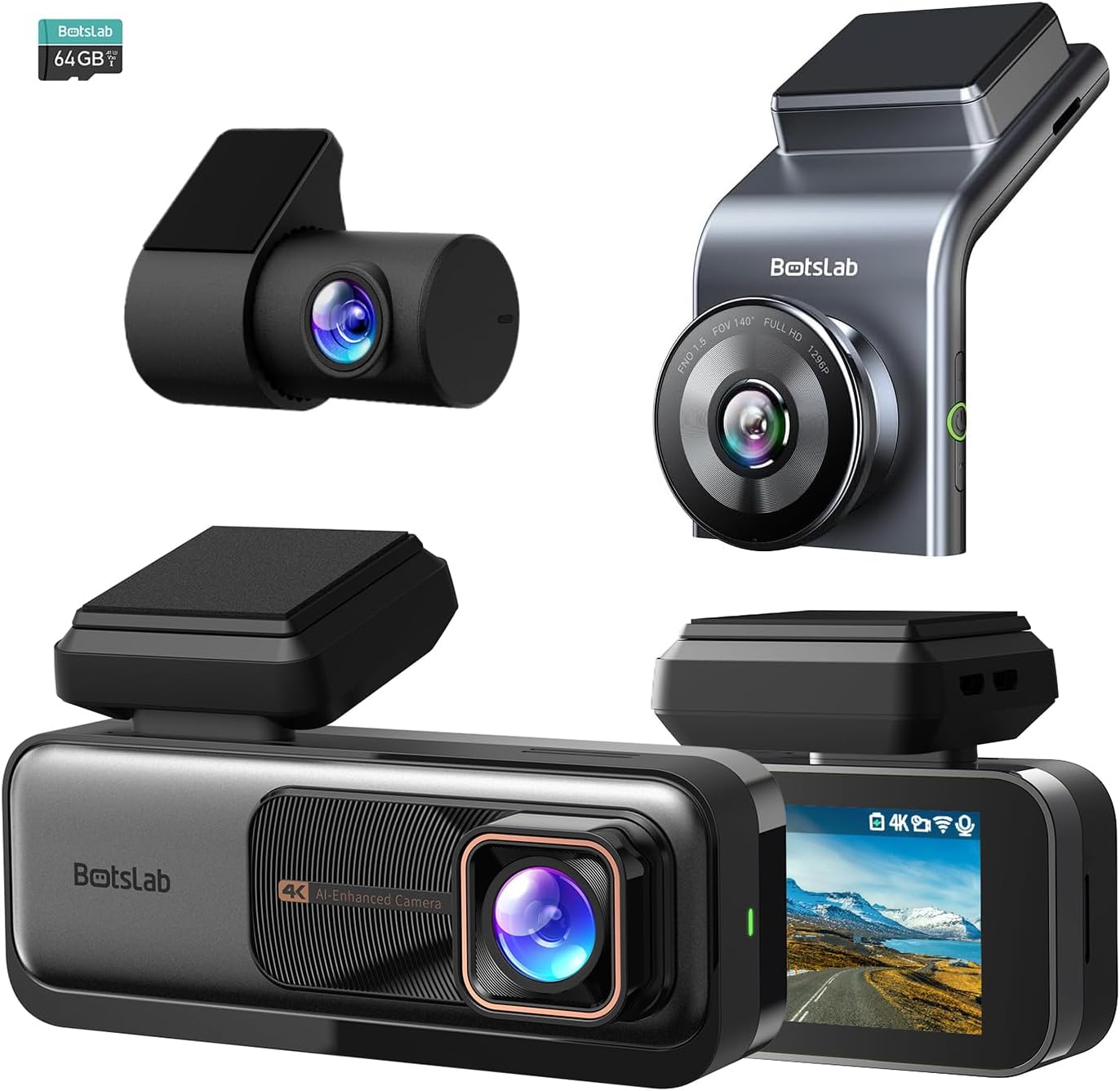
Figura 3.1: Overview of the BOTSLAB G980H and G300H dash cam units.

Figure 3.2: Illustration of the Sony IMX 415 sensor and the 6-layer lens with F1.5 aperture for enhanced clarity.
4. Setup è Installazione
Proper installation is crucial for optimal performance of your dash cam. Follow these steps carefully:
4.1 Preparazione per a stallazione
- Scegli un locu: Sceglite un locu nantu à u parabrisa chì ùn vi impedisca micca di vede. view, typically behind the rearview specchiu.
- Pulite u parabrisa: Ensure the mounting area is clean and dry for secure adhesion.
- Inserite a carta SD: Insert a compatible microSD card (not included, unless specified) into the dash cam's card slot. Ensure the card is formatted before first use (refer to Section 6.1).
4.2 Muntaggio di a Dash Cam
- Attach the mounting bracket to the dash cam unit.
- Remove the protective film from the adhesive pad on the bracket.
- Firmly press the dash cam with the bracket onto the chosen windshield location for at least 30 seconds.
- For the G980H, install the rear camera on the rear windshield, ensuring a clear view.
4.3 Cunnessione di putenza
- Connect the power cable to the dash cam's power input port.
- Route the power cable along the edge of the windshield and dashboard to the vehicle's 12V power outlet (cigarette lighter socket) or fuse box.
- For 24/7 Parking Mode functionality, connect the included hardwire kit to your vehicle's fuse box according to the hardwire kit's specific instructions. This allows the dash cam to receive continuous power even when the vehicle is off.
- Connect the rear camera cable to the G980H main unit and route it to the rear camera.

Figure 4.1: Recommended installation position for a wide, unobstructed view (170°).
5. Operating Instructions
5.1 Funzionamentu di basa
- Accensione / spegnimentu: The dash cam will automatically power on and begin recording when the vehicle's ignition is turned on. It will power off automatically when the ignition is turned off (unless hardwired for parking mode).
- Registrazione: Loop recording is enabled by default. Older files will be overwritten by new ones when the memory card is full.
- Registrazione d'emergenza (G-Sensor): In the event of a collision or sudden braking, the built-in G-Sensor will automatically detect the event and lock the current video segment, preventing it from being overwritten.
5.2 Sistemi Avanzati di Assistenza à a Guida (ADAS)
The dash cam features an AI NPU chip that provides real-time ADAS alerts to enhance driving safety:
- Avvisu di collisione di pedoni: Alerts you to potential pedestrian collisions.
- Vehicle Movement Ahead: Vi avvisa quandu u veiculu davanti principia à muoversi.
- Avvisu di partenza di corsia: Alerts you if you unintentionally drift out of your lane.
- Headway Monitoring: Helps maintain a safe distance from the vehicle ahead.
- Driver Fatigue Alerts: Provides alerts every 2 hours to remind you to take a break.

Figure 5.1: Visual representation of ADAS alerts and the AI NPU chip.

Figura 5.2: Esample of a timely alert for front vehicle departure.

Figura 5.3: Esample of pedestrian recognition with voice reminders.
5.3 Built-in GPS Functionality
The integrated GPS module records your driving data, including speed and location. This data can be viewed on Google Maps via a connected smartphone application, ensuring your travel data remains private and secure.

Figure 5.4: Visualization of GPS route recording and data display.
5.4 Modu Parking
When connected with the dedicated hardwire kit (ASIN: B0D3QK86TQ), the dash cam can continue to monitor your vehicle even when it is turned off. This mode provides protection against theft and vandalism by recording events while parked.
5.5 Night Vision and Clarity
Both dash cam models are equipped with advanced sensors and optics (like the Sony IMX 415 in G980H) to ensure clear video capture even in low-light conditions or at night, without relying on streetlights.

Figura 5.5: Esample of clear video capture in dark road conditions.

Figure 5.6: Comparison showing enhanced clarity with the G300H's 2.5K resolution.
6. Mantenimentu
6.1 Gestione di e carte SD
- Formattazione: It is recommended to format the microSD card regularly (e.g., once a month) to prevent data corruption and ensure optimal recording performance. This can usually be done through the dash cam's settings menu.
- Rimpiazzamentu di a carta: MicroSD cards have a limited lifespan. If you experience frequent recording errors or corrupted files, consider replacing the card.
6.2 Pulizia di u dispusitivu
- Use a soft, dry cloth to clean the dash cam's lens and body.
- Do not use chemical cleaners or solvents, as they may damage the device.
7. Risoluzione di prublemi
Sè avete prublemi cù a vostra dash cam, riferitevi à i seguenti prublemi è suluzioni cumuni:
| Prublemu | Possibile Causa / Soluzione |
|---|---|
| A dash cam ùn s'accende micca. |
|
| A registrazione si ferma o files sò currutti. |
|
| U signale GPS hè debule o micca truvatu. |
|
| ADAS alerts are not functioning. |
|
8. Specificazioni
| Feature | Descrizzione |
|---|---|
| Nome di mudellu | G980H (Dual), G300H (Front) |
| Marca | BOTSLAB |
| Risoluzione Video Capture | 4K (G980H Front), 1080P (G980H Rear), 2.5K (G300H Front) |
| Funzioni spiciali | Built-In GPS, ADAS, G-Sensor, 24/7 Parking Mode (with hardwire kit) |
| Tecnulugia di cunnessione | USB, Wireless (Wi-Fi for app connectivity) |
| Culore | Neru |
| Orientazione | Front and Inside (G980H), Front (G300H) |
| Cumpunenti inclusi | Kit Hardwire |
| U fabricatore | BOTSLAB |
9. Garanzia è Support
For warranty information and technical support, please contact BOTSLAB customer service directly. Details can typically be found on the official BOTSLAB website or through the contact information provided with your purchase documentation.


