1. Introduzione
The MAXHUB UC P30 SC802A 12X VHD Camera is a high-definition video capture device designed for professional use. Featuring 12x optical zoom and 1080p video resolution, it is ideal for various applications including video conferencing, live streaming, and educational environments. This manual provides detailed instructions to help you set up, operate, and maintain your camera for optimal performance.
2. Ciò chì hè in a scatula
Verificate chì tutti i cumpunenti sò presenti in u pacchettu:
- 1 x MAXHUB UC P30 SC802A 12X VHD Camera
- (Additional accessories such as power adapter, USB cable, remote control, etc., would typically be listed here if provided in the product data. Based on "Included Components: 1 product", only the camera is explicitly mentioned.)
3. Produttu Finituview
Familiarize yourself with the key components and features of your MAXHUB UC P30 SC802A camera.
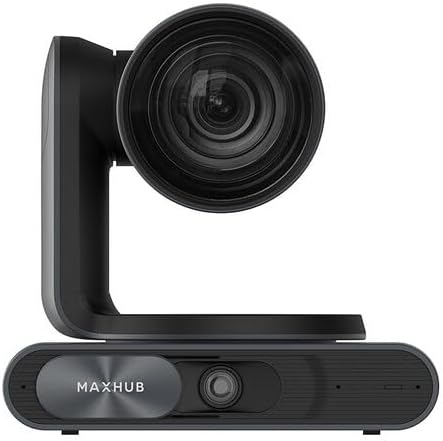
Figura 3.1: Fronte view of the MAXHUB UC P30 SC802A camera, showing the main lens and the MAXHUB branding on the base.

Figura 3.2: Angulu view of the MAXHUB UC P30 SC802A camera, highlighting its compact design and the rotating camera head.
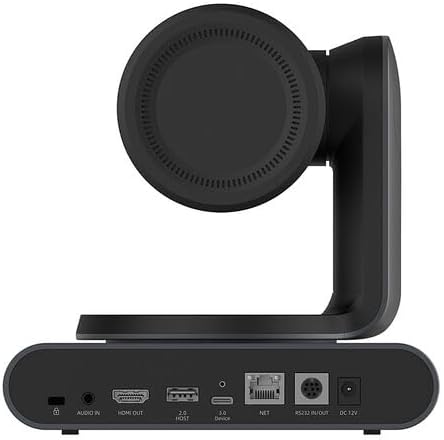
Figura 3.3: daretu view of the MAXHUB UC P30 SC802A camera, displaying various connectivity ports including Audio In, HDMI Out, USB 2.0 Host, USB 3.0 Device, NET (Ethernet), RS232 In/Out, and DC 12V power input.
4. Setup
Follow these steps to set up your MAXHUB UC P30 SC802A camera:
- Placement: Place the camera on a stable, flat surface or mount it securely using compatible mounting hardware (not included, unless specified). Ensure it has a clear line of sight to the area you wish to capture.
- Cunnessione di putenza: Connect the provided power adapter to the DC 12V input port on the rear of the camera (refer to Figure 3.3) and plug the adapter into a power outlet.
- Cunnessione USB: Connect the camera to your computer using a USB cable (USB 3.0 Device port, refer to Figure 3.3). The camera is designed for plug-and-play operation with most operating systems.
- Output Video (Opcional): For direct video monitoring, connect an HDMI cable from the HDMI Out port on the camera to an HDMI input on a display device (refer to Figure 3.3).
- Ingressu Audio (Opzionale): If using an external microphone, connect it to the Audio In port on the camera (refer to Figure 3.3).
- Cunnessione di rete (opzionale): For network control or streaming, connect an Ethernet cable to the NET port (refer to Figure 3.3).
- Installazione di driver: In most cases, the camera will be recognized automatically by your operating system. If prompted, allow the system to install necessary drivers. For advanced features or specific software, refer to the manufacturer's websitu per i download di driver.
5. Operating Instructions
Once the camera is set up, you can begin operation:
- Power On: The camera will power on automatically once connected to power. An indicator light (if present) will illuminate.
- Riconoscimentu di u Software: Open your preferred video conferencing, streaming, or recording software on your computer. Select the MAXHUB UC P30 camera as your video input device.
- Cuntrollu di Panoramica, Inclinazione, Zoom (PTZ):
- Cuntrollu Manuale: The camera head can be manually adjusted for initial positioning.
- Cuntrolla di u Software: Utilize the PTZ controls within your video software or a dedicated MAXHUB control application (if available) to remotely adjust pan, tilt, and zoom.
- Control remoto (se applicabile): If a remote control was included, use it to precisely adjust the camera's position and zoom level.
- Ajustamentu di Focus: The camera typically features auto-focus. If manual focus is required, it can usually be adjusted via software controls.
- Impostazioni Video: Adjust video settings such as resolution (up to 1080p), frame rate, brightness, contrast, and white balance through your software's camera settings.
- Spegnimentu: Disconnect the power adapter from the camera or the power outlet to turn off the device.
6. Mantenimentu
Proper maintenance ensures the longevity and optimal performance of your camera:
- Pulizia di a lente: Use a soft, lint-free cloth specifically designed for optical lenses to gently wipe the camera lens. Avoid abrasive materials or harsh chemicals.
- Pulizia di u corpu: Asciugate u corpu di a camera cù un pannu dolce è asciuttu. Per a sporcizia ostinata, asciugate leggermente.amp Si pò aduprà un pannu, ma assicuratevi chì ùn entre micca umidità in i porti o in i cumpunenti interni.
- Conservazione: When not in use for extended periods, store the camera in a cool, dry place, away from direct sunlight and extreme temperatures. Use the original packaging or a protective case if available.
- Evite l'ostruzzioni: Ensure the camera's ventilation openings (if any) are not blocked to prevent overheating.
7. Risoluzione di prublemi
Vede sta sezione per i prublemi cumuni è e so suluzioni:
| Prublemu | Causa Possibile | Soluzione |
|---|---|---|
| Nisuna uscita d'imagine/video |
|
|
| Scarsa qualità d'imagine |
|
|
| Camera micca ricunnisciuta da l'urdinatore |
|
|
8. Specificazioni
Key technical specifications for the MAXHUB UC P30 SC802A 12X VHD Camera:
| Feature | Detail |
|---|---|
| Nome di mudellu | UCP30 |
| Marca | MAXHUB |
| Tipu di camcorder | Action Camera (Note: This might be a misclassification in the source data, as it's a PTZ camera. Describing it as a "Professional Video Conferencing Camera" would be more accurate based on its features.) |
| Zoom otticu | 12 x |
| Risoluzione Video Capture | 1080 p |
| Format Video Capture | MP4 |
| Tecnulugia di cunnessione | USB |
| Culore | Neru |
| Pesu di l'articulu | 2.2 liri |
| Dimensioni di u pacchettu | 3.94 x 0.79 x 0.39 inch |
| ASIN | B0DF5RFM3J |
| Data Prima Disponibile | 25 d'aostu di u 2024 |
9. Garanzia infurmazione
MAXHUB products are typically covered by a manufacturer's warranty. For specific warranty terms, conditions, and duration, please refer to the warranty card included with your product or visit the official MAXHUB websitu. Conservate a vostra prova d'acquistu per e richieste di garanzia.
10. Supportu
If you encounter any issues not covered in this manual or require further assistance, please contact MAXHUB customer support. You can usually find contact information on the official MAXHUB websitu o per mezu di u rivenditore induve avete acquistatu u pruduttu.
Per e risorse in linea, visitate u situ MAXHUB Store on Amazon.


