1. Introduzione
This manual provides essential instructions for the safe operation, assembly, and maintenance of your Genesis Designs Smart Full Body Massage Chair, model GM1-W. Please read this manual thoroughly before using the product to ensure proper function and to prevent injury or damage.
The Genesis Designs GM1-W massage chair features 2D SL-track rollers, voice activation, a tablet remote control, 12 auto pre-programmed modes, and 6 massage techniques. It includes a zero-gravity function, built-in Bluetooth speakers, and a USB charging port. Airbag massage is provided for the shoulders, arms, waist, legs, and feet, along with a heated lumbar function and foot rollers.
2. Impurtante Information Safety
WARNING: To reduce the risk of electric shock, burns, fire, or injury, always follow these basic precautions:
- Leghjite tutte l'istruzzioni prima di utilizà a sedia di massaggio.
- Ùn aduprate micca allegati micca cunsigliatu da u fabricatore.
- Scollegate da a presa quandu ùn hè micca in usu, prima di mette o toglie pezzi, è prima di pulisce.
- Una stretta vigilanza hè necessaria quandu stu pruduttu hè utilizatu da, nantu à, o vicinu à i zitelli, invalidi, o persone disabili.
- Ùn operate micca sottu una manta o cuscinu. Un surriscaldamentu eccessiva pò accade è causà incendi, scossa elettrica, o ferite à e persone.
- Ùn mai operate stu pruduttu s'ellu hà un cordone o plug dannatu, s'ellu ùn funziona micca bè, s'ellu hè statu cascatu o dannatu, o cascatu in acqua.
- Mantene u cordone luntanu da e superfici riscaldate.
- Ùn aduprate micca fora.
- Ùn operate micca induve i prudutti d'aerosol (spray) sò usati o induve l'ossigenu hè amministratu.
- Per disconnette, trasfurmate tutti i cuntrolli in a pusizione OFF, poi sguassate u plug da a presa.
- Stu apparecchiu hè destinatu solu à l'usu domesticu.
- Consult a physician before using if you have any medical conditions, are pregnant, or have a pacemaker.
3. Cuntenutu di u pacchettu
Verificate chì tutti i cumpunenti sò presenti in l'imballu:
- Genesis Designs GM1-W Massage Chair (Main Unit)
- Tablet Remote Control
- Cordone d'alimentazione
- Manuale d'uso (stu documentu)

Figura 3.1: "In The Box" diagram illustrating the main chair unit, the tablet remote control, and the power cord.
4. Setup è Assemblea
The Genesis Designs GM1-W massage chair typically arrives partially assembled. Follow these steps for final assembly and placement.
4.1 Unpacking and Placement
- Carefully remove all packaging materials. It is recommended to retain packaging for future transport or service.
- Position the chair in a suitable location. Ensure there is enough space around the chair for full recline, especially for the zero-gravity function. The chair requires approximately 66.33 inches in length when fully reclined.
- Ensure the chair is placed on a level surface.

Figura 4.1: Front-side view of the Genesis Designs GM1-W massage chair.

Figura 4.2: Latu view of the Genesis Designs GM1-W massage chair, illustrating its profile.
4.2 Cunnessu Power
- Locate the power input port on the back or bottom of the chair.
- Connect the power cord securely to the chair.
- Inserite l'altra estremità di u cordone di alimentazione in una presa elettrica messa a terra.
5. Operating Instructions
Your Genesis Designs GM1-W massage chair offers various functions for a personalized massage experience.
5.1 Cuntrolli sopraview
The chair can be controlled via the handheld tablet remote or the quick-start buttons on the right armrest.

Figura 5.1: Handheld tablet remote control interface.

Figura 5.2: Quick-start control panel on the right armrest.
5.2 Starting a Massage
- Pusatevi comodamente nantu à a sedia.
- Press the Power button on the tablet remote or the quick-start panel.
- Selezziunate unu di i 12 auto pre-programmed modes or choose from 6 massage techniques using the tablet remote.
5.3 Caratteristiche è funzioni principali
- 2D SL-Track Rollers: The massage rollers follow the natural curve of your spine, extending from your neck to your thighs, providing a comprehensive massage.
- Zero Gravity Function: Activate zero gravity mode to recline the chair to a position that elevates your legs above your heart, reducing pressure on your spine and enhancing relaxation. The chair offers multiple recline levels.

Figura 5.3: Illustration of the chair's zero gravity recline positions.
- Attivazione di voce: Use voice commands to control various functions of the massage chair. Refer to the tablet remote interface for specific voice commands.
- Massaggio Airbag: Airbags located in the shoulders, arms, waist, legs, and feet inflate and deflate to provide compression massage. Adjust intensity via the tablet remote.
- Heated Lumbar Function: Activate the heating function for the lower back to soothe muscles and enhance relaxation.
- Massaggio di i pedi: The legrest can extend up to 6.25 inches to accommodate different user heights. Foot rollers provide a targeted massage to the soles of your feet.
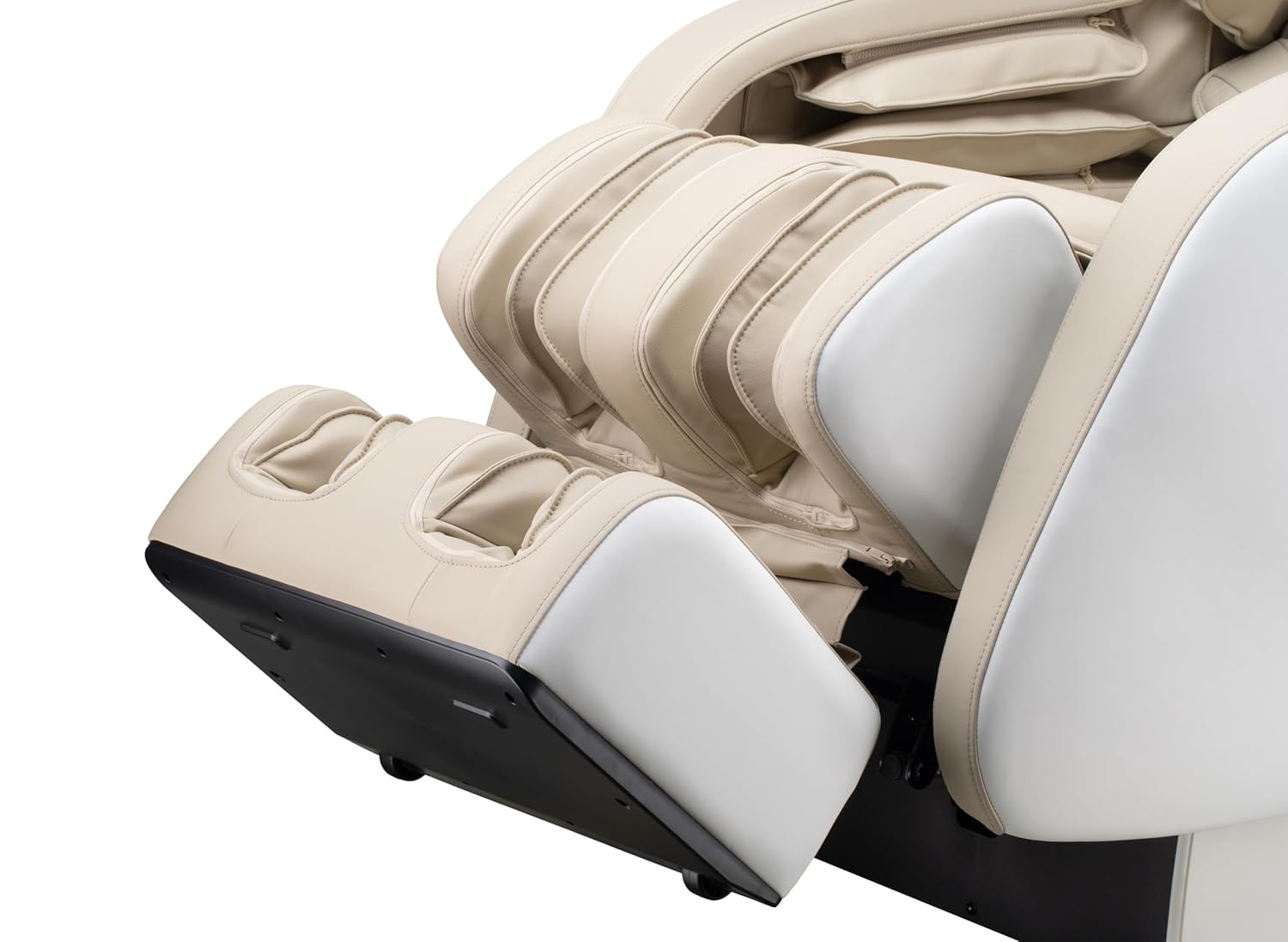
Figura 5.4: Detail of the footrest with integrated foot rollers.
- Speakers Bluetooth: Connect your personal device via Bluetooth to enjoy audio during your massage.
- Attivà Bluetooth nant'à u vostru dispusitivu.
- Cerca "Genesis Massage Chair" or similar on your device's Bluetooth settings.
- Accoppiate è cunnette.
- Portu di Ricarica USB: A convenient USB port is available for charging your mobile devices.

Figura 5.5: Overview of main features and their locations on the chair.
6. Mantenimentu è Cura
Una manutenzione adatta assicura a longevità è e prestazioni ottimali di a vostra sedia di massaggio.
6.1 Pulizia
- Esternu: Pulisci cun un soffiu, damp cloth. Do not use abrasive cleaners, solvents, or harsh chemicals, as these may damage the upholstery.
- Internu: Periodically vacuum any dust or debris from crevices.
- Ensure the chair is unplugged before cleaning.
6.2 Storage
If storing the chair for an extended period, unplug it and cover it to protect from dust and moisture. Store in a cool, dry place.
7. Risoluzione di prublemi
If you encounter issues with your massage chair, refer to the following common problems and solutions:
| Prublemu | Causa Possibile | Soluzione |
|---|---|---|
| Chair does not power on. | U cavu d'alimentazione ùn hè micca bè inseritu. Nisuna alimentazione da a presa. | Check power cord connection to chair and outlet. Test outlet with another device. |
| I rulli di massaggio ùn si movenu micca. | Chair is in standby mode. Program not selected. | Ensure chair is powered on. Select an auto program or manual massage technique. |
| Bluetooth ùn si cunnetta micca. | Bluetooth on device is off. Chair's Bluetooth is off or not discoverable. | Ensure Bluetooth is enabled on your device. Check tablet remote for Bluetooth activation. Try restarting both devices. |
| Voice activation not responding. | Microphone obstructed. Incorrect commands. | Ensure no obstructions near the microphone. Speak clearly and use the specified voice commands. |
| Rumori inusual durante l'operazione. | Normal operational sounds. Loose component. | Some motor and airbag sounds are normal. If noise is excessive or new, discontinue use and contact customer support. |
If the problem persists after attempting these solutions, please contact Genesis Designs customer support for assistance.
8. Specificazioni
| Feature | Detail |
|---|---|
| Numero di mudellu | GM1-W |
| Marca | Disegni di Genesi |
| Massage Track | 2D SL-Track |
| Upright Dimensions (L x W x H) | 57.67 x 29.72 x 44.33 inch |
| Zero Gravity Dimensions (L x W x H) | 66.33 x 29.72 x 38.77 inch |
| Pesu di u produttu | 165 liri |
| Larghezza di u sediu | 21 inch |
| Legrest Extension | Finu à 6.25 inch |
| Programmi di massaggi | 12 Auto Modes, 6 Manual Techniques |
| Funzioni spiciali | Voice Activation, Bluetooth Speakers, USB Charging, Heated Lumbar, Foot Rollers |
| Certificazione | Certificatu ETL |
| UPC / GTIN | 811691028064 |

Figura 8.1: Dimensional diagram of the massage chair.
9. Garanzia è Assistenza Clienti
For warranty information, please refer to the documentation included with your purchase or contact Genesis Designs customer support directly. Keep your proof of purchase for warranty claims.
If you require technical assistance, have questions about operation, or need to report a problem, please contact Genesis Designs customer support through their official websitu o l'infurmazioni di cuntattu furnite cù u vostru pruduttu.


