1. Introduzione
The Inseego MiFi X Pro M3000 is a powerful and secure mobile hotspot designed to provide reliable 5G and 4G LTE connectivity. Equipped with Wi-Fi 6 technology, it supports up to 32 Wi-Fi enabled devices, offering a virtually lag-free connected experience. This manual provides essential information for setting up, operating, and maintaining your device.
Chì ci hè in u Box
- Inseego MiFi X Pro M3000 Hotspot Device
- Cable USB Type-C
- Power Adapter (if included with your specific package)
- Guida d'iniziu rapidu (stu documentu)
2. Setup
2.1 Inserimentu di a carta SIM è di a batteria
- Assicuratevi chì u dispusitivu hè spenta.
- Carefully remove the back cover of the MiFi X Pro.
- Insert your activated Nano SIM card into the designated SIM card slot. Ensure correct orientation as indicated on the device.
- Inserite a batteria in u so compartimentu.
- Rimpiazzate u coperchio posteriore, assicurendusi ch'ellu sia incastratu bè in u so postu.
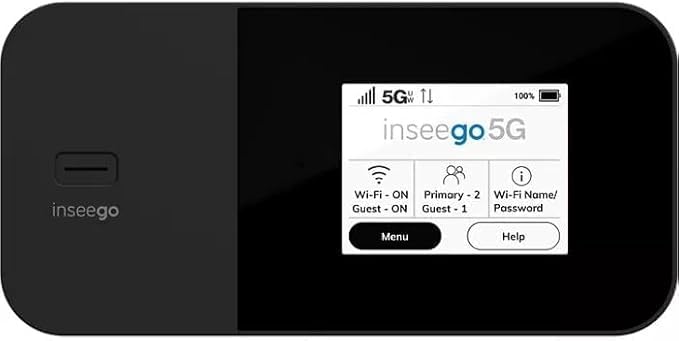
Figura 1: Fronte view of the Inseego MiFi X Pro M3000, showing the display with network status, Wi-Fi, and menu options.
2.2 Accensione è Cunfigurazione Iniziale
- Appughjà è tene premutu u buttone di accensione (di solitu situatu à fiancu o in cima) finu à chì u schermu s'illumina.
- Follow the on-screen prompts to complete the initial setup, which may include setting a device password and Wi-Fi network name (SSID) and password.
- Alternatively, you can manage settings via the Inseego Mobile app or a web interface by connecting a device to the hotspot and navigating to the device's IP address (typically 192.168.1.1).
3. Uperativu
3.1 Dispositivi di cunnessione
- Nant'à u vostru dispusitivu cù cunnessione Wi-Fi (smartphone, tablet, laptop), cercate e rete Wi-Fi dispunibili.
- Select the Wi-Fi network name (SSID) displayed on your MiFi X Pro screen.
- Enter the Wi-Fi password displayed on your MiFi X Pro screen.
- U vostru dispositivu avà deve esse cunnessu à Internet.
3.2 Managing Wi-Fi Networks and Connections
- The MiFi X Pro supports simultaneous dual-band Wi-Fi 6 with primary and guest networks.
- Access the device's menu (via the touchscreen or web interface) to view connected devices, monitor data usage, and configure network settings.
- Guest networks can be enabled or disabled and configured with separate passwords for enhanced security.

Figura 2: Side view of the Inseego MiFi X Pro M3000, highlighting the USB-C port for charging and data, and the power button.
4. Mantenimentu
4.1 Cura è Carica di a Batteria
- Charge the MiFi X Pro using the provided USB Type-C cable and power adapter.
- The device features fast-charging capabilities.
- For 24/7 operation, utilize the proprietary battery preservation mode when connected to AC power.
- Avoid exposing the device to extreme temperatures or direct sunlight for prolonged periods to preserve battery life.
4.2 Reset di u dispusitivu
If you experience persistent issues, a factory reset may resolve them. Refer to the device's on-screen menu or web interface for instructions on performing a factory reset. This will erase all custom settings and return the device to its default state.
5. Risoluzione di prublemi
- Nisuna cunnessione Internet:
- Assicuratevi chì a vostra carta SIM sia inserita currettamente è attivata cù un pianu di dati.
- Check the signal strength indicator on the device screen. Move to an area with better network coverage if necessary.
- Restart the MiFi X Pro and the connected device.
- Verify that your data plan has not been exceeded.
- Velocità lente:
- Riduce u numeru di dispositivi cunnessi.
- Ensure you are within optimal Wi-Fi range (up to 35 feet).
- Verificate a congestione di a rete in a vostra zona.
- U dispositivu ùn si accende micca:
- Assicuratevi chì a batteria sia carica. Cunnette u dispusitivu à una fonte di alimentazione.
- Sè a batteria hè cumpletamente scarica, pò esse bisognu di uni pochi di minuti di carica prima chì u dispusitivu possi accende si.
6. Specificazioni
| Feature | Detail |
|---|---|
| Nome di mudellu | Inseego MiFi X Pro (M3000) |
| Connettività | 5G, 4G LTE, Wi-Fi 6 (802.11ax) |
| Classe di banda di frequenza | Dual-Band |
| Max Dispositivi cunnessi | Finu à 32 |
| Porti | 1 Gbps Ethernet port, USB-C port |
| Funzioni di sicurezza | Enterprise-grade security, Open VPN, VPN pass-through, static IP support, Wi-Fi privacy separation, WPA3 |
| Funzione speciale | WPS (Configurazione Prutetta Wi-Fi) |
| Batteria | Long-lasting, fast-charging, proprietary battery preservation mode |
| Culore | Neru |
| Pesu di l'articulu | 13.4 once |
| Dimensioni di u pacchettu | 6.69 x 4.37 x 2.32 inch |
7. Garanzia è Support
For warranty information and technical support, please refer to the official Inseego website or contact your product retailer. Keep your purchase receipt for warranty claims.
This product is offered as an Amazon Renewed item, which typically includes a separate Amazon Renewed Guarantee. Please consult the Amazon Renewed Guarantee details for specific coverage and support related to your purchase.