1. Introduzione
Thank you for choosing the Skyworth 60G6500G 60-inch UHD 4K LED Google TV. This manual provides essential information for the safe and efficient use of your new television. Please read it thoroughly before operating the device and retain it for future reference.
This television features a stunning UHD (3840 x 2160) resolution, a borderless display, and a brightness of 250 nits. It incorporates advanced technologies such as Eye Care 2.0 and Chameleon Extreme 2.0 for an enhanced viewing experience. Powered by Google TV, it offers access to a wide range of streaming services and apps, including Netflix, YouTube, Prime Video, and Disney+.
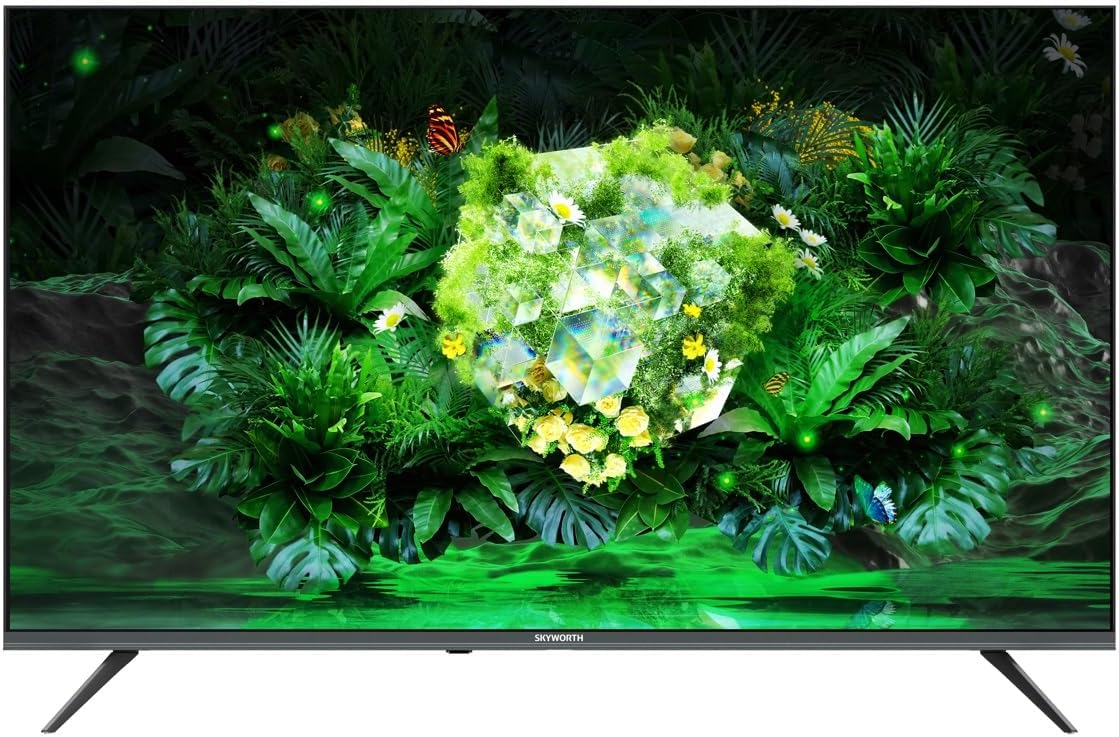
Image 1.1: Front view of the Skyworth 60G6500G television.
2. Informazioni di sicurezza
Rispettate sempre e seguenti precauzioni di sicurezza per prevene scosse elettriche, incendi o danni à u televisore.
- Fonte di energia: Connect the TV only to an AC power supply as indicated on the label. Ensure the power cord is not damaged or pinched.
- Ventilazione: Ùn bluccate micca l'aperture di ventilazione. Mantene un spaziu adeguatu intornu à u televisore per un flussu d'aria currettu.
- L'acqua è l'umidità: Ùn espone micca u televisore à a pioggia o à l'umidità. Ùn mette micca oggetti pieni di liquidi, cum'è vasi, nantu à u televisore.
- Calore: Mantene u televisore luntanu da fonti di calore cum'è radiatori, registri di calore, stufe o altri apparecchi chì producenu calore.
- Pulizia: Scollegate u televisore da a presa murale prima di pulisce. Aduprate un pannu dolce è asciuttu. Ùn aduprate micca detergenti liquidi o detergenti aerosol.
- Placement: Place the TV on a stable, level surface. Avoid placing it in direct sunlight or near strong electromagnetic fields.
- I zitelli: Survegliate i zitelli per assicurà chì ùn si arrampicanu micca o ùn ghjocanu micca cù a televisione.
3. Cuntenutu di u pacchettu
Please check that all the following items are included in your TV package:
- Skyworth 60G6500G 60-inch UHD 4K LED Google TV
- Control remoto
- Cavu di putenza
- Supportu TV (2 pezzi)
- Viti per u montaggio di u supportu
- Manuale d'uso (stu documentu)
4. Setup
4.1 Fissà u supportu TV
- Carefully place the TV face-down on a soft, flat surface (e.g., a blanket or foam) to prevent screen damage.
- Identify the left and right stand pieces.
- Allineate ogni pezzu di supportu cù i fori di viti currispondenti in u fondu di u televisore.
- Fissate ogni pezzu di supportu cù e viti furnite. Assicuratevi ch'elli sianu stretti bè.
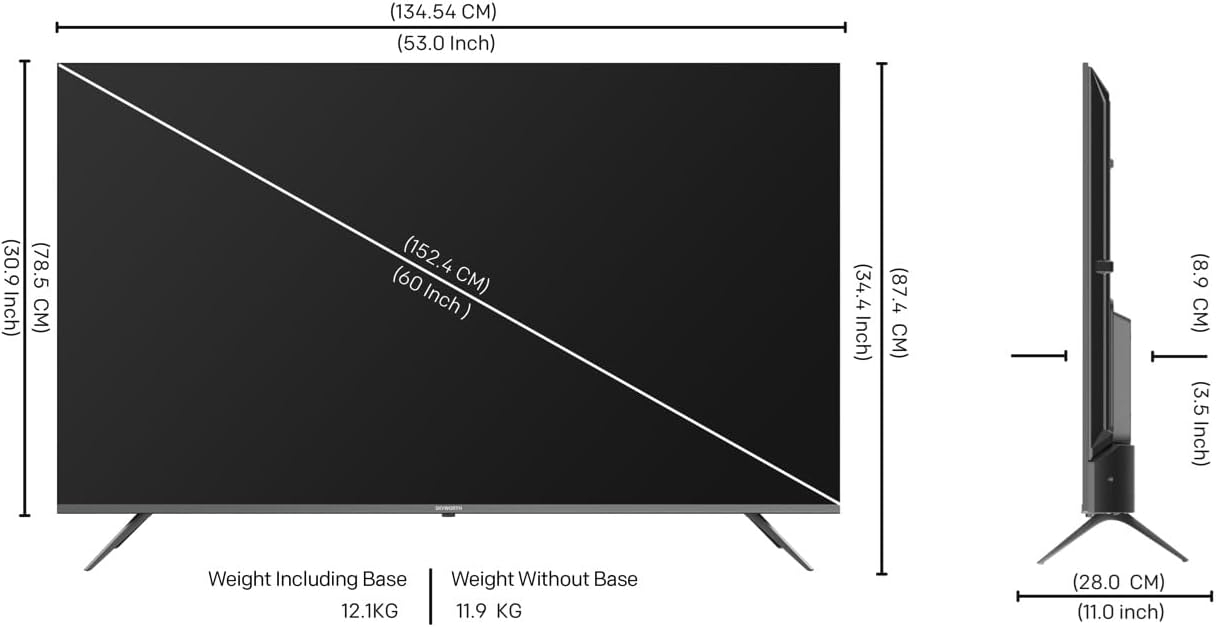
Image 4.1: Diagram illustrating TV dimensions and stand installation.
4.2 Muntaggio à u muru (opzionale)
If you choose to wall mount your TV, please ensure you use a VESA-compatible wall mount kit (not included) that supports the TV's weight and size. Follow the instructions provided with your wall mount kit. It is recommended to seek professional installation for wall mounting.
4.3 Cunnessu periferiche
Cunnette i vostri dispusitivi esterni à u televisore aduprendu i porti adatti. Riferitevi à l'imagine quì sottu per a pusizione di i porti.

Imagine 4.2: Latu view of the TV displaying various input/output ports.
- HDMI: Connect Blu-ray players, game consoles, or other HDMI-enabled devices to the 3 HDMI ports.
- USB: Connect USB storage devices to the 2 USB ports for media playback.
- Antenna / Cable: Connect an antenna or cable TV signal to the DVB-T/T2/S input.
- Ethernet (LAN): Per una cunnessione internet cablata.
- Out audio: Per cunnette sistemi audio esterni.
4.4 Accensione iniziale è cunfigurazione
- After connecting all necessary cables, plug the power cable into a wall outlet.
- Appughjà u buttone Power nant'à u telecomandu o nant'à u televisore stessu.
- Segui l'istruzzioni nantu à u screnu per compie a cunfigurazione iniziale, cumprese a selezzione di a lingua, a cunnessione di rete (Wi-Fi o Ethernet) è l'accessu à u contu Google.
5. Operating Your TV
5.1 Control Remote Overview
The remote control allows you to navigate the TV's features. Key functions include:
- putenza: Accende o spegne a TV.
- Google Assistant: Attiva i cumandamenti vocali.
- Buttuni di navigazione: Up, Down, Left, Right, and OK for menu navigation.
- Volume +/-: Ajusta u livellu di u voluminu.
- Canale +/-: Cambia i canali TV.
- Input: Selezziuna a fonte d'entrata (HDMI, AV, ecc.).
- Casa: Ritorna à a schermata iniziale di Google TV.
- Accorciate app: Dedicated buttons for popular streaming services like Netflix, YouTube, Prime Video, Disney+.
5.2 Interfaccia di Google TV
Your Skyworth TV runs on Google TV, providing a personalized experience with content recommendations, easy access to apps from the Google Play Store, and integrated Google Assistant functionality.
- Pantalla di casa: Displays recommended content, installed apps, and quick access to settings.
- Apps: Download and manage your favorite streaming and utility applications from the Google Play Store.
- Google Assistant: Use your voice to search for movies, stream apps, play music, and control the TV.
5.3 Impostazioni di l'imagine è di u sonu
Accede à u menu di i paràmetri di a TV per persunalizà u vostru viewesperienza d'ascoltu è di esperienza.
- Modi di stampa: Choose from various preset picture modes (e.g., Standard, Vivid, Movie, Game) or customize settings like brightness, contrast, color, and sharpness.
- Eye Care 2.0: This feature automatically adjusts screen brightness and color temperature to reduce eye strain, especially in low-light conditions.
- Modu Filmmaker: Preserves the original aspect ratio, colors, and frame rates of content, delivering the director's intended vision.
- Modi di sonu: Select from preset sound modes (e.g., Standard, Music, Movie, Speech) or adjust bass and treble.
- DTS Studio Sound: Enhances audio quality for a more immersive sound experience.
5.4 Funzioni di cunnessione
- Wi-Fi (2.4G + 5G): Cunnette vi à a vostra rete wireless di casa per accede à Internet è streaming.
- Miracast / Chromecast: Wirelessly cast content from your compatible smartphone, tablet, or computer to the TV screen.
5.5 Modu di ghjocu
Activate Game Mode for optimized gaming performance, which typically reduces input lag and enhances responsiveness.
6. Mantenimentu
6.1 Pulizia di a TV
- Screen: Asciugate delicatamente u schermu cù un pannu dolce è senza pelu. Per e macchie ostinate, asciugate leggermente.ampSciacquate u pannu cù acqua o un detergente per schermi specializatu (ùn spruzzate micca direttamente nantu à u schermu).
- corpu: Asciugate a cornice è u supportu di a TV cù un pannu dolce è asciuttu.
- Impurtante: Always unplug the TV before cleaning. Do not use abrasive cleaners, alcohol, benzene, or thinners, as these can damage the TV's surface.
6.2 Actualizazioni di u Software
Your TV may receive software updates periodically to improve performance and add new features. Ensure your TV is connected to the internet to receive these updates. You can usually check for updates in the TV's settings menu.
7. Risoluzione di prublemi
Sè avete prublemi cù u vostru televisore, riferitevi à i seguenti prublemi cumuni è suluzioni:
| Prublemu | Soluzione Possibile |
|---|---|
| Nisun putere | Verificate s'ellu u cavu di alimentazione hè bè cunnessu à u televisore è à a presa murale. Pruvate una presa diversa. |
| Nisuna imagine, ma u sonu hè presente | Ensure the correct input source is selected. Check cable connections (HDMI, AV). |
| Nisun sonu, ma l'imagine hè presente | Check the volume level and mute settings. Ensure external audio devices are properly connected and powered on. |
| U cuntrollu remoto ùn funziona micca | Rimpiazzà e batterie. Assicuratevi chì ùn ci sia micca ostaculi trà u telecomandu è u sensore IR di u televisore. |
| Ùn pò micca cunnette à Wi-Fi | Verificate u vostru router è u modem. Riavviate a TV è u vostru equipagiu di rete. Inserite torna a password Wi-Fi. |
| L'imagine hè distorta o sfocata | Check the signal source. Adjust picture settings. Ensure the TV's resolution matches the input source. |
Sè u prublema persiste dopu avè pruvatu ste suluzioni, cuntattate l'assistenza clienti.
8. Specificazioni
Key technical specifications for the Skyworth 60G6500G TV:
- Numero di mudellu: 60G6500G
- Dimensione di u screnu: 60 inch
- Tecnulugia di visualizazione: LED
- Risoluzione: 4K UHD (3840 x 2160)
- Frequenza di rinfrescante: 60 Hz
- Luminosità: 250 nits
- Funzioni speciali: Miracast, Chromecast, Game Mode, Eye Comfort Mode (Eye Care 2.0), Filmmaker Mode, Chameleon Extreme 2.0
- Connettività: 3 x HDMI, 2 x USB, Wi-Fi (2.4G+5G), DVB-T/T2/S Tuner
- Output audio: 2 x 12W, DTS Studio Sound
- Sistema Operativu: Google TV
- Dimensioni di u produttu (P x L x A): 8.8 cm x 134.5 cm x 77.9 cm (senza supportu)
- Pesu (cù stand): 12.1 kg
- Pesu (senza stand): 11.9 kg
- Rapportu d'aspettu: 16: 9
- Paese d'origine: Cina
9. Garanzia è Support
9.1 Garanzia infurmazione
Your Skyworth 60G6500G TV comes with a standard manufacturer's warranty. Please refer to the warranty card included in your package for specific terms, conditions, and duration of coverage. Keep your purchase receipt as proof of purchase for warranty claims.
9.2 Assistenza Clienti
For technical assistance, troubleshooting beyond this manual, or warranty inquiries, please contact Skyworth customer support. Contact details can typically be found on the Skyworth official websitu o nantu à a vostra carta di garanzia.
Risorse in linea: Visit the official Skyworth websitu per FAQ, aghjurnamenti di software è risorse di supportu supplementari.


