Introduzione
This manual provides instructions for the assembly, operation, and maintenance of your FLEXISPOT MT137 32-inch Height Adjustable Standing Desk Converter. This product is designed to transform your existing desk into an ergonomic sit-to-stand workstation, promoting a healthier work routine.
Informazioni di sicurezza
- Segui sempre attentamente l'istruzzioni di montaggio.
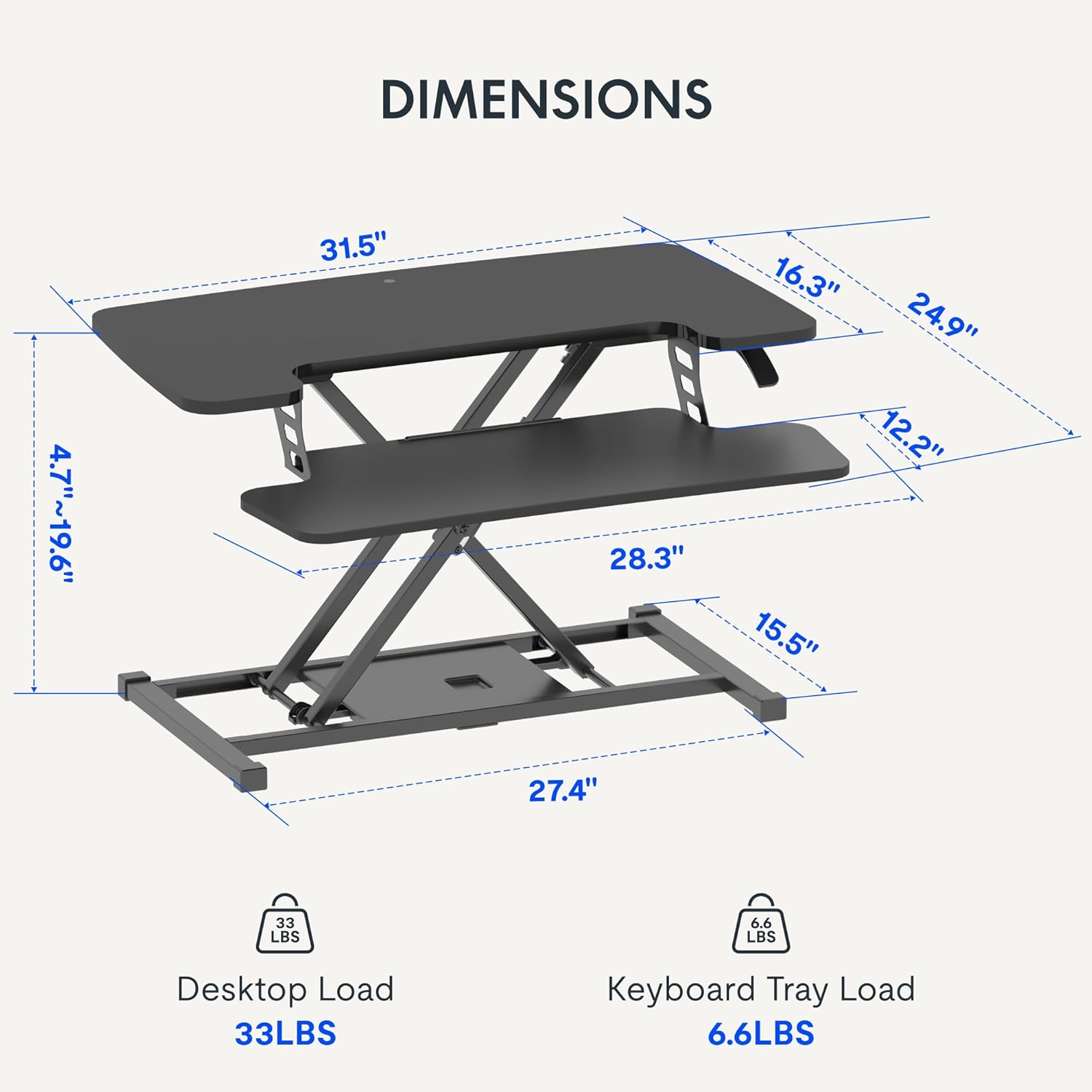
- Do not exceed the weight limit of 33 lbs (15 kg) on the upper desktop.
- Do not exceed the weight limit of 6.6 lbs (3 kg) on the keyboard tray.
- Ensure the desk converter is placed on a stable, flat surface.
- Keep hands and fingers clear of moving parts during height adjustment.
Cuntenutu di u pacchettu
- Pre-assembled Desk Converter Unit
- Tastiera Tastiera
- Mounting Screws for Keyboard Tray
- Manuale d'istruzzioni (stu documentu)
Setup è Assemblea
- Unpacking: Eliminate cù cura tutti i cumpunenti da l'imballu.
- Keyboard Tray Attachment: Position the keyboard tray beneath the main desktop. Align the pre-drilled holes on the keyboard tray with the mounting points on the converter's frame. Secure the keyboard tray using the provided screws.
- Placement: Place the assembled desk converter on a stable, flat desk surface.

The desk converter is largely pre-assembled, requiring only the attachment of the keyboard tray for immediate use.
Istruzzioni di funziunamentu
- Aghjustassi Altezza: To adjust the height, locate the adjustment lever on the side of the upper desktop.
- Alzendu u Scrivania: Squeeze the lever and gently lift the desktop to your desired standing height. Release the lever to lock it in place. The gas spring mechanism assists in smooth elevation.
- Abbassà u Scrivania: Squeeze the lever and apply gentle downward pressure to lower the desktop to your desired sitting height. Release the lever to lock it in place.
- Capacità di pesu: The upper desktop supports up to 33 pounds (15 kg). The keyboard tray supports up to 6.6 pounds (3 kg). Do not exceed these limits.


Features
- Disegnu ergonomicu: Seamlessly transition between sitting and standing positions to promote a healthy work posture. The streamlined edges are designed to reduce wrist discomfort.
- Spacious Two-Tier Workstation: The upper desktop provides ample space for monitors or laptops, while the lower keyboard tray accommodates your keyboard and mouse. A U-shaped cutout on the upper deck allows for laptop placement directly on the tray, optimizing space.
- Sturdy X-Frame Construction: Built with a robust X-frame, ensuring stability and smooth, effortless height adjustments.
- Versatile Height Range: Offers a height adjustment range from 4.7 inches (12 cm) to 19.6 inches (50 cm), accommodating various user heights and work preferences.


Mantenimentu
- Pulizia: Asciugà a superficia cù un soffiu, damp tela. Evita i detergenti abrasivi.
- Ispezione: Verificate periodicamente tutte e viti è e cunnessione per assicurassi ch'elle sianu sicure.
Risoluzione di prublemi
- Difficultà à aghjustà l'altezza: Ensure no objects are obstructing the lifting mechanism. Verify that the weight on the desk does not exceed the specified limits.
- Vacillante: Confirm the desk converter is placed on a flat, stable surface. Check all assembly screws for tightness.
Specificazioni
| Marca | FLEXISPOT |
| Nome di mudellu | MT137 |
| Dimensioni di u produttu | 24"P x 32"L x 19.7"A (61cm P x 81cm L x 50cm A) |
| Culore | Neru |
| Materiale di basa | Metallu |
| Tipu di materiale superiore | Legnu |
| Pesu di l'articulu | 24 Libbra (10.9 kg) |
| Maximum Upper Desktop Load | 33 Libbra (15 kg) |
| Maximum Keyboard Tray Load | 6.6 Libbra (3 kg) |
| Gamma di regulazione di l'altezza | 4.7 pollici (12 cm) à 19.6 pollici (50 cm) |
| Assemblea Necessaria | Iè (Minimal) |
| Strumenti cunsigliati per l'assemblea | cacciavite |
| UPC | 810072862501 |
Garanzia è Supportu
Tipu di garanzia: This product comes with a Full Warranty.
For further assistance, warranty claims, or technical support, please contact FLEXISPOT customer service. Refer to the official FLEXISPOT websitu per i dettagli di cuntattu attuali.


