1. Introduzione
Thank you for choosing the MESWAO 15.6 inch Android 14 Tablet Pro. This tablet is designed to provide a superior visual and performance experience with its large Full HD display, powerful octa-core processor, and extended battery life. This manual will guide you through the setup, operation, maintenance, and troubleshooting of your new device, ensuring you get the most out of its advanced features.
2. Ciò chì hè in a scatula
Per piacè verificate u cuntenutu di u vostru pacchettu. Sè qualchì articulu manca o hè dannighjatu, cuntattate l'assistenza clienti.
- 1 x MESWAO 15.6 inch Android Tablet
- 1 x Adattatore d'alimentazione
- 1 x Cable Type-C
- 1 x Manuale d'utilizatore
- 1 x adattatore Type-C à USB
- 1 x Stuck pin (SIM ejector tool)

Image: Visual representation of the MESWAO tablet and its included accessories.
3. Produttu Finituview
3.1 Funzioni chjave
- 15.6-inch 1080P FHD IPS Display: Large screen with 1920x1080p resolution, 16:9 aspect ratio, 85% screen-to-body ratio, and 350 nits adjustable brightness for clear visuals.
- Sistema operativu Android 14: Latest Android version for faster app launches, intuitive user interface, split-screen multitasking, and GMS certification for Google Play access.
- MediaTek Helio G99 CPU: Octa-core processor (6nm, up to 2.2GHz) and ARM Mali-G57 GPU for smooth performance in multitasking, streaming, and gaming.
- 12,000mAh Mega Battery & 30W Fast Charging: Provides up to 15 hours of video playback and 12+ hours of daily use, with 90% charge in 3 hours.
- 6 GB di RAM + 128 GB di ROM (espansibile finu à 1 TB): Ample storage for apps, photos, and videos, with expandable memory via microSD card (FAT32 format).
- Dual-band Wi-Fi & Bluetooth 5.0: High-speed 2.4G/5G Wi-Fi and efficient Bluetooth connectivity for peripherals.
- 5MP Front + 32MP Rear Cameras: Capture moments and conduct clear video calls.
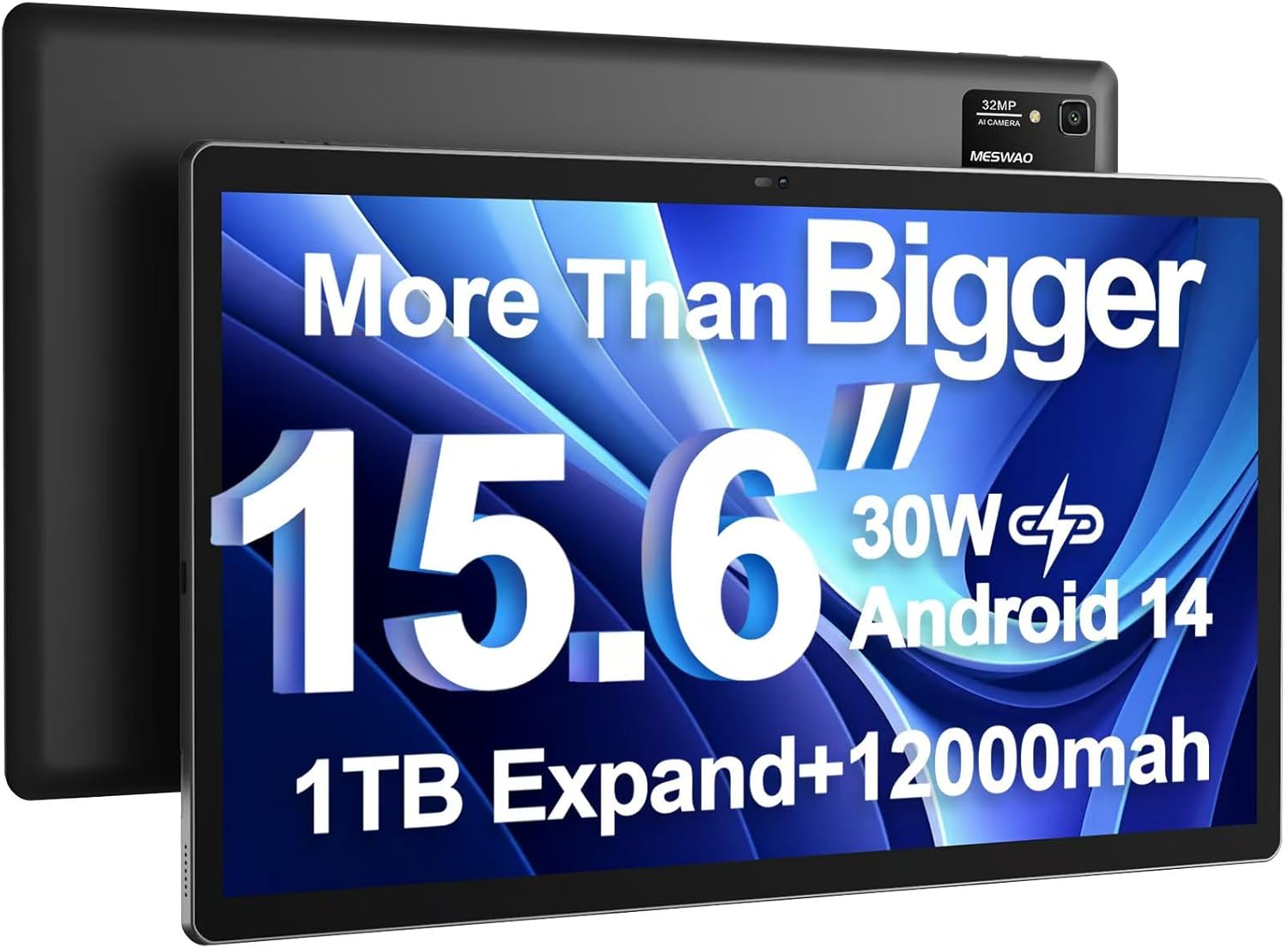
Image: The MESWAO 15.6 inch Android 14 Tablet Pro, showcasing u so grande display è u modulu di camera posteriore.

Image: Visual comparison highlighting the significantly larger screen area of the 15.6-inch tablet compared to a standard 10-inch tablet.

Image: Illustration of the tablet's 12,000mAh ultra-large capacity battery and 30W fast charging, indicating quick charge times and extended usage.
3.2 Cumponenti di a tableta
Familiarize yourself with the physical components of your MESWAO tablet:
- Pulsante di putenza: Situatu à u latu, adupratu per accende / spegne a tableta o attivà / dorme u schermu.
- Pulsanti di volume: Adjust audio output levels.
- Camera frontale: Camera 5MP per videochiamate è selfie.
- Camera posteriore: 32MP camera with flash for high-resolution photos and videos.
- Tip-C Port: Per carica è trasferimentu di dati.
- Slot per Carta TF: For expanding storage with a microSD card.
- Altoparlanti stereo: Quad speakers for enhanced audio experience.
- Jack per cuffie da 3.5 mm: For wired audio connection (requires included Type-C to 3.5mm adapter).
4. Setup
4.1 Accensione iniziale
- Appughjà è tene premutu Pulsante di putenza until the MESWAO logo appears on the screen.
- Segui l'istruzzioni nantu à u screnu per selezziunà a vostra lingua, regione è cunnette vi à una rete Wi-Fi.
- Sign in with your Google account or create a new one to access Google Play Store and other services.
4.2 Caricamentu di a tableta
Before first use, fully charge the tablet. Use the provided power adapter and Type-C cable.
- Connect the Type-C cable to the tablet's Type-C port.
- Inserite l'adattatore di corrente in una presa murale.
- The charging indicator will appear on the screen. A full charge takes approximately 3 hours with the 30W fast charger.
4.3 Inserimentu di una carta MicroSD
To expand storage, insert a microSD card (FAT32 format, up to 1TB, sold separately).
- Truvate a fessura di a carta TF nant'à u latu di a tableta.
- Use the provided stuck pin to gently press into the small hole next to the slot to eject the tray.
- Pone a carta microSD in u cassettu cù i cuntatti d'oru rivolti in ghjò.
- Riinserite cù cura u vassoio in a fessura finu à chì si sente un clic.
5. Operating Instructions
5.1 Navigazione basica
- Pantalla di casa: Scorri à manca o à diritta per navigà trà e schermate principali.
- App Drawer: Access all installed applications (if using a launcher with an app drawer, otherwise apps are on home screens).
- Notificazioni è Impostazioni Rapide: Swipe down from the top of the screen to access notifications and quick settings toggles (Wi-Fi, Bluetooth, Brightness, etc.).
- Apps recenti: Tap the square icon (or swipe up and hold from the bottom if using gesture navigation) to view è cambià trà l'applicazioni aduprate di recente.
5.2 Multitasking with Split Screen
The Android 14 OS supports split-screen functionality for enhanced productivity.
- Aprite a prima applicazione chì vulete aduprà.
- Go to the Recent Apps view.
- Tap the app icon at the top of the first app's card and select 'Split screen'.
- Choose the second app from your recent apps or app drawer to open it in the other half of the screen.
- Adjust the size of each app by dragging the divider in the middle.

Imagine: Più diview of key features of the Android 14 operating system on the tablet, including multitasking capabilities.
5.3 Connettività
- Wi-Fi: Andà à Impostazioni > Rete è internet > Wi-Fi to connect to available networks. Supports 2.4Ghz and 5Ghz bands.
- Bluetooth: Andà à Impostazioni> Dispositivi cunnessi> Preferenze di cunnessione> Bluetooth to pair with Bluetooth headphones, keyboards, or other devices.
- Trasmissione di schermu: The tablet supports wireless screen casting to compatible displays. Access this feature from Quick Settings or Impostazioni > Dispositivi cunnessi > Preferenze di cunnessione > Trasmetti.

Image: Depiction of the tablet's stable dual-band Wi-Fi and Bluetooth 5.0 capabilities, enabling seamless wireless connections.
6. Mantenimentu
6.1 Cura di a batteria
- Evitate e temperature estreme (calde o fredde) perchè ponu degradà a durata di a batteria.
- Ùn lasciate micca chì a batteria si scarichi cumpletamente spessu. Caricatela prima ch'ella ghjunghji à 0%.
- Use only the provided charger or a certified 30W PD fast charger.
6.2 Pulizia
- Aduprate un pannu dolce è senza pelu per pulisce u schermu è u corpu.
- Per e macchie ostinate, leggermente dampSciacquate u pannu cù acqua o un detergente per schermi. Evitate i prudutti chimichi aggressivi.
- Do not spray liquids directly onto the tablet.
6.3 Actualizazioni di u Software
Verificate è installate regularmente l'aghjurnamenti di u sistema per assicurà prestazioni è sicurezza ottimali.
- Connect your tablet to a stable Wi-Fi network.
- Andà à Impostazioni > Sistema > Aghjurnamentu di u sistema.
- Segui l'istruzzioni nantu à u screnu per scaricà è installà qualsiasi aghjurnamenti dispunibili.
7. Risoluzione di prublemi
Sè avete prublemi cù a vostra tableta, cunsultate e seguenti suluzioni cumuni:
| Prublemu | Causa Possibile | Soluzione |
|---|---|---|
| A tableta ùn s'accende micca | Batteria bassa; Crash di u sistema | Caricate a tableta per almenu 30 minuti. Appughjate è tene premutu u buttone di accensione per 10-15 secondi per furzà u riavviu. |
| Prestazione lenta / Lag | Troppu app in esecuzione; Spaziu di almacenamentu bassu; Software obsoletu | Close background apps. Clear cache. Free up storage. Check for system updates. |
| Problemi di cunnessione Wi-Fi | Incorrect password; Router issue; Tablet Wi-Fi off | Ensure Wi-Fi is on. Re-enter password. Restart router. Forget and reconnect to network. |
| A batteria si scarica rapidamente | High screen brightness; Background apps; Heavy usage | Reduce screen brightness. Close unused apps. Limit background data. Check battery usage in settings. |
| Touchscreen unresponsive/Phantom touches | Temporary software glitch; Defective unit | Restart the tablet. If the issue persists, contact MESWAO customer support for assistance. |
If the problem persists after trying these solutions, please contact MESWAO customer support for further assistance.
8. Specificazioni
| Feature | Detail |
|---|---|
| Nome di mudellu | MES-B3 Pro |
| Sistema upirativu | Android 14 |
| Size Screen | 15.6 inch |
| Risoluzione di u screnu | 1920 x 1080 pixel (Full HD IPS) |
| Processore | MediaTek Helio G99 Octa-core (finu à 2.2 GHz) |
| Coprocessore graficu | ARM Mali-G57 |
| RAM | 6 GB |
| Memoria interna (ROM) | 128 GB |
| Storage espansibile | Up to 1TB via MicroSD card (FAT32 format) |
| Capacità batterie | 12,000 mAh |
| Autonomia di a batteria (media) | 13 Hours (up to 15 hours video playback) |
| Carica | 30W PD Fast Charging |
| Connettività wireless | 802.11a/b/ac/ax (2.4G/5G Dual-band Wi-Fi), Bluetooth 5.0 |
| Camera frontale | 5 MP |
| Camera posteriore | 32 MP |
| Pesu di l'articulu | 4.42 libbre (circa 2 kg) |
| Dimensioni di u produttu | 14.49 x 8.66 x 0.39 inch (36.8 x 22 x 1 cm) |
9. Garanzia è Support
MESWAO products come with a standard manufacturer's warranty. Please refer to the warranty card included in your package for specific terms and conditions. For technical support, troubleshooting assistance, or warranty claims, please contact MESWAO customer service through the contact information provided on the official MESWAO websitu o a vostra piattaforma di compra.
Informazioni di cuntattu: Please visit the official MESWAO website or refer to the support card included in your product packaging for the most up-to-date contact details.