1. Introduzione
Grazie per l'acquistuasing the XO F41 Mirror Bluetooth Speaker. This device combines a digital clock display with a portable Bluetooth speaker, offering multiple playback options including Bluetooth, TF card, and FM radio. Please read this manual carefully before use to ensure proper operation and to maximize your experience with the product.

Image 1.1: The XO F41 Mirror Bluetooth Speaker in use, showing its digital clock display.
2. Caratteristiche di u produttu
- Connettività Bluetooth 5.3: For stable and efficient wireless audio streaming.
- Mirror Display: Clear digital time display with adjustable brightness.
- Modi di riproduzione multipli: Supports Bluetooth, TF card, and FM radio.
- Microfonu Integratu: Per chjamate senza mani.
- Longu tempu di riproduzione: Up to 8 hours at 50% volume, 5 hours at 100% volume.
- Disegnu compactu è portatile: Easy to carry and place anywhere.
- Carica USB-C: Modern and convenient charging port.
3. Cuntenutu di u pacchettu
Verificate u pacchettu per i seguenti elementi:
- XO F41 Mirror Bluetooth Speaker
- Cavu di carica USB-C
- Manuale d'usu

Image 3.1: The XO F41 Mirror Bluetooth Speaker packaging.
4. Disposizione è cuntrolli di u dispusitivu
Familiarizatevi cù i buttoni è i porti di l'altoparlante:
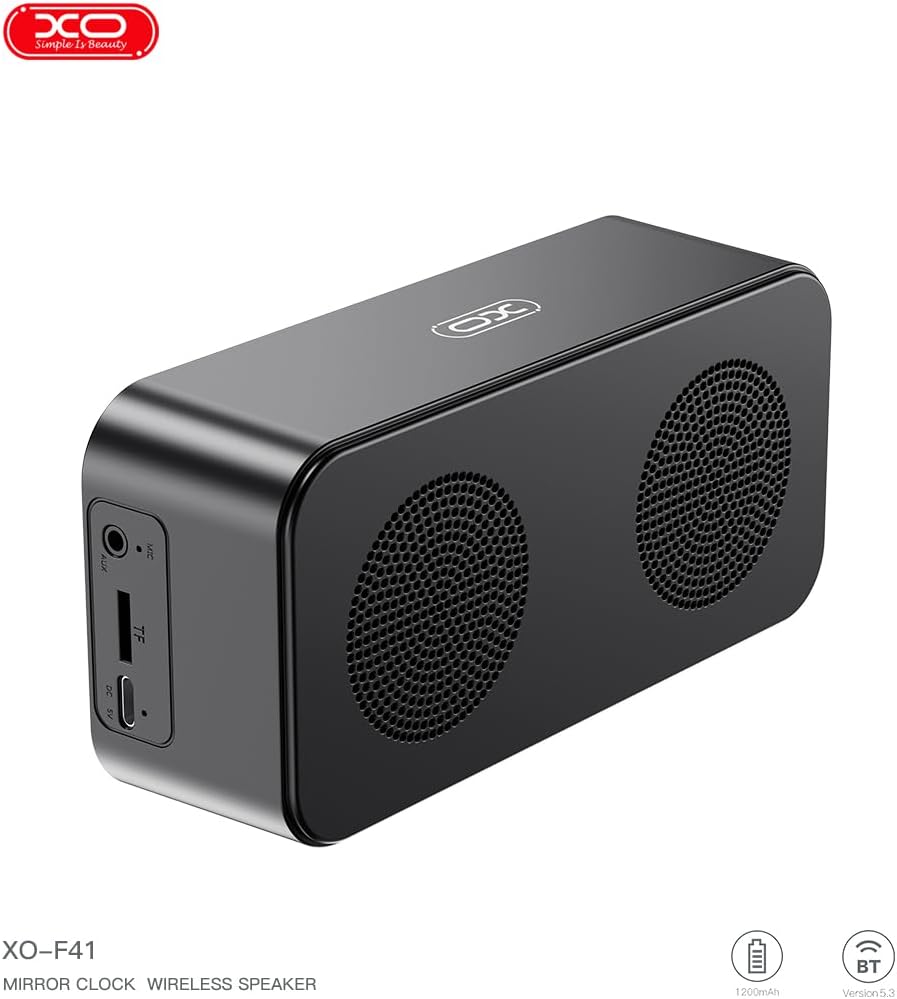
Imagine 4.1: Latu view of the XO F41 with ports labeled.
- Pulsante di putenza: Press and hold to power on/off. Short press to switch modes.
- Pulsante Play/Pause: Play or pause audio. Answer/end calls.
- Volume Up / Next Track: Appughjà brevemente per aumentà u vulume, appughjà longu per a traccia dopu.
- Volume Down/Traccia Precedente: Appughjà brevemente per calà u vulume, appughjà longu per a traccia precedente.
- Portu USB-C: Per carricà u dispusitivu.
- Slot per Carta TF: Insert a TF (MicroSD) card for local music playback.
- Portu AUX: Per l'entrata audio cablata.
5. Setup
5.1 Caricamentu di l'altoparlante
- Cunnette u cavu USB-C furnitu à u portu di carica di l'altoparlante.
- Cunnette l'altra estremità di u cavu à un adattatore di alimentazione USB (micca inclusu) o à a porta USB di un urdinatore.
- The charging indicator will illuminate. It takes approximately 3 hours for a full charge.
- The indicator will turn off or change color once fully charged.
5.2 Power On/Off
- Per accende: Press and hold the Power button for approximately 3 seconds. You will hear an audible prompt.
- Per spegne: Press and hold the Power button for approximately 3 seconds. You will hear an audible prompt.
6. Operating Instructions
6.1 Accoppiamentu Bluetooth
- Ensure the speaker is powered on and in Bluetooth mode. If not, short press the Power button to cycle through modes until "BT" or a Bluetooth icon appears on the display.
- In u vostru dispositivu mobile, attivate u Bluetooth è cercate i dispositi dispunibili.
- Select "XO-F41" from the list of devices.
- Una volta assuciatu, l'altoparlante indicarà una cunnessione riescita, è pudete cumincià à ghjucà l'audio da u vostru dispositivu.
6.2 Modu Carta TF
- Inserite una carta TF (MicroSD) cù audio MP3 files in u slot per a carta TF.
- The speaker will automatically switch to TF card mode and begin playing music. If not, short press the Power button to cycle to TF card mode.
- Use the Volume Up/Down buttons for track navigation and the Play/Pause button for playback control.
6.3 Modu Radio FM
- Short press the Power button to switch to FM radio mode. The display will show the FM frequency.
- Long press the Play/Pause button to automatically scan and save available FM stations.
- Short press the Volume Up/Down buttons to switch between saved stations.
6.4 Impostazioni di l'orologio è di a sveglia
The XO F41 features a digital clock display. Specific instructions for setting the time and alarm are typically found in the detailed manual included with the product. Generally, a dedicated 'M' (Mode) or 'Set' button is used to enter time/alarm setting mode, and volume buttons are used to adjust values.

Image 6.1: The XO F41 speaker functioning as a bedside clock.
6.5 Aghjustà a luminosità di u display
The display brightness is adjustable. Look for a dedicated button (often labeled with a sun icon or similar) or a combination of button presses (e.g., double-pressing the Power button) to cycle through brightness levels. Refer to the included quick start guide for exact steps.
7. Mantenimentu
- Pulizia: Aduprate un pannu dolce è asciuttu per pulisce a superficia di l'altoparlante. Ùn aduprate micca detergenti abrasivi o solventi.
- Conservazione: Conservate l'altoparlante in un locu frescu è asciuttu, luntanu da a luce diretta di u sole è da temperature estreme quandu ùn hè micca adupratu per periodi prolungati.
- Resistenza à l'acqua: Stu dispusitivu ùn hè micca impermeabile. Evitate l'esposizione à l'acqua o à l'umidità eccessiva.
- Cura di a batteria: Per prulungà a durata di a batteria, evitate di scaricà cumpletamente a batteria spessu. Caricate u dispusitivu regularmente, ancu s'ellu ùn hè micca in usu custante.
8. Risoluzione di prublemi
| Prublemu | Causa Possibile | Soluzione |
|---|---|---|
| L'altoparlante ùn s'accende micca. | Batteria bassa. | Caricate l'altoparlante per almenu 30 minuti. |
| Ùn si pò micca accoppià via Bluetooth. | Speaker not in pairing mode; Bluetooth disabled on device; too far from device. | Ensure speaker is in Bluetooth mode. Enable Bluetooth on your device. Move speaker closer to your device (within 10 meters). |
| No sound from TF card. | Carta TF micca inserita currettamente; micca supportata file format; no audio files on card. | Reinserite a carta TF. Assicuratevi files are in MP3 format. Verify audio files are present on the card. |
| Scarsa ricezione di a radio FM. | Segnale debule; interferenza ambientale. | Move the speaker to a different location. Re-scan for stations. |
9. Specificazioni
| Feature | Detail |
|---|---|
| Numero di mudellu | XO-F41 |
| Versione Bluetooth | Bluetooth V5.3 |
| Frequenza Bluetooth | 2.402GHz-2.480GHz |
| Capacità batterie | 1200 mAh |
| Input di carica | USB-C, DC5V/0.5A |
| Tempu di carica | Circa 3 ore |
| Play Time | 8H (50% volume); 5H (100% volume) |
| Distanza effettiva | Meno di 10 metri |
| Potenza massima | 5W |
| Unità di altoparlante | 52 mm |
| Rapportu Signal-to-Noise | > 80 dB |
| Dimensioni di u produttu | 15 x 3.81 x 11 cm (circa 150 x 45 x 72 mm) |
| Pesu di u produttu | 320 g (circa 0.28 kg) |
| Materiale | Plastica |
| Funzione speciale | Luminosità regulabile |

Image 9.1: Detailed product parameters.
10. Garanzia infurmazione
The XO F41 Mirror Bluetooth Speaker comes with a standard manufacturer's warranty. Please refer to the warranty card included in your package for specific terms, conditions, and duration. Keep your purchase receipt as proof of purchase for any warranty claims.
11. Assistenza Clienti
For further assistance, technical support, or inquiries regarding your XO F41 Mirror Bluetooth Speaker, please contact the retailer or manufacturer's customer service department. Contact details are typically provided on the product packaging or the official brand websitu.