Introduzione
The 1Mii SafeFly Pro is a versatile Bluetooth 5.3 audio adapter designed to transmit and receive audio wirelessly. It features an OLED screen for clear status display and supports advanced audio codecs for high-quality sound. This device allows you to connect your wireless headphones to non-Bluetooth audio sources or stream audio from your Bluetooth-enabled devices to wired audio systems.
Chì ci hè in u Box

This image displays all items included in the 1Mii SafeFly Pro package. You will find the SafeFly Pro Bluetooth Audio Adapter, a USB-C Charging Cable, a 3.5mm Female to Female Audio Adapter, and a Keychain.
- SafeFly Pro Bluetooth Audio Adapter
- Cavu di carica USB-C
- 3.5mm Female to Female Audio Adapter
- Portachiavi
- Manuale d'uso (stu documentu)
Product Overview

Questa imagine furnisce dettagli view of the 1Mii SafeFly Pro, highlighting its key components. These include the flexible audio cable with a 3.5mm audio connection, an audio plug protector, the OLED display screen, the 'M' key, the 'OK' key, the TX/RX sliding switch, a one-click reset button, and the USB-C charging port.
Cumpunenti è Funzioni:
- Cunnessione audio da 3.5 mm: Connects to audio source (TX mode) or audio receiver (RX mode).
- Audio Plug Protector: Protects the 3.5mm audio plug when not in use.
- OLED Display Screen: Shows battery level, volume, paired device names, and active audio codecs.
- 'M' Key: In pairing mode, press once to select the connected device. In TX mode, press twice to switch the Bluetooth decoding format.
- 'OK' Key: Power ON/OFF (long press for 1 second). Long press for 2 seconds to enter pairing mode. Also functions as Play/Pause.
- TX/RX Sliding Switch: Selezziuna a modalità Trasmettitore (TX) o Ricevitore (RX).
- Pulsante di reset: Long press for 3 seconds to resettate u dispusitivu.
- Portu di carica USB-C: Per carica a batteria interna.
Istituisci
1. Charging u dispusitivu
Before first use, fully charge the SafeFly Pro using the provided USB-C charging cable. Connect the cable to the USB-C port on the device and a standard USB power adapter (not included). The OLED screen will indicate charging status.
2. Powering On / Off
- Per accende: Long press the 'OK' button for 1 second.
- Per spegne: Long press the 'OK' button for 1 second.
3. Selecting Operating Mode (TX/RX)
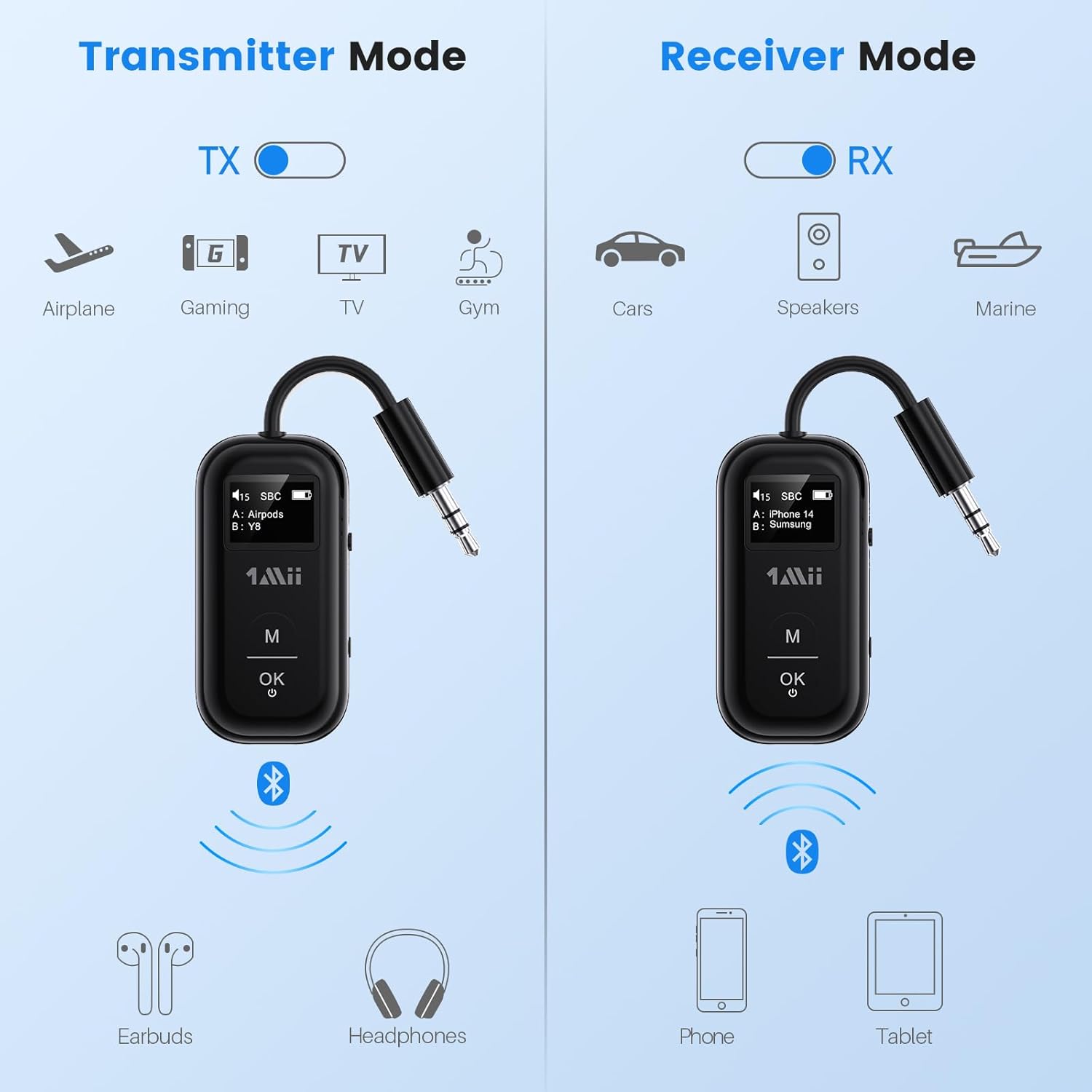
This image illustrates the two operating modes: Transmitter (TX) and Receiver (RX). TX mode is used for devices like airplanes, gaming consoles, TVs, and gym equipment to transmit audio to earbuds or headphones. RX mode is used for cars, speakers, and marine systems to receive audio from phones or tablets.
Use the TX/RX sliding switch on the side of the device to select the desired mode:
- Modu TX (Trasmettitore): For sending audio from non-Bluetooth devices (e.g., airplane entertainment, TV, gym equipment) to Bluetooth headphones or speakers.
- Modu RX (Ricevitore): For receiving audio from Bluetooth-enabled devices (e.g., smartphones, tablets) to wired audio systems (e.g., car stereo, home speakers).
4. Pairing in TX Mode (Connecting to Headphones)

- Set the SafeFly Pro to TX mode using the sliding switch.
- Plug the 3.5mm audio connection into your audio source (e.g., airplane entertainment system, TV headphone jack). If needed, use the dual-prong airplane adapter.
- Long press the 'OK' button on the SafeFly Pro for 2 seconds to enter pairing mode. The screen will display "Searching".
- Put your Bluetooth headphones or speakers into pairing mode. Refer to your headphone's manual for specific instructions.
- The SafeFly Pro will automatically search for and connect to nearby Bluetooth devices. Once connected, the device name will appear on the OLED screen.
- To connect a second pair of headphones: After the first device is connected, long press the 'OK' button again for 2 seconds to enter pairing mode for the second device. Put the second pair of headphones into pairing mode. Both devices will then be connected simultaneously.

This image shows the 1Mii SafeFly Pro connected to an airplane's in-flight entertainment system, enabling wireless audio streaming to a user's Bluetooth headphones.
5. Pairing in RX Mode (Connecting to Smartphones/Tablets)
- Set the SafeFly Pro to RX mode using the sliding switch.
- Plug the 3.5mm audio connection into your wired audio system's AUX input (e.g., car stereo, home speaker).
- Long press the 'OK' button on the SafeFly Pro for 2 seconds to enter pairing mode. The screen will display "Searching".
- On your smartphone or tablet, go to Bluetooth settings and select "1Mii SafeFly Pro" from the list of available devices to connect.
- Once connected, the device name will appear on the OLED screen.
- To connect a second smartphone/tablet: After the first device is connected, long press the 'OK' button again for 2 seconds to enter pairing mode for the second device. Connect the second smartphone/tablet via its Bluetooth settings.

This image shows the 1Mii SafeFly Pro in RX mode, connected to a car's audio system, receiving audio wirelessly from a smartphone.
Istruzzioni di funziunamentu
Display OLED

Questa imagine furnisce un primu pianu view of the OLED screen, indicating the power status, audio format (e.g., SBC), volume level, battery level, and the names of the two currently paired devices (A and B).
The OLED screen provides real-time information:
- Livellu di batteria: Indica a carica restante di a batteria.
- Livellu di volume: Displays the current audio output volume.
- Dispositivu accoppiatu: Shows the name(s) of the connected Bluetooth headphones or smartphones.
- Codec audio: Displays the active audio codec (e.g., aptX LL, aptX HD, aptX Adaptive, aptX, AAC, SBC).
Funzioni di u buttone
- 'OK' Button: Short press to Play/Pause audio.
- Buttone 'M': In TX mode, press twice to cycle through available audio codecs (aptX LL, aptX HD, aptX Adaptive, AAC, SBC) if supported by your connected headphones.
Mantenimentu
To ensure the longevity and optimal performance of your 1Mii SafeFly Pro, follow these maintenance guidelines:
- Pulizia: Asciugate l'apparechju cù un pannu dolce è asciuttu. Ùn aduprate micca detergenti liquidi o materiali abrasivi.
- Conservazione: Conservate l'apparechju in un locu frescu è asciuttu, luntanu da a luce diretta di u sole è da temperature estreme.
- Cura di a batteria: Evitate di scaricà cumpletamente a batteria spessu. Caricate u dispusitivu regularmente, ancu s'ellu ùn hè micca in usu, per mantene a salute di a batteria.
- Trattamentu: Maneghjà l'apparechju cun cura. Evitate di fà lu cascà o di sottumettelu à forti impatti.
Risoluzione di prublemi
If you encounter issues with your SafeFly Pro, try the following steps:
- U dispositivu ùn si accende micca: Assicuratevi chì u dispusitivu sia cumpletamente caricu. Cunnettelu à una fonte d'alimentazione cù u cavu USB-C.
- Unable to Pair:
- Ensure the SafeFly Pro is in the correct TX or RX mode.
- Make sure both the SafeFly Pro and your target Bluetooth device are in pairing mode.
- Avvicinate i dispusitivi l'uni à l'altri.
- Spegne è accende i dui dispusitivi, dopu pruvate di novu à accoppià.
- Nisun audio / Scarsa qualità audio:
- Check that the 3.5mm audio cable is securely connected to both the SafeFly Pro and the audio source/receiver.
- Ensure the volume on both the SafeFly Pro and the connected device is turned up.
- Verify that the correct audio codec is selected (in TX mode, press 'M' twice to cycle).
- Test with a different audio cable or source/receiver if possible.
- Device Frozen/Unresponsive: Long press the Reset Button (small hole on the side) for 3 seconds using a thin object (e.g., paperclip) to restart the device.
Specificazioni
| Dimensioni di u produttu | 2.24 x 1.18 x 0.51 inch |
| Pesu di l'articulu | 0.64 once |
| Numeru di mudellu di l'articulu | SafeFly Pro |
| Batterie | 1 Batteria Lithium Polymer (inclusa) |
| Tecnulugia di cunnessione | AUX, Bluetooth 5.3 |
| Fonte d'energia | Alimentatu à batteria |
| Materiale | Acrilonitrile Butadiene Stirene (ABS) |
| Funzioni spiciali | AptX LL/HD/Adaptive, Bluetooth Transmitter & Receiver, Built-in Battery, Connect 2 Devices, with Screen |
Informazioni di sicurezza
Leghjite è seguitate queste linee guida di sicurezza per prevene danni à u dispusitivu o ferite persunali:
- Avoid exposure to extreme temperatures (hot or cold).
- Handle the battery with care. Do not puncture, disassemble, or expose to fire.
- Fate attenzione à e putenziali interferenze cù altri dispositivi wireless.
- Mantene u dispusitivu luntanu da l'acqua è altri liquidi.
- Ùn pruvate micca di riparà o mudificà l'apparechju da per voi. Cuntattate l'assistenza clienti per assistenza.
Garanzia è Supportu
1Mii products are designed for reliability and performance. For warranty information, technical support, or customer service inquiries, please refer to the official 1Mii website or contact their customer support team directly. Keep your purchase receipt as proof of purchase for warranty claims.


