Introduzione
This manual provides detailed instructions for the installation, operation, and maintenance of your GIGABYTE B860M GAMING X WIFI6E Motherboard. Please read this manual thoroughly before installing or using the product to ensure correct operation and to prevent damage.
The GIGABYTE B860M GAMING X WIFI6E Motherboard is designed to support Intel Core Ultra Series CPUs, featuring a robust power delivery system, DDR5 memory support, and advanced connectivity options including PCIe 5.0, M.2, 2.5GbE LAN, WIFI 6E, and USB 4.
Guida di installazione
1. Unpacking è Inspection
Carefully remove the motherboard from its packaging. Inspect for any signs of damage during transit. Ensure all accessories listed in the package contents are present.
- GIGABYTE B860M GAMING X WIFI6E Motherboard
- Cavi SATA
- Antenna Wi-Fi
- Manuale d'uso (stu documentu)
- CD/USB di u driver (s'ellu hè inclusu)
2. Disposizione di a scheda madreview
Familiarizatevi cù i cumpunenti chjave è i connettori di a scheda madre.
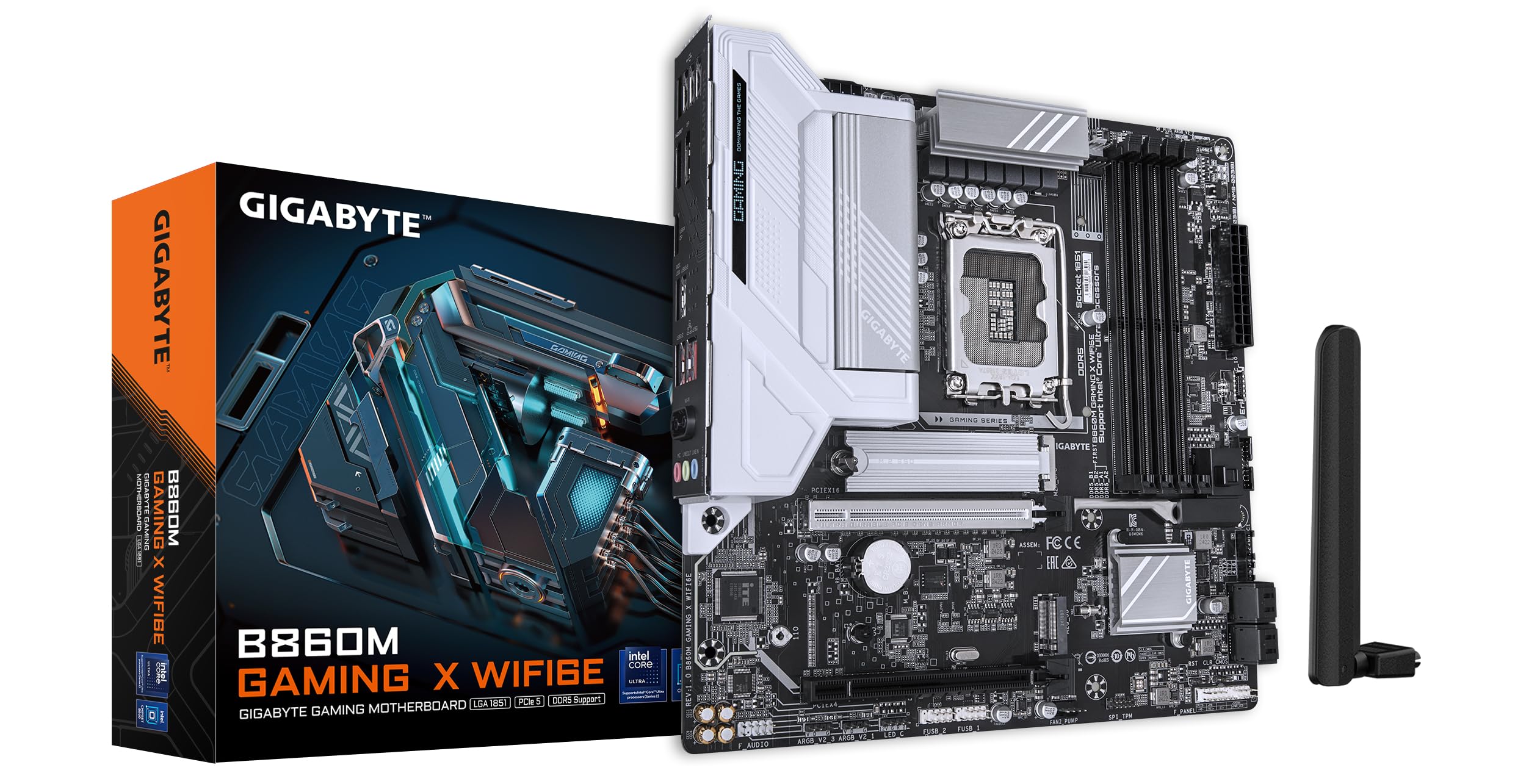
Imagine: Da cima à fondu view of the GIGABYTE B860M GAMING X WIFI6E Motherboard, highlighting the CPU socket, DDR5 DIMM slots, PCIe slots, and M.2 slots.

Imagine: Angulata view of the GIGABYTE B860M GAMING X WIFI6E Motherboard, showing the heatsinks and overall board design.
3. Installazione di a CPU (LGA 1851)
- Aprite a leva di u socket di a CPU.
- Align the CPU with the socket, ensuring the triangular mark on the CPU matches the mark on the socket.
- Pone delicatamente a CPU in u socket senza furzà la.
- Chiude a leva di u socket per fissà a CPU.
4. Installazione di memoria (DDR5)
- Aprite i clips à e duie estremità di u slot DIMM.
- Allineate u modulu di memoria cù u slot, assicurendu chì a tacca nantu à u modulu currisponde à a chjave in u slot.
- Appughjà fermamente nantu à e duie estremità di u modulu di memoria finu à chì i clips si scattanu in u so postu.
- For dual-channel operation, install modules in the recommended slots (refer to motherboard diagram for specific slots).
5. Installazione di dispositivi di almacenamiento (SSD M.2)
- Truvate i slot M.2 nantu à a scheda madre.
- Remove the M.2 heatsink and stand-off screw.
- Inserite l'SSD M.2 in u slot à un angulu.
- Push down the SSD and secure it with the stand-off screw.
- Reattach the M.2 heatsink for thermal protection.
6. Graphics Card (PCIe 5.0) Installation
- Aprite u fermu di u slot PCIe 5.0 x16.
- Align your graphics card with the slot and press down firmly until it is fully seated and the latch closes.
- Assicurate a carta grafica à u vostru chassis di u PC cù viti.
7. Cunnessione di periferiche è alimentazione
Connect the 24-pin ATX power connector and the 8-pin CPU power connector from your power supply to the motherboard. Connect front panel headers (power button, reset, USB, audio) according to the motherboard manual diagram. Install the Wi-Fi antenna to the rear I/O panel.

Image: Rear I/O panel of the GIGABYTE B860M GAMING X WIFI6E Motherboard, showing USB ports, HDMI, DisplayPort, 2.5GbE LAN, Wi-Fi antenna connectors, and audio jacks.
Istruzzioni di funziunamentu
1. Primu avviu è cunfigurazione di u BIOS
After assembling your system, power it on. Press the DEL key during startup to enter the BIOS/UEFI setup utility. Here you can configure boot order, system time, and other advanced settings.
2. Installazione Driver
Once the operating system is installed, install the necessary drivers for the motherboard components (chipset, LAN, Wi-Fi, audio, etc.). These can be found on the included driver disk/USB or downloaded from the official GIGABYTE websitu.
3. Wi-Fi 6E Connectivity
Ensure the Wi-Fi antenna is securely connected. In your operating system's network settings, select the appropriate Wi-Fi 6E network and enter the password to connect.
4. Q-Flash Plus
The Q-Flash Plus feature allows you to update the BIOS without installing a CPU, memory, or graphics card. Download the latest BIOS file da u GIGABYTE website, rename it as instructed, and save it to a USB flash drive. Insert the USB drive into the designated Q-Flash Plus USB port on the rear I/O panel and press the Q-Flash Plus button.
Mantenimentu
1. Aghjurnamenti di u BIOS
Verificate regularmente u GIGABYTE website for the latest BIOS updates. BIOS updates can improve system stability, performance, and add support for new hardware. Follow the instructions provided by GIGABYTE carefully when performing a BIOS update.
2. Aghjurnamenti di i Driver
Keep your motherboard drivers updated to ensure optimal performance and compatibility. Download drivers only from the official GIGABYTE support page.
3. Pulizia
Pulite periodicamente a polvera da a scheda madre è da i cumpunenti cù aria compressa. Assicuratevi chì u sistema sia spento è scollegatu prima di pulisce. Evitate l'usu di liquidi o materiali abrasivi.
Risoluzione di prublemi
1. U sistema ùn s'accende micca
- Verificate chì tutte e cunnessione di l'alimentazione (ATX 24-pin, CPU 8-pin) sianu ben fissate.
- Verificate chì l'alimentatore funziona currettamente.
- Ensure the front panel power button header is correctly connected.
2. Nisuna uscita di visualizazione
- Confirm the graphics card is properly seated in the PCIe slot and connected to the power supply (if required).
- Check that the monitor cable is securely connected to both the graphics card and the monitor.
- If using integrated graphics, ensure the monitor is connected to the motherboard's video output (HDMI/DisplayPort).
3. Instabilità di u sistema o crash
- Verify that all components (CPU, RAM, GPU) are correctly installed.
- Check for overheating issues; ensure CPU cooler and case fans are working.
- Aggiorna u BIOS è tutti i driver à l'ultime versioni.
- Test memory modules individually if you suspect RAM issues.
4. Prublemi di cunnessione Wi-Fi
- Ensure the Wi-Fi antenna is securely attached to the rear I/O panel.
- Check if Wi-Fi drivers are installed correctly.
- Verify that the Wi-Fi module is enabled in the BIOS.
Specificazioni
| Feature | Detail |
|---|---|
| Nome di mudellu | B860M GAMING X WIFI6E |
| Socket CPU | LGA 1851 |
| Processori cumpatibili | Intel Core Ultra Series CPUs |
| Chipset | Intel B860M |
| Tecnulugia di memoria RAM | DDR5, Dual Channel (4 x DIMMs) |
| Max Memory Clock Speed | Up to 6400MHz (OC) |
| PCIe Slots | 1x PCIe 5.0 x16, 1x PCIe 4.0 |
| M.2 Slots | Multiple M.2 slots with Thermal Protection |
| LAN | 2.5 GbE LAN |
| Connettività wireless | Realtek 2x2 Wi-Fi 6E |
| Porti USB | USB 4.0 Type-C, USB 3.2 Gen 2 Type-C, various USB 3.2/2.0 |
| VRM | Hybrid Digital 8+1+2+2 Phase 60A DrMOS |
| Dimensioni | 9.61 x 9.61 x 1.38 inch |
| Pesu di l'articulu | 2.65 liri |
Garanzia è Supportu
GIGABYTE motherboards come with a limited warranty. Please refer to the official GIGABYTE website or your product packaging for specific warranty terms and conditions applicable to your region.
Per assistenza tecnica, scaricamenti di driver, aggiornamenti di BIOS è ulteriori informazioni sul prodotto, visitate il sito ufficiale di assistenza GIGABYTE. websitu:
https://www.gigabyte.com/support
When contacting support, please have your motherboard model name (B860M GAMING X WIFI6E) and serial number ready.


