Introduzione
Welcome to your JLab Go Lux ANC Wireless Headphones. This manual provides detailed instructions to help you get the most out of your new headphones, covering setup, operation, maintenance, and troubleshooting.
Chì ci hè in u Box
- JLab Go Lux ANC Wireless Headphones
- Cavu di carica USB-C

Image: JLab Go Lux ANC Headphones and included USB-C charging cable.
Product Overview
Familiarize yourself with the key components and controls of your JLab Go Lux ANC Wireless Headphones.

Imagine: Primu pianu view of the right earcup, highlighting the power button, volume controls, and ANC/Be Aware mode button.
Funzioni chjave:
- Cancellazione attiva di u rumore ibrida (ANC): Reduces external distractions by up to 30 dB.
- Modu Attenti: Vi permette di sente ciò chì vi circonda mentre ascoltate l'audio.
- Cloud Foam Comfort: Ergonomically shaped Form-Fit Earcups with 1-inch Cloud Foam cushions and adjustable hinges for extended comfort.
- JLab App Customization: Personalize ANC/Be Aware settings, touch controls, and sound preferences.
- Chjami Crystal Clear: Equipped with noise-canceling microphones for clear communication.
- Bluetooth Multipoint: Cunnette si à dui dispusitivi simultaneamente.
- Wireless Share Mode: Share audio wirelessly between two Lux headphones.
- Google Fast Pair è Microsoft Swift Pair: Effortless pairing with Android and Windows devices.
- Google Find My Device: Locate your headphones if misplaced.
- Design Pieghevole: Rotating earcups for compact storage and portability.
Istituisci
1. Carica iniziale
Before first use, fully charge your headphones using the provided USB-C cable. The LED indicator will show charging status.
2. Power On / Off
- Power On: Mantene premutu u buttone di putenza finu à chì l'indicatore LED si accende.
- Spegnimentu: Mantene premutu u buttone di putenza finu à chì l'indicatore LED si spegne.
3. Abbinamentu Bluetooth
- Turn on your JLab Go Lux ANC headphones.
- The headphones will automatically enter pairing mode (LED will flash blue/red).
- On your device (smartphone, laptop, etc.), open Bluetooth settings and select "JLab Go Lux ANC" from the list of available devices.
- Una volta cunnessu, u LED diventerà blu fissu.
Google Fast Pair è Microsoft Swift Pair: For supported Android and Windows 10/11 devices, simply turn on your headphones near the device, and a pop-up notification will prompt you to connect with a single click.
4. JLab App Customization
Download the JLab App from the App Store or Google Play Store to unlock full customization options for your headphones.
- Customize ANC/Be Aware settings.
- Adjust touch controls.
- Fine-tune sound with the equalizer (JLab Signature, Balance, Bass Boost presets available).
- Enable Safe Hearing with volume limits.
- Riceve l'aghjurnamenti di u software.

Image: The JLab App interface on a smartphone, demonstrating sound and noise control customization options.
Istruzzioni di funziunamentu
1. Active Noise Cancelling (ANC) & Be Aware Mode
Toggle between ANC, Be Aware, and ANC Off modes using the dedicated button on the earcup.
- ANC ibridu: Eliminates external distractions for an immersive audio experience.
- Modu Attenti: Allows ambient sounds to pass through, keeping you aware of your surroundings.

Image: A person wearing the headphones, demonstrating the use of ANC or Be Aware mode in a public environment.
2. Funzioni di chjama
The built-in noise-canceling microphones ensure clear calls.
- Rispondi / Finisce a chjama: Appughjà una volta u buttone multifunzione.
- Reject Call: Appughjà è tene premutu u buttone multifunzione.
- Attivà l'Assistente Vocale: Appughjà duie volte u buttone multifunzione.

Image: A person engaged in a phone call while wearing JLab Go Lux ANC headphones, emphasizing the clear call feature.
3. Riproduzione musicale
- Play/Pause: Appughjà una volta u buttone multifunzione.
- Aument du volume : Appughjà brevemente u buttone "+".
- Volume Imbruglia: Appughjà brevemente u buttone '-'.
- Prussima pista: Appughjà longu u buttone '+'.
- Pista Precedente: Appughjà longu u buttone '-'.
4. Bluetooth Multipuntu
Connect your headphones to two devices simultaneously. For example, connect to your laptop for work calls and your phone for music. The headphones will intelligently switch between devices.
5. Wireless Share Mode
Share your audio with another pair of JLab Lux headphones. Refer to the JLab App or JLab support for detailed instructions on activating Wireless Share Mode.
6. Google Find My Device
If you misplace your headphones, use the Google Find My Device feature to locate them. Ensure this feature is enabled and configured on your connected Android device.

Image: A person using the Google Find My Device app on a smartphone to locate their JLab headphones.
Cunfortu è Fit
The JLab Go Lux ANC headphones are designed for comfort during extended use.
- Form-Fit Earcups: Ergonomically shaped to the natural outline of the ear.
- Cloud Foam Cushions: 1-inch thick cushions provide plush comfort.
- Cerniere regulabili: Customize the fit for various head sizes and shapes.

Image: A person wearing JLab Go Lux ANC headphones, showcasing the comfortable Cloud Foam earcups.
Carica è vita di a batteria
Your JLab Go Lux ANC headphones offer extended battery life.
- Durata di a batteria: Up to 70+ hours of playtime (40+ hours with ANC on).
- Carica: Use the included USB-C cable to charge. A full charge typically takes a few hours.
- Indicatore LED: The LED light on the earcup indicates charging status and battery level.
Mantenimentu
- Clean headphones with a soft, damp tela. Evite i sustanzi chimichi duri.
- Mantene in un locu frescu è seccu quandu ùn hè micca in usu.
- Ùn espone micca à temperature estreme o umidità.
- The headphones are not water resistant. Avoid contact with liquids.
- The foldable design with rotating earcups allows for compact storage.
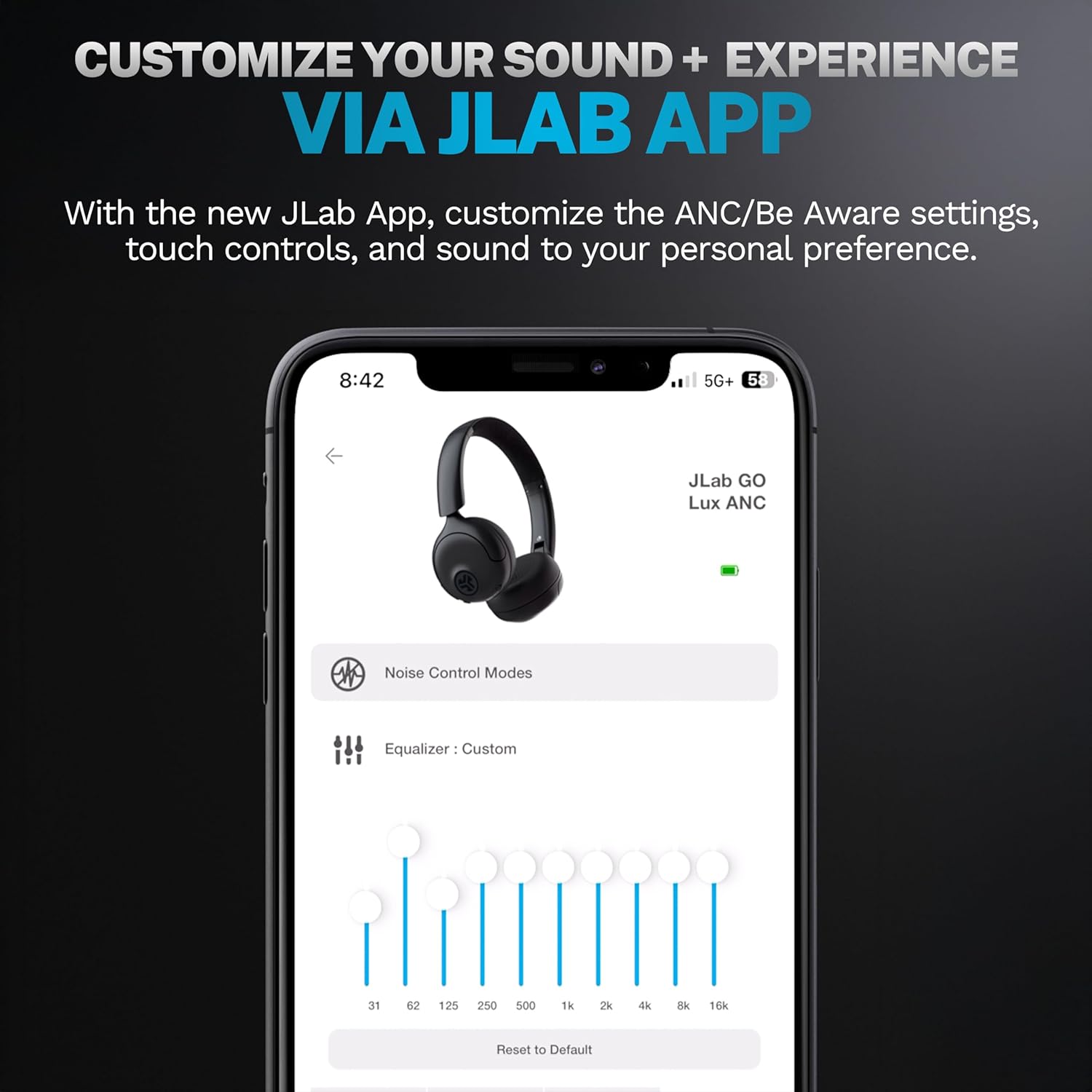
Image: JLab Go Lux ANC headphones in their folded position, demonstrating portability.
Risoluzione di prublemi
| Prublemu | Soluzione |
|---|---|
| L'auriculare ùn si accende micca | Ensure headphones are charged. Press and hold the power button for 3-5 seconds. |
| Ùn si pò micca accoppià cù u dispusitivu | Make sure Bluetooth is enabled on your device. Ensure headphones are in pairing mode (flashing blue/red LED). Forget the device in your Bluetooth settings and re-pair. |
| Nisun sonu o pocu volume | Check volume levels on both headphones and your connected device. Ensure headphones are properly connected. |
| L'ANC ùn funziona micca bè | Ensure ANC mode is activated. Adjust headphone fit to ensure a good seal around your ears. |
| Prublemi di qualità di chjama | Ensure microphones are not obstructed. Check your device's connection and signal strength. |
Specificazioni
| Feature | Detail |
|---|---|
| Nome di mudellu | HBGOLUXANCMVE20WEB |
| Tecnulugia di cunnessione | Wireless (Bluetooth) |
| Versione Bluetooth | 5.0 |
| Forma di l'auriculare | À l'orechja |
| Funzioni di cuntrollu di u rumore | Hybrid Active Noise Canceling, Be Aware Mode |
| Tipu di Driver Audio | Driver dinamicu (40 mm) |
| Risposta di Frequency | 20 Hz - 20 KHz |
| Sensibilità | 104 dB |
| A vita di a batteria | Up to 70+ hours (40+ hours with ANC) |
| Metudu di cuntrollu | Toccate, cuntrollu di l'app |
| Pesu di l'articulu | 10.6 ounces (0.3 kilogrammi) |
| Dimensioni di u produttu | 2.95 x 6.1 x 7.48 inch |
| Livellu di resistenza à l'acqua | Ùn hè resistente à l'acqua |
Garanzia è Supportu
Your JLab Go Lux ANC Wireless Headphones come with a JLab 2 Year Warranty.
For detailed warranty information, product support, or to contact customer service, please visit the official JLab websitu o riferitevi à a carta di garanzia inclusa cù u vostru pruduttu.
Pudete ancu visità u Negoziu JLab nant'à Amazon per più infurmazioni è accessori.


