1. Introduzione
Thank you for choosing the CAMECHO 7-inch Android 15 Car Stereo. This manual provides detailed instructions for the installation, operation, and maintenance of your new car multimedia system. Please read this manual thoroughly before use to ensure proper installation and optimal performance. Keep this manual for future reference.
2. Informazioni di sicurezza
- Installazione prufessiunale cunsigliata: A causa di a cumplessità di i sistemi elettrici di l'auto, l'installazione prufessiunale hè assai cunsigliata per impedisce danni à l'unità o à u vostru veiculu.
- Alimentazione elettrica: Assicuratevi chì l'unità sia cunnessa à una alimentazione CC di 12 V cù una terra negativa. Volumu incorrectutage pò causà danni.
- Evite l'acqua è l'umidità: Do not expose the unit to water or excessive moisture. This can lead to electric shock or malfunction.
- Temperature : Operate the unit within the specified temperature range (-20°C to 75°C).
- Sicurezza di guida: Ùn aduprate micca l'unità in un modu chì vi distragga da a guida. Date sempre priorità à a sicurezza stradale.
- Ventilazione: Assicuratevi una ventilazione adatta intornu à l'unità per impedisce u surriscaldamentu.
3. Cuntenutu di u pacchettu
Verificate chì tutti l'articuli elencati quì sottu sò inclusi in u vostru pacchettu:
- 1 x Android Car Stereo Player
- 1 x Low Allocation Vehicle Power Cable
- 1 x High Allocation Vehicle Power Cable
- 2 x Cavi USB
- 1 x Antenna Radio
- 1 x Antenna GPS
- 1 x CANBUS Decoder
- 1 x Cavu d'entrata di a camera posteriore
- 1 x Cavu RCA
- 1 x Manuale d'utilizatore
- 1 x Camera posteriore
- 1 x Microfonu Esternu

Image: Overview of the CAMECHO car stereo unit, its dimensions (225mm/8.8inch width, 140mm/5.5inch height, 215mm/8.4inch bottom width), and a visual representation of all included accessories and their respective cables. Key ports are labeled: 1. Power Cable, 2. RCA Input/Output, 3. Reversing Camera Input, 4. USB Cable, 5. GPS Antenna, 6. Radio Antenna.
4. Produttu Finituview
The CAMECHO 7-inch Android 15 Car Stereo is a high-performance multimedia system designed for select VW, Skoda, and Seat vehicles. It features a responsive touchscreen, powerful processor, and a range of connectivity options to enhance your driving experience.
Funzioni chjave:
- Sistema Operativu Android 15
- 4GB RAM + 64GB ROM for smooth performance and ampu almacenamentu
- 8-Core Processor
- 7-inch IPS Touchscreen Display (1024*600 resolution)
- Wireless Carplay and Android Auto support
- Built-in Bluetooth 5.0, WiFi, and GPS Navigation
- FM/RDS Radio with DSP sound processing
- Compatibilità di u cuntrollu di u volante
- Rear Camera input (AHD/CVBS) with included backup camera
- Funzione Mirror Link per i dispositivi iOS è Android
- Split-Screen multitasking
- Capacità di cuntrollu vocale
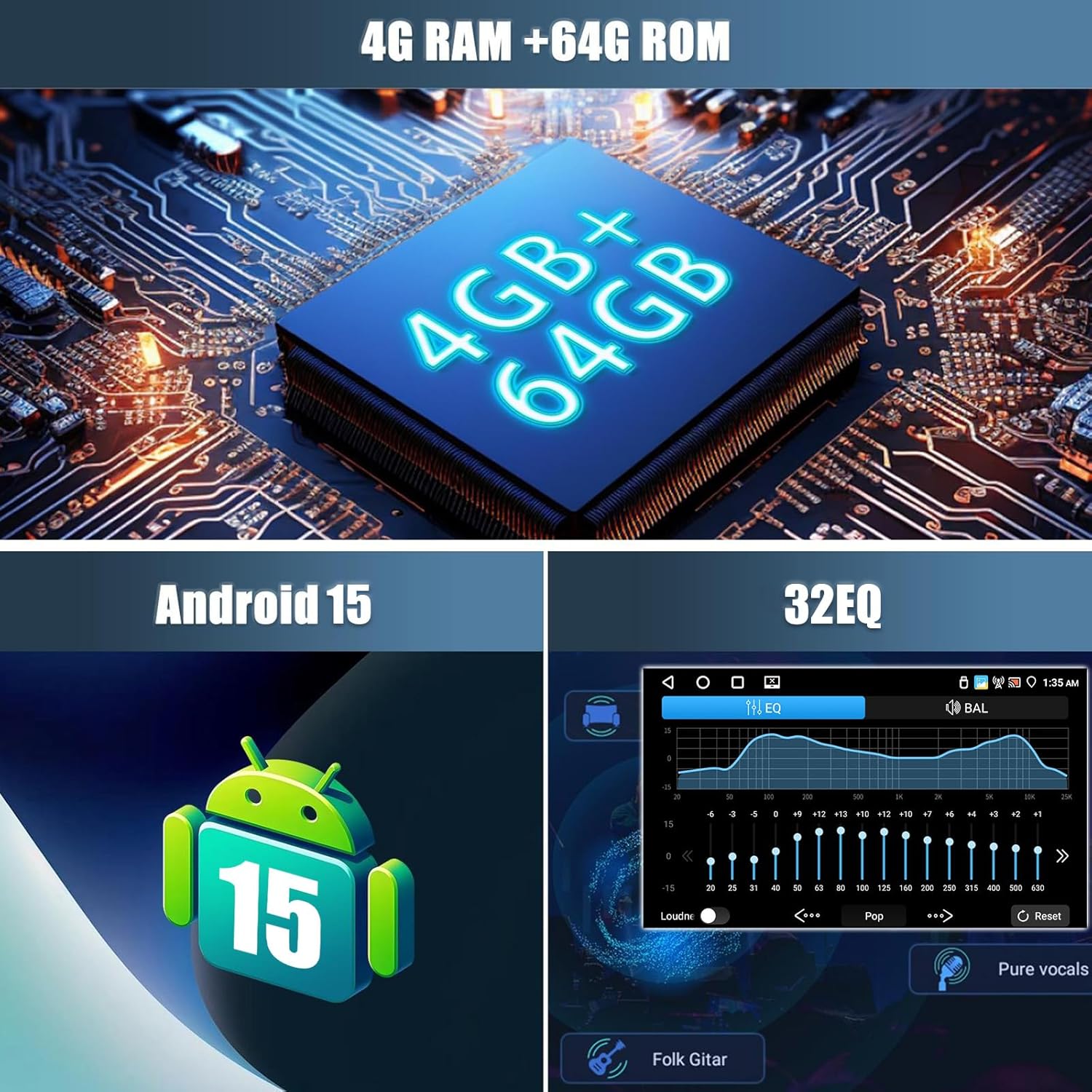
Image: Visual representation of the car stereo's core specifications, highlighting 4GB RAM + 64GB ROM, Android 15 operating system, and a 32-band Equalizer (EQ) for audio customization.
5. Installazione
5.1. Compatibilità di i veiculi
This car stereo is designed to be compatible with various VW, Skoda, and Seat models. Please verify your vehicle's compatibility before proceeding with installation.
- Per VW: SAGITAR/JATTA/JETTA, MAGOTAN/MAGOTAN V6, a part of VW/TS/TRANSPORTER, PASSAT B6, PASSAT V6, MAGOTAN VARIANT, PASSAT B7, PASSAT NMS, PASSAT VARIANT, PASSAT CC, PASSAT TSI, GOLF BLUE MOTION, GOLF VI, GOLF VARIANT, VW/TIGUAN/TIGUAN GP, SHARAN, CADDY, POLO, EOS, SCIROCCO, TOURAN, R36 VARIANT, BEETLE, MULTZVAN, GOLF CROSS, GOLF V, SPORTLINE, BORA, AMAROK.
- For SKODA: LIMOUSINE AB 02/2007 BIS 2012, FABIA COMBI AB 04/2007 BIS 2012, PRAKTIK AB 04/2007 BIS 2012, ROOMSTER AB 04/2006 BIS 2012, OCTAVIA COMBI 06/2004 BIS FACELIFT, OCTAVIA LIMOUSINE AB 06/2004 BIS FACELIFT, OCTAVIA II 2 & III3, YETI AB 2009 BIS 2012.
- For SEAT: ALTEA AB 05/2004, TOLEDO AB 12/2004, LEON AB 09/2005, ALTEA XL AB 04/2007 ALHAMBRA AB 2010.
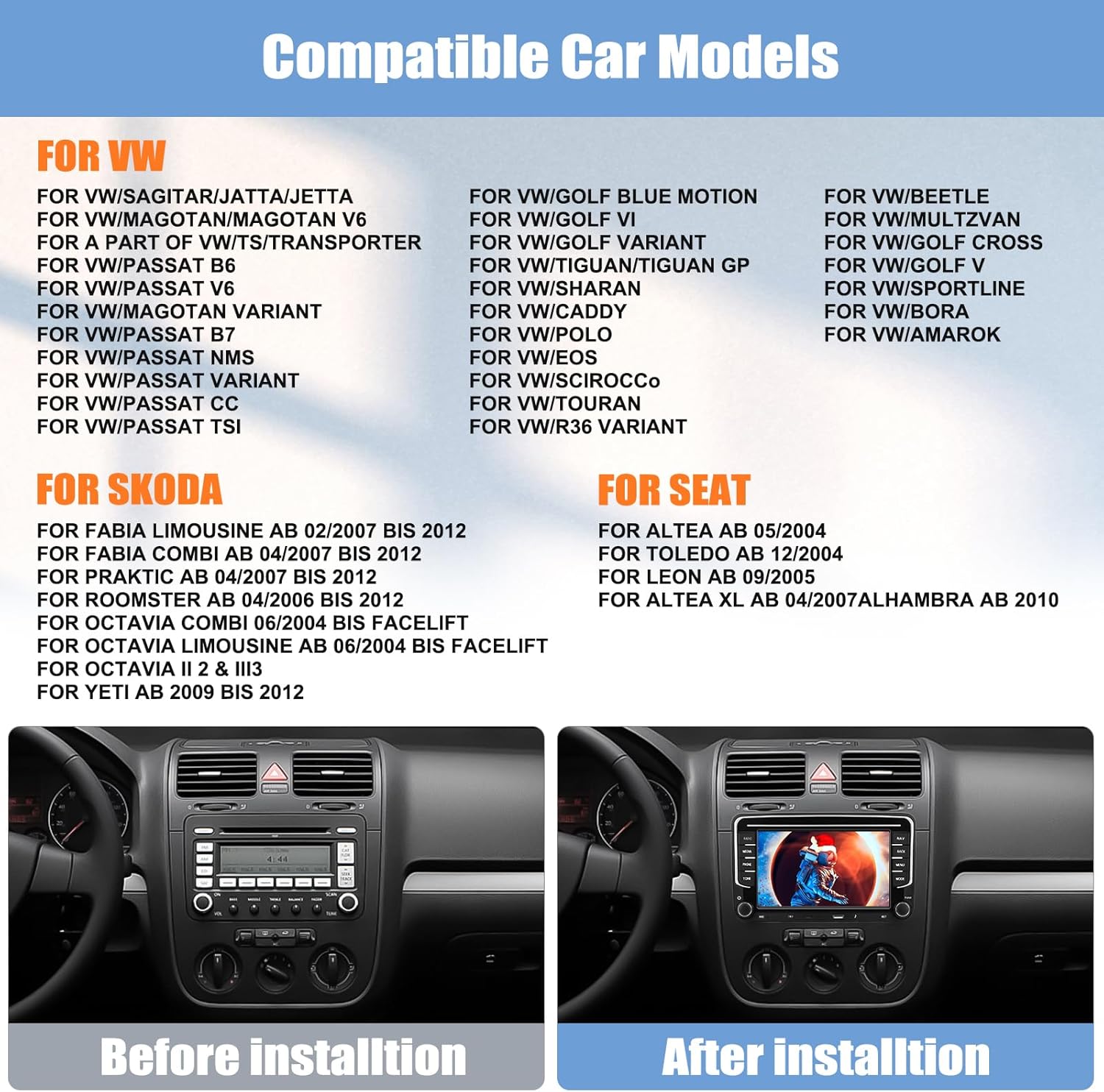
Image: A list of compatible car models for VW, Skoda, and Seat vehicles. Below the list, a comparison shows a car's dashboard before and after the installation of the CAMECHO car stereo, demonstrating a seamless fit.
5.2. Schema di Cablaggio
Refer to the included wiring diagram in the user manual and the labels on the unit itself for correct connections. Ensure all cables are securely connected to prevent intermittent issues.
5.3. Passi di stallazione
- Disconnect Battery: Prima di principià, scollegate u terminal negativu di a batteria di u veiculu per impedisce cortocircuiti elettrichi.
- Eliminate a vechja unità: Carefully remove your existing car stereo unit from the dashboard.
- Cunnette u cablaggio: Connect the power cables, speaker wires, GPS antenna, radio antenna, USB cables, CANBUS decoder, rear camera input, and RCA cables to the new CAMECHO unit according to the wiring diagram.
- Cunnessioni di prova: Before fully mounting, reconnect the battery and briefly test the unit's basic functions (power on, radio, sound) to ensure all connections are correct.
- Unità di muntatura: Securely mount the CAMECHO car stereo into the dashboard opening.
- Assemblea finale: Reassemble any removed dashboard panels or trim.
6. Operating Instructions
6.1. Funzionamentu Basic
- Accensione / spegnimentu: Press u buttone di putenza per accende o spegne l'unità.
- Controlu di u voluminu: Use the volume knob or touchscreen controls to adjust the audio level.
- Pantalla di casa: Toccate l'icona Home per vultà à l'interfaccia principale di Android.
6.2. Carplay senza filu è Android Auto
Connect your smartphone wirelessly or via USB to access Carplay (for iPhone) or Android Auto (for Android phones). This allows seamless integration of phone features like navigation, calls, messages, and music directly on the car stereo display.
- Assicuratevi chì Bluetooth sia attivatu nant'à u vostru telefunu è nant'à u stereo di a vittura.
- Accoppiate u vostru telefunu cù l'autoradio via Bluetooth.
- Once paired, Carplay or Android Auto should automatically launch. For wired connection, connect your phone via a USB cable.
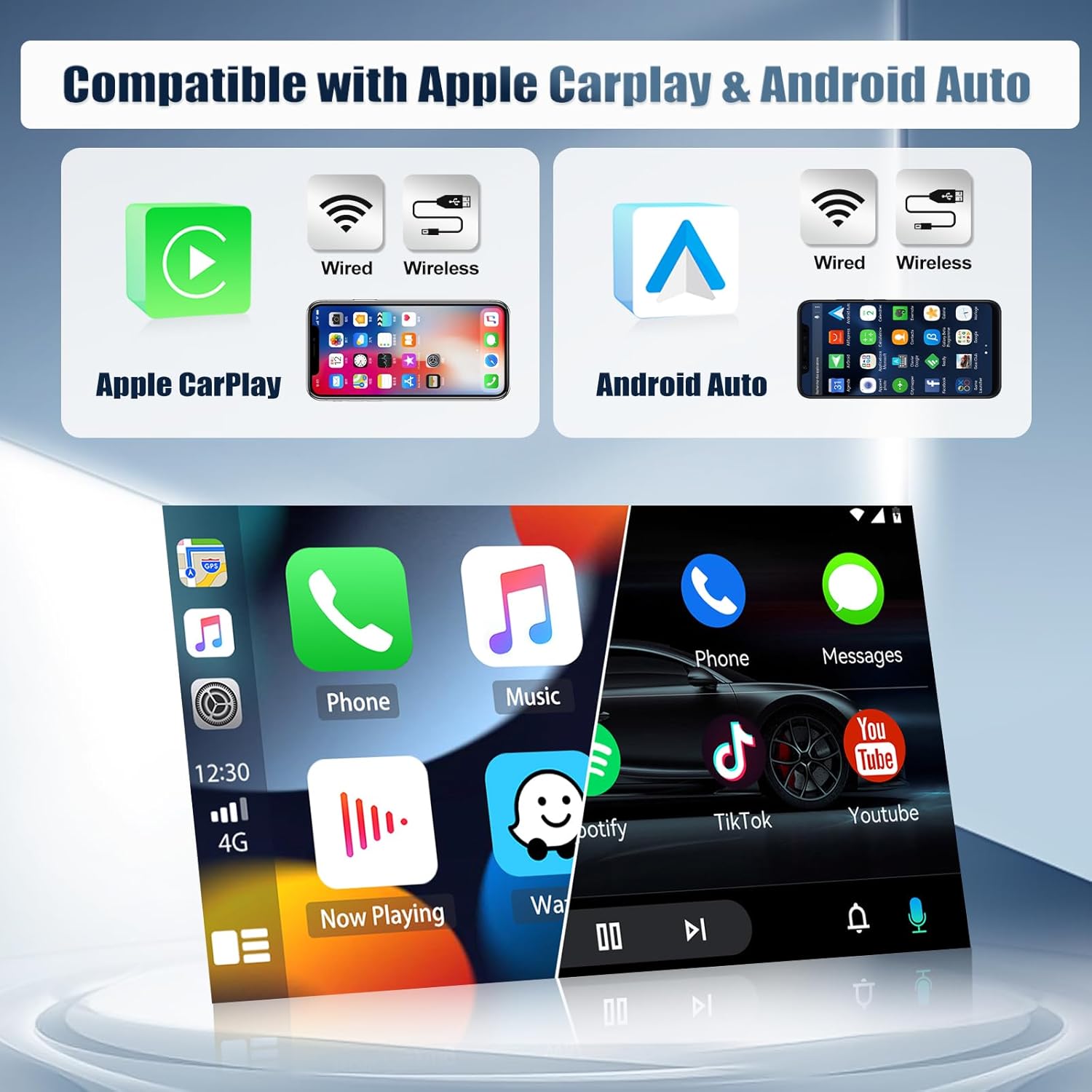
Image: Displays the compatibility of the car stereo with both Apple Carplay and Android Auto, showing options for both wired and wireless connections. The image illustrates the user interface of both systems on the stereo screen.
6.3. Connectivity Bluetooth
Bluetooth 5.0 allows for hands-free calling and wireless audio streaming.
- Andate à i paràmetri Bluetooth di u stereo di a vittura.
- Attivate Bluetooth nant'à u vostru telefunu è cercate i dispusitivi dispunibili.
- Select the car stereo from the list and pair.
- Una volta cunnessu, pudete fà / riceve chjamate è ascultà musica senza filu.

Image: A multi-panel display showing various functions of the CAMECHO car stereo: the FM/RDS radio interface, the WiFi interface displaying online content, the Bluetooth dial pad for phone calls, and the rear camera view cù caratteristiche di sicurità.
6.4. WiFi & GPS Navigation
Connect to a WiFi hotspot to access online maps, stream media, and download apps from the Play Store. The built-in GPS module provides accurate navigation.
- Go to Settings > Network & Internet > Wi-Fi to connect to a network.
- Open the pre-installed navigation app or download your preferred map application.
- The unit supports both online and offline maps (offline maps require prior download).
6.5. Radio FM/RDS
Tune into your favorite radio stations with FM/RDS functionality. The RDS (Radio Data System) displays station information where available.
- Selezziunate l'applicazione "Radio" da u menu principale.
- Use the scan function to automatically find and save stations, or manually tune to a frequency.
- Preset up to 18 stations for quick access.
6.6. Ligame Specchiu
Mirror Link allows you to display your smartphone's screen on the car stereo. Android phones support two-way control, while iPhones support one-way control (display only).
- Open the 'Mirror Link' app on the car stereo.
- Follow the on-screen instructions to connect your iOS or Android device via WiFi or USB.

Image: Illustrates the iOS/Android Mirror Link feature, showing a smartphone screen being mirrored onto the car stereo display, enabling content sharing and control.
6.7. Cuntrollu di u volante
The unit supports steering wheel controls, allowing you to manage audio and other functions without taking your hands off the wheel. This requires proper CANBUS connection and configuration.
- Accede à i paràmetri "Cuntrollu di u volante" in u menu di l'unità.
- Follow the on-screen prompts to program each button on your steering wheel to the desired function.

Image: Shows the interface for setting up steering wheel controls, allowing users to assign functions to their vehicle's steering wheel buttons. Also displays the Equalizer (EQ) adjustment screen for customizing audio output.
6.8. Funzione di a camera posteriore
Quandu u veiculu hè messu in retromarcia, l'autoradio mostra automaticamente u view from the included rear camera, assisting with parking and maneuvering.
- Ensure the rear camera is correctly installed and connected to the 'Reversing Camera Input' port.
- The camera features night vision, auxiliary lines, waterproof protection, and a wide 170° angle.
6.9. Voice Control
Utilize voice commands for various functions, enhancing convenience and safety while driving.
- Activate the voice control feature (usually by a dedicated button or voice command).
- Speak clear commands for navigation, music playback, calls, etc.
6.10. Split-Screen
Multitask by running two applications simultaneously on the screen, such as navigation and music player.
- Aprite a prima applicazione.
- Appughjà longu u buttone di l'applicazioni recenti o trascinallu da u latu (secondu l'interfaccia utente) per attivà a modalità di schermu divisu.
- Selezziunate a seconda applicazione da visualizà accantu à a prima.
7. Mantenimentu
- Pulizia di u screnu: Aduprate un pannu dolce è senza pelu per asciugà delicatamente u schermu tattile. Ùn aduprate micca detergenti abrasivi o solventi.
- Actualizazioni di u software: Verificate periodicamente l'aghjurnamenti di u software per assicurà prestazioni ottimali è accessu à e nuove funzionalità. L'aghjurnamenti si ponu generalmente truvà in i paràmetri di u sistema o in u schedariu di u fabricatore. websitu.
- Evite temperature estreme: Do not leave the unit exposed to direct sunlight or extreme cold for extended periods.
- Cunnessioni di cable: Assicuratevi chì tutti i cavi sianu cunnessi currettamente. E cunnessione lasse ponu purtà à prublemi intermittenti.
8. Risoluzione di prublemi
If you encounter any issues with your CAMECHO car stereo, refer to the following common problems and solutions:
| Prublemu | Causa Possibile | Soluzione |
|---|---|---|
| L'unità ùn si accende micca | Cablaggio incorrectu, fusibile bruciatu, alimentazione insufficiente. | Check power cable connections. Verify vehicle fuse and unit's fuse. Ensure 12V DC power. |
| Nisun sonu | Speaker wires disconnected, volume too low, mute function active, incorrect audio output settings. | Check speaker wire connections. Increase volume. Disable mute. Check audio settings. |
| I cumandamenti di u volante ùn funzionanu micca | CANBUS not connected or configured, incorrect programming. | Ensure CANBUS decoder is correctly installed. Re-program steering wheel controls in settings. |
| Problemi di cunnessione Bluetooth | Bluetooth off, pairing failed, interference. | Assicuratevi chì u Bluetooth sia attivatu nant'à i dui dispusitivi. Sguassate l'accoppiamenti precedenti è rifate l'accoppiamentu. Avvicinatevi à l'unità. |
| Segnale GPS persu o imprecisu | GPS antenna not connected, antenna obstructed, poor satellite reception. | Ensure GPS antenna is securely connected and placed in a clear area (e.g., dashboard). Move to an open area. |
| U schermu ùn risponde micca o hè bluccatu | Problema di software, errore di sistema tempurale. | Perform a soft reset (refer to the unit's specific reset method, usually a small reset button). If persistent, disconnect power for a few minutes. |
| A camera posteriore ùn si mostra micca | Camera input cable loose, camera faulty, reverse trigger wire not connected. | Check rear camera input cable. Ensure reverse trigger wire is correctly connected to the vehicle's reverse light circuit. |
Sè u prublema persiste dopu avè pruvatu ste suluzioni, cuntattate l'assistenza clienti CAMECHO per più assistenza.
9. Specificazioni
| Feature | Specificazione |
|---|---|
| Sistema | Android 15 |
| Chipset | 8257 (8-Core) |
| Size Screen | 7 inch |
| Memoria | 4GB RAM + 64GB ROM |
| Risoluzione di u screnu | 1024 * 600 |
| Radio Chip | 8035 |
| Forza di output | 4 * 45W |
| Versione Bluetooth | 5.0 |
| Temperature di travagliu | -20 ℃ à 75 ℃ |
| Controlu di u volante | Supportatu |
| putenza Amplifier Chip | YD7388 |
| Banda Radio | FM/RDS |
| Output Video | Supportatu |
| Ingressu d'inversione | AHD/CVBS |
| Microfonu esternu | Supportatu |
| Split Screen | Supportatu |
| Maps | Built-in offline maps (requires Internet for data download) |
| WIFI | Supportatu |
| Interfaccia USB | Doppiu USB |
| Formati Audio | APE/FLAC/WAV/MP3/WMA ecc. |
| Formati Video | MKV/RMVB/AVI/MP4/MDV ecc. |
| Formati d'Image | PNG/JPEG/JPG/GIF/WBMP/BNP ecc. |
| Parolla chjave di l'impostazione di fabbrica | 1234 |
| Lingue | Multi-language support including English, French, German, Spanish, etc. |
| Pesu | 1.3 chilògrammi |
| Tecnulugia di cunnessione | Bluetooth, USB, Wi-Fi |
| Dispositivi compatibles | Smartphone |
10. Garanzia è Support
CAMECHO provides the following warranty and support for this product:
- Garanzia di u fabricatore: Garanzia di 2 anni da a data di compra.
- Ritorni: Pulitica di ritornu di 30 ghjorni.
- Assistenza Clienti: Response to inquiries within 24 hours.
For technical assistance, warranty claims, or any other support needs, please contact CAMECHO customer service through the platform where you purchased the product or refer to the contact information provided in your purchase documentation.


