1. Produttu Finituview
The CAMECHO 4-Channel 1080P Dashcam is designed to provide comprehensive vehicle surveillance with its multi-camera system. Featuring a 3-inch IPS display, it records video from the front, left, right, and rear of your vehicle, ensuring a 360-degree field of view. Key functionalities include loop recording, enhanced night vision, motion detection, and parking assistance.
Funzioni chjave:
- 4 Independent Cameras: Front 1080P + 3 side 480P cameras for 360° coverage.
- 3-Inch IPS Display: Real-time monitoring with easy switching between views.
- Visione notturna migliorata: 8 anti-glare IR LEDs and exposure compensation for clear low-light recording.
- Registrazione in loop: Automatically overwrites oldest files (excluding locked videos) when the TF card is full.
- Rilevazione di muvimentu: Initiates recording when movement is detected near the vehicle while parked.
- Assistenza à u parcheghju: Displays reverse view with guidelines when the vehicle is in reverse gear.
- Interfaccia multilingue: Supports 13 OSD languages.
- Microfonu Integratu: For audio recording.
Chì ci hè in u Box:
- 1 x Unità DVR
- 1 x Rear Camera Lens
- 1 x Caricatore di vittura
- 1 x Manuale d'utilizatore
- 1 x Supportu di Muntatura
- 1 x Anti-slip Pad
- 1 x Extension Cable (for rear camera)
2. Setup è Installazione
Follow these steps for proper installation of your CAMECHO Dashcam.
2.1 Muntatura di a Dashcam
- Clean the desired area on your windshield with a rag to ensure proper adhesion.
- Attach the mounting bracket to the dashcam unit.
- Remove the protective film from the adhesive pad on the bracket and firmly press it onto the cleaned windshield area.
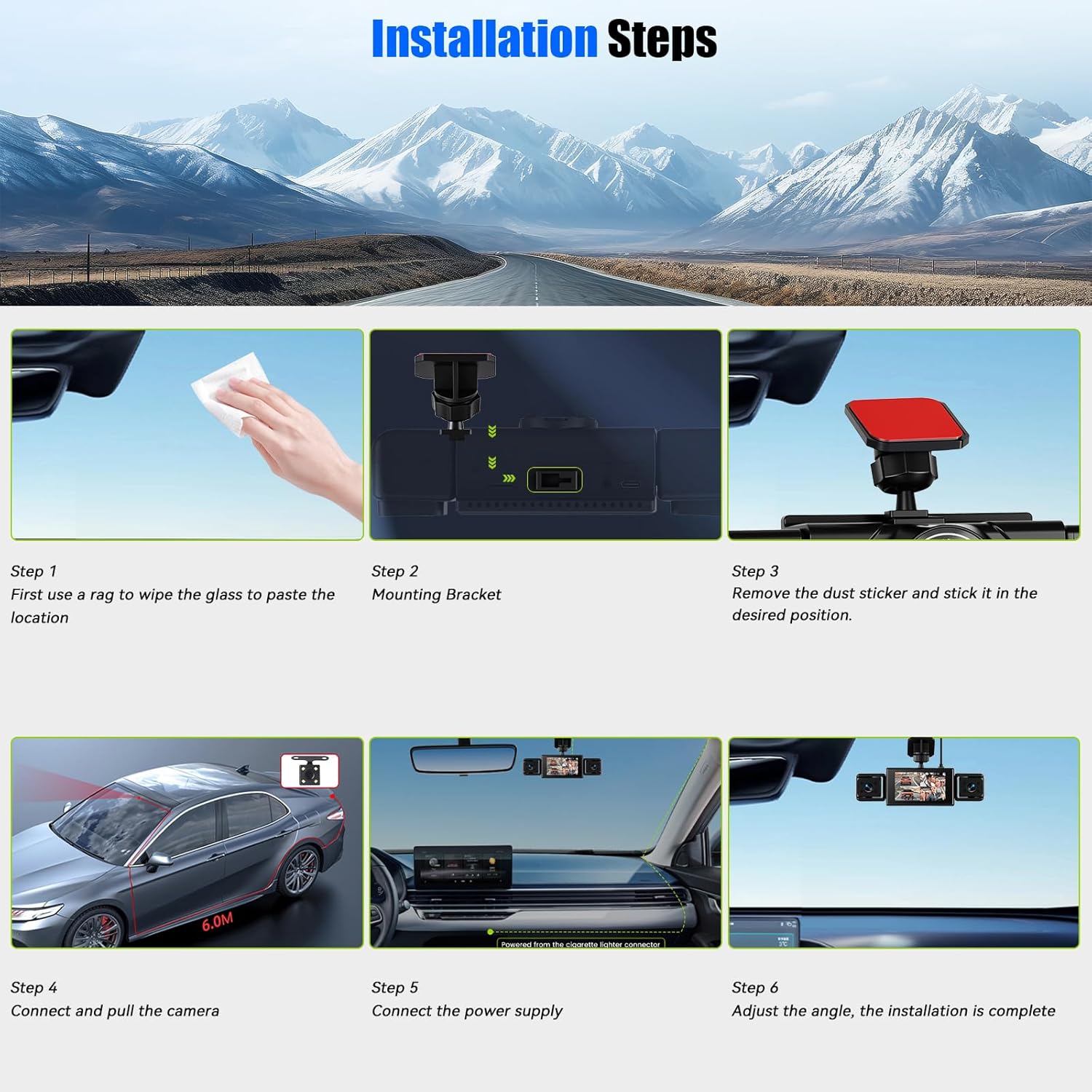
Image: Step-by-step guide for installing the dashcam, showing cleaning the windshield, attaching the bracket, and securing the unit.
2.2 Connecting Power and Rear Camera
- Connect the power cable from the dashcam to the car charger, then plug the car charger into your vehicle's cigarette lighter socket.
- Connect the rear camera to the main DVR unit using the provided extension cable. Route the cable discreetly along the vehicle's interior to the desired rear camera mounting location.
- Adjust the angle of the main dashcam unit and the side cameras for optimal viewing.
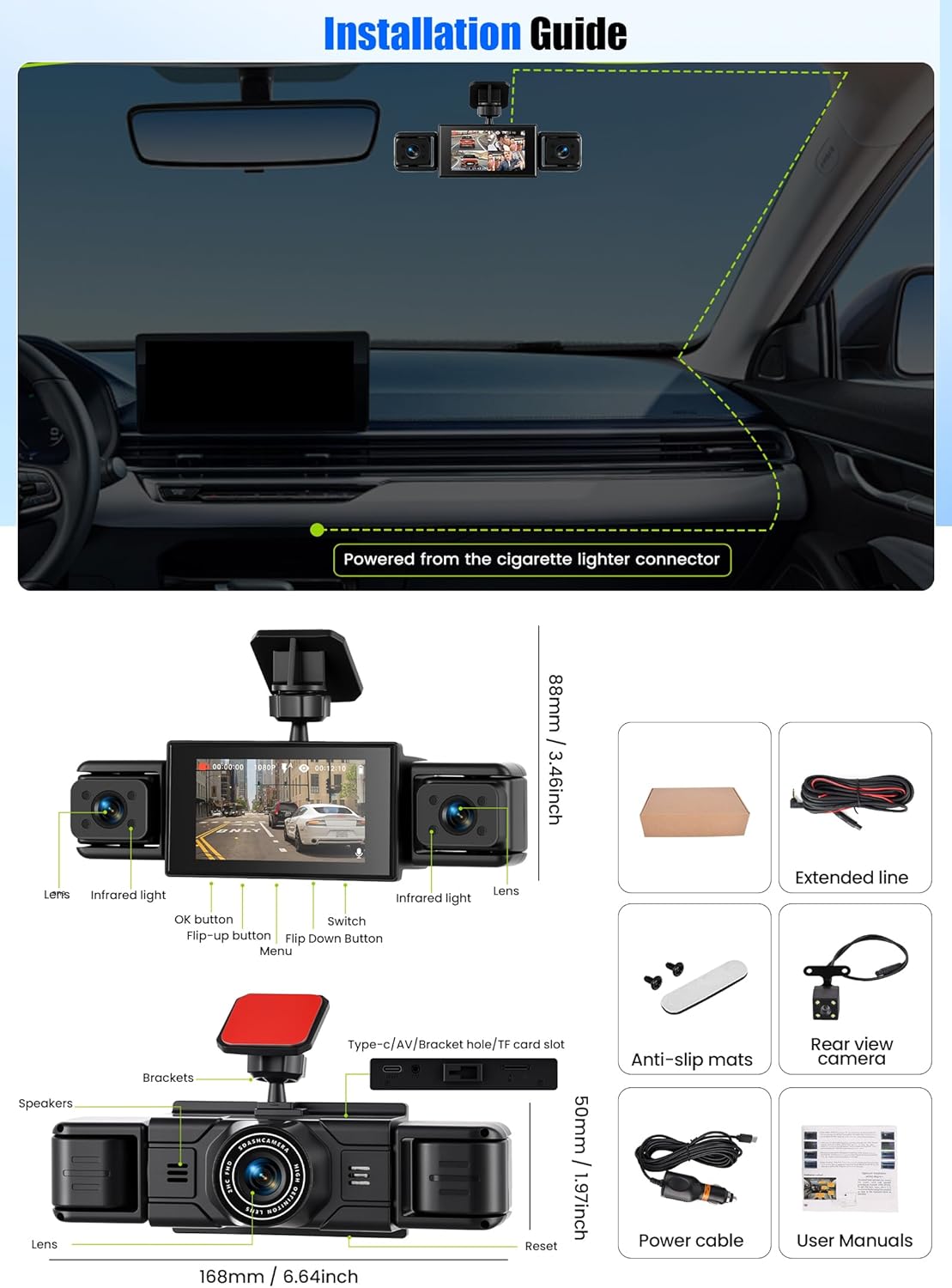
Image: Diagram illustrating the dashcam's dimensions, button layout, ports, and included accessories like the rear view camera, power cable, and anti-slip mats.
2.3 Inserimentu di a carta TF
- Assicuratevi chì a dashcam sia spenta.
- Insert a high-speed Class 10 TF (Micro SD) card (up to 64GB recommended) into the designated TF card slot on the dashcam.
- For first-time use, it is recommended to format the TF card through the dashcam's settings menu to ensure compatibility and optimal performance.
3. Operating Instructions
This section details the primary functions and operations of your dashcam.
3.1 Power On/Off and Basic Display
- The dashcam will automatically power on and begin recording when your vehicle's ignition is turned on.
- Si spegnerà automaticamente pocu dopu chì l'accensione sia spenta.
- The 3-inch IPS screen displays live feeds from the cameras. You can switch between different camera views (front, rear, side, or split-screen) using the navigation buttons.
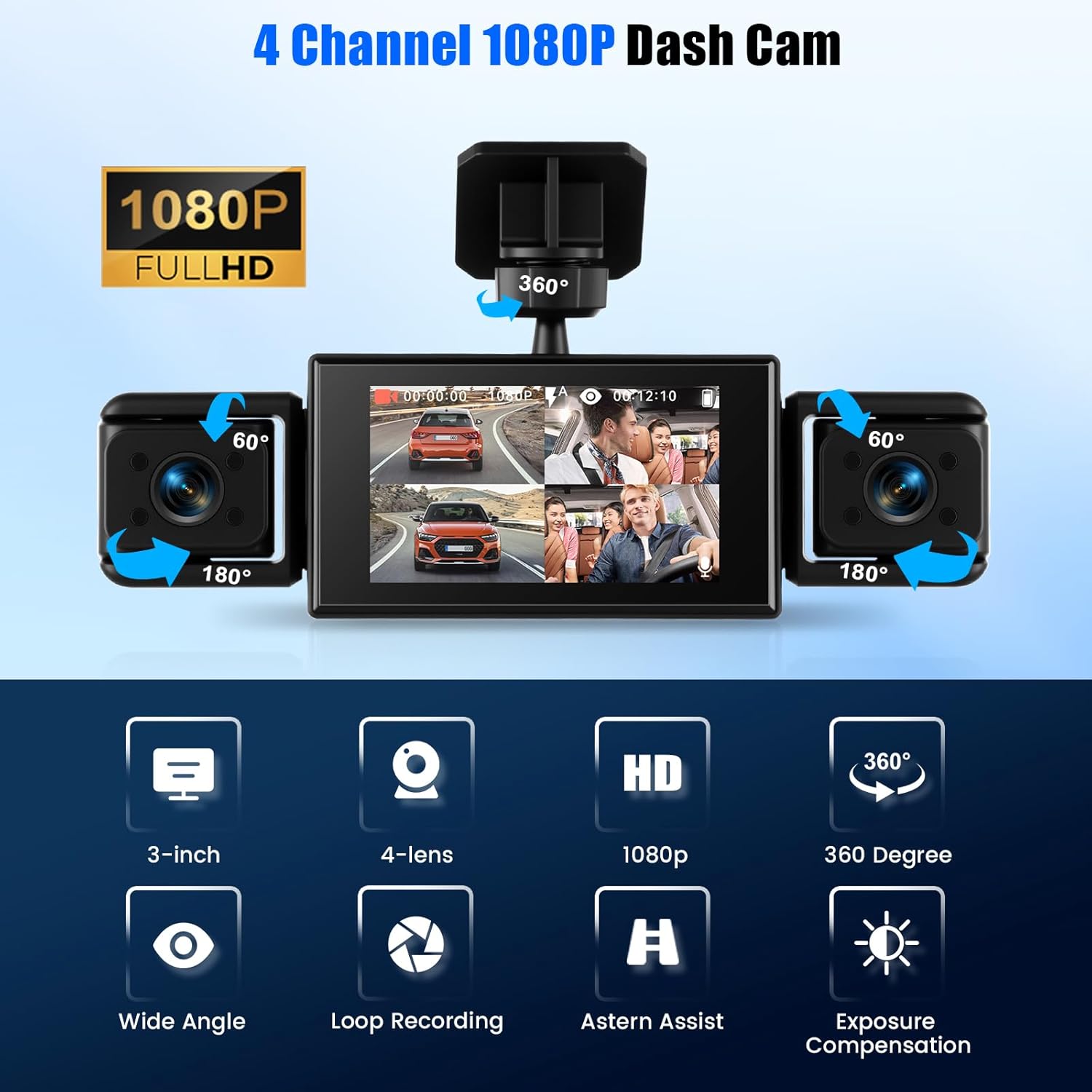
Imagine: Più diview of the CAMECHO 4-channel dashcam showing the main unit with a 3-inch screen displaying multiple camera views, and two adjustable side cameras providing 180-degree rotation and 60-degree lens angle.
3.2 Registrazione in Loop
The dashcam continuously records video in short segments (e.g., 1, 3, or 5 minutes). When the TF card reaches its storage limit, the oldest unlocked video fileI dati sò automaticamente sovrascritti da e nuove registrazioni. Questu assicura una registrazione cuntinua senza intervenzione manuale.
- Video Locked: Videos triggered by the G-sensor (due to sudden impact or collision) or manually locked will not be overwritten.
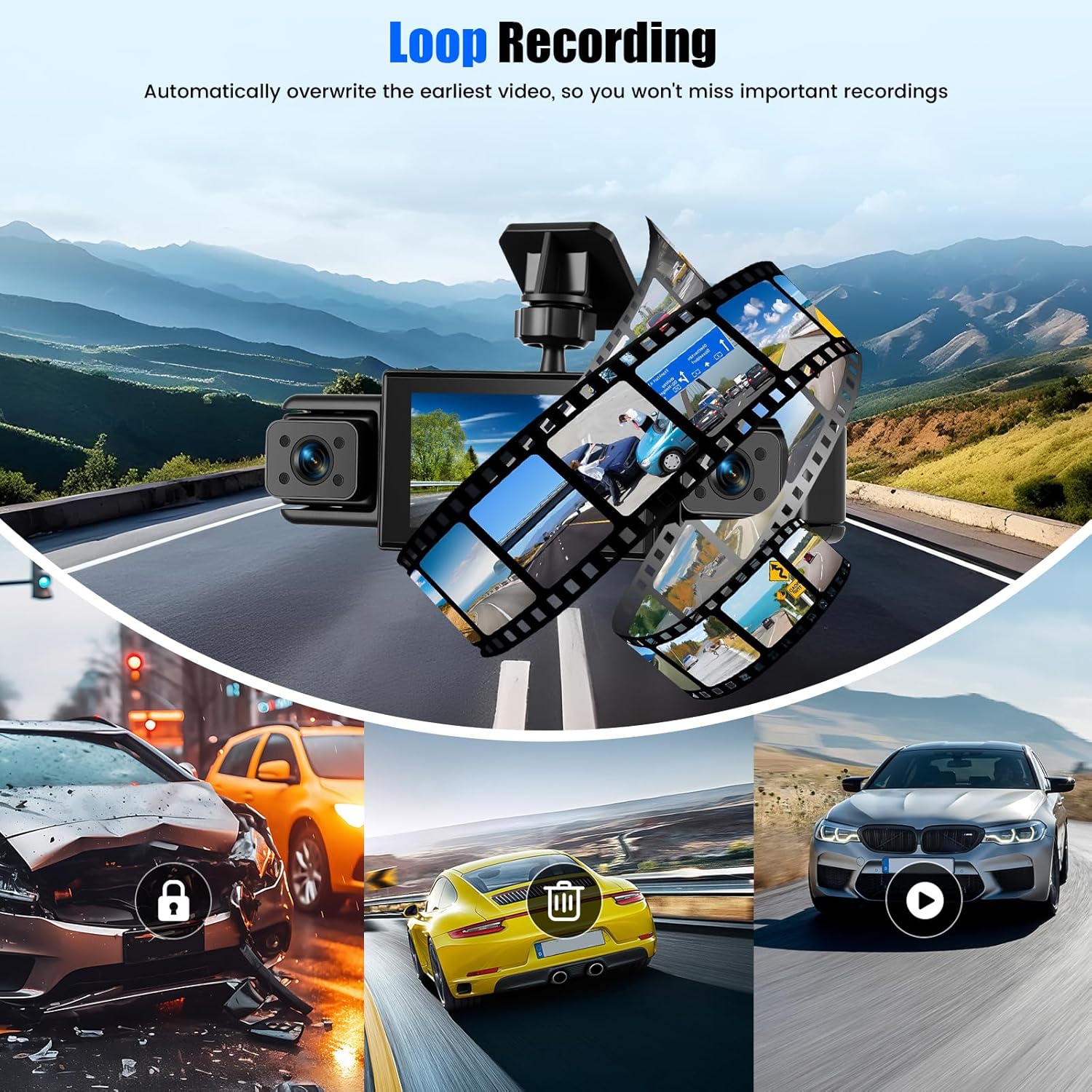
Image: Visual representation of the loop recording function, showing older video segments being replaced by new ones, while important event-triggered videos are locked and protected.
3.3 Detezzione di u muvimentu
When enabled, the motion detection feature allows the dashcam to automatically start recording if it detects movement around your parked vehicle. This is useful for monitoring your car when it's unattended.
- To activate/deactivate motion detection, navigate to the settings menu on the dashcam.

Image: A scenario depicting the motion detection feature, where the dashcam automatically records when it senses movement, such as a person approaching the vehicle.
3.4 Night Vision and Exposure Compensation
The dashcam is equipped with 8 anti-glare infrared (IR) night vision lights and an exposure compensation function. This technology ensures clear video capture even in low-light conditions or at night, and prevents overexposure in bright daylight.
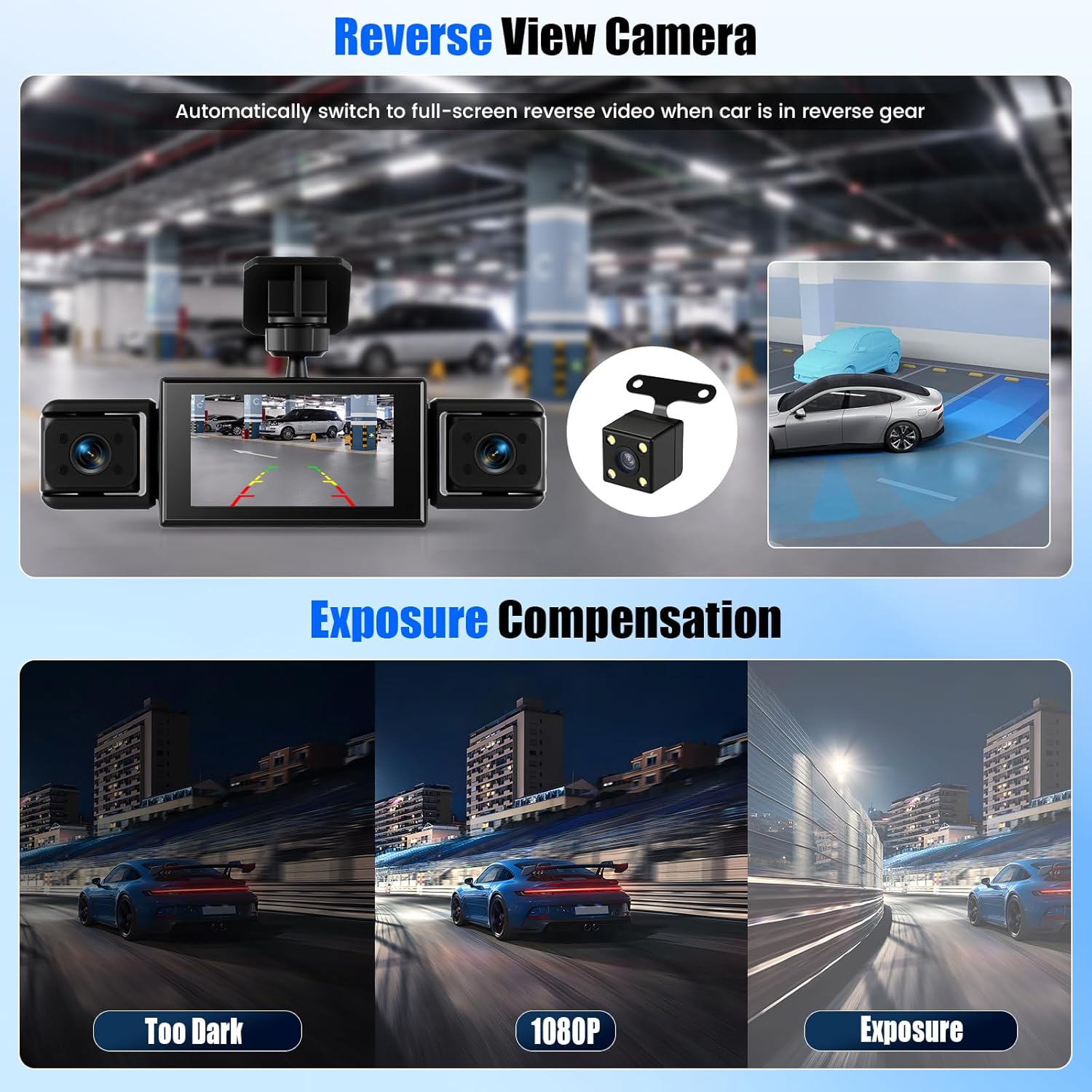
Image: Comparison of video quality in different lighting conditions: 'Too Dark', '1080P' (standard), and 'Exposure' (compensated), demonstrating the effectiveness of night vision and exposure compensation for clear recording.
3.5 Parking Assist (Reverse View)
When the vehicle is shifted into reverse gear, the dashcam automatically switches to a full-screen display of the rear camera feed. Fixed guidelines are overlaid on the screen to assist with safe parking maneuvers.
Image: Illustration of the reverse view camera feature, showing the dashcam display automatically switching to a full-screen rear view with parking guidelines when the car is in reverse.
3.6 360-Degree Protection
The four-camera system provides a comprehensive 360-degree view around your vehicle. The front camera offers a 150-degree wide-angle view, while the side cameras provide 120-degree coverage, minimizing blind spots and capturing events from all directions.
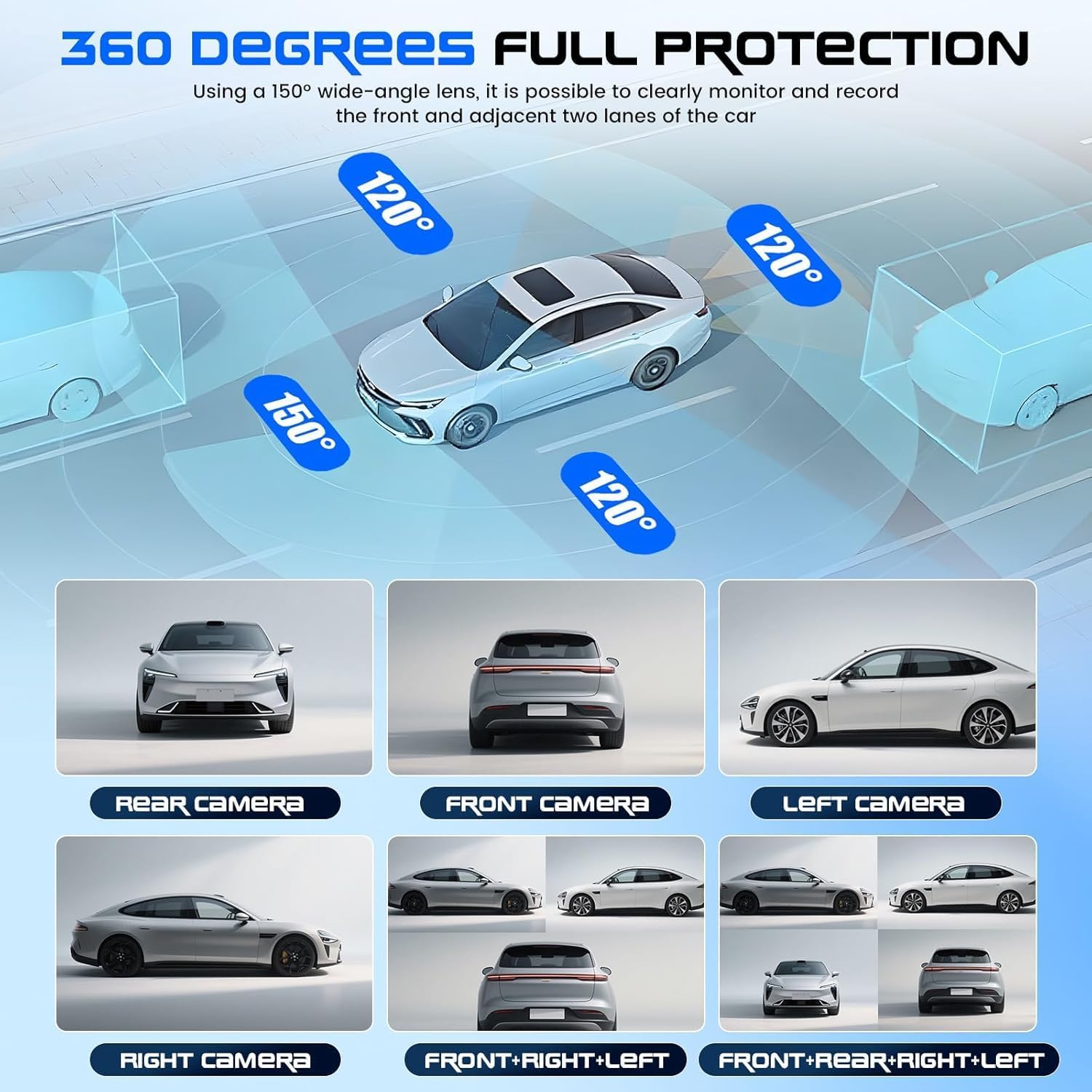
Image: Diagram showing the 360-degree coverage provided by the dashcam's multiple lenses, with 150-degree front view and 120-degree side views, ensuring full protection around the vehicle.
4. Mantenimentu
Una manutenzione regulare assicura a longevità è e prestazioni ottimali di a vostra dashcam.
4.1 Pulizia
- Use a soft, dry cloth to clean the dashcam's lenses and screen. Avoid abrasive materials or chemical cleaners that could damage the surfaces.
- Ensure the windshield area around the dashcam is clean to maintain clear video quality.
4.2 TF Card Management
- Periodically format the TF card (e.g., once a month) through the dashcam's settings menu. This helps prevent data corruption and maintains recording efficiency.
- Replace the TF card if you notice any recording errors or performance degradation.
5. Risoluzione di prublemi
Sè avete prublemi cù a vostra dashcam, riferitevi à i seguenti prublemi è suluzioni cumuni.
- Dashcam does not power on:
- Check if the car charger is properly connected to the cigarette lighter socket and the dashcam.
- Assicuratevi chì l'accensione di u veiculu sia accesa.
- Test the car charger with another device to confirm it is functioning.
- A registrazione si ferma o si blocca:
- Ensure you are using a high-speed Class 10 TF card.
- Format the TF card through the dashcam's settings menu.
- The TF card may be full; loop recording should manage this, but ensure no excessive locked files.
- Replace the TF card if the issue persists.
- A camera posteriore ùn mostra micca:
- Check the connection of the rear camera cable to the main DVR unit.
- Assicuratevi chì u cable ùn hè micca dannatu.
- Qualità video povera:
- Clean the camera lenses and windshield.
- Assicuratevi chì a pellicola protettiva sia stata rimossa da e lenti.
- Check video resolution settings in the menu.
- Dashcam gets hot during operation:
- It is normal for dashcams to generate some heat during operation. If it becomes excessively hot or shuts down, contact support.
6. Specificazioni
| Feature | Specificazione |
|---|---|
| Marca | CAMECHO |
| Nome di mudellu | Car Camera (3-Inch 4-Channel Dashcam) |
| Size Screen | 3 pollici IPS |
| Risoluzione Video | 1080P (Front) + 3*480P (Side/Rear) |
| Format Video | AVI |
| Formatu di foto | JPG |
| Frame Rate | 30 FPS |
| Campu di View | 150 Degrees (Front), 120 Degrees (Side) |
| Funzioni spiciali | 4 Channels, Loop Recording, 360° Monitoring, Night Vision, Motion Detection, Parking Assist |
| Dispositivi compatibles | Car, Truck, Vehicle |
| Supportu per a carta di memoria | TF Card (Max 64GB, Class 10 high-speed) |
| Tipu di muntatura | Suction Cup and Adhesive Mount |
| Dimensioni | 19P x 18L x 6A centimetri |
| Culore | Neru |
7. Garanzia è Support
7.1 Garanzia di u fabricatore
Stu pruduttu vene cun a Garanzia di u fabricatore di 2 anni. It also includes a 30-day free return policy.
7.2 Assistenza Clienti
For any questions, technical assistance, or warranty claims, please contact CAMECHO customer support. Online service is available 24 hours a day.
E-mail: CAMECHOVIP@126.com


