1. Introduzione
The GODOX XT-16 Flash Trigger Transmitter is a wireless control device designed for Godox 2.4G X System photography monolights and studio strobe lights. It operates on a 2.4GHz frequency, offering 16 channels and 16 groups for flexible control. This transmitter enables remote adjustment of flash power, modeling lamp, buzzer, AF-assist beam, and flash triggering, providing enhanced convenience and precision in studio and on-location photography setups.
2. Setup è Installazione
2.1 Accensione
Ensure the XT-16 transmitter has fresh batteries installed. Turn on the power switch located on the side of the unit.
2.2 Pairing with Godox 2.4G X System Monolights
The XT-16 transmitter works directly with Godox 2.4G X system monolights such as MS300, MS300V, SK300II, SK400II, SK400IIV, DP400II, DP400III, DP600II, and DP600III. No additional receiver is required for these units.

Figure 1: Godox XT-16 trigger compatibility with various Godox 2.4G X System monolights. The image shows the XT-16 in the center, surrounded by compatible flashes like DP II, Quick II, Quicker DII, MS300, MS300-V, SK300II, SK400II, and SK400II-V, indicating direct wireless control.
2.3 Pairing with Non-2.4G X System Studio Strobes
For non-2.4G X system studio strobe lights, the Godox XTR-16 receiver is required to receive commands from the XT-16 transmitter and enable synchronization. Ensure the XTR-16 receiver is properly connected to the strobe's USB 'SYN' port.
2.4 Pairing with V850/V860 Series Flashes
When using the XT-16 with Godox V850 or V860 series flashes, the Godox XTR-16S receiver is necessary for synchronization.
2.5 Basic Setup Steps with 2.4G Strobe
- Ensure all devices (transmitter and strobe) are powered ON.
- Turn ON the 2.4G signal on the strobe.
- Set the same channel on both the XT-16 transmitter and the strobe.
- Set the POWER dial to the desired GROUP number/letter selected on the Godox 2.4G X system strobe.

Figure 2: XT-16 display and setup instructions. The image highlights the 2.4G signal indicator, channel, group, and output ratio on the XT-16's screen, alongside a step-by-step guide for connecting to a 2.4G strobe.
3. Operating Instructions
3.1 Muntà u trasmettitore
Mount the XT-16 transmitter onto your camera's hot shoe. Ensure it is securely fastened.
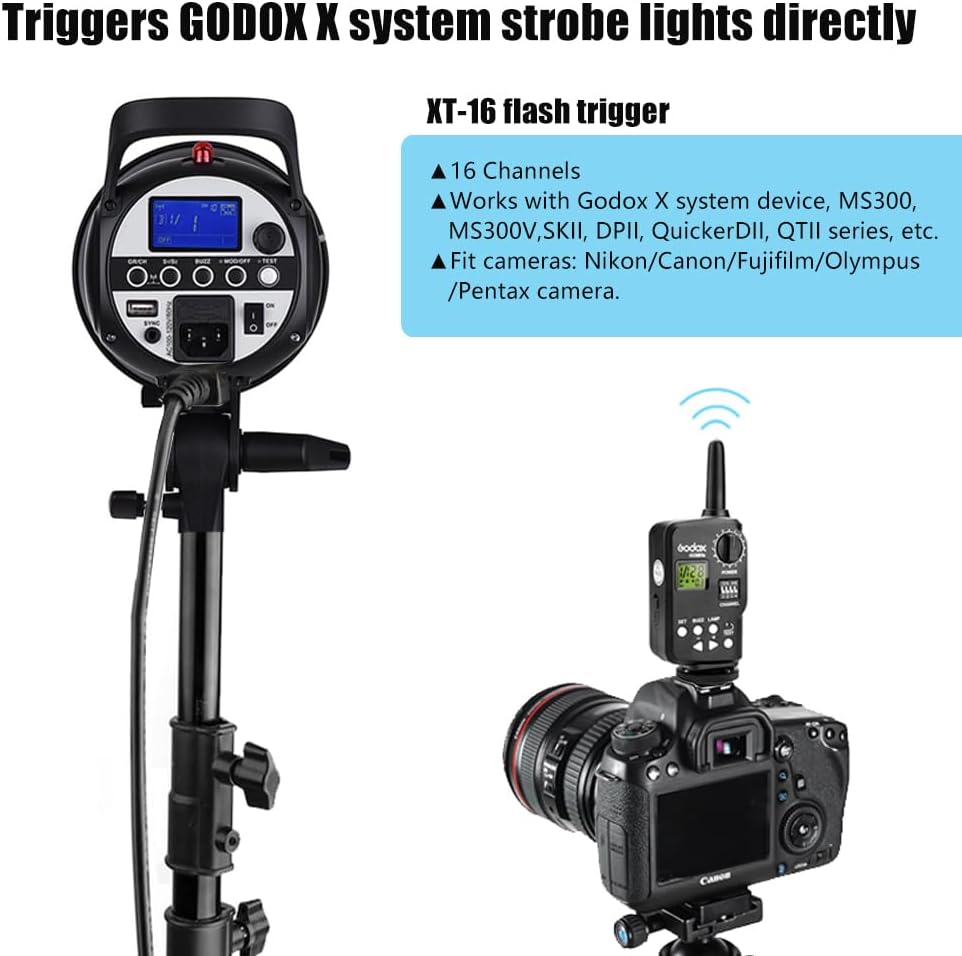
Figure 3: XT-16 mounted on a camera. This image illustrates the XT-16 trigger attached to a camera's hot shoe, demonstrating its use in wirelessly triggering a studio strobe.
3.2 Cuntrolli è Funzioni
- Power ON/OFF: Use the dedicated switch to turn the unit on or off.
- Selezzione di canali: The XT-16 offers 16 channels. Use the channel selector to match the channel with your strobe.
- Selezzione di u gruppu: Control up to 16 groups (0-9, A-F). Select the desired group for individual or multiple strobe control.
- Ajustamentu di u livellu di putenza: Use the power dial to adjust the flash output level of the connected strobes.
- Mudellaghju Lamp ON/OFF: Toggle the modeling lamp of the strobe.
- Buzzer ON/OFF: Activate or deactivate the strobe's buzzer sound.
- AF-Assist Beam ON/OFF: Control the autofocus assist beam function.
- Pulsante di prova: Press to fire a test flash and verify connection.
Prestazioni Wireless 3.3
The XT-16 operates on a 2.4GHz frequency, providing a wireless control working distance of up to 100 meters. The fastest synchronization speed achievable is 1/250s.
4. Cumpatibilità
The GODOX XT-16 Flash Trigger Transmitter is widely compatible with various camera brands, including Canon, Nikon, Sony, Fujifilm, Olympus, and Pentax. It synchronizes the camera shutter with Godox X system monolights.
4.1 Camera Compatibility List
Refer to the detailed compatibility list below for specific camera models and their flash sync capabilities with the XT-16. This table indicates models that support legacy hot shoe control.
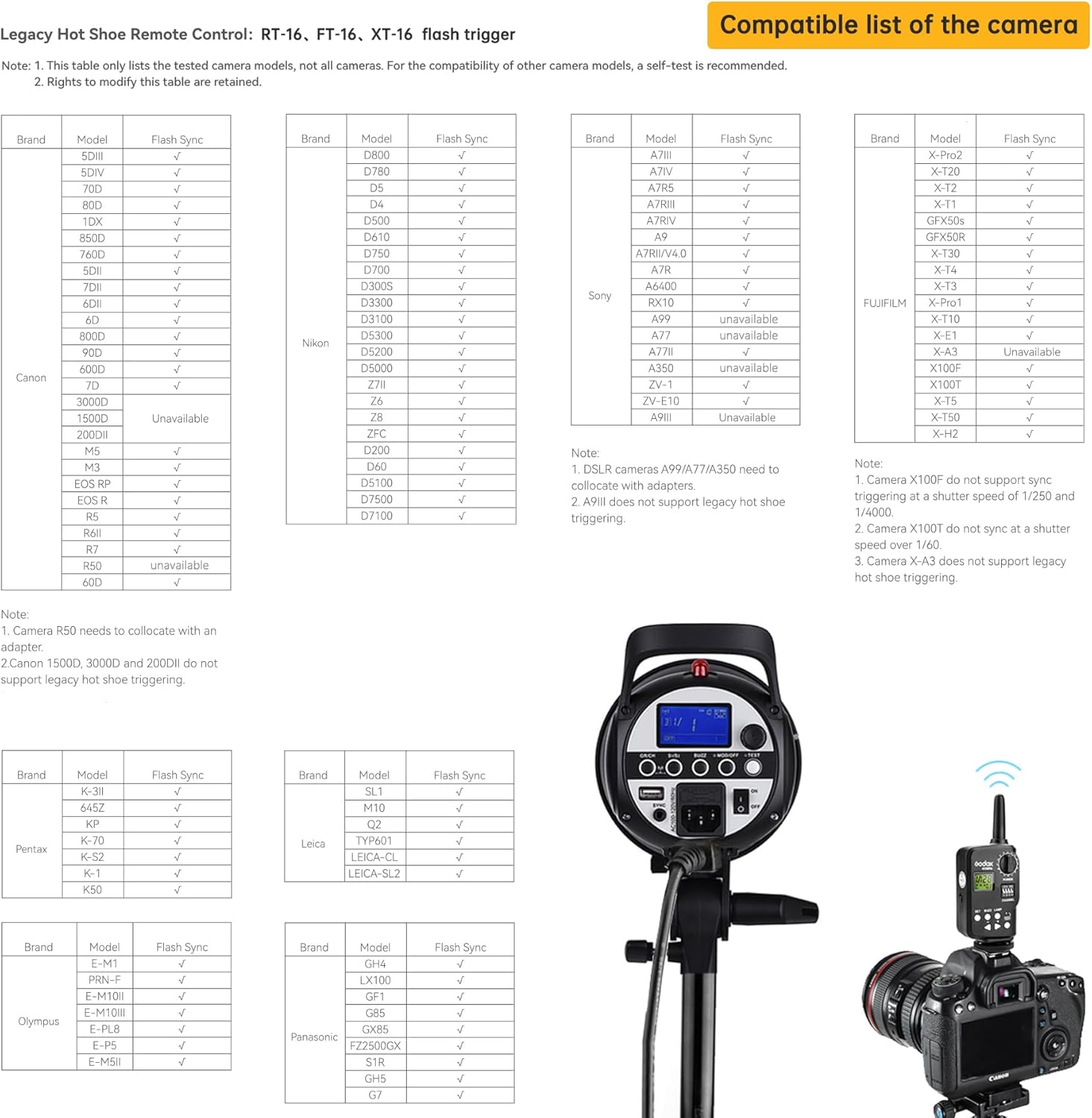
Figure 4: Camera compatibility list. This image displays a comprehensive table detailing the compatibility of various camera models from brands like Canon, Nikon, Sony, Fujifilm, Olympus, Pentax, Leica, and Panasonic with the XT-16 trigger, indicating their flash synchronization status.
Nota: This table only lists tested camera models. For other camera models, a self-test is recommended. Some models may require an adapter or have specific limitations (e.g., sync speed). Always refer to your camera's manual for hot shoe compatibility.
5. Mantenimentu
- Mantene l'apparechju asciuttu. Ùn manipule micca cù e mani bagnate è ùn l'immerge micca in acqua.
- Avoid sudden impacts. The device may malfunction if subjected to strong shocks, drops, or vibrations.
- Mantene fora di a portata di i zitelli.
- Ùn smuntate micca u dispusitivu. E riparazioni devenu esse eseguite solu da u persunale di serviziu autorizatu.
- Clean the device with a soft, dry cloth. Do not use solvents or harsh chemicals.
- Eliminate e batterie se u dispusitivu ùn serà micca adupratu per un periodu prolongatu per impedisce perdite.
6. Risoluzione di prublemi
6.1 U flash ùn si accende micca
- Verificate u putere: Ensure both the XT-16 transmitter and the strobe/flash unit are powered on and have sufficient battery life.
- Verify Channel/Group: Confirm that the channel and group settings on the XT-16 match those on the receiving strobe/flash unit.
- Cunnessione sicura: Ensure the XT-16 is properly seated in the camera's hot shoe. For external receivers (XTR-16/XTR-16S), ensure they are securely connected to the flash unit.
- Gamma: Check if the transmitter and receiver are within the effective operating range (up to 100 meters). Obstacles can reduce this range.
- Settings Camera: Ensure your camera's flash settings are correctly configured and not set to a mode that disables external flash.
6.2 Inconsistent Firing or Missed Flashes
- Interferenza: 2.4GHz signals can be affected by other wireless devices. Try changing the channel on your XT-16 and strobe.
- Livellu di batteria: Low batteries in either the transmitter or the flash unit can lead to inconsistent performance. Replace or recharge batteries.
- Distanza/Ostaculi: Reduce the distance between the transmitter and receiver, or remove any large metallic objects that might be blocking the signal.
6.3 Incorrect Flash Output
- Paràmetri di putenza: Double-check the power level set on the XT-16 transmitter.
- Modu Strobe: Ensure the strobe is in the correct mode (e.g., Manual) if you are controlling power manually from the XT-16.
7. Specificazioni
| Dimensioni di u pacchettu | 6.81 x 5.31 x 1.85 inch |
| Pesu di l'articulu | 2.99 once |
| Frequenza wireless | 2.4 GHz |
| Canali | 16 |
| Gruppi | 16 (0-9, A-F) |
| Velocità massima di sincronizazione | 1/250s |
| Distanza di cuntrollu wireless | Finu à 100 metri |
| U fabricatore | GODOX |
8. Garanzia è Support
For warranty information and technical support, please refer to the documentation included with your purchase or visit the official GODOX websitu. Conservate a vostra prova d'acquistu per qualsiasi reclamazione di garanzia.


