1. Introduzione
Welcome to the user manual for your new FLEXISPOT 63x28 Inch Dual Motor Electric Standing Desk. This manual provides essential information for the safe assembly, operation, maintenance, and troubleshooting of your desk. Please read it thoroughly before use and retain it for future reference.
2. Istruzzioni di sicurità
- Assicuratevi chì tutti i cumpunenti sianu presenti è intatti prima di u montaggio. Ùn aduprate micca se qualchì parte manca o hè dannighjata.
- Mantene i zitelli è l'animali domestici luntanu da u scrivania durante l'operazione per evità ferite.
- Ùn mette micca e mani o altre parti di u corpu vicinu à e parti mobili di u scrivania durante a regulazione di l'altezza.
- Assicuratevi chì u scrivania sia piazzatu nantu à una superficia piana per impedisce u ribaltamentu.
- Ùn sovraccaricate micca u scrivanu. Riferitevi à e specificazioni per a capacità di pesu massima.
- Keep all electrical cords organized and away from moving parts to prevent damage or entanglement.
- Scollegate u scrivania da a presa di corrente prima di pulisce o di fà qualsiasi manutenzione.
- Only use the desk for its intended purpose as a workstation.
3. Cuntenutu di u pacchettu
Verificate chì tutti l'articuli elencati quì sottu sò inclusi in u vostru pacchettu:
- Desktop Surface (Black)
- Desk Frame (Black, including dual motors and lifting columns)
- Control Panel with Memory Controller
- Adattatore d'alimentazione è Cable
- Ferramenta di montaggio (viti, strumenti, ecc.)
- Manuale d'istruzzioni

Imagine: Più diview of the FLEXISPOT 63x28 Inch Dual Motor Electric Standing Desk, showing the desktop, frame, and control panel.
4. Setup Instructions
4.1 Unpacking
Carefully remove all components from the packaging. Place them on a soft, clean surface to prevent scratches or damage during assembly. Keep all packaging materials until assembly is complete and you are satisfied with the product.
4.2 Assemblaggio di u quadru
Follow the detailed diagrams provided in the separate assembly guide to connect the lifting columns to the crossbar and attach the footings. Ensure all screws are tightened securely.
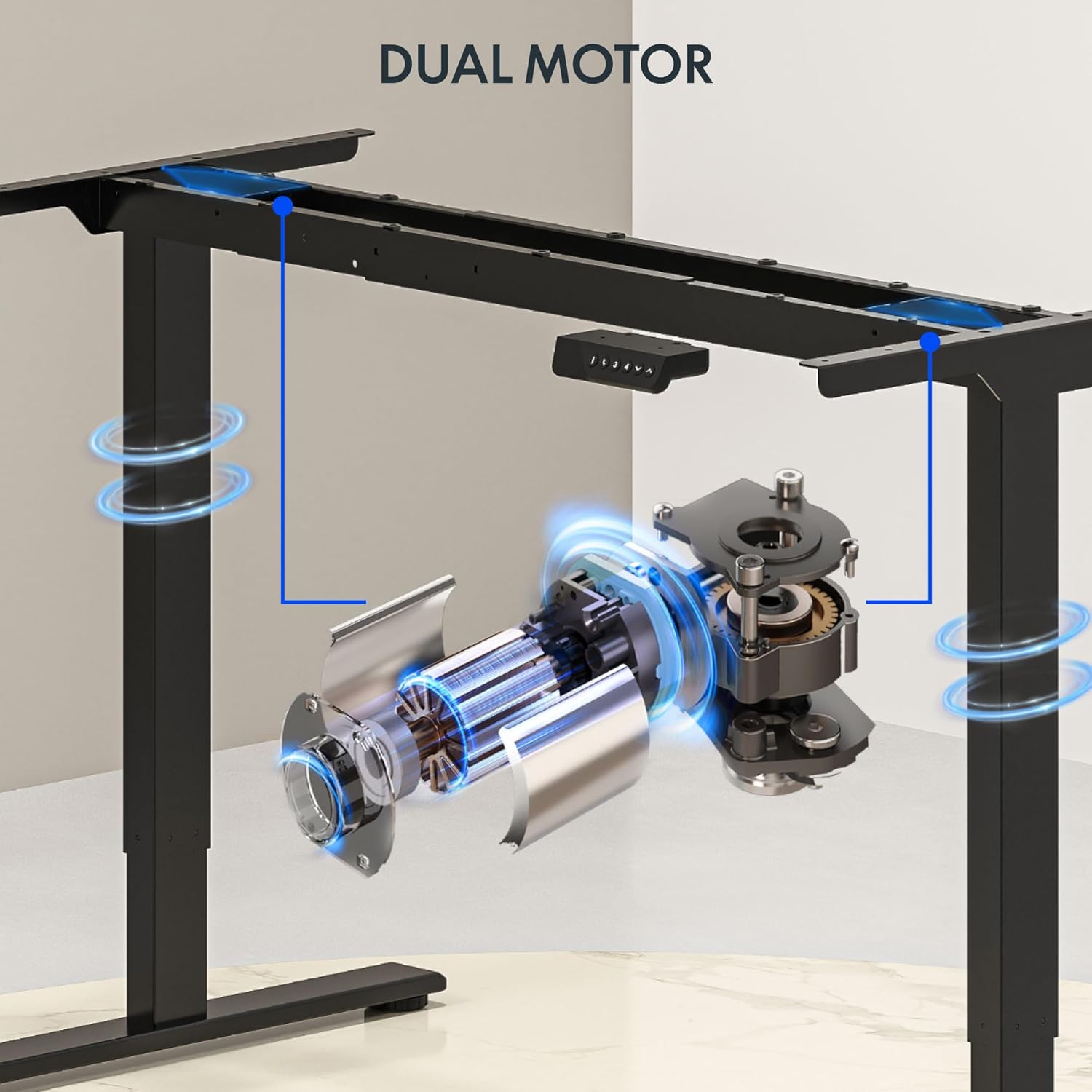
Imagine: Dettagliata view of the dual motor desk frame, illustrating the motor placement and structural components.
4.3 Attaccà u Desktop
Carefully place the desktop upside down on a soft surface. Align the assembled frame with the pre-drilled holes on the desktop. Secure the desktop to the frame using the provided screws. Once secured, carefully flip the desk upright with assistance.
4.4 Cunnessione di u pannellu di cuntrollu è di l'alimentazione
Connect the control panel cable to the control box, and then connect the power adapter to the control box. Plug the power cable into a standard electrical outlet. The desk is now ready for initial operation.

Image: Close-up of the desk's control panel, showing the LED display and buttons for height adjustment and memory presets.
Video: Demonstrates the dual-motor strength and smooth operation of the FLEXISPOT standing desk, highlighting its robust design and functionality.
5. Operating Instructions
5.1 Aghjustà l'altezza
- Press u Su (∧) buttone per alzà u scrivania.
- Press u Giù (∨) buttone per calà u scrivania.
- Rilasciate u buttone à l'altezza desiderata. U display LED mostrerà l'altezza attuale.
5.2 Usendu i Preset di Memoria
The control panel features four memory presets (1, 2, 3, 4) to save and recall your preferred sitting and standing heights.
- Ajustate u scrivanu à l'altezza desiderata aduprendu i buttoni Su/Giù.
- Press u "M" button (or similar memory set button, indicated by 'i' on some models) once. The display will flash.
- Immediately press one of the number buttons (1, 2, 3, or 4) to save the current height to that preset.
- Per richiamà una altezza salvata, basta à appughjà u buttone numericu currispundente (1, 2, 3, o 4). U scrivania si moverà automaticamente à a pusizione salvata.

Image: Close-up of the memory controller, highlighting the numbered preset buttons and the up/down controls for precise height adjustments.
5.3 Sistema anticollisione
The desk is equipped with an anti-collision system. If the desk encounters an obstacle during height adjustment, it will automatically stop and reverse slightly to prevent damage. This feature enhances safety during operation.
6. Mantenimentu
- Pulizia: Asciugate a superficia di u scrivania è a struttura cù un pannu dolce èamp pannu. Evitate detergenti abrasivi o chimichi aggressivi chì puderanu dannà a finitura.
- Ispezione: Regularly check all screws and connections to ensure they are tight. Re-tighten if necessary.
- Gestione di Cable: Ensure all cables are neatly organized and not pinched or tangled, especially during height adjustments.
- Cordone d'alimentazione: Inspect the power cord for any signs of damage. If damaged, discontinue use and contact customer support.
7. Risoluzione di prublemi
| Prublemu | Causa Possibile | Soluzione |
|---|---|---|
| U scrivanu ùn si move micca. | Power cable disconnected; motor cable loose; overload. | Verificate a cunnessione elettrica; assicuratevi chì tutti i cavi sianu ben cunnessi; riduce u pesu nantu à u scrivania. |
| U scrivania si move in modu irregulare o face un rumore insolitu. | Carica irregulare; cunnessione allentate; ostruzione. | Distribute weight evenly; check and tighten all screws; remove any obstructions. |
| I preset di altezza ùn funzionanu micca. | Presets not properly set. | Re-program the memory presets following section 5.2. |
| U sistema anticollisione si attiva spessu. | Obstacles in the path of movement; sensitivity setting too high. | Clear the area around the desk; consult the full manual for adjusting anti-collision sensitivity if available. |
If you encounter issues not listed here or if the solutions do not resolve the problem, please contact FLEXISPOT customer support.
8. Specificazioni
| Feature | Detail |
|---|---|
| Marca | FLEXISPOT |
| Mudellu | 63x28 Inch Dual Motor Electric Standing Desk |
| Dimensioni Desktop | 63"L x 28"P |
| Gamma d'altezza | 28.3" à 47.6" |
| Capacità massima di pesu | 198 lbs |
| Tipu di Motore | Doppiu Motore |
| Panel di cuntrollu | Memory Controller with 4 Presets |
| Materiale di Scrivania | Engineered Wood (Black Top) |
| Materiale di quadru | Alloy Steel (Black Frame) |
| Funzioni spiciali | Dual Motor, 198 lbs Heavy-Duty Capacity, Memory Controller, 63"x28" Large Desktop |

Image: Diagram illustrating the dimensions of the FLEXISPOT 63x28 Inch Electric Standing Desk, including height range, width, and depth.
9. Garanzia è Support
9.1 Garanzia limitata
This FLEXISPOT product comes with a limited warranty against defects in materials and workmanship. The specific terms and duration of the warranty may vary. Please refer to the warranty card included in your package or visit the official FLEXISPOT websitu per infurmazioni dettagliate di garanzia.
The warranty typically covers the desk frame, motors, and control panel under normal use conditions. Damage resulting from misuse, accidents, unauthorized modifications, or improper assembly is not covered.
9.2 Assistenza Clienti
For technical assistance, warranty claims, or any questions regarding your FLEXISPOT standing desk, please contact our customer support team:
- Websitu: www.flexispot.com
- E-mail: support@flexispot.com
- Telefonu: (Refer to your product packaging or websitu per i numeri di cuntattu regiunali)
Please have your model number (B0F29ZD4DN) and purchase date ready when contacting support.


