
Introduzione
Welcome to the Parsonver SR2 Smart Watch user manual. This guide provides detailed instructions on how to set up, operate, maintain, and troubleshoot your new smart watch. Please read this manual thoroughly to ensure optimal performance and longevity of your device.

Image: The Parsonver SR2 Smart Watch, showcasing its display with time, date, steps, and heart rate, alongside a smaller inset of its GPS tracking feature.
1. Setup
1.1 Cuntenuti di u pacchettu
Prima di principià, verificate chì tutti l'articuli sò presenti in u vostru pacchettu:
- Parsonver SR2 Smart Watch
- Cavu di carica
- Manuale d'uso (stu documentu)

Image: An illustration showing the Parsonver SR2 Smart Watch, its magnetic charging cable, and the included user manual.
1.2 Caricà u dispusitivu
Upon first use, fully charge your smart watch. Connect the magnetic charging cable to the charging contacts on the back of the watch and plug the USB end into a power adapter (not included) or a computer's USB port. A full charge typically takes approximately 2 hours.
Image: The Parsonver SR2 Smart Watch connected to its magnetic charging cable, displaying a 100% charge indicator.
1.3 Installazione è accoppiamentu di l'app
To unlock the full functionality of your Parsonver SR2 Smart Watch, download and install the companion application on your smartphone.
- Scan the QR code in the manual or search for the 'Parsonver' app in your phone's app store (Google Play Store for Android, Apple App Store for iPhone).
- Installate l'applicazione è create un contu o cunnettatevi.
- Assicuratevi chì Bluetooth hè attivatu nantu à u vostru smartphone.
- Open the Parsonver app, navigate to the device section, and follow the on-screen instructions to pair your SR2 Smart Watch.
- Grant all necessary permissions requested by the app for full functionality, including notifications and location services.
2. Funziunamentu di u vostru Smart Watch
2.1 Navigazione basica
The Parsonver SR2 Smart Watch features a responsive touchscreen and dual physical buttons for intuitive control.
- Touchscreen: Scorri à manca/destra, in su/in giù per navigà trà i menu è e funzioni. Tocca per selezziunà.
- U buttone superiore: Typically used to return to the home screen or wake the device.
- Pulsante inferiore: Customizable. Can be set to quickly access workout modes or frequently used applications via the companion app.

Image: A close-up of the Parsonver SR2 Smart Watch highlighting its dual button design and a menu showing 'Exercise', 'Walking', and 'Treadmill' options.
2.2 Chjamate Bluetooth è Notificazioni Intelligenti
The SR2 Smart Watch supports Bluetooth 5.3 for stable connectivity, allowing you to answer and make calls directly from your wrist and receive smart notifications.
- Risponde / Fà chjame: Once paired, incoming calls will display on your watch. You can answer or reject them. Use the integrated microphone and speaker for conversations.
- Notificazioni Smart: Receive alerts for calls, SMS, and various social media applications directly on your watch. Ensure app permissions are granted for notifications.
- Quick Call Replies: (Android only) Respond instantly to calls with pre-set messages.

Image: A person interacting with the Parsonver SR2 Smart Watch, showing a call screen with a dial pad and contact list, along with icons for various social media notifications.
2.3 Sports Modes & Built-in GPS
Track your fitness activities with over 100 sports modes and accurate built-in GPS.
- Più di 100 modi sportivi: Select your activity from a wide range of sports to get precise tracking of duration, distance, calories burned, and heart rate zones.
- GPS integratu: Accurately record your workout routes without needing your phone. View detailed maps and statistics in the companion app after your activity.
- Rilevazione intelligente: The watch can automatically recognize when you are running, walking, or using a treadmill.

Image: A person running outdoors, with the Parsonver SR2 Smart Watch displaying a GPS-tracked route on its screen and a smartphone app showing detailed workout data including distance and time.
2.4 Monitoraghju di a salute 24 ore su 24
Monitor your health metrics continuously with the SR2 Smart Watch.
- Monitoramentu di a Frequenza Cardiaca: Tracks your heart rate throughout the day. Set custom alerts for high or low readings.
- Monitoraghju di u sonnu: Analyzes your sleep patterns (deep sleep, light sleep, REM, awake time, sporadic naps) to provide insights into your sleep quality.
- Monitoraghju di l'ossigenu di sangue (SpO2): Measures your blood oxygen levels, providing clear trends and real-time tracking.
- Monitoraghju di u Stress: Understand your emotional fluctuations through data-driven body-mind analysis.
- Women's Health Companion: Provides data-driven cycle management features.

Image: A person sleeping, wearing the Parsonver SR2 Smart Watch, with graphics illustrating sleep monitoring, heart rate monitoring, stress monitoring, and blood oxygen monitoring features.
2.5 Watch Faces & DIY
Personalize your watch with a variety of watch faces or create your own.
- 100+ Watch Faces: Choose from a wide selection of pre-installed watch faces to match your style.
- DIY Watch Faces: Use the companion app to upload your own photos and customize your watch face.

Image: The Parsonver SR2 Smart Watch displaying a custom watch face with a photo, surrounded by various other watch face designs and a smartphone screen showing the watch face synchronization interface.
2.6 Funzioni supplementari
The SR2 Smart Watch offers a range of other useful functions:
- Orologio Mondiale
- Ajustamentu di a luminosità
- Alarma
- Calculatrice
- Timer
- Truvate u mo telefunu
- Alza per sveglià
- Cronometru
- Music Control
- Remote Camera Trigger
- Esercizii di respirazione
- Reminders (Handwashing, Medication, Event, Drinking, Standing)

Image: The Parsonver SR2 Smart Watch screen surrounded by icons representing various features like weather, music, camera control, alarm, and more.
3. Mantenimentu
3.1 Classificazione Impermeabile (IP68)
The Parsonver SR2 Smart Watch is rated IP68 waterproof, meaning it is rigorously tested to withstand splashes, hand washing, face washing, and intense sweat. It is suitable for daily use and light water exposure.
Note: Avoid using the watch while showering, in saunas, or swimming, as hot water, steam, or prolonged submersion can compromise the seal and cause damage.

Image: A man kayaking on a river, wearing the Parsonver SR2 Smart Watch, illustrating its IP68 waterproof capability against splashes.
3.2 Pulizia è Cura
- Pulite regularmente u vostru orologio è u cinturinu cù un pannu dolce èamp tela.
- Evitate l'usu di prudutti chimichi aggressivi, detergenti abrasivi o solventi.
- Assicuratevi chì i cuntatti di carica sianu puliti è asciutti prima di caricalli per impedisce a corrosione.
3.3 Cura di a batteria
- Charge the watch regularly, avoiding complete discharge for extended periods.
- Conservate l'orologio in un locu frescu è asciuttu quandu ùn hè micca in usu.
- Typical battery life is 5-7 days with normal use, and up to 40 days in standby mode. Actual battery life may vary based on usage.
4. Risoluzione di prublemi
If you encounter issues with your Parsonver SR2 Smart Watch, please refer to the following common solutions:
| Issue | Soluzione Possibile |
|---|---|
| Fighjate micca accende | Assicuratevi chì l'orologio sia cumpletamente caricatu. Cunnettelu à u caricatore per almenu 30 minuti. |
| Ùn si pò micca accoppià cù u telefunu | Ensure Bluetooth is enabled on your phone. Restart both the watch and phone. Make sure the watch is within Bluetooth range. Check app permissions. |
| Notificazioni micca ricevute | Verify that notification permissions are granted in the Parsonver app and your phone's settings. Ensure the app is running in the background. |
| Dati sanitari imprecisi | Ensure the watch is worn snugly on your wrist, not too tight or too loose. Clean the sensor on the back of the watch. Avoid excessive movement during measurements. |
| GPS not tracking | Assicuratevi di esse in una zona aperta è chjara view of the sky. Wait for the watch to acquire a GPS signal before starting your activity. |
| Corta vita di a bateria | Reduce screen brightness, disable 'Lift-to-wake' if not needed, limit continuous heart rate monitoring, and close unused apps on the watch. |
Se u prublema persiste, cuntattate l'assistenza clienti per più assistenza.
5. Specificazioni
| Feature | Detail |
|---|---|
| Numero di mudellu | SR2 |
| Dimensioni di u produttu | 9.84 x 1.69 x 0.46 inch |
| Pesu di l'articulu | 1.41 once (40 grammi) |
| Size Screen | 1.27 pollici (dimensione di u schermu in piedi) |
| Diagonale di u screnu visibile | 2" / 4 cm |
| Capacità di almacenamiento di memoria | 256 MB |
| Comunicazione wireless | Bluetooth 5.3 |
| Input di l'interfaccia umana | Touchscreen |
| Classificazione di Prutezzione Internaziunale | IP68 |
| Batteria | Richiede 1 batteria C (inclusa) |
| U fabricatore | Parsonver |
| Prima Data Disponibile | 12 ottobre 2025 |
6. Garanzia è Supportu
6.1 Garanzia di u Produttu
Parsonver products are designed and manufactured to the highest quality standards. This product is covered by a limited warranty against defects in materials and workmanship. Please refer to the warranty card included in your package or contact Parsonver customer support for specific warranty terms and conditions.
6.2 Assistenza Clienti
For any questions, technical assistance, or support needs, please contact Parsonver customer service. Our support team is available 24/7 to assist you.
- Supportu in ligna: Visit the official Parsonver website or contact us through the companion app for online assistance.
- Supportu per email: Refer to your warranty card or product packaging for email contact information.
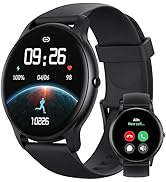
Image: An icon representing 24/7 online customer support, featuring a headset and chat bubbles.


