1. Introduzione
Thank you for choosing the Kinglucky ClipFree Open-Ear Headphones Model A8. These innovative headphones combine high-quality audio with a unique jewelry-inspired design, featuring detachable butterfly earrings. Designed for comfort and awareness, they provide a secure fit without blocking your ear canal, allowing you to enjoy your audio while staying connected to your surroundings. This manual will guide you through the setup, operation, and maintenance of your new headphones.
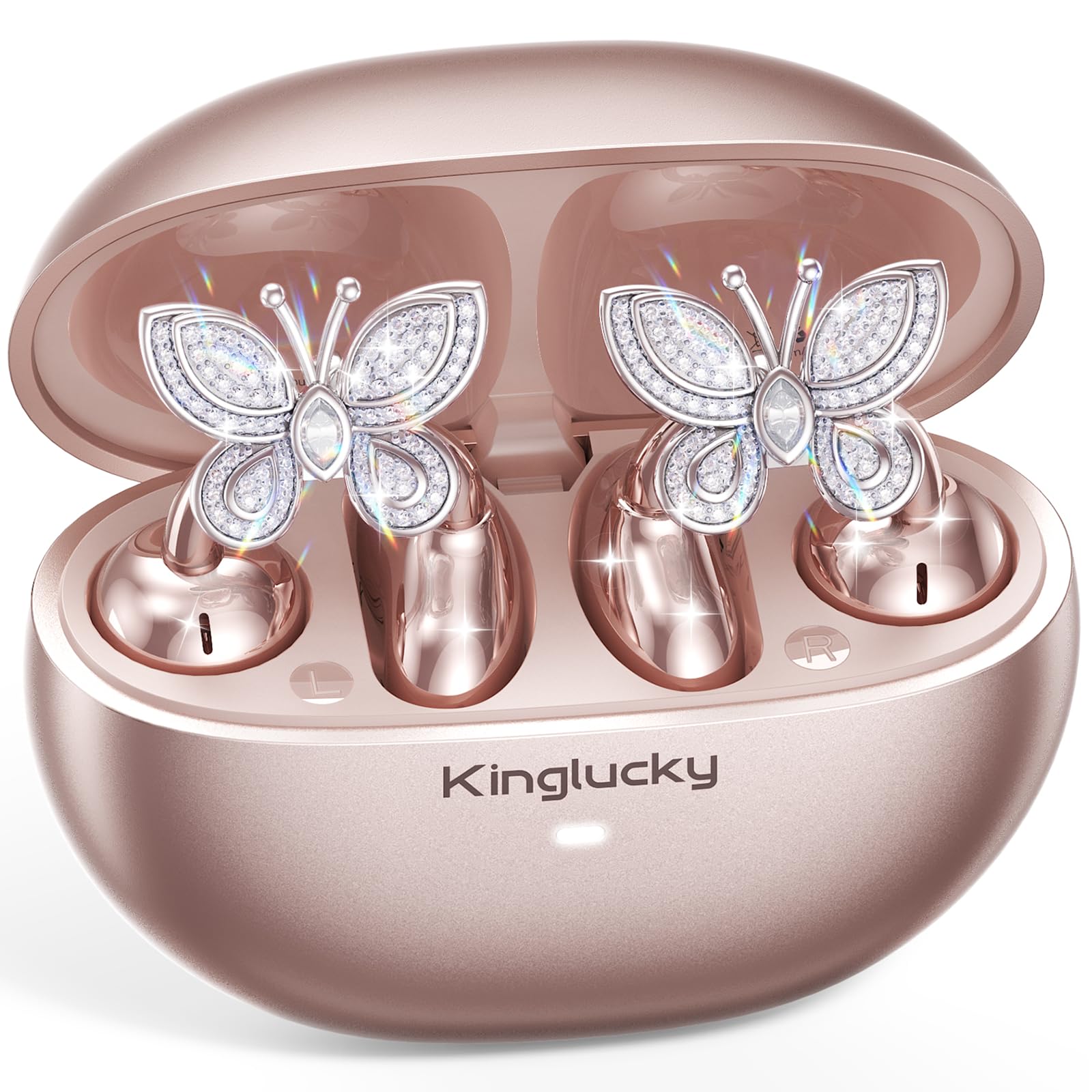
Image: Kinglucky ClipFree Open-Ear Headphones Model A8 in Rose Gold charging case.
2. Ciò chì hè in a scatula
Your Kinglucky ClipFree Open-Ear Headphones package includes the following items:
- Kinglucky OpenEarRing A8 Headphones (Rose Gold)
- Casu di carica
- Crystal Butterfly Ear Clip Charms (Detachable)
- Cavu di carica USB-C
- Manuale d'uso (stu documentu)

Image: All components included in the Kinglucky ClipFree Open-Ear Headphones package.
3. Setup: First-Time Pairing
Follow these steps to pair your Kinglucky headphones with your device for the first time:
- Eliminate i filmi prutettivi: Carefully remove any protective films from the charging contacts on the earbuds.
- Place in Charging Case: Place both ear clips into the charging case and close the lid. Ensure they are seated correctly.
- Open Lid & Pair: Open the charging case lid. The earbuds will automatically enter pairing mode. On your device (smartphone, tablet, etc.), go to Bluetooth settings and select "Kinglucky Earbuds" from the list of available devices to connect.

Image: Visual guide for the initial pairing process of the earbuds.
4. Wearing the Earbuds & Attaching Charms
The Kinglucky ClipFree headphones are designed for an open-ear fit, resting gently on your ear without entering the ear canal. This ensures comfort and situational awareness.
4.1 Purtà l'auricolari
Gently place the ear clip over the helix (the outer rim) of your ear. Adjust for a secure and comfortable fit. The speaker component should be positioned near your ear canal for optimal sound delivery.

Image: The C-shaped design ensures a comfortable and stable fit on the ear.
4.2 Attaching the Butterfly Charms
To personalize your headphones, you can attach the included crystal butterfly charms:
- Gently Open Ear Cuff: Locate the small opening on the earbud's cuff.
- Clip onto Earphone Stem: Carefully clip the butterfly charm onto the stem of the earphone.
- Posizione: Place the earbud with the attached charm over your ear. Ensure the charm is securely fastened.
The silicone pad helps secure the charm. The charms are detachable and not stored in the charging case.

Image: Step-by-step guide to attaching the butterfly charms to your earbuds.
5. Operating Instructions
5.1 Touch Controls
L'auricolari sò dotati di cuntrolli tattili intuitivi per a gestione di l'audio è di e chjamate:
- Play/Pause: Tap unicu nant'à ogni cuffie.
- Rispondi / Finisce a chjama: Tap unicu nant'à ogni cuffie.
- Prussima pista: Doppiu toccu nantu à l'auriculare drittu.
- Pista Precedente: Doppiu toccu nantu à l'auriculare sinistro.
- Aument du volume : Toccate trè volte nantu à l'auriculare drittu.
- Volume Imbruglia: Toccate trè volte nantu à l'auriculare sinistro.
- Attivà l'Assistente Vocale: Appughjà longu (2 secondi) nantu à unu di i dui auriculari.
5.2 Carica
To charge your earbuds and charging case:
- Auriculari: Place the earbuds into the charging case. They will automatically begin charging. The indicator light on the case will show charging status.
- Casu di carica: Connect the provided USB-C charging cable to the port on the back of the charging case and to a power source. The indicator light will show charging progress.
Una carica cumpleta furnisce finu à 50 ore di riproduzione tutale cù a custodia di ricarica.

Image: The charging case provides extended battery life for your earbuds.
5.3 MultiPoint Pairing
Your Kinglucky headphones support MultiPoint Pairing, allowing seamless connection to two devices simultaneously. This enables you to effortlessly switch between your phone, tablet, smartwatch, or computer without re-pairing.

Image: MultiPoint Pairing allows connection to two devices simultaneously.
6. Caratteristiche è Vantaghji
- Jewelry-Inspired Design: Unique clip-on open-ear earbuds with detachable crystal butterfly earrings, offering both audio and style.
- Secure & Comfortable Open-Ear Fit: Weighing just 4.0g each, they rest gently on the ear without blocking the canal, providing a pressure-free and stable fit. Ideal for small ears, long hair, or glasses.
- Qualità audio chjara: Tuned for clear vocals and balanced sound, allowing you to enjoy podcasts, calls, and music without the fatigue of in-ear headphones.
- Bluetooth 6.0: Ensures fast pairing and a stable wireless connection.
- Resistenza à l'acqua IP56: Designed to withstand sweat and rain, making them suitable for daily commutes, office calls, and light workouts.
- Tempu di ghjocu estensu: Up to 50 hours of listening time with the portable charging case.
- AI-Powered Call Clarity: Equipped with 2 beamforming microphones and advanced noise-canceling technology for crisp conversations.

Image: The unique design blends elegance with everyday comfort and functionality.
7. Specificazioni
| Feature | Detail |
|---|---|
| Nome di mudellu | A8 |
| Marca | Rè furtunatu |
| Tecnulugia di cunnessione | Senza filu (Bluetooth 6.0) |
| Posizionamentu di l'arechja | Orechja aperta |
| Fattore di forma | True Wireless |
| A vita di a batteria | Finu à 50 ore (cù a custodia di ricarica) |
| Livellu di resistenza à l'acqua | IP56 (Resistente à u sudore è à a pioggia) |
| Metudu di cuntrollu | Tocca |
| Materiale | Plastic, Metal, Rhinestones |
| Pesu di l'articulu | 3.17 Ounces |
| Cumpunenti inclusi | Cavu USB-C |
8. Mantenimentu
To ensure the longevity and optimal performance of your Kinglucky headphones, follow these maintenance guidelines:
- Pulizia: Aduprate un pannu dolce è asciuttu per pulisce l'auricolari è a custodia di carica. Evitate l'usu di prudutti chimichi aggressivi o materiali abrasivi.
- Cuntatti di carica: Periodically clean the charging contacts on both the earbuds and inside the case with a dry cotton swab to ensure a good connection.
- Conservazione: Quandu ùn sò micca in usu, conservate l'auricolari in a so custodia di ricarica per prutegeli da a polvere è i danni.
- Esposizione à l'acqua: While IP56 rated for sweat and rain, avoid submerging the headphones in water. Dry them thoroughly if they get wet.
- Charms: Handle the detachable charms with care to prevent damage to the crystals or clips.
9. Risoluzione di prublemi
If you encounter any issues with your Kinglucky headphones, refer to the following common solutions:
- Auricolari chì ùn si accoppianu micca:
- Assicuratevi chì i dui auricolari sianu cumpletamente carichi.
- Disattivate u Bluetooth nant'à u vostru dispusitivu, dopu riattivatelu.
- Forget "Kinglucky Earbuds" from your device's Bluetooth list and attempt to re-pair.
- Place earbuds back in the case, close the lid for 5 seconds, then open to reset pairing mode.
- Nisun sonu o un vulume bassu:
- Verificate i livelli di vulume sia nant'à u vostru dispusitivu sia nant'à l'auricolari (cù i cuntrolli tattili).
- Ensure earbuds are correctly seated on your ears.
- Verificate chì l'auricolari sò cunnessi à u dispusitivu currettu.
- Un auriculare ùn funziona micca:
- Place both earbuds back in the charging case, close the lid, then open it again.
- Assicuratevi chì e duie cuffie sò caricate.
- Try resetting the earbuds (refer to the full manual for specific reset instructions if available).
- Problemi di carica:
- Assicuratevi chì u cavu USB-C sia cunnessu currettamente à a custodia è à a fonte di alimentazione.
- Verificate s'è i cuntatti di carica nantu à l'auricolari è a custodia sò puliti è senza detriti.
- Pruvate un altru cable USB-C o adattatore di alimentazione.
10. Garanzia è Supportu
Kinglucky is committed to providing quality products and customer satisfaction. Your Kinglucky ClipFree Open-Ear Headphones Model A8 come with the following:
- Garanzia di 18 mesi: Scan the QR code on the product packaging to activate your warranty within 14 days of purchase.
- Garanzia di 180 ghjorni: Enjoy peace of mind with our extended guarantee.
- Sostituzione gratuita: In case of eligible issues, a free replacement will be provided.
- Assistenza Rapida 24 ore su 24, 7 ghjorni su 7: For any questions, concerns, or assistance, please contact Kinglucky customer support.
If you encounter issues such as a used item, no sound, inability to pair, or charging problems, please reach out to our support team for hassle-free assistance.

Image: Kinglucky customer care details for support and warranty.


