1. Introduzione
The ALIGATOR AZA930B is a mobile phone designed with ease of use in mind, particularly for seniors. It features a large keypad, a clear 2.8-inch color display, and essential safety functions such as an SOS button and SOS locator. This manual provides detailed instructions on how to set up, operate, maintain, and troubleshoot your device to ensure optimal performance and safety.
2. Informazioni di sicurezza
Leghjite attentamente sta sezione prima di utilizà u vostru telefunu per assicurà un funziunamentu sicuru è currettu.
- Sicurezza di a batteria: Use only ALIGATOR approved batteries and chargers. Do not short-circuit, puncture, or expose the battery to extreme temperatures. Dispose of batteries properly.
- Carica: The phone does not include a charger. Use a compatible USB-C charger (recommended model ALIGATOR CHA0047) with a power output of 2.5-3W. Avoid charging in damp cundizioni.
- Prutezzione di l'udito: Evitate l'ascolta prolungata à livelli di vulume elevati per prevene danni à l'uditu.
- Sicurezza di guida: Always prioritize driving safety. Use hands-free accessories and obey all local laws and regulations regarding mobile phone use while driving.
- Dispositivi medichi: Maintain a safe distance between the phone and medical devices such as pacemakers. Consult your physician and the medical device manufacturer for specific guidelines.
- Resistenza à l'acqua: Stu telefunu ùn hè micca resistente à l'acqua. Evitate l'esposizione à i liquidi.
3. Cuntenutu di u pacchettu
Verificate chì tutti l'articuli sò presenti in u vostru imballaggio di u pruduttu:
- ALIGATOR AZA930B Mobile Phone
- Dock di carica
- Manuale d'uso (stu documentu)
- Note: Charger is not included and must be purchased separately.
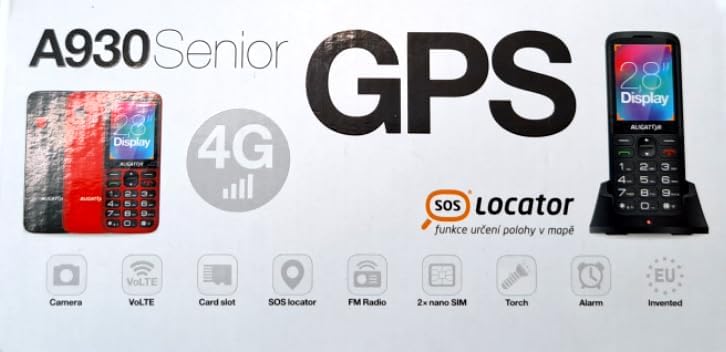
Figure 3.1: Product packaging illustrating the phone, charging dock, and various features such as 4G connectivity, GPS, SOS Locator, camera, VoLTE, card slot, FM radio, torch, and alarm. The box also indicates the 2.8-inch display.
4. Setup
4.1. Inserzione di carte SIM
The ALIGATOR AZA930B supports Dual SIM (2 x Nano SIM) functionality. To insert SIM cards:
- Spegni u telefunu.
- Eliminate a tappa posteriore è a bateria.
- Locate the SIM card slots. Insert your Nano SIM cards into the designated slots, ensuring the gold contacts face down and the cut corner aligns correctly.
- Sustituite a bateria è a tappa posteriore.
4.2. Inserimentu di una carta Micro SD
The phone supports a Micro SD memory card up to 256 GB for additional storage.
- Follow steps 1 and 2 from "4.1. Inserting SIM Cards".
- Locate the Micro SD card slot. Insert the Micro SD card with the gold contacts facing down until it clicks into place.
- Sustituite a bateria è a tappa posteriore.
4.3. Carica iniziale
Before first use, fully charge the phone's 1700 mAh Li-ion battery.
- Connect the USB-C cable (not included) to the phone's USB-C port or place the phone in the charging dock.
- Connect the other end of the cable to a compatible charger (e.g., ALIGATOR CHA0047, 2.5-3W) or a powered USB port.
- The charging indicator will illuminate. A full charge may take several hours.

Figure 4.1: The ALIGATOR AZA930B phone placed in its dedicated charging dock. The phone's screen shows the current time and network signal indicators.

Figure 4.2: Detail from the product box, explicitly showing an icon indicating that a charger is not included and specifying a recommended charger power of 2.5-3W.
5. Operating Instructions
5.1. Power On / Off
- Per accende: Tenite premutu u buttone di Accensione/Fine Chjama (buttone rossu) finu à chì u schermu s'illumina.
- Per spegne: Press and hold the Power/End Call button until the power off options appear, then select "Power off".
5.2. Funzioni di chjama basiche
- Fà una Chjama: Enter the phone number using the large keypad and press the Call button (green button).
- Risponde à una Chjama: When the phone rings, press the Call button (green button).
- Finisce una chjama: Press the Power/End Call button (red button).
- Mani libere: During a call, activate hands-free mode via the on-screen option or a dedicated button if available.
5.3. SOS Button and SOS Locator
The SOS button is a critical safety feature, allowing quick contact in emergencies.
- Pulsante SOS: Located on the back of the phone (often red). Press and hold this button to activate the emergency sequence.
- SOS Presets: You can set up to 5 preset emergency contacts. When the SOS button is pressed, the phone will automatically call these numbers in sequence and send an emergency SMS.
- SOS Locator: This function sends the phone's location via SMS to the emergency contacts after the SOS button is pressed. The recipient can then view the location on a map via a web link provided in the SMS. This feature utilizes both GSM and GPS for location accuracy.

Figura 5.1: Posteriore view of the ALIGATOR AZA930B, showing the prominent red SOS button and the speaker grille for clear audio.

Figura 5.2: Parte posteriore angulata view of the ALIGATOR AZA930B, demonstrating the activated flashlight feature.
5.4. "Zachranka" Rescue Application
The "Zachranka" application is a mobile emergency call application pre-installed on the device.
- It provides quick contact with emergency medical services or mountain rescue.
- The application is valid in Austria, Hungary, the Czech Republic, and in the territories of the Slovak mountains.
- For more information, refer to the "Zachranka" app's official resources.

Figura 5.3: Davanti è daretu views of the ALIGATOR AZA930B, accompanied by the "Zachranka" rescue application logo, indicating its integration with the device.
5.5. Other Features
- Rubrica: Store up to 500 contacts.
- Missaghju: Send and receive SMS messages (memory for 100 SMS). Supports sending photos via MMS.
- Multimedia:
- Radio FM: Ascoltà e stazioni radio FM.
- Media Player: Riproduce audio è video files stored on the phone or Micro SD card.
- Registratore di voce: Registrà note vocali.
- torcia: Attivate a torcia integrata per l'illuminazione.
- Strumenti: Includes Alarm, Calculator, and SIM toolkit support.
- Bluetooth: Cunnette si à cuffie Bluetooth o altri dispositivi.
- Alarma di vibrazione: Set the phone to vibrate for incoming calls or notifications.
- Melodie: Choose from 10+1 pre-installed melodies.
- Ajustamentu automaticu di u tempu: The phone can automatically adjust its time.

Figura 5.4: Fronte view of the ALIGATOR AZA930B, highlighting its user-friendly large keypad and vibrant color display.
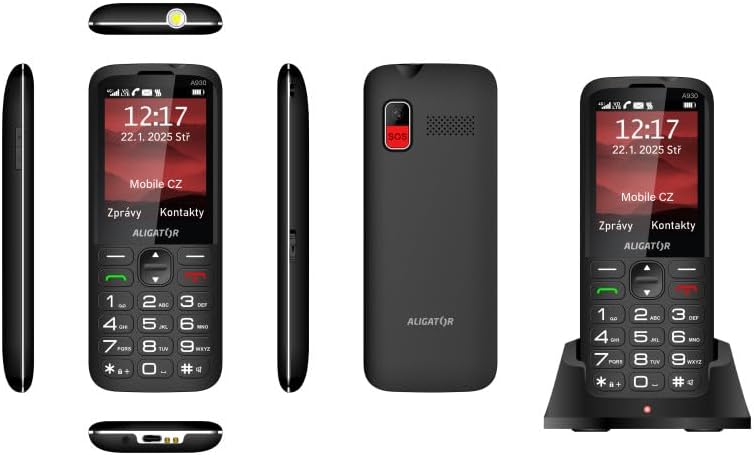
Figura 5.5: Cumpleta views of the ALIGATOR AZA930B, illustrating its design from the top, sides, front, back, and when seated in its charging dock.
6. Mantenimentu
- Pulizia: Aduprate un pannu dolce è asciuttu per pulisce a superficia di u telefunu. Evitate l'usu di prudutti chimichi aggressivi o materiali abrasivi.
- Cura di a batteria: To prolong battery life, avoid fully discharging the battery frequently. Store the phone in a cool, dry place if not used for extended periods.
- Conservazione: Keep the phone away from extreme temperatures, direct sunlight, and dusty environments.
7. Risoluzione di prublemi
| Prublemu | Causa Possibile | Soluzione |
|---|---|---|
| U telefunu ùn si accende. | A batteria hè scarica o ùn hè micca inserita currettamente. | Caricate a batteria. Assicuratevi chì a batteria sia inserita currettamente. |
| Nisun signalu di rete. | A carta SIM ùn hè micca inserita currettamente o hè fora di a cupertura di a rete. | Inserite torna a carta SIM. Trasferitevi in una zona cù una megliu cupertura di rete. |
| Ùn possu fà o riceve chjamate. | No credit, SIM card issue, or network problem. | Check your account balance. Verify SIM card insertion. Contact your network provider. |
| U buttone SOS ùn funziona micca. | SOS numbers not set up or incorrect. | Ensure SOS numbers are correctly configured in settings. Check network signal. |
| A batteria si scarica rapidamente. | High usage, background apps, or aging battery. | Riduce a luminosità di u schermu. Chiudi l'applicazioni inutili. Cunsiderate a sustituzione di a batteria s'ella hè vechja. |
8. Specificazioni
| Feature | Detail |
|---|---|
| Numero di mudellu | AZA930B |
| Mostra | Schermu TFT à culori di 2.8 pollici |
| Slot per carte SIM | Dual SIM (2 x Nano SIM) |
| Supportu per a carta di memoria | Micro SD finu à 256 GB |
| Batteria | 1700 mAh Li-ion |
| Tempu di parlà | Finu à 480 minuti |
| Tempu di Standby | Finu à 10 ghjorni |
| Camera | 1.9 MP |
| Connettività | 4G/LTE/VoLTE, Bluetooth |
| Portu di carica | USB-C |
| Jack per cuffie | 3.5 mm |
| Dimensioni | 14.3 x 5.8 x 1.36 cm |
| Pesu | 95 g |
| Sistema upirativu | Symbian 9.1 |
| Culore | Neru |
Nota: e specificazioni sò sottumessi à cambià senza avvisu previ.
9. Garanzia è Support
ALIGATOR products are designed and manufactured to the highest quality standards. For detailed warranty information, including terms, conditions, and duration, please refer to the warranty card included with your product or visit the official ALIGATOR websitu.
For technical support, service, or inquiries regarding your ALIGATOR AZA930B mobile phone, please contact ALIGATOR customer service or visit their official support channels. Keep your purchase receipt and product serial number (IMEI) handy when seeking support.
- IMEI 1: 357140835088496
- IMEI 2: 357140835088504
- Barcode/UPC: 8596426108267