Introduzione
This manual provides detailed instructions for the assembly, operation, and maintenance of your FLEXISPOT One-Piece Standing Desk with Rattan Drawers. Please read this manual thoroughly before installation and use to ensure proper function and safety. Keep this manual for future reference.

Image: The FLEXISPOT One-Piece Standing Desk in black with rattan drawers, featuring a monitor shelf and an integrated control panel.
Importante infurmazione di sicurezza
Per impedisce ferite o danni à u pruduttu, osservate e seguenti linee guida di sicurezza:
- Segui sempre attentamente l'istruzzioni di l'assemblea.
- Mantene i zitelli è l'animali alluntanati da l'area di assemblea.
- Aduprate strumenti è equipaggiamenti di sicurezza adatti durante u montaggio.
- Assicuratevi chì tutte e cunnessione sianu sicure prima di fà funziunà u scrivania.
- Ùn sovraccaricate micca u scrivanu. A capacità di pesu massima hè di 110 lbs.
- Keep hands and objects clear of moving parts during height adjustment.
Cuntenutu di u pacchettu
Verify that all components are present before beginning assembly. The desk ships in two separate packages.
- Desktop with integrated monitor shelf and rattan drawers
- Desk frame and legs
- Panel di cuntrollu
- Adattatore di alimentazione è cavi
- Assembly hardware (screws, bolts, tools)
- Manuale d'usu

Image: A diagram illustrating the dimensions of the desk components and indicating that the product ships in two separate packages.
Istruzzioni di Assemblea
Assembly typically takes approximately one hour. Refer to the separate detailed assembly guide included in your package for step-by-step instructions and diagrams. Ensure all fasteners are correctly identified and used in their designated locations.
- Disimballate tutti i cumpunenti è verificate cù a lista di cuntenutu di l'imballu.
- Attach the desk legs to the desktop frame using the provided hardware.
- Connect the control panel and motor cables as instructed.
- Secure any cable management components.
- Place the desk in its desired location.
Istituisci
After assembly, connect the desk to a power source.
- Plug the power adapter into the desk's control box.
- Inserite u cordone di alimentazione in una presa elettrica standard.
- The desk is now ready for initial use.
Istruzzioni di funziunamentu
Ajustamentu di l'altezza
The desk features an electric motor system for smooth height transitions.
- Press u Freccia su buttone per alzà u scrivania.
- Press u Freccia giù buttone per calà u scrivania.
- The desk can adjust between 28.9 inches (minimum) and 46.5 inches (maximum).
- The motor operates quietly, typically below 50dB.

Image: The desk shown at its minimum (28.9") and maximum (46.5") adjustable heights.
Presets di memoria
Program up to three preferred height settings for quick adjustments.
- Ajustate u scrivania à l'altezza desiderata.
- Press u M buttone, dopu appughjà unu di i buttoni preselezionati numerati (1, 2, o 3) in 3 secondi per salvà l'altezza attuale.
- Per richiamà una altezza salvata, basta à appughjà u buttone preimpostatu numeratu currispundente.

Imagine: Un primu pianu view of the desk's control panel, highlighting the up/down arrows and memory preset buttons.
Monitor Shelf
The integrated monitor shelf is designed to elevate screens to an ergonomic eye level.
- Place your monitor(s) on the shelf to reduce neck and back strain.
- This helps maintain proper posture during extended work sessions.

Image: Visual comparison of poor posture versus ergonomic sitting and standing postures facilitated by the adjustable desk.
Rattan Drawers
The desk includes both sliding-door desktop compartments and an under-desk drawer for organized storage.
- Use the desktop compartments (47.2"x8.7"x5.5") for easy access to frequently used items.
- The under-desk drawer (23.6"x11.8"x3.9") provides discreet storage for documents or books.
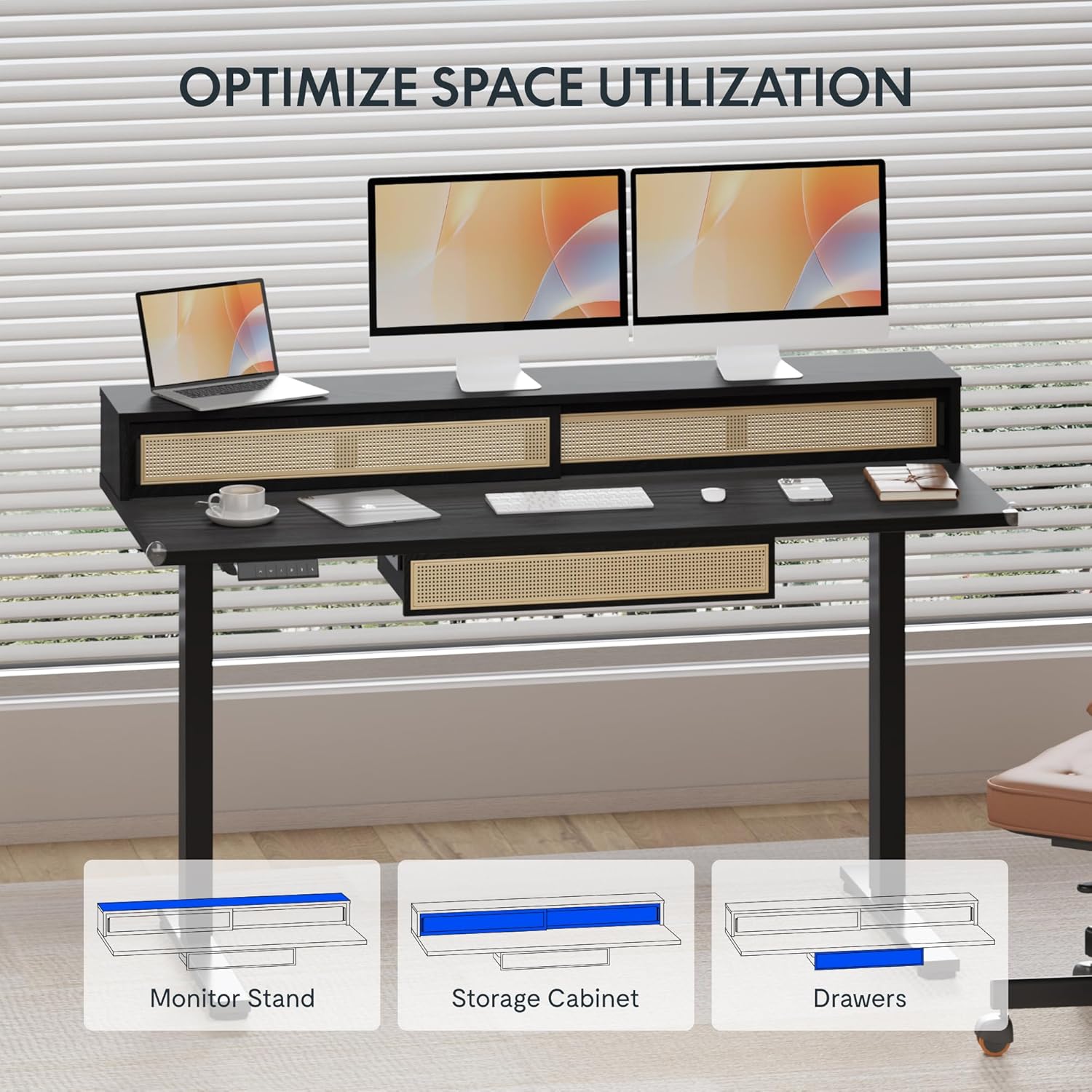
Image: An illustration demonstrating the various storage options, including the monitor stand, storage cabinet, and drawers, for optimal space utilization.
Mantenimentu
Una manutenzione regulare assicura a longevità è e prestazioni ottimali di u vostru scrivania.
- Pulizia: Asciugate e superfici di u scrivania cù un pannu dolce èamp tela. Evite detergenti abrasivi o chimichi duri chì ponu dannà a finitura.
- Ispezione: Verificate periodicamente tutte e viti è i bulloni per assicurassi ch'elli sianu ben stretti. Stringhjiteli di novu se necessariu.
- Gestione di Cable: Ensure cables are neatly organized and not interfering with the desk's movement.
Risoluzione di prublemi
Sè avete prublemi cù u vostru scrivania, riferitevi à e seguenti suluzioni cumuni:
| Prublemu | Causa Possibile | Soluzione |
|---|---|---|
| U scrivania ùn si move micca o ùn risponde micca à i cumandamenti. | Power connection issue, cable disconnected, motor error. | Check power cord connection to outlet and desk. Ensure all motor cables are securely connected. Unplug and replug the power for 10 seconds to reset. |
| U scrivania si move in modu irregulare o face un rumore insolitu. | Uneven load, loose connections, obstruction. | Ensure weight is evenly distributed. Check for any obstructions under the desk. Verify all assembly screws are tight. |
| I preset di memoria ùn funzionanu micca. | I preset ùn sò micca salvati currettamente. | Re-save the desired height settings by pressing 'M' then the preset number within 3 seconds. |
Specificazioni
| Feature | Detail |
|---|---|
| Marca | FLEXISPOT |
| Dimensioni di u produttu (P x L x A) | 23.6"D x 47.2"W x 29"H (at lowest point) |
| Culore | Neru |
| Materiale di basa | Alloy Steel |
| Tipu di materiale superiore | Legnu |
| Altezza minima | 28.9 inch |
| Altezza massima | 46.5 inch |
| Numero di Cacciadori | 1 (under-desk) |
| Enclosed Shelves | 2 (sliding-door desktop compartments) |
| Funzione speciale | Corded electric height adjustment, Memory Presets |
| Assemblea necessaria | Iè |
Garanzia è Supportu
FLEXISPOT provides comprehensive warranty coverage for your standing desk:
- Telaio è Motore: Cupertura di 5 anni.
- Elettronica: Cupertura di 2 anni.
This warranty ensures lasting security for your workspace investment. For customer support, technical assistance, or warranty claims, please refer to the contact information provided in your product packaging or visit the official FLEXISPOT websitu.


