1. Introduzione
Grazie per l'acquistuasing the SENCOR SPT 3907 Bluetooth Radio Player. This compact and versatile device offers multiple audio playback options, including CD, Bluetooth, USB, and FM radio. This manual provides essential information for safe and efficient use of your new player. Please read it thoroughly before operation and retain it for future reference.
2. Istruzzioni di sicurità
- Fonte di energia: Assicuratevi chì l'alimentazione di l'alimentazione voltage matches the rating indicated on the unit. Use only the provided power cable.
- L'acqua è l'umidità: Ùn espone micca l'unità à a pioggia, à l'umidità, o à i liquidi chì gocciolanu/schizzi. Ùn mette micca oggetti pieni di liquidi, cum'è vasi, nantu à l'unità.
- Ventilazione: Ùn bluccate micca alcuna apertura di ventilazione. Assicuratevi chì ci sia un spaziu adeguatu intornu à l'unità per un flussu d'aria currettu.
- Calore: Mantene l'unità luntanu da fonti di calore cum'è radiatori, registri di calore, stufe o altri apparecchi (cumpresi amplifiers) chì producenu calore.
- Pulizia: Scollegate l'unità da a presa murale prima di pulisce. Aduprate un pannu dolce è asciuttu. Ùn aduprate micca detergenti liquidi o detergenti aerosol.
- Service : Ùn circate micca di serviziu stu pruduttu voi stessu. Cunsultate tutti i servizii à u persunale di serviziu qualificatu.
- Batterie: When using batteries, ensure correct polarity. Do not mix old and new batteries, or different types of batteries. Remove batteries if the unit is not used for extended periods.
3. Cuntenutu di u pacchettu
Verificate chì tutti l'articuli sò presenti in u pacchettu:
- SENCOR SPT 3907 Radio Player
- Control remoto
- Cavu di Alimentazione AC
- Documentazione (stu manuale)
4. Caratteristiche di u produttu
The SENCOR SPT 3907 is designed for versatile audio entertainment:
- Potenza di output: 4W RMS for clear sound.
- Lettore CD: Supports CD-R/RW discs with programmable playback for up to 20 songs.
- Connettività Bluetooth: Bluetooth V2.1 + EDR for wireless audio streaming from compatible devices.
- Riproduzione USB: USB connection for MP3 file playback with programmable playback for up to 99 songs.
- Radio FM: Stereo FM radio receiver with digital tuning and 30 station presets.
- AUX-IN: 3.5mm auxiliary input for connecting external audio sources.
- Display: Backlight LCD display for easy navigation.
- Control remoto: Telecomandu cumpletu per un funziunamentu convenientu.
- Opzioni di putenza: Operates on AC 100-240V or D/LR20 batteries for portability.
- Funzioni supplementari: Repeat and random playback modes.
5. Controls è Funzioni
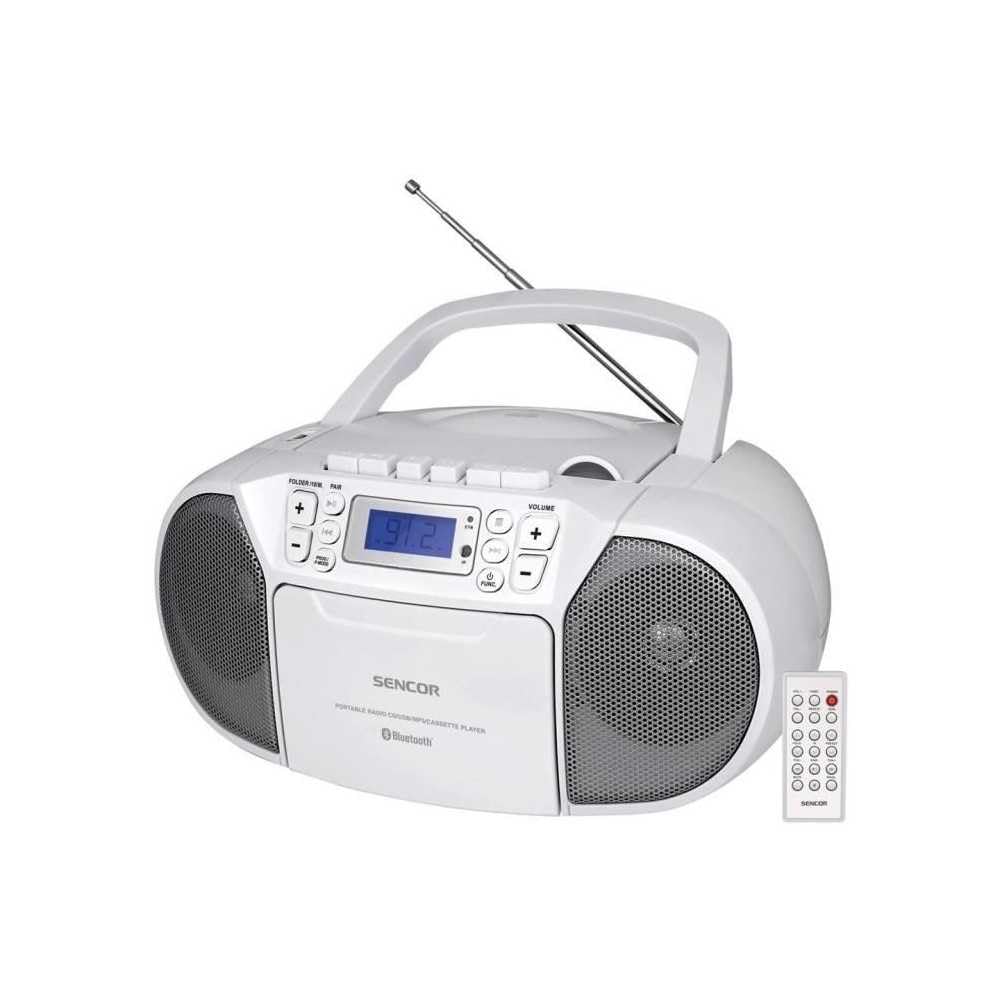
Fronte view of the SENCOR SPT 3907 unit, highlighting the control buttons, LCD screen, CD tray, and speakers. The remote control is also visible.
Cuntrolli di u pannellu frontale:
- Pulsante POWER: Accende o spegne l'unità.
- Pulsante MODE: Switches between CD, Bluetooth, USB, FM Radio, and AUX-IN modes.
- Buttoni VOLUME +/-: Ajusta u livellu di output audio.
- PLAY/PAUSE (►/▮▮) Button: Starts or pauses playback in CD, Bluetooth, or USB mode.
- SKIP (◀◀ / ►►) Buttons: Salta à a traccia/stazione precedente o successiva.
- STOP (■) Button: Arresta a riproduzione.
- FOLDER / PAIR Button: Navigates folders in USB mode; initiates Bluetooth pairing.
- Buttone FUNC: Accesses additional functions (e.g., program, repeat, random).
- Display LCD: Shows current mode, track number, frequency, and other information.
- Scompartimentu CD: Per inserisce CD audio.
- Port USB: Per cunnette dispositivi di almacenamiento USB.
- Jack AUX-IN: Per cunnette i dispositi audio esterni.
- Output per cuffie: Per l'ascolta privata.
Cuntrolli di u pannellu posteriore:
- Input AC Power: Cunnetta u cavu di alimentazione AC.
- Antenna FM: Extendable telescopic antenna for FM reception.
Control remoto:
The remote control duplicates most of the front panel functions for convenient operation from a distance. Refer to the remote control diagram in the included documentation for specific button layouts.
6. Setup
6.1 Cunnessione di putenza
The SENCOR SPT 3907 can be powered by AC mains or batteries.
Alimentazione AC:
- Assicuratevi chì l'unità hè spenta.
- Connect the supplied AC power cable to the AC input jack on the rear of the unit.
- Plug the other end of the AC power cable into a standard wall outlet (AC 100-240V, 50/60Hz).
Alimentazione di a batteria:
- Aprite u coperchio di u compartimentu di a batteria situatu in u fondu di l'unità.
- Insert 6 x D/LR20 size batteries (not included), ensuring correct polarity (+/-) as indicated inside the compartment.
- Chiudere in modu sicuru u coperchiu di u compartimentu di a batteria.
Note: When the AC power cable is connected, battery power is automatically disconnected. Remove batteries if the unit will not be used for an extended period to prevent leakage.
6.2 Installazione di l'antenna
For optimal FM radio reception, fully extend the telescopic FM antenna located on the rear of the unit. Adjust its position for the best signal.
7. Operating Instructions
7.1 Accensione/Spegnimentu è Selezzione di Modu
- Press u POWER button to turn the unit on. The LCD display will light up.
- Press u MODE button repeatedly to cycle through available modes: CD, Bluetooth, USB, FM Radio, AUX-IN. The selected mode will be shown on the LCD display.
- Press u POWER buttone di novu per spegne l'unità.
7.2 Riproduzione di CD
- Press u MODE buttone per selezziunà u modu CD.
- Aprite u coperchiu di u compartimentu di u CD.
- Place a CD (CD-R/RW compatible) with the label side facing up onto the spindle.
- Chjude u coperchiu di u compartimentu di u CD. L'unità leghjerà u discu, è u numeru tutale di piste apparirà nantu à u display.
- Press u PLAY/PAUSE buttone per inizià a riproduzione.
- Aduprà u SALTA (◀◀ / ►►) i buttoni per saltà e tracce.
- Press u FERMA (■) buttone per piantà a riproduzione.
- Riproduzione di u prugramma: Mentre site in modu STOP, appughjà u buttone FUNC buttone per entre in a modalità di prugramma. Aduprate SKIP buttons to select tracks and FUNC again to confirm. Up to 20 CD songs can be programmed.
7.3 Funzionamentu Bluetooth
- Press u MODE button to select Bluetooth mode. The display will show 'BT' and flash, indicating it's in pairing mode.
- Nant'à u vostru dispusitivu cumpatibile cù Bluetooth (per esempiu, smartphone, tableta), attivate Bluetooth è cercate i dispusitivi dispunibili.
- Select 'SPT 3907' from the list of devices. Once paired, the 'BT' indicator on the display will stop flashing and remain solid.
- Start playing audio on your connected device. The sound will be streamed through the SENCOR SPT 3907.
- Aduprà u PLAY/PAUSE è SKIP buttons on the unit or remote control to manage playback.
Riproduzione USB 7.4
- Insert a USB flash drive (containing MP3 files) in u portu USB.
- Press u MODE button to select USB mode. The unit will automatically read the files.
- Press u PLAY/PAUSE buttone per inizià a riproduzione.
- Aduprà u SALTA (◀◀ / ►►) i buttoni per saltà e tracce.
- Press u CARTURULA buttone per navigà trà i cartulari nantu à a chiavetta USB.
- Riproduzione di u prugramma: Mentre site in modu STOP, appughjà u buttone FUNC buttone per entre in a modalità di prugramma. Aduprate SKIP buttons to select tracks and FUNC again to confirm. Up to 99 MP3 songs can be programmed.
7.5 Funziunamentu di a Radio FM
- Press u MODE button to select FM Radio mode. The current frequency will appear on the display.
- Stende l'antenna telescopica per una migliore ricezione.
- Sintonizazione automatica: Appughjà è tene premutu SALTA (◀◀ / ►►) buttons for a few seconds to automatically scan for the next available station.
- Tuning Manuale: Appughjà brevemente u SALTA (◀◀ / ►►) buttons to fine-tune the frequency step-by-step.
- Stazioni preset: To save a station, tune to the desired frequency, then press the FUNC buttone. Aduprà SKIP buttons to select a preset number (P01-P30), then press FUNC di novu per cunfirmà.
- Per richiamà una stazione preselezionata, appughjà u buttone FUNC u buttone ripetutamente per passà da e stazioni salvate.
7.6 Cunnessione AUX-IN
- Connect one end of a 3.5mm audio cable (not included) to the AUX-IN jack on the SENCOR SPT 3907.
- Cunnette l'altra estremità di u cavu à a presa di l'auricolari o à l'uscita audio di u vostru dispositivu audio esternu (per esempiu, lettore MP3, smartphone).
- Press u MODE per selezziunà u modu AUX-IN.
- Start playback on your external device. The audio will be played through the SENCOR SPT 3907.
- Ajuste u voluminu cù u VOLUME +/- buttons on the unit or remote control, and also on your external device.
8. Mantenimentu
8.1 Pulizia di l'unità
Wipe the exterior of the unit with a soft, dry cloth. Do not use abrasive cleaners, waxes, or solvents as they may damage the finish. Ensure the unit is unplugged from the power source before cleaning.
8.2 Cura di l'obiettivu CD
If the CD player experiences reading errors, the lens may need cleaning. Use a commercially available CD lens cleaner disc. Do not touch the lens directly.
8.3 Sustituzione di batterie
When the unit operates on batteries and the sound becomes distorted or the unit stops functioning, replace all batteries with new D/LR20 batteries, ensuring correct polarity.
9. Risoluzione di prublemi
| Prublemu | Causa Possibile | Soluzione |
|---|---|---|
| Nisun putere | Cavu d'alimentazione micca cunnessu; Batterie scariche o inserite in modu incorrectu. | Check AC power connection; Replace batteries, ensuring correct polarity. |
| Nisun sonu | Vulume troppu bassu; Modu incorrectu sceltu; Cuffie cunnesse. | Increase volume; Select correct mode (CD, BT, USB, FM, AUX); Disconnect headphones. |
| U CD ùn hè micca ghjucatu / Salta | CD dirty or scratched; CD inserted incorrectly; CD lens dirty. | Clean or replace CD; Insert CD with label side up; Use a CD lens cleaner. |
| Bluetooth ùn hè micca cunnessu | Unit not in pairing mode; Device too far; Bluetooth not enabled on external device. | Ensure unit is in BT pairing mode; Move device closer; Enable Bluetooth on your device. |
| Pessima ricezione FM | Antenna not extended or positioned correctly; Weak signal. | Fully extend and adjust the telescopic antenna; Try moving the unit to a different location. |
10. Specificazioni
| Feature | Specificazione |
|---|---|
| Mudellu | SPT 3907 |
| Forza di output | 4W RMS |
| Media supportatu | CD-R, CD-RW, Bluetooth, MP3, USB |
| Versione Bluetooth | V2.1 + EDR |
| Presets Radio FM | 30 stazioni |
| Connettività | Auxiliary (3.5mm), USB |
| Fonte d'energia | AC 100-240V, 50/60Hz; 6 x D/LR20 batteries |
| Pesu di l'articulu | 1 kg 960 g |
| Dimensioni | (Not specified in provided data) |
11. Garanzia è Support
SENCOR products are manufactured to high-quality standards and are warranted against manufacturing defects. For specific warranty terms and conditions, please refer to the warranty card included with your purchase or visit the official SENCOR website. For technical support, service, or inquiries, please contact your local SENCOR distributor or authorized service center.


