Introduzione
This manual provides essential instructions for the setup, operation, and maintenance of your Invicta Activa Digital Essentials ACW8108-003 Smart Watch. Please read this guide thoroughly to ensure proper use and to maximize the functionality of your device.
Product Overview
The Invicta Activa Digital Essentials ACW8108-003 is a digital smart watch designed for daily wear. It features Bluetooth connectivity for pairing with iOS and Android smartphones, allowing for enhanced functionality. The watch is equipped with a durable polyurethane band and a buckle clasp, offering comfort and security. Its water-resistant design provides protection against splashes and brief immersion.
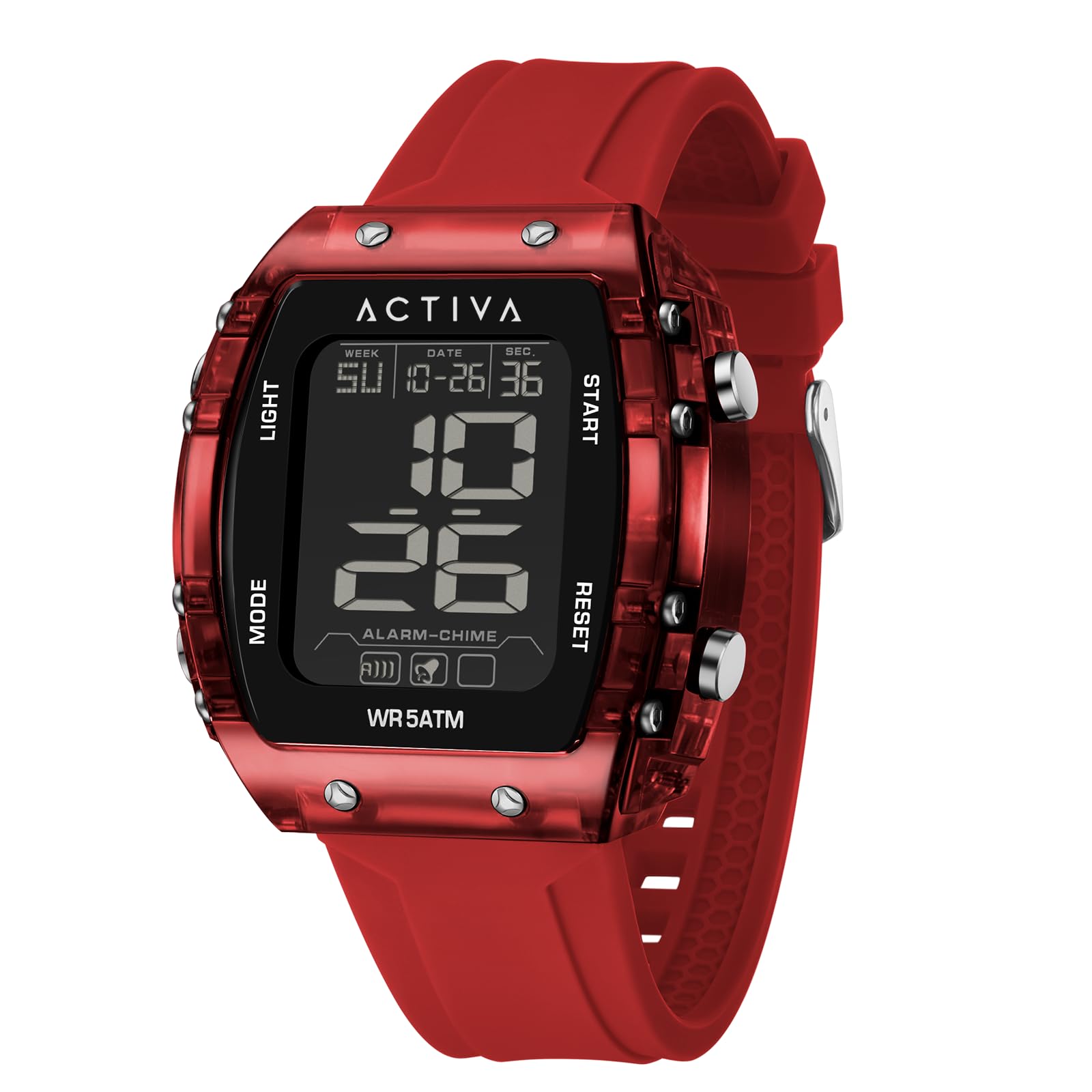
Figura 1: Fronte view of the Invicta Activa Digital Essentials ACW8108-003 Smart Watch. This image displays the digital interface and the red polyurethane strap with a buckle clasp.
Istituisci
- Unboxing è Inspeczione: Carefully remove the watch from its packaging. Inspect the watch for any visible damage. Ensure all components are present.
- Accensione iniziale: The watch typically comes with a pre-installed battery. To power on, press and hold the main power button (refer to the diagram in the included quick start guide, if applicable) until the display illuminates. If the watch does not power on, proceed to battery installation/check.
- Installazione/Verificazione di a batteria: The watch uses a Silver Oxide battery. If the watch does not power on, or the display is dim, the battery may need to be installed or replaced. Consult the battery compartment instructions on the watch's back cover for proper access and polarity.
- Pairing with Smartphone (Bluetooth):
- Ensure Bluetooth is enabled on both your iOS or Android smartphone.
- On your watch, navigate to the Bluetooth settings menu (usually by pressing a specific button or sequence of buttons).
- On your smartphone, search for available Bluetooth devices. Select "Invicta ACW8108-003" from the list.
- Follow any on-screen prompts on both your watch and smartphone to complete the pairing process. A confirmation message should appear on both devices.
- Impostazione di l'ora è a data: Once paired with your smartphone, the watch should automatically synchronize its time and date. If manual adjustment is needed, refer to the operating instructions for navigating the settings menu using the watch buttons.
Istruzzioni di funziunamentu
Your Invicta Activa Digital Essentials ACW8108-003 Smart Watch is operated primarily through its side buttons.
- Funzioni di u buttone:
- Pulsante superiore: Typically used for backlight activation, mode switching, or selecting options.
- Middle Button (if present): Often serves as the main menu access or confirmation button.
- U buttone di fondu: Used for navigating through menus, adjusting values, or starting/stopping functions.
- Modi di Visualizazione: Press the designated mode button (usually the top or middle button) to cycle through various display modes such as:
- Time (Hour, Minute, Second)
- Date (Month, Day, Year)
- U ghjornu di a settimana
- Smart Notifications (requires smartphone pairing)
- Stopwatch/Timer (if available)
- Funzioni intelligenti: When paired with your smartphone, the watch can display notifications for calls, messages, and app alerts. Access these features through the watch's menu.
- Resistenza à l'acqua: The watch is water-resistant up to 30 meters (3 ATM). This means it is suitable for everyday use and can withstand splashes, rain, and brief immersion in water. It is micca suitable for swimming, showering, or diving. Avoid pressing buttons while the watch is wet.
Mantenimentu
- Pulizia: Per pulisce u vostru orologio, asciugatelu delicatamente cù un pannu dolce èamp cloth. For the polyurethane band, mild soap and water can be used, then rinse thoroughly and dry. Avoid using harsh chemicals, solvents, or abrasive cleaners, as these can damage the watch's finish or materials.
- Sustituzione di batterie: When the battery needs replacement (indicated by a dim display or loss of function), take your watch to an authorized service center or a qualified watch technician. If replacing yourself, use a new Silver Oxide battery of the correct type (refer to specifications) and ensure the water-resistant seal is properly re-seated.
- Conservazione: Quandu ùn hè micca adupratu per periodi prolungati, cunservate u vostru orologio in un locu frescu è asciuttu, luntanu da a luce diretta di u sole è da temperature estreme.
Risoluzione di prublemi
- Fighjate chì ùn si accende micca:
- Check if the battery is properly installed.
- Sustituisci a bateria s'ellu hè esaurita.
- Ensure no buttons are stuck.
- Problemi di cunnessione Bluetooth:
- Ensure Bluetooth is enabled on both the watch and your smartphone.
- Move the watch closer to your smartphone.
- Forget the device on your smartphone's Bluetooth settings and attempt to re-pair.
- Riavvia l'orologio è u vostru smartphone.
- Data/ora sbagliata:
- Verify that the watch is correctly paired and synchronized with your smartphone.
- Manually adjust the time and date through the watch's settings menu if automatic sync fails.
- U schermu ùn risponde micca:
- Try pressing and holding the main power button to perform a soft reset.
- If the issue persists, the battery may be low or depleted.
Specificazioni
| Numero di mudellu | ACW8108-003 |
| Marca | Invicta |
| Wearable Computer Type | Smart Watch |
| Tipu di visualizazione | Digitale |
| Tipu di materiale di banda | Polyurethane |
| Colore di banda | Rossu |
| Tipu di chiusura | Fibbia |
| Livellu di resistenza à l'acqua | Resistente à l'acqua |
| Prufundità di Resistenza à l'Acqua | 30 Millimeters (3 ATM) |
| Communication Feature | Bluetooth |
| Dispositivi compatibles | Smartphone (iOS and Android) |
| Tipu di pila di batterie | ossidu d'argentu |
| Input di l'interfaccia umana | Bottoni |
| Larghezza di banda | 34 millimetri |
| Lunghezza di banda | 220 millimetri |
| Funzionalità GPS | Nisun GPS |
Infurmazioni di Garanzia
The Invicta Activa Digital Essentials ACW8108-003 Smart Watch comes with a limited warranty. For detailed information regarding warranty coverage, terms, and conditions, please refer to the warranty card included with your product or visit the official Invicta websitu. Conservate a vostra prova d'acquistu per e richieste di garanzia.
Assistenza Clienti
Should you encounter any issues not covered in this manual or require further assistance, please contact Invicta customer support. Visit the official Invicta websitu per i dettagli di cuntattu, e FAQ è risorse supplementari.


