Introduzione
Thank you for choosing the Blukar K9129 Rechargeable Headlamp. This manual provides essential information for the safe and efficient use of your headlampLeghjitelu attentamente prima di l'operazione è cunservatelu per riferimentu futuru.
Product Overview
Funzioni chjave
- Dual Color Temperatures: Features both white and warm light options for various environments.
- Modi di illuminazione multipli: Offers 12 modes, including standard and motion sensor modes, with XPG White, XPG Warm, COB White, XPG+COB White, COB Red, and COB Red Strobe.
- U cuntrollu di u sensoru di muvimentu: Allows hands-free operation by waving your hand within 15cm.
- USB-C ricaricabile: Built-in 1200mAh battery provides up to 30 hours of runtime on a single charge.
- Luminosità dimmable: Stepless dimming from 100% to 30% with memory function.
- Adjustable & Comfortable: 45° réglable lamp head and a comfortable, washable elastic headband.
- IPX5 Impermeabile: Designed to resist water splashes from all angles.
Cuntenutu di u pacchettu
- Blukar K9129 Headlamp
- Cavu di carica USB-C
- Helmet Clips (4x)
- Manuale d'uso (stu documentu)
Istituisci
1. Carica iniziale
Prima di u primu usu, caricate cumpletamente a testaamp. Connect the provided USB-C charging cable to the headlamp's charging port and to a USB power source (e.g., AC charger, power bank, computer). The 4 battery indicators will show charging progress. A full charge typically takes 2-3 hours.
Imagine: U capuamp being charged via its USB-C port. It can be connected to various USB power sources like an AC adapter, power bank, or computer.
2. Aghjustà a fascia per a testa
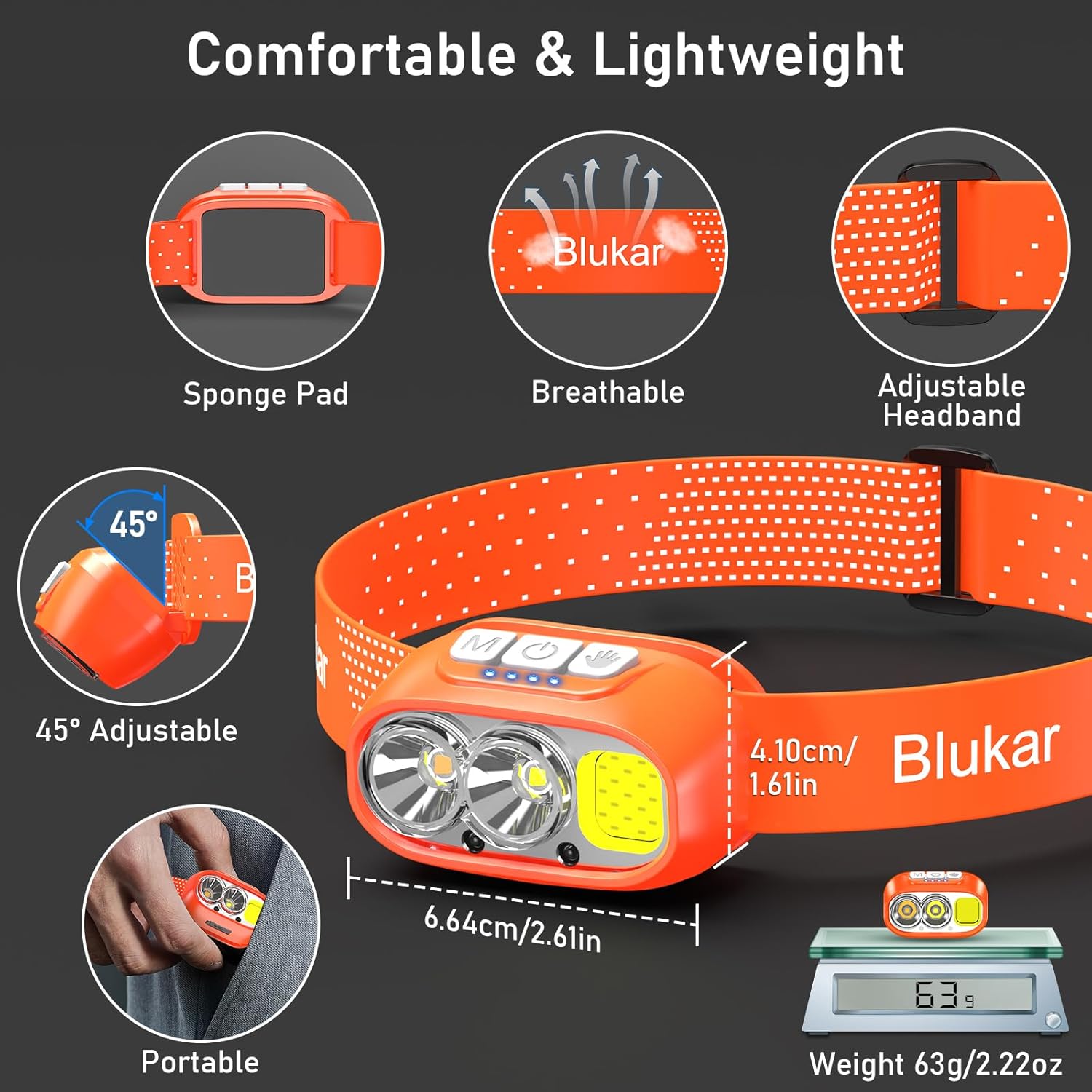
The elastic headband is adjustable to fit various head sizes. Adjust the length for a comfortable and secure fit. The headband is also removable and washable for hygiene.

Image: Details of the headlamp's comfortable and lightweight design, showing the adjustable headband, sponge pad, and 45-degree tilt capability.
3. Attaching to a Helmet (Optional)
Use the included 4 helmet clips to securely attach the headlamp to a helmet for a stable fit during activities.
Istruzzioni di funziunamentu
Funzioni di u buttone

Image: Close-up of the headlamp's top panel, highlighting the three independent control buttons: 'M' for Normal Mode, a hand icon for Sensor Mode, and a power icon for Power & Dimmer.
- Normal Mode Button (M): Short press to cycle through standard lighting modes.
- Sensor Mode Button (Hand Icon): Short press to activate motion sensor mode (green light indicates activation). Once active, wave your hand within 15cm to turn the light on/off.
- Power & Dimmer Button (Power Icon):
- Short press to turn the light on/off.
- Long press to adjust brightness steplessly (100%-30%).
- Features a memory function for the last used brightness and mode.
Modi d'illuminazione
U capuamp offers 12 lighting modes, accessible via the Normal Mode button and Sensor Mode button.

Image: Visual representation of the 12 lighting modes available, including various white light combinations, red light, and sensor modes. It also illustrates the stepless dimming function.
- Standard Modes (6): XPG White Light, XPG Warm Light, COB White Light, XPG+COB White Light, COB Red Light, COB Red Light Strobe.
- Sensor Modes (6): The same 6 modes as above, activated by the Sensor Mode button.
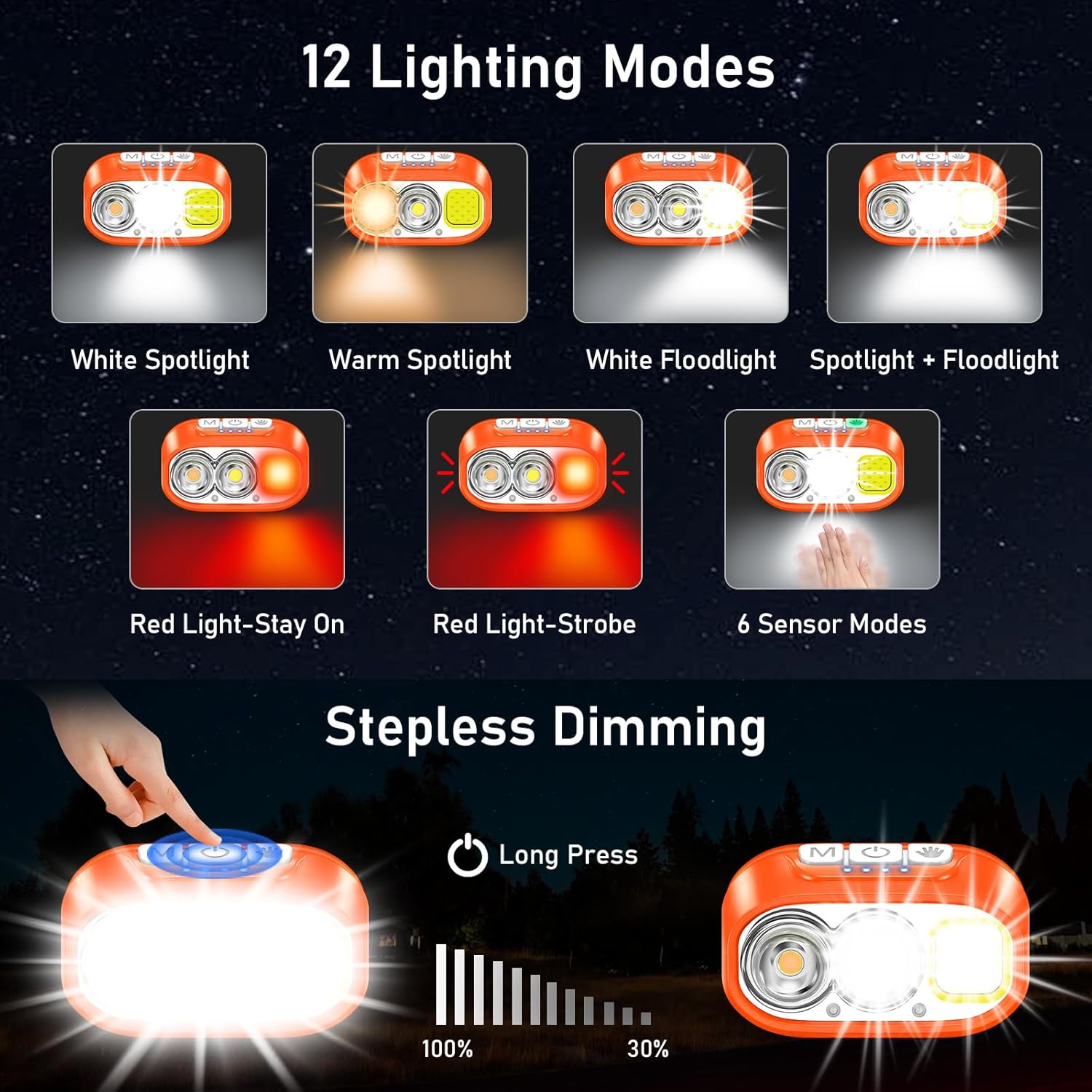
Image: Illustration of the three main light sources: White Light for general use, Warm Light for challenging weather conditions like fog or snow, and Red Light for specialized uses like night fishing or emergency signaling.
Funzionamentu di u sensoru di muvimentu
To use the motion sensor, press the Sensor Mode button. A green indicator light will illuminate. Once active, simply wave your hand within 15cm (approximately 6 inches) in front of the headlamp to toggle the light on or off without touching the buttons.
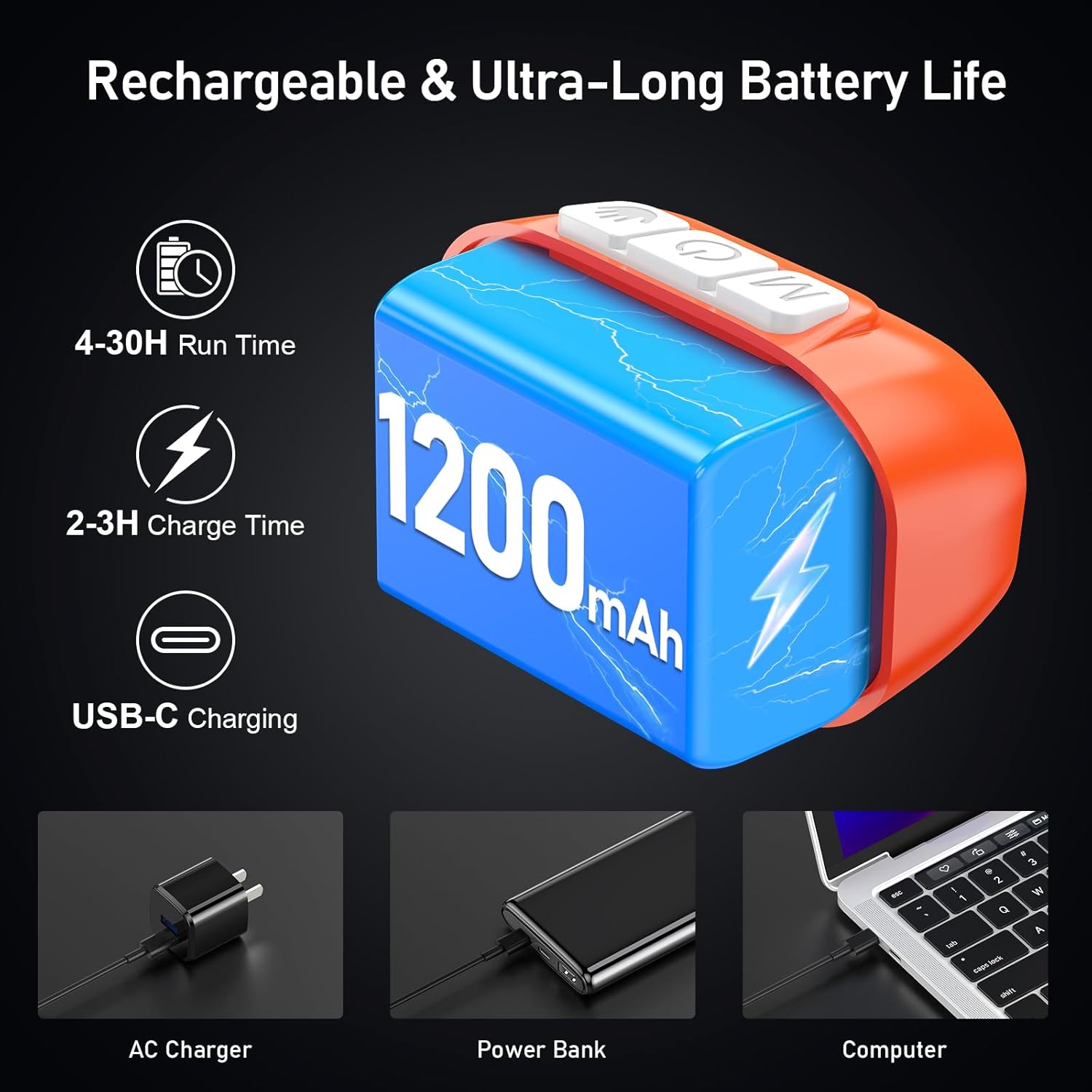
Image: A person demonstrating the motion sensor mode, turning the headlamp on and off with a hand wave while working on a car engine, highlighting the 15cm sensing distance.
Ajustamentu di l'angolo di fasciu
U capuamp unit can be tilted up or down by 45° to direct the light precisely where needed.
Imagine: U capuamp unit is shown with an arrow indicating its 45-degree adjustable tilt capability.
Mantenimentu
- Pulizia: The elastic headband is removable and washable. Clean the headlamp corpu cù un dolce, damp tela. Ùn aduprate micca detergenti abrasivi o solventi.
- Cura di a batteria: To prolong battery life, charge the headlamp regularly, even if not in frequent use. Avoid fully discharging the battery for extended periods.
- Conservazione: Guardà u capuamp dans un endroit frais et sec à l'abri de la lumière directe du soleil et des températures extrêmes.
- Resistenza à l'acqua: U capuamp is IPX5 waterproof, meaning it can resist water splashes. Do not submerge the headlamp in acqua.
Imagine: U capuamp is shown with water splashing over it, illustrating its IPX5 waterproof capability, which protects against water jets from any direction.
Risoluzione di prublemi
| Prublemu | Causa Possibile | Soluzione |
|---|---|---|
| Testaamp turns off unexpectedly in sensor mode. | Sensor reacting to unintended movement or objects. | Switch off the sensor mode if not needed, or ensure no objects are passing within 15cm of the sensor. |
| Testaamp ùn accende micca. | A batteria hè scaricata. | Carica u capuamp cumpletamente aduprendu u cavu USB-C furnitu. |
| L'emissione di luce hè deb. | Low battery or dimming function activated. | Recharge the battery. Long press the Power & Dimmer button to increase brightness. |
| Testaamp micca carica. | Cavu o fonte d'alimentazione difettosa. | Try a different USB-C cable or a different USB power source. Ensure the cable is securely connected. |
Specificazioni
| Numero di mudellu | K9129 |
| Marca | Blukar |
| Materiale | ABS |
| Culore | Aranciu |
| Dimensioni di u produttu | 2.61 "D x 1.61" W x 1.38 "H |
| Pesu di l'articulu | 84 grammi (2.96 once) |
| Capacità batterie | 1200 mAh |
| Tipu di batterie | Lithium Polymer |
| Tempu di carica | 2-3 ore |
| Runtime | Up to 4 hours (ultra-bright mode), up to 30 hours (soft light mode) |
| Valutazione impermeabile | IPX5 |
| Cumpunenti inclusi | Cavu USB |
Garanzia è Supportu
Blukar products are designed for reliability and performance. For any questions, technical support, or warranty inquiries, please contact Blukar customer service through the retailer where the product was purchased or visit the official Blukar websitu.
Per piacè conservate a vostra prova di compra per rivendicazioni di garanzia.


