1. Introduzione
The EPOMAKER Click Lite Wireless Gaming Mouse is designed for precision and versatility across multiple platforms. Featuring tri-mode connectivity, a high-precision PAW3311 sensor, and a lightweight ergonomic design, it offers an enhanced user experience for gaming and productivity.
2. Cuntenutu di u pacchettu
- 1 x Click Lite Wireless Gaming Mouse
- 1 x 2.4GHz Dongle (stored inside the mouse)
- 1 x Detachable USB-A to USB-C Cable
- 1 x Manuale d'usu multilingue
- Extra PTFE Stickers

3. Produttu Finituview
Funzioni chjave
- Connettività Tri-Mode: Supports 2.4GHz wireless, Bluetooth (BT1/BT2), and USB-C wired connections.
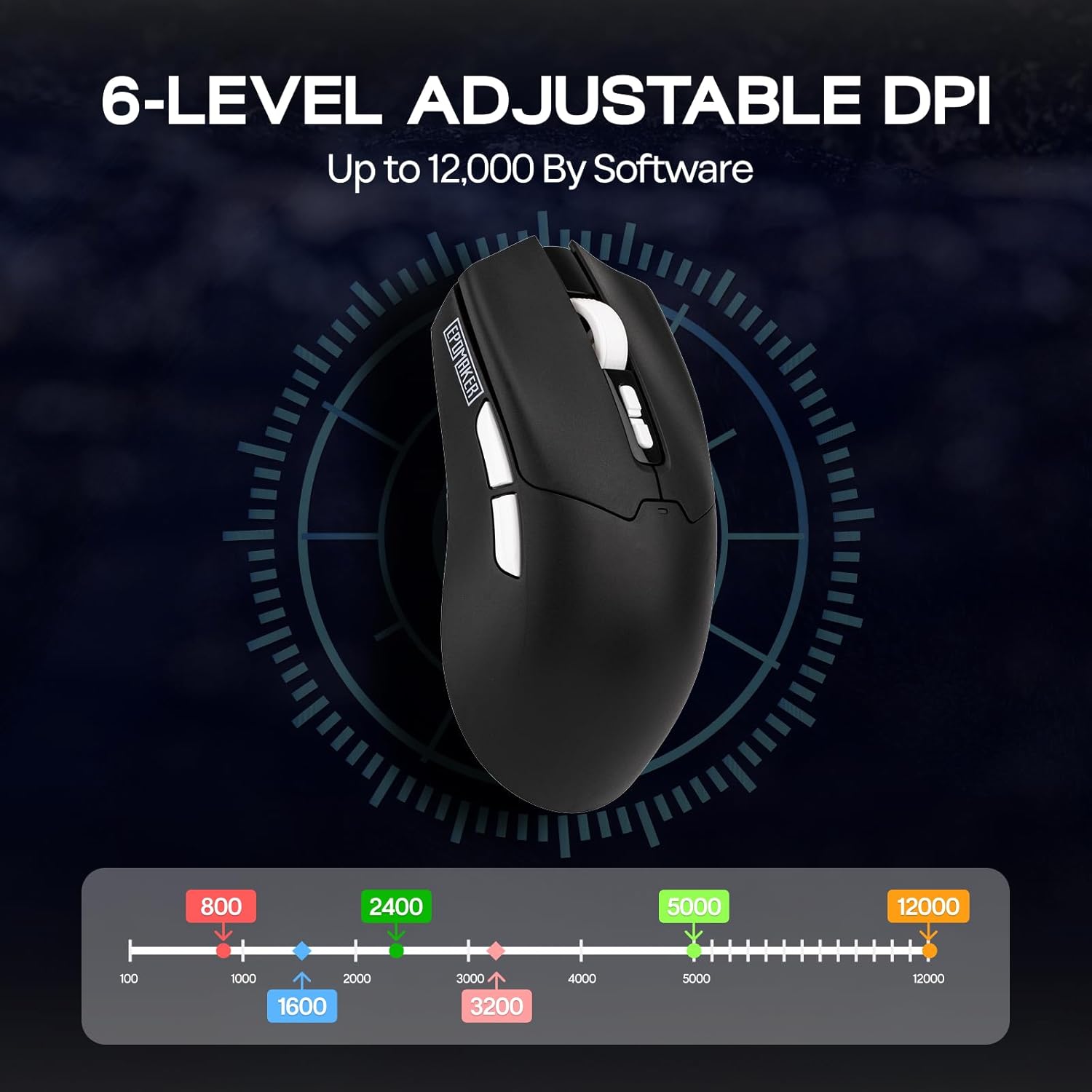
- Sensore d'alta precisione: Equipped with a PAW3311 sensor, offering adjustable DPI from 800 to 12,000.
- Pulsanti programmabili: Features 5 customizable buttons for personalized control.
- Batteria di lunga durata: Integrated 500mAh rechargeable battery provides up to 78 hours of continuous use.
- Design ultra-leggeru: Weighs only 59 grams for comfortable extended use.
- Tasso di votazione altu: Stable 1000Hz polling rate with 1ms latency.
- Disegnu ergonomicu: Shaped for natural fit and fatigue-free operation.

Buttoni è Indicatori
- Buttuni di cliccà sinistra/destra: Standard mouse buttons.
- Rotella di scorrimentu: Per a funzionalità di scorrimentu è di cliccu mediu.
- DPI Up/Down Buttons: Located near the scroll wheel for on-the-fly DPI adjustment.
- Bottoni laterali: Two programmable buttons on the left side.
- Interruttore di cunnessione: Located on the bottom of the mouse to select 2.4G, BT1, BT2, or USB wired mode.
- Polling Rate Button: Located on the bottom of the mouse to cycle through polling rates.
- Indicatore LED: Provides feedback on DPI, polling rate, and connectivity status.

4. Setup
Carica u Mouse
Connect the included USB-A to USB-C cable to the mouse's front USB-C port and to a power source (e.g., computer USB port, USB wall adapter). The LED indicator will show charging status.
Modi di cunnessione
The Click Lite mouse supports three connection modes: 2.4GHz wireless, Bluetooth, and USB-C wired. Use the switch on the bottom of the mouse to select your desired mode.
- Modu wireless 2.4GHz:
- Remove the 2.4GHz USB dongle from its storage slot on the bottom of the mouse.
- Inserite u dongle in un portu USB-A dispunibule nantu à u vostru urdinatore.
- Fate scorrere l'interruttore in fondu à u mouse in a pusizione "2.4G". U mouse si cunnetterà automaticamente.
- Modu Bluetooth (BT1/BT2):
- Slide the switch on the bottom of the mouse to either 'BT1' or 'BT2' position.
- On your device, search for Bluetooth devices and select 'EPOMAKER Click Lite' to pair. The LED indicator will flash during pairing and become solid once connected.
- You can pair with two different Bluetooth devices using BT1 and BT2.
- Modu USB-C cablatu:
- Connect the USB-A to USB-C cable from your computer to the mouse.
- U mouse funziona cum'è un mouse cablatu è si carica simultaneamente.
5. Operating Instructions
Ajustamentu DPI
The mouse features adjustable DPI settings from 800 to 12,000. Use the DPI Up/Down buttons located behind the scroll wheel to cycle through the preset DPI levels. The LED indicator will change color to reflect the current DPI setting.
Ajustamentu di a tarifa di votazione
The polling rate can be adjusted using the dedicated button on the bottom of the mouse. Cycle through available polling rates (e.g., 125Hz, 250Hz, 500Hz, 1000Hz) to match your preference and optimize responsiveness.
Status batterie
The mouse is equipped with a 500mAh rechargeable battery, offering up to 78 hours of continuous use on a full charge. The LED indicator will signal low battery status and charging progress.

6. Personalizazione di u Software
Enhance your mouse functionality by downloading the official EPOMAKER Click Lite driver software from the EPOMAKER website. The software allows for advanced customization of buttons, DPI, and performance settings.
Impostazioni chjave
- Change Key Setting: Riassignà e funzioni à qualsiasi di i 5 buttoni programmabili.
- Rapid-fire Key: Configure a button for rapid, repeated key presses.
- Combo Keys: Assign complex key combinations to a single button.
- Macro Settings: Create and assign custom macros for automated sequences.
- Funzioni: Access a library of predefined functions to assign to buttons.
- Disable Key: Deactivate specific buttons to prevent accidental presses.
Impostazioni DPI
Fine-tune your mouse sensitivity by adjusting DPI levels. The software allows for precise control over DPI values and associated LED colors.
Impostazioni di rendiment
- Move Correction: Enable or disable Straight Correction and Ripple Correction for smoother tracking.
- Impostazioni di sonnu: Adjust the 2.4G and Bluetooth standby times to conserve battery.
- Mouse Report Rate: Set the polling rate (125Hz, 250Hz, 500Hz, 1000Hz).
- Parameter Settings (Debounce): Adjust the debounce time for click registration.

7. Mantenimentu
- Pulizia: Use a soft, dry cloth to clean the mouse surface. For optical sensor, use a cotton swab lightly dampfinitu cù alcolu isopropilico.
- Conservazione: Conservate u mouse in un locu frescu è asciuttu, luntanu da a luce diretta di u sole è da e temperature estreme.
- Cura di a batteria: Avoid fully discharging the battery frequently. Charge the mouse regularly to maintain battery health.
8. Risoluzione di prublemi
| Prublemu | Soluzione Possibile |
|---|---|
| Mouse not responding in 2.4GHz mode | Ensure the 2.4GHz dongle is securely plugged into a USB port. Check if the mouse switch is set to '2.4G'. Try a different USB port. |
| Problemi di cunnessione Bluetooth | Ensure the mouse switch is set to 'BT1' or 'BT2'. Make sure Bluetooth is enabled on your device and the mouse is in pairing mode. Remove previous pairings and re-pair. |
| DPI ùn cambia micca | Press the DPI Up/Down buttons firmly. If using custom software settings, ensure they are applied correctly. |
| Mouse cursor erratic or unresponsive | Clean the optical sensor on the bottom of the mouse. Ensure you are using the mouse on a suitable surface (not highly reflective or transparent). |
| Corta vita di a bateria | Ensure the mouse is fully charged. Adjust sleep settings in the software to conserve power. |
9. Specificazioni
- Mudellu: Click Lite
- Connettività: Senza filu 2.4 GHz, Bluetooth, USB-C cablatu
- Sensore: Sensore otticu PAW3311
- DPI: 800-12,000 (Ajustabile)
- Tasso di votazione: 125 Hz, 250 Hz, 500 Hz, 1000 Hz
- Bottoni: 5 Pulsanti Programmable
- Batteria: 500mAh Ricaricabile
- Durata di a batteria: Finu à 78 ore (usu cuntinuu)
- Pesu: Circa 59 g
- Dimensioni: 4.76 x 2.5 x 0.04 inch
- Accelerazione: 35G
- Velocità di seguimentu: 300 FPS
- Cumpatibilità: PC, Mac, Linux
10. Garanzia è Support
EPOMAKER products come with a standard manufacturer's warranty. For detailed warranty information, technical support, or service inquiries, please visit the official EPOMAKER websitu o cuntattate a so squadra di supportu à i clienti. Conservate a vostra ricevuta di compra per e richieste di garanzia.


