1. Introduzione
This manual provides essential information for the safe and effective use of your FLEXISPOT V9-Max-AR Exercise Bike with 2D Desktop. Please read all instructions carefully before assembly and operation. Retain this manual for future reference.
Importante infurmazione di sicurezza
- Assicuratevi chì tutte e parte sianu fissate bè prima di ogni usu.
- Ùn superate micca a raccomandazione di pesu massimu di 300 libbre.
- Tenite i zitelli è l'animali domestici luntanu da a bicicletta d'eserciziu durante l'usu.
- Cunsultate un medicu prima di inizià qualsiasi novu prugramma d'eserciziu.
- Use the product on a stable, level surface.
2. Produttu Finituview è cumpunenti
The FLEXISPOT V9-Max-AR is a versatile exercise bike designed for indoor use, featuring an integrated 2D adjustable desktop. It combines a stationary bike with a functional workspace, allowing for simultaneous exercise and productivity.

Figure 2.1: User operating the FLEXISPOT V9-Max-AR Exercise Bike with the desktop in use.
Key features include an 8-level quiet magnetic resistance system, an LCD display for tracking workout metrics, and a robust design supporting up to 300 lbs. The adjustable seat and desktop accommodate various user heights and preferences.
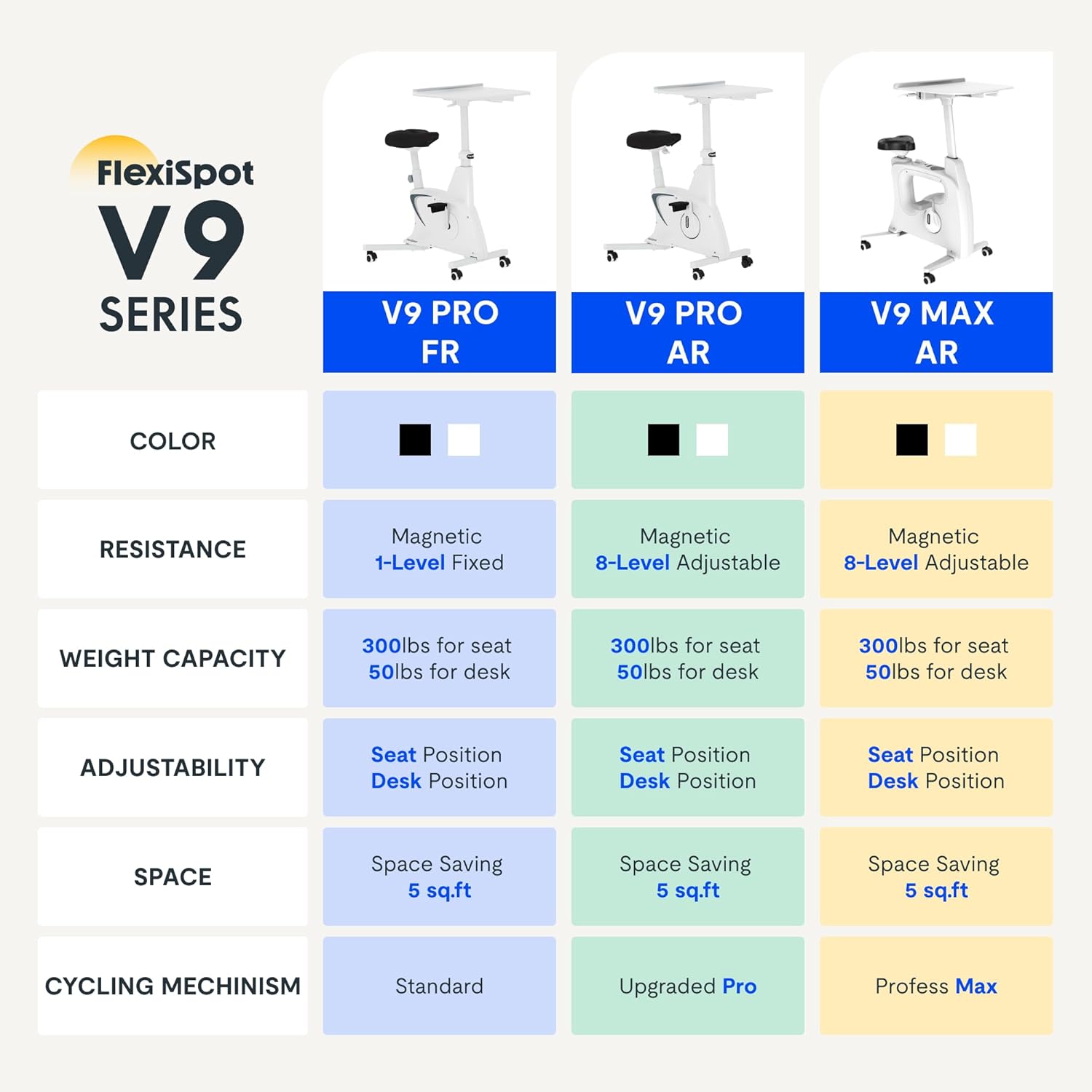
Figure 2.2: Comparison of FlexiSpot V9 series models, highlighting features like resistance and adjustability.
Componenti principali:
- Main Frame with Flywheel and Resistance Mechanism
- Sede ajustable
- Adjustable Desktop
- Pedali
- LCD Display Console
- Roti di trasportu
3. Setup è Assemblea
The FLEXISPOT V9-Max-AR is designed for quick and straightforward assembly, typically requiring about 10 minutes.
Passi di Assemblea:
- Disimballate tutti i cumpunenti è verificate cù a lista d'imballu.
- Attach the front and rear stabilizers to the main frame using the provided screws.
- Install the pedals, ensuring the left pedal is tightened counter-clockwise and the right pedal clockwise.
- Mount the seat post and seat onto the main frame, securing them firmly.
- Attach the desktop support column to the main frame.
- Secure the desktop to its support column.
- Insert batteries into the LCD display (batteries not included) and connect the sensor wire.
- Ensure all screws and connections are tightened before first use.

Figure 3.1: Illustration of adjustable components for personalized setup.
4. Operating Instructions
Adjusting Seat and Desktop:
- Altezza di u sediu: Use the quick-release lever located on the seat post to adjust the seat to a comfortable height. Ensure your leg has a slight bend at the knee when the pedal is at its lowest point.
- Desktop Height: The desktop can be adjusted vertically. Locate the adjustment lever beneath the desktop and raise or lower the desktop to your desired working height.
- Desktop Depth: The desktop can also be adjusted horizontally (forward/backward) to optimize your working posture.
Livelli di resistenza:
The V9-Max-AR features 8 levels of quiet magnetic resistance. Rotate the resistance knob, located below the desktop, clockwise to increase resistance and counter-clockwise to decrease it.

Figure 4.1: LCD display and resistance control knob.
Utilizendu u schermu LCD:
The built-in LCD display monitors your workout statistics. It tracks:
- U tempu
- Velocità
- Distanza
- Calorie brusgiate
- Total Distance Covered (Odometer)
- Velocità di rotazione
Press the button on the display to cycle through different metrics or hold it to reset values (refer to display specific instructions for exact operation).
Using the 2D Desktop:
The spacious desktop (20" x 22.8") is designed to hold a laptop, notebook, mobile phone, or water cup. It provides a stable surface for working or entertainment while exercising.

Figure 4.2: Desktop in use for studying or working.
Portabilità:
Equipped with movable silent wheels, the exercise bike can be easily relocated within your home or office. Simply tilt the bike and roll it to your desired position.
5. Mantenimentu
Regular maintenance ensures the longevity and optimal performance of your FLEXISPOT V9-Max-AR Exercise Bike.
- Pulizia: Pulite a bicicletta regularmente cù publicitàamp pannu è detergente dolce. Evitate detergenti abrasivi o solventi.
- Ispezione: Periodically check all bolts, nuts, and moving parts for tightness. Tighten any loose components immediately.
- Lubrificazione: Nisuna lubrificazione specifica hè necessaria per u sistema di resistenza magnetica.
- Conservazione: Conservate a bicicletta in un locu asciuttu è frescu, luntanu da a luce diretta di u sole è da temperature estreme.
6. Risoluzione di prublemi
Questa sezione tratta di i prublemi cumuni chì pudete scuntrà cù a vostra bicicletta d'eserciziu.
| Prublemu | Causa Possibile | Soluzione |
|---|---|---|
| U display LCD ùn funziona micca | E batterie sò morte o installate incorrectamente. | Replace batteries (AAA, not included) or ensure correct polarity. |
| Unstable or wobbly bike | Bulloni allentati o superficia irregulare. | Check and tighten all assembly bolts. Ensure the bike is on a flat, stable surface. |
| A resistenza ùn cambia micca | Problema di mecanismu di resistenza. | Ensure the resistance knob is properly engaged. If the issue persists, contact customer support. |
| Cigolii o rumori inusuali | Loose components or friction. | Inspect all connections and tighten any loose parts. Ensure no foreign objects are interfering with moving parts. |
7. Specificazioni
Detailed specifications for the FLEXISPOT V9-Max-AR Exercise Bike:
- Mudellu: V9-Max-AR (Exercise Bike with Desk)
- Marca: FLEXISPOT
- Culore: Neru
- Meccanismu di resistenza: Magneticu
- Numero di livelli di resistenza: 8
- Raccomandazione di pesu massimu: 300 liri
- Dimensioni di u produttu (P x L x A): 37.6" x 23.2" x 47.2"
- Dimensioni di u desktop: Approximately 20" x 22.8"
- Minimum Height (Seat): 29.6 inch
- Maximum Height (Overall): 47.2 Inches (desktop height can go up to 47.2")
- Fonte di energia: À pedale (micca elettricu)
- Sistema di Drive: Cintura
- Caratteristica speciale: Adjustable Seat, Adjustable Desktop
- Usi cunsigliati: Internu
- Space Occupied: Circa 5 sq ft

Figura 7.1: Dimensioni di u pruduttu.
8. Garanzia è Support
FLEXISPOT is committed to providing quality products and customer satisfaction.
- Ritorni: Stu pruduttu hè eligibile per ritorni faciuli di 30 ghjorni. Per piacè riferitevi à a pulitica di ritornu di a vostra piattaforma di compra per i dettagli.
- Garanzia: For specific warranty terms and conditions, please refer to the official FLEXISPOT websitu o cuntattate direttamente u so serviziu clienti.
- Assistenza Clienti: For any questions, assistance, or troubleshooting not covered in this manual, please contact FLEXISPOT customer support. Contact information can typically be found on the manufacturer's websitu o a vostra ducumentazione d'acquistu.
9. Informazioni supplementari
While no specific official product videos were provided in the product data, users may find helpful assembly or usage guides on the manufacturer's official website or their authorized channels. Always ensure the source is official for accurate information.


