1. Introduzione
Thank you for choosing the Darmoshark M5PRO Mini Wireless Gaming Mouse. This manual provides detailed instructions for setting up, operating, and maintaining your new gaming mouse. The M5PRO features a tri-mode connection (2.4G wireless, Bluetooth, wired), a high-precision PAW3950 optical sensor, and a lightweight design for optimal performance.
2. Produttu Finituview
The Darmoshark M5PRO is designed for competitive gaming, offering versatile connectivity and advanced sensor technology. Its ergonomic shape is ideal for finger grip players, providing responsive control and comfort during extended use.

Image: Darmoshark M5PRO Mini Wireless Gaming Mouse in various colors, highlighting its design.
Funzioni chjave:
- Connettività Tri-Mode: Seamlessly switch between 2.4G wireless, Bluetooth 5.0, and wired USB connections.
- PAW3950 Optical Sensor: Provides up to 30000 DPI, 750 IPS tracking speed, and 50G acceleration for precise and responsive tracking.
- 8KHz Polling Rate: Experience ultra-low latency with an 8KHz polling rate in 2.4G wireless mode, ensuring rapid response times.
- Design ultra-leggeru: Weighing approximately 38 grams, the mouse reduces hand fatigue during long gaming sessions.
- 5 Pulsanti programmabili: Customize button functions via the dedicated software.
- Batteria di lithium integrata: High-capacity rechargeable battery for extended wireless usage.
- Ampia cumpatibilità: Compatible with Windows and Apple Mac operating systems.
3. Cuntenutu di u pacchettu
Verificate u pacchettu per i seguenti elementi:
- Darmoshark M5PRO Mini Wireless Gaming Mouse
- Ricevitore senza filu 2.4G (dongle USB)
- Cavu USB-C à USB-A (per a carica è a cunnessione cablata)
- Manuale d'uso (stu documentu)
- Grip Tape (optional accessory, if included)
4. Setup è Connectivity
4.1. Modu cablatu
- Cunnette l'estremità USB-C di u cavu furnitu à u mouse.
- Cunnette l'estremità USB-A di u cavu à una porta USB dispunibile nantu à u vostru urdinatore.
- U mouse passerà automaticamente in modalità cablata è cumincerà à carica.
4.2. 2.4G Wireless Mode (with 8KHz Receiver)
- Truvate u ricevitore wireless 2.4G (dongle USB) in l'imballu.
- Cunnette u ricevitore wireless 2.4G à una porta USB dispunibile di u vostru urdinatore.
- On the bottom of the mouse, locate the tri-mode switching key. Switch it to the 2.4G wireless icon (usually indicated by a small antenna or 'G' symbol).
- The mouse should automatically connect. If not, press and hold the pairing button (if available, refer to the diagram) on the mouse until the indicator light flashes, then release.

Image: M5PRO mouse with its 8KHz wireless receiver for 2.4G connectivity.
4.3. Modu Bluetooth
- On the bottom of the mouse, switch the tri-mode switching key to the Bluetooth icon.
- The mouse's indicator light will start flashing, indicating it is in pairing mode.
- Nant'à u vostru urdinatore o dispusitivu, apre i paràmetri Bluetooth.
- Cerca new devices and select "Darmoshark M5PRO" from the list.
- Segui tutti i suggerimenti nantu à u screnu per compie u prucessu di accoppiamentu.
5. Utilizà u mouse
5.1. Funzioni di u buttone
The M5PRO mouse features 5 programmable buttons and a scroll wheel.
- Clicca sinistra: Clic primariu standard.
- Clicca dritta: Clic secundariu standard.
- Track Roller Key (Scroll Wheel): Scorre in su/in giù, è agisce cum'è un buttone di cliccu centrale.
- Chjave di regulazione DPI: Passa da i livelli di DPI preimpostati.
- Pulsante avanti: Default function for navigating forward in web navigatori o file esploratori.
- Pulsante Backspace: Default function for navigating backward in web navigatori o file esploratori.

Imagine: Splosa view of the M5PRO mouse showing internal components and button layout.
5.2. Ajustamentu DPI
Press the DPI Adjustment Key (located on the underside of the mouse, refer to the product diagram) to cycle through different DPI sensitivity levels. The default DPI settings can be customized using the Darmoshark software.
5.3. Caricamentu di u mouse
When the battery is low, the mouse's indicator light will typically flash red. Connect the mouse to your computer using the provided USB-C cable to charge it. The indicator light will show charging status and turn off or change color when fully charged.
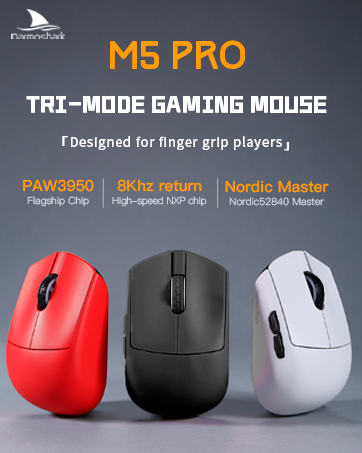
Image: Darmoshark M5PRO mouse charging via USB-C cable, highlighting its built-in lithium battery.
6. Personalizazione di u Software
To unlock the full potential of your Darmoshark M5PRO mouse, download and install the official Darmoshark driver software from the manufacturer's websitu. U software vi permette di:
- Customize DPI settings and create multiple profiles.
- Program button functions and macros.
- Ajustà a tarifa di sondaggio.
- Manage power settings and battery life.
- Aghjurnate u firmware.

Image: Darmoshark proprietary driver software interface for mouse customization.
7. Specificazioni
| Mudellu | M5PRO |
| Sensore | Sensore otticu PAW3950 |
| DPI | Finu à 30000 DPI |
| Tracking Speed | 750 FPS |
| Acceleration | 50G |
| Tasso di votazione | 8KHz (2.4G Wireless), 1KHz (Wired/Bluetooth) |
| Connettività | 2.4G senza filu, Bluetooth 5.0, USB-C cablatu |
| Bottoni | 5 Pulsanti Programmable |
| Pesu | Circa. 38 g |
| Dimensioni (L x W x H) | 91.7 mm x 57.4 mm x 35.7 mm |
| Batteria | Batteria di lithium integrata (300mAh) |
| Cumpatibilità | Windows, Apple Mac |
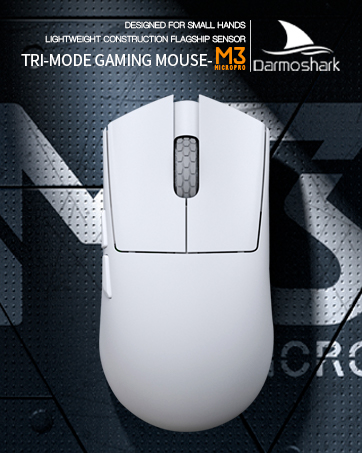
Image: Product parameter diagram with mouse dimensions.
8. Mantenimentu
- Pulizia: Aduprate un pannu dolce è asciuttu per pulisce u mouse. Evitate l'usu di prudutti chimichi aggressivi o materiali abrasivi.
- Conservazione: Conservate u mouse in un locu frescu è asciuttu, luntanu da a luce diretta di u sole è da e temperature estreme.
- Cura di a batteria: Per prolongà a durata di a batteria, evitate di scaricà cumpletamente u mouse spessu. Caricatelu quandu appare l'indicatore di batteria bassa.
9. Risoluzione di prublemi
9.1. U mouse ùn risponde micca
- Modu Wired: Assicuratevi chì u cavu USB sia cunnessu currettamente à u mouse è à l'urdinatore. Pruvate una porta USB diversa.
- Modu wireless 2.4G: Ensure the 2.4G receiver is plugged in and the mouse is switched to 2.4G mode. Try re-pairing the mouse with the receiver. Ensure the mouse battery is charged.
- Modu Bluetooth: Ensure Bluetooth is enabled on your device and the mouse is in Bluetooth pairing mode. Try re-pairing the mouse in your device's Bluetooth settings. Ensure the mouse battery is charged.
9.2. U muvimentu di u cursore hè erraticu o imprecisu
- Pulite u sensore otticu situatu sottu à u mouse cù un pannu dolce è asciuttu.
- Assicuratevi d'utilizà u mouse nantu à una superficia adatta (per esempiu, un tappetinu di mouse). Evitate superfici assai riflettenti o trasparenti.
- Adjust the DPI settings using the DPI Adjustment Key or the software.
- Check for any software conflicts or outdated drivers. Update mouse drivers if necessary.
9.3. Prublemi di cunnessione senza filu
- Reduce the distance between the mouse and the receiver/device.
- Avoid placing the receiver near other wireless devices or sources of interference (e.g., Wi-Fi routers, cordless phones).
- Assicuratevi chì u mouse sia cumpletamente caricatu.
10. Video ufficiale di u pruduttu
Watch the official product video for a visual guide on the Darmoshark M5PRO Mini Wireless Gaming Mouse.
Video: Un overview of the Darmoshark M5PRO Wireless Gaming Mouse, showcasing its design and features in various colors.
11. Garanzia è Support
For warranty information and technical support, please refer to the warranty card included with your product or visit the official Darmoshark websitu.
Produttore: Darmoshark
Websitu: Darmoshark Official Store


