1. Introduzione
This manual provides detailed instructions for the installation, operation, and maintenance of your CAMECHO 4+128G Android 15 Car Radio. This advanced car multimedia system is designed to enhance your driving experience with features such as wireless CarPlay, Android Auto, GPS navigation, Bluetooth connectivity, and a high-resolution INCELL touchscreen. Please read this manual thoroughly before installation and use to ensure proper functionality and safety.
2. Compatible Vehicles
This CAMECHO car radio is compatible with the following Mercedes Benz models and years:
- Mercedes Benz W169 (2004-2012)
- Mercedes Benz B200 (2004-2012)
- Mercedes Benz W245 (2004-2012)
- Mercedes Benz W639 Viano (2006-2014)
- Mercedes Benz Vito (2006-2014)
- Mercedes Benz Sprinter W906 (2006-2012)

This image displays various Mercedes Benz dashboards, illustrating the fitment of the CAMECHO car radio in compatible models such as the Vito, Viano, V-Class W639, Sprinter, and B-Class.
Nota impurtante: Prima di cumpràasing and installation, please verify your vehicle's radio line interface. If your radio line interface matches the one shown in the diagram requiring an optical fiber box, you will need to acquire a separate car optical fiber box. Contact CAMECHO support for guidance if needed.
3. Cuntenutu di u pacchettu
The following items are included in your CAMECHO car radio package:
- CAMECHO Android Car Radio Unit (9-inch INCELL screen)
- Cavu di putenza
- Cable RCA
- USB Cables (6-pin and 4-pin)
- Antenna GPS
- Adattatore d'antenna radio
- AHD Rear Camera (Gift)
- Microfonu esternu
- Canbus & Antenna Adapter
- Strumenti di stallazione
- Manuale d'usu
This image illustrates the car radio unit's dimensions and lists the various cables and accessories included in the package, such as the AHD Rear Camera, Power Cable, USB cables, GPS antenna, and installation tools.
4. Guida d'installazione
4.1 Cuntrolli Pre-Installazione
- Ensure your vehicle is compatible with the car radio model.
- Turn off the vehicle's ignition and disconnect the negative terminal of the car battery to prevent electrical shorts.
- Inspect your vehicle's existing radio wiring harness and dashboard opening.
- If unsure about compatibility or wiring, consult a professional installer.
4.2 Connessioni Wiring
Refer to the wiring diagram provided with your unit and the image below for correct connections. Ensure all cables are securely connected to their respective ports.
This diagram illustrates the rear panel of the car radio and its connection points, including Power Cable, Camera Input, RCA Cable, USB Cables, Radio Antenna, and GPS Antenna.
- Cablaghjolu: Cunnette si à u cablaggio di putenza di u veiculu.
- Input camera: Connect the included AHD rear camera.
- Cavu RCA: Per l'uscita audio/video à l'esternu ampvivitori o monitori.
- Cavi USB: Connect for data transfer, media playback, and charging.
- Antenna radio: Cunnette l'antenna radio di u veiculu.
- Antenna GPS: Muntate in un locu chjaru view di u celu per una ricezione ottimale di u signale.
- Microfonu Esternu: Connect for improved hands-free call quality.
- Canbus: Connect the Canbus adapter if your vehicle requires it for steering wheel controls or other vehicle data integration.
4.3 Muntà l'unità
- Carefully insert the car radio into the dashboard opening.
- Assicurate l'unità cù i supporti di montaggio è e viti furnite.
- Ensure all cables are neatly tucked away and not pinched.
- Reconnect the car battery's negative terminal.
5. Funzionamentu Basic
5.1 Power On/Off
- Power On: Turn on your vehicle's ignition. The unit should power on automatically. If not, press the power button on the unit.
- Spegnimentu: Turn off your vehicle's ignition. The unit will power off automatically.
5.2 Funziunamentu di u schermu tattile
The 9-inch INCELL HD touchscreen supports multi-touch gestures. Tap to select, swipe to navigate, and pinch to zoom (where applicable).
6. Caratteristiche è funzioni principali
6.1 Android 15 System & Performance
Equipped with the latest Android 15 operating system, 4GB RAM, and 128GB ROM, this unit provides fast and stable performance for multitasking, app loading, and media storage. The 4-Core CPU ensures efficient operation.

This image highlights the internal specifications of the car radio, including the 4-Core CPU, 4GB RAM, and 128GB ROM, emphasizing its excellent performance capabilities.
6.2 9-inch INCELL HD Screen
Experience superior visuals with the 9-inch INCELL touchscreen, featuring a resolution of 1280*720. INCELL technology delivers vibrant colors, wide viewing angles, and highly responsive touch interaction, ensuring clarity even in direct sunlight.
CarPlay senza filu 6.3 è Android Auto
Connect your smartphone wirelessly for seamless integration. Access navigation, music, messages, and apps directly from the car radio display. Use voice commands via Siri or Google Assistant for safe and intuitive control.

This image displays the user interfaces for both Apple CarPlay and Android Auto running on the car radio, showing navigation, music, and app icons.
6.4 4G, WiFi & Integrated GPS
Stay connected with built-in Wi-Fi and precise GPS navigation. Access real-time traffic information (with downloaded maps), stream music from services like Spotify and YouTube, and browse the web. The unit supports split-screen functionality for simultaneous use of navigation and other apps.
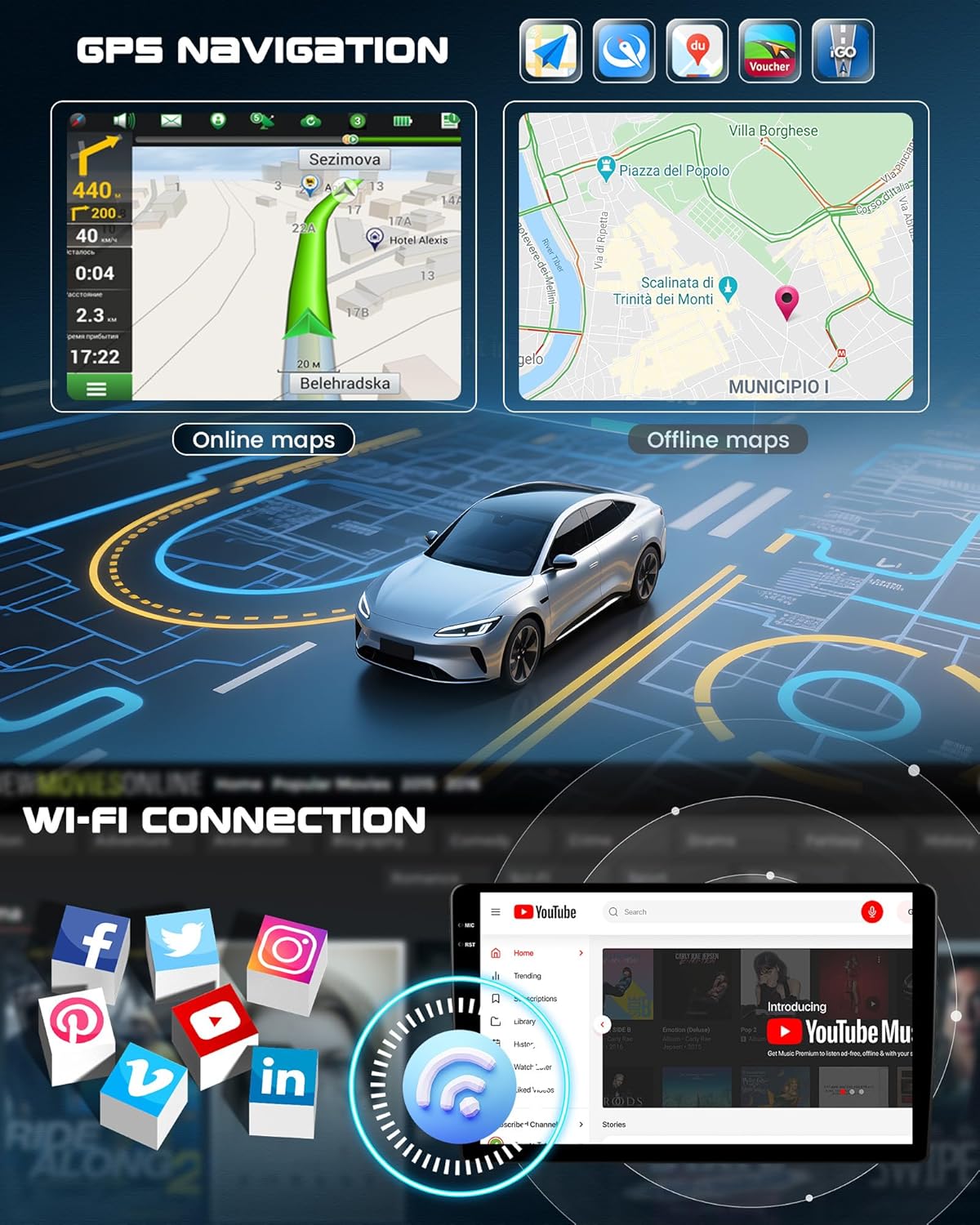
This image shows the GPS navigation interface with online and offline map capabilities, alongside a representation of Wi-Fi connectivity and various social media app icons.
6.5 Rear Camera Function
An HD rear camera is included to provide clear and accurate views behind your vehicle, aiding in safe parking. The display automatically switches to the camera view when reversing, with intelligent guidelines.

This image demonstrates the reversing assistance feature, showing a car backing up with a clear view from the HD rear camera, highlighting night vision, waterproof, and wide-angle capabilities.
6.6 Control di u volante
Learn and customize your steering wheel controls directly from the screen. Manage volume, navigation, calls, and music playback without taking your hands off the wheel. Full compatibility with original Mercedes Benz steering wheel buttons is supported.
This image includes a section demonstrating the steering wheel control learning function, allowing users to customize button assignments for various functions.
6.7 Microfonu esternu
An external microphone is included to provide exceptional hands-free call quality. Install it on your dashboard for optimal voice capture, ensuring clear conversations even at high speeds.
6.8 Bluetooth 5.0, FM/RDS Radio & Equalizer
Utilize Bluetooth 5.0 for music streaming and hands-free calls. The FM/RDS radio offers crystal-clear reception. Personalize your audio experience with the 32-band digital equalizer.

This image showcases the Bluetooth call and music playback features, the FM/RDS radio interface, and the detailed 32-band digital equalizer for sound customization.
6.9 Split-Screen Function
The split-screen feature allows you to run two applications simultaneously, such as navigation on one side and music playback on the other, enhancing multitasking capabilities.
This image also illustrates the split-screen function, showing two applications, such as navigation and YouTube, running side-by-side on the display.
6.10 Assistenza Vucale
The unit supports voice assistance for hands-free control. This feature requires activation and allows you to control various functions using voice commands.
This image includes a visual representation of the voice assistance feature, indicating that activation is required for use.
6.11 DAB Function
Digital Audio Broadcasting (DAB) functionality is supported. Please note that a separate DAB module must be purchased and connected to activate this feature.
This image displays the DAB function interface and indicates that an external DAB module is required for activation.
6.12 OBD2 Function
The unit supports On-Board Diagnostics II (OBD2) functionality, allowing you to monitor vehicle data. This feature requires activation and a compatible OBD2 adapter (sold separately).
This image illustrates the OBD2 function interface, showing vehicle data and indicating that activation is required.
7. Mantenimentu
- Pulizia: Aduprate un pannu dolce è asciuttu per pulisce u schermu è l'unità. Evitate detergenti abrasivi o solventi.
- Actualizazioni di u software: Periodically check for software updates from CAMECHO to ensure optimal performance and access to new features.
- Cundizioni Ambientali: Evitate d'espone l'unità à temperature estreme, à a luce diretta di u sole per periodi prolungati o à umidità eccessiva.
8. Risoluzione di prublemi
If you encounter issues with your CAMECHO car radio, refer to the following common troubleshooting steps:
- Nisun putere: Verificate tutti i cunnessione di putenza è a scatula di fusibili di u veiculu. Assicuratevi chì l'accensione sia accesa.
- Nisun sonu: Verificate e cunnessione di l'altoparlanti, i paràmetri di u vulume è a selezzione di a fonte audio. Verificate se a funzione mute hè attiva.
- U GPS ùn funziona micca: Assicuratevi chì l'antenna GPS sia cunnessa currettamente è muntata in un locu cù una vista chjara. view di u celu. Verificate i paràmetri GPS in u sistema.
- Problemi di cunnessione Bluetooth: Ensure Bluetooth is enabled on both the car radio and your device. Try unpairing and re-pairing the devices.
- Schermu tattile chì ùn risponde micca: Pruvate à riavvià l'unità. Sè u prublema persiste, puderia esse necessariu un reset di fabbrica (nota: questu cancellerà tutti i dati di l'utente).
- CarPlay/Android Auto ùn si cunnetta micca: Ensure your phone's Wi-Fi and Bluetooth are on. Check for any software updates for your phone or the car radio.
For persistent issues or advanced troubleshooting, please contact CAMECHO customer support.
9. Specificazioni
| Feature | Specificazione |
|---|---|
| Marca | CAMECHO |
| Sistema upirativu | Android 15 |
| RAM | 4 GB |
| ROM | 128 GB |
| Processore | 4-core |
| Size Screen | 9 inch |
| Tipu di schermu | INCELL HD Touchscreen |
| Risoluzione di u screnu | 1280 * 720 |
| Tecnulugia di cunnessione | Ethernet, USB, Bluetooth 5.0, Wi-Fi, 4G (via external modem) |
| Tipu di cuntrollu | Android |
| Funzioni spiciali | Wireless CarPlay & Android Auto, Mirror Link, GPS Navigation, FM/RDS Radio, 32-band EQ, Rear Camera Input, Steering Wheel Control, Voice Assistant, DAB (external module required), OBD2 (external adapter required) |
| Dispositivi compatibles | Smartphone, Tablet, PC, Speaker, Amplifier, TV, Rear Camera, Driving Recorder, OBD2 |
| Modu Output Audio | Stereo |
| Cunfigurazione di u Canale Sonu Surround | 5.1 |
| Codifica Video | H.264, H.265/HEVC |
| Forza di output | 45 Watt x 4 Canali |
10. Garanzia è Support
Your CAMECHO car radio comes with a standard manufacturer's warranty. For specific warranty terms and conditions, please refer to the documentation included with your purchase or visit the official CAMECHO websitu.
For technical support, troubleshooting assistance, or any inquiries regarding your product, please contact CAMECHO customer service through the retailer where you purchased the product or via the contact information provided on the official CAMECHO websitu.


