1. Introduzione
The Raddy SH-908 is a versatile and robust emergency radio designed to keep you informed and connected in various situations, from power outages to outdoor adventures. It features multiple power sources, including a 10,000mAh internal battery, solar panel, hand crank, and USB-C charging, along with AM/FM/SW radio reception, an LED flashlight, a reading lamp, an SOS alarm, and a built-in compass. This manual provides detailed instructions for its proper use and maintenance.
2. Istruzzioni di sicurità
- Ùn espone micca u dispusitivu à temperature estreme o à a luce diretta di u sole per periodi prolungati.
- Mantene u dispusitivu luntanu da campi magnetichi forti.
- Ùn smuntate micca o pruvate micca di riparà u dispusitivu da per voi. Cunsultate u persunale di serviziu qualificatu.
- Ensure all ports are dry before charging to prevent damage.
- When using the hand crank, apply steady, moderate force. Excessive force may cause damage.
- Eliminate e batterie secondu a regulazione lucali.
3. Cuntenutu di u pacchettu
Verificate chì tutti l'articuli sò presenti in u pacchettu:
- Raddy SH-908 Emergency Radio
- Cavu di carica USB-C
- Cinturione da polso
- Picculu cacciavite
- Spazzola di pulizia
- Manuale d'uso (stu documentu)

Image: Raddy SH-908 radio and its accessories, including a USB-C cable, wrist strap, small screwdriver, and cleaning brush.
4. Produttu Finituview
Familiarize yourself with the main components and controls of the Raddy SH-908 radio.
- Pantalla di visualizazione: Shows frequency, battery level, and time.
- Tuning Knob (TUN): Ajusta a frequenza radio.
- Manopola di u vulume (VOL): Ajusta u livellu di output audio.
- Band/Scan Button: Switches between AM/FM/SW bands and initiates auto-scan.
- Buttone Mutu: Disattiva / riattiva l'audio.
- U buttone di tempu: Sets time.
- M-/M+ Buttons: Navigate through preset stations or fine-tune frequency.
- Pulsante SOS: Activates emergency alarm and light.
- torcia: Integrated LED light on one end.
- lettura di Lamp: Fold-out lamp per l'illuminazione ambientale.
- Pannellu Solar: Top-mounted panel for solar charging.
- Manovella: Foldable crank for manual power generation.
- Port d'entrée USB-C: For charging the radio's internal battery.
- Port d'uscita USB-A: Per caricare dispositivi esterni.
- Scompartimentu di batterie AAA: For optional backup power.
- Antenna telescopica: Per una migliore ricezione radio.
- bussola: Built-in for navigation.
5. Cunfigurazione è Primu Usu
5.1 Carica iniziale
Before first use, fully charge the internal 10,000mAh battery using the USB-C port.
- Connect the provided USB-C cable to the radio's USB-C input port.
- Cunnette l'altra estremità di u cavu à un adattatore di alimentazione USB standard (micca inclusu) o à una porta USB di l'urdinatore.
- The battery indicator on the display will show charging status. Charging is complete when the indicator shows full.
5.2 Installing AAA Batteries (Optional)
For additional backup power, you can install 3 AAA batteries (not included).
- Locate the AAA battery compartment cover, usually on the side or back of the radio.
- Use the provided screwdriver to open the compartment.
- Inserite 3 batterie AAA, assicurendu a polarità curretta (+/-).
- Chiudere a tappa di u compartimentu in modu sicuru.
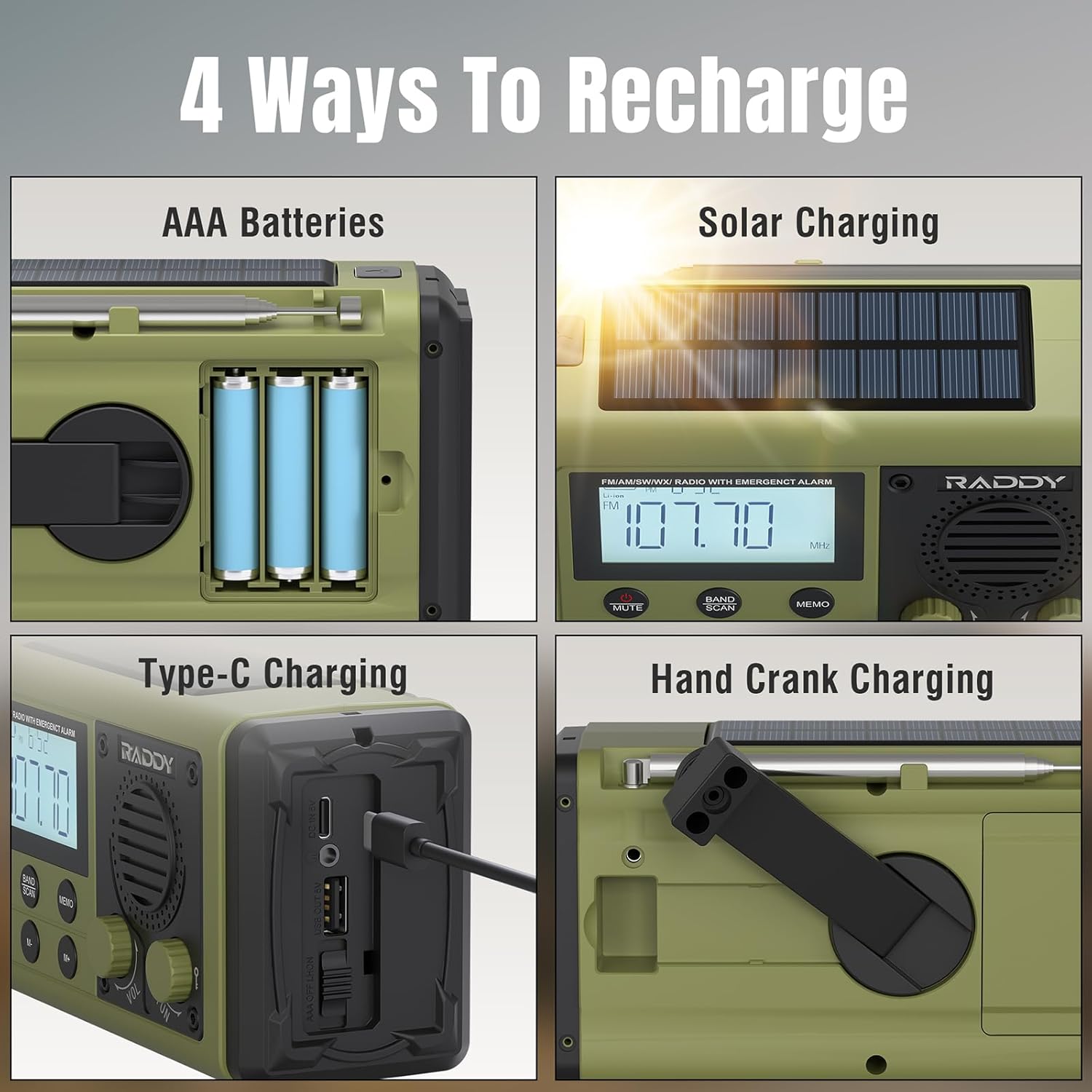
Image: The Raddy SH-908 radio demonstrating its four charging methods: AAA battery installation, solar panel charging, USB-C port charging, and hand crank operation.
6. Operating Instructions
6.1 Accensione / spegnimentu
Appughjà è tene premutu POWER button (if available, otherwise assume a dedicated button or a long press on a multi-function button) to turn the radio on or off. The display will illuminate.
6.2 Radio Operation (AM/FM/SW)
- Extend the Antenna: Stende cumpletamente l'antenna telescopica per una ricezione ottimale.
- Selezziunà a banda: Press u BANDA / SCAN button to cycle through FM, AM, and SW bands.
- Stazioni di sintonizazione:
- Tuning Manuale: Girate u TUN manubriu per aghjustà manualmente a frequenza.
- Scansione Automatica: Appughjà è tene premutu BANDA / SCAN button to automatically scan for and save available stations.
- Preset Navigation: Aduprà u M- è M+ buttons to cycle through saved preset stations.
- Ajuste u voluminu: Girate u VOL manubriu per aumentà o diminuisce u vulume.

Image: The Raddy SH-908 radio with its telescopic antenna extended, illustrating its AM/FM/SW radio capabilities.
6.3 Torcia è lettura Lamp
- torcia: Appughjà u buttone dedicatu LUCE button (or similar) once to turn on the flashlight. Press again to turn off.
- lettura di Lamp: Lift the reading lamp panel to activate the lamp. Close the panel to turn it off.
6.4 SOS Alarm
In casu d'emergenza, attivate l'allarme SOS:
- Press u SOS button. The radio will emit a loud siren and flash its lights.
- Press u SOS button again to deactivate the alarm.
6.5 Usu cum'è una batteria esterna
The 10,000mAh internal battery can charge external devices.
- Connect your device's charging cable to the radio's Portu di Uscita USB-A.
- The radio will begin charging your device. Monitor your device's charging status.

Image: The Raddy SH-908 radio charging a smartphone, demonstrating its 10,000mAh power bank functionality.
6.6 Caricà a Radio
The Raddy SH-908 offers four ways to recharge its internal battery:
- Carica USB-C: (Refer to Section 5.1 Initial Charging).
- Carica a manovella: Rotate the hand crank clockwise or counter-clockwise at a steady pace (approximately 120-150 RPM) for 3-5 minutes to generate power for short-term use.
- Carica solare: Place the radio with the solar panel facing direct sunlight. This method is primarily for maintaining battery charge or for slow charging in emergencies.
- Batterie AAA: If installed, the radio can draw power from the AAA batteries when the internal rechargeable battery is depleted.
6.7 Compass Usage
The integrated compass can assist with basic navigation. Hold the radio level and away from metallic objects to get an accurate reading.
7. Mantenimentu
7.1 Pulizia
Asciugà a radiu cù un soffiu, damp cloth. Do not use harsh chemicals or abrasive cleaners. Use the provided cleaning brush to remove dust from crevices.
7.2 Resistenza à l'acqua (IPX6)
The Raddy SH-908 is IPX6 waterproof, meaning it is protected against powerful water jets. It is not designed for submersion. Ensure all port covers are securely closed to maintain water resistance.

Image: The Raddy SH-908 radio being splashed with water, illustrating its IPX6 water resistance.
7.3 Cura di a batteria
- For optimal battery life, fully charge the internal battery at least once every three months if not in regular use.
- Remove AAA batteries if the radio will not be used for an extended period to prevent leakage.
8. Risoluzione di prublemi
| Prublemu | Causa Possibile | Soluzione |
|---|---|---|
| A radio ùn s'accende micca. | A batteria hè scaricata. | Charge the radio via USB-C, hand crank, or solar panel. Check AAA batteries if installed. |
| Pessima ricezione radio. | Antenna micca stesa; segnale debule; interferenza. | Stende cumpletamente l'antenna telescopica. Pruvate à riposizionà a radio. |
| Ùn si pò caricà un dispusitivu esternu. | Radio battery is low; incorrect cable; device not compatible. | Ensure the radio's internal battery is sufficiently charged. Use a compatible USB cable. |
| A manovella hè rigida o ùn si carica micca. | Meccanismu di manovella ostruitu o dannighjatu. | Ensure no debris is obstructing the crank. Apply steady, moderate force. If persistent, contact support. |
9. Specificazioni
| Feature | Detail |
|---|---|
| Mudellu | SH-908 |
| Bandi di Radio | AM, FM, SW |
| Batteria interna | 10,000mAh (ricaricabile) |
| Backup Power | 3 x batterie AAA (micca incluse) |
| I metudi di carica | USB-C, Hand Crank, Solar Panel |
| Portu di Salite | USB-A (for charging external devices) |
| Resistenza à l'acqua | IPX6 |
| illuminazione | LED Flashlight, Reading Lamp |
| Funzioni supplementari | SOS Alarm, Built-in Compass |
| Dimensioni (circa) | 16.7 cm (L) x 8.5 cm (L) x 6.7 cm (A) |
| Pesu (circa) | 680 g |
10. Garanzia è Support
Raddy products are designed for reliability and performance. For warranty information, please refer to the warranty card included with your purchase or visit the official Raddy website. For technical support or inquiries, please contact Raddy customer service through the contact information provided on the product packaging or websitu.
Per piacè cunservate a vostra prova d'acquistu per qualsiasi reclamu di garanzia.


