1. Introduzione
The COUGAR CFV235 is an innovative PC case featuring a Central Floating Ventilation (CFV) structure. This design separates the power supply unit compartment from the main chamber, utilizing the space between them as a highly effective ventilation channel to enhance cooling performance. The CFV235 combines a full panoramic view, a compact footprint, and structurally reinforced cooling capabilities to achieve superior airflow beyond traditional case designs.
This manual provides essential information for the proper installation, operation, and maintenance of your COUGAR CFV235 PC case. Please read it thoroughly before beginning assembly.
2. Funzioni chjave
- Central Floating Ventilation (CFV) Structure: Innovative design for enhanced cooling efficiency.
- Full Panoramic View: Clear tempered glass panels for showcasing cumpunenti interni.
- Cuncepimentu à flussu d'aria elevatu: Optimized for superior air circulation.
- Ampia cumpatibilità: Supports Mini ITX, Micro ATX, ATX, and CEB motherboards.
- AmpOpzioni di almacenamentu: Multiple drive bays for 3.5" HDDs and 2.5" SSDs.
- Generous Component Clearance: Accommodates long GPUs, tall CPU coolers, and standard PSUs.
- Custruzzione durabile: Custruitu cù materiali robusti per a longevità.

Figura 2.1: Parte anteriore view of the COUGAR CFV235 PC case, highlighting its panoramic glass panels and illuminated interior.

Figure 2.2: The COUGAR CFV235 PC case showcasing its design in both black and white variants, with internal components and customizable RGB lighting.
3. Setup Guide
3.1 Unpacking the Case
- Eliminate cù cura a carcassa di u PC da u so imballaggio.
- Verificate a cassa per eventuali segni di danni durante u trasportu. Cuntattate subitu u vostru rivenditore se si trova qualchì dannu.
- Remove all protective films and internal packaging materials.
3.2 Installazione di i cumpunenti
Before installing components, ensure you have all necessary tools, including a Phillips head screwdriver.
- Installazione di a scheda madre:

Figure 3.1: Interior of the CFV235 case, showing pre-installed motherboard standoffs.
- Installate u schermu I/O in l'apertura posteriore di u chassis.
- Align your Mini ITX, Micro ATX, ATX, or CEB motherboard with the pre-installed standoffs.
- Assicurate a scheda madre cù e viti furnite.
- Installazione di l'unità di alimentazione (PSU):
- The CFV235 features a dedicated PSU compartment. Install your ATX PSU (up to 200mm length) into this compartment.
- Assicurate l'alimentatore cù viti da u fondu di u chassis.
- Installazione di unità di almacenamiento:

Figure 3.2: Rear interior of the CFV235, illustrating cable management options and locations for 2.5" and 3.5" drive bays.
- Install 3.5" HDDs into the designated drive bays (up to 2 drives).
- Install 2.5" SSDs into the dedicated SSD mounts (up to 4 drives, 2 of which are shared with 3.5" bays).
- Ensure all drives are securely fastened.
- Installazione di a carta grafica (GPU):

Figure 3.3: Diagram indicating the maximum GPU length of 430mm supported by the CFV235 case.
- U chassis supporta GPU finu à 430 mm di lunghezza.
- Insert your GPU into the appropriate PCIe slot on the motherboard and secure it with the retention clip and screw.
- Installazione di u Raffreddatore di CPU:
- The case supports CPU coolers up to 175mm in height.
- Installate u vostru raffreddatore di CPU secondu l'istruzzioni di u fabricatore.
- Gestione di Cable:
- Aduprate i ritagli di percorsu di i cavi è i punti di fissaggio daretu à u vassoio di a scheda madre per gestisce i cavi in modu ordinatu.
- Proper cable management improves airflow and aesthetics.
4. Operating Instructions
4.1 Pannellu I/O frontale

Figure 4.1: The front I/O panel of the CFV235, featuring USB ports, audio jacks, and the power button.
U pannellu I/O frontale furnisce un accessu faciule à i porti è i cuntrolli essenziali:
- Pulsante di putenza: Press to power on/off your system.
- Pulsante di reset: Press to restart your system.
- Porti USB: Cunnette vi i dispusitivi USB.
- Prese audio: Connect headphones and microphones.
4.2 Flussu d'aria è raffreddamentu
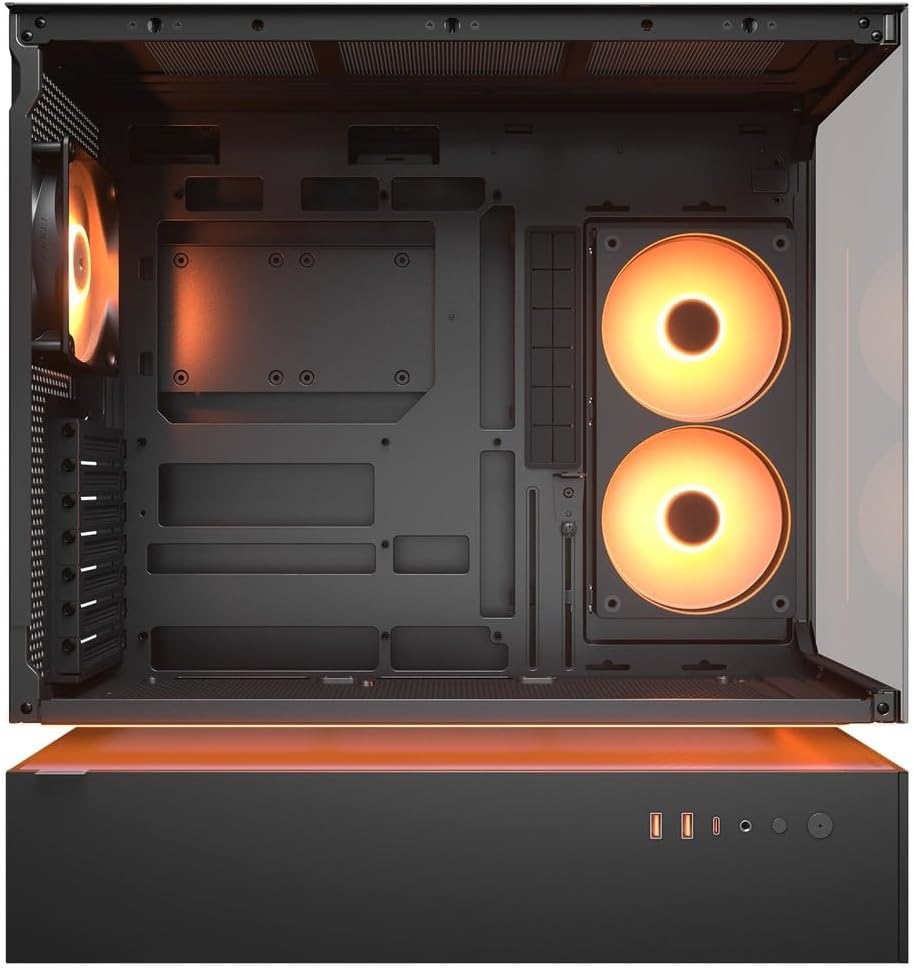
Figura 4.2: Internu view of the CFV235 with fans installed, demonstrating the potential for high airflow.
The CFV235 is designed for optimal airflow. Ensure all fans are correctly installed and oriented to facilitate efficient cooling. The Central Floating Ventilation structure promotes direct airflow to critical components.
5. Mantenimentu
5.1 Pulizia di u filtru di a polvere

Figure 5.1: Removable magnetic dust filter for easy cleaning.
Regular cleaning of dust filters is crucial for maintaining optimal airflow and preventing dust buildup inside your PC. The CFV235 features easily removable dust filters:
- Gently remove the magnetic dust filters located on the top and bottom of the case.
- Pulite i filtri cù aria compressa o sciacquandoli cù acqua. Assicuratevi ch'elli sianu cumpletamente asciutti prima di riattaccalli.
- Reattach the filters to their respective positions.
5.2 Pulizia generale
- Aduprà un soft, damp cloth to wipe down the exterior surfaces of the case.
- Avoid using harsh chemicals or abrasive materials that could damage the finish or tempered glass.
- For internal cleaning, use compressed air to remove dust from components and fan blades.
6. Risoluzione di prublemi
Questa sezione tratta di prublemi cumuni chì pudete scuntrà. Per prublemi più cumplessi, per piacè riferitevi à a sezione di supportu.
6.1 U sistema ùn si accende micca
- Verificate se u cavu di alimentazione hè cunnessu currettamente à l'alimentatore è à a presa murale.
- Ensure the PSU switch is in the "ON" position.
- Verificate chì u cavu di u buttone d'alimentazione di u pannellu frontale sia cunnessu currettamente à a scheda madre.
- Confirm that all internal power connections (24-pin ATX, CPU, GPU) are firmly seated.
6.2 Prublemi di surriscaldamentu
- Ensure all case fans and CPU/GPU coolers are functioning correctly.
- Clean any dust buildup from fans and dust filters (refer to Section 5.1).
- Verify that fans are oriented for optimal airflow (intake and exhaust).
- Check for proper cable management to avoid obstructing airflow.
6.3 USB/Audio Ports Not Working
- Ensure the front panel USB and audio cables are correctly connected to the motherboard headers.
- Check your operating system's device manager for any driver issues.
7. Specificazioni
| Feature | Specificazione |
|---|---|
| Marca | COUGAR |
| Nome di mudellu | CFV235 |
| Dimensioni Prodotto (W x H x D) | 235 x 493 x 460 mm |
| Pesu di u produttu | 9.5 kg |
| Schede madre supportate | Mini ITX / Micro ATX / ATX / CEB |
| Drive Bays | 5.25" x0 / 3.5" x2 / 2.5" SSD x2+2 (2 shared with 3.5" bays) |
| Lunghezza massima GPU | 430 mm |
| Altezza massima di CPU Cooler | 175 mm |
| Lunghezza massima PSU | 200 mm |
| Culore | Neru |
| Features | Central Floating Ventilation, Panoramic Glass, High Airflow, Built-in Fans |
8. Garanzia è Support
Your COUGAR CFV235 PC case comes with a 1 anni di garanzia da a data di compra. Questa garanzia copre i difetti di fabricazione è i difetti di materiale in cundizioni d'usu nurmale.
For technical support, warranty claims, or further assistance, please visit the official COUGAR website or contact your local retailer. Please have your product model number (CFV235) and proof of purchase ready when contacting support.
COUGAR ufficiale Websitu: cougargaming.com


