


SYSCOM R50 Power Debugging

Specificazioni
| Cumpunente | Descrizzione |
|---|---|
| Strumentu di software | R-50.exe |
| Strumentu di prova | 8920A RF COMMUNICATIONS Test SET |
| Adjustment Channels | CH 0, CH 2, CH 4 |
Introduzione
This guide provides instructions for using the R-50 Power Adjust Software to debug the R50 device. Follow the steps below to ensure proper setup and adjustment.
Istruzzioni di stallazione
- Scumpressate u file and open the R-50.exe tool located in the R-50 Power Adjust Software folder.

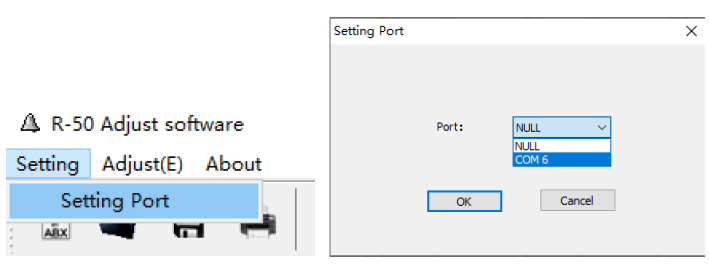
- Connect the R50 to a power source and turn it on. Use a programming cable to connect the R50 to the computer, and use an RF cable to connect the R50 to the 8920A RF COMMUNICATIONS Test SET instrument. Then, click Setting, enter Setting Port, and select the correct COM port.
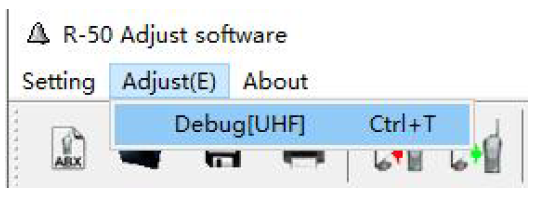
- Select Adjust(E) to enter Debug.
- TX Power Low Adjustment
- Click to select the TX Power Low Adjustment [CH 0] item, then press the Enter key on the keyboard to enter debugging mode.

- Adjust the TX Power value by sliding the mouse or pressing the ← and → keys on the keyboard. Once the expected value is reached, press the Enter key to save the parameter.

- Sequentially debug TX Power Low [CH 0], [CH 2], [CH 4].
- The power debugging is now complete. Close the debugging software, and the R50 can be used normally after a restart.
- Click to select the TX Power Low Adjustment [CH 0] item, then press the Enter key on the keyboard to enter debugging mode.
FAQ
What should I do if the COM port is not recognized?
Ensure that the programming cable is properly connected and the correct drivers are installed on your computer.
How do I know if the TX Power value is correct?
Adjust the TX Power value until the expected value is reached as indicated on the debugging interface, then press Enter to save.
Can I use the R50 immediately after debugging?
Yes, after completing the debugging process and restarting the device, the R50 can be used normally.
Documenti / Risorse
 |
SYSCOM R50 Power Debugging [pdfGuida di l'utente R50, R50 Power Debugging, Power Debugging |